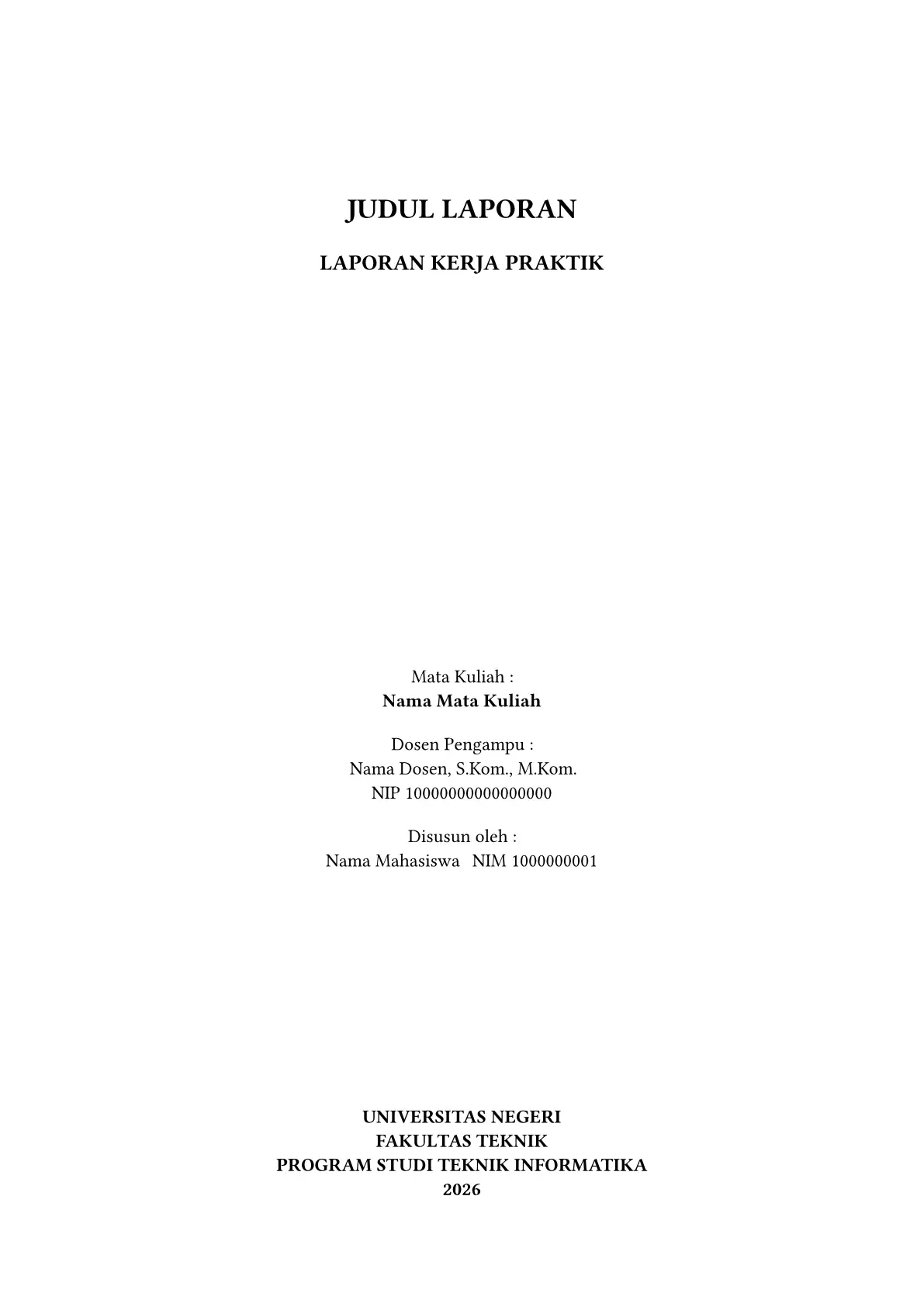
A Typst template for Indonesian university reports.
See the example.pdf file to see how it looks.
Usage
You can use this template in the Typst web app by clicking “Start from
template” on the dashboard and searching for jilid.
Alternatively, you can use the CLI to kick this project off using the command
typst init @preview/jilid
Typst will create a new directory with all the files needed to get you started.
The template initializes your project with a sample call to the jilid
function in a show rule. If you want to change an existing project to use this template, add a show rule like this at the top of your file:
#import "@preview/jilid:0.2.0": jilid, frontmatter, appendix

#show: jilid.with(
  title: [Judul Laporan],
  kind: [Laporan Kerja Praktik],
  course: "Nama Mata Kuliah",
  lecturers: (name: "Nama Dosen, S.Kom., M.Kom.", id: "10000000000000000"),
  students: (
    (name: "Nama Mahasiswa", id: "1000000001"),
  ),
  program: "Teknik Informatika",
  faculty: "Teknik",
  university: "Universitas Negeri",
  year: "2026",
  bibliography: bibliography("refs.bib", style: "apa"),
  // logo: image("logo.png"),
  // cover-details: (([Mitra], [Nama Mitra]),),
  // typography: (font-family: "Times New Roman"),
  // margin: "print",
  // numbering: (position: "top"),
)

#frontmatter(title: [Kata Pengantar])[ ... ]

= Pendahuluan
...

#appendix(title: [Data Pengujian])[ ... ]
Fonts
The body font is Typst’s bundled Libertinus Serif. Most campus guidelines ask for Times New Roman. To use it, install it or upload the font files to your web app project, then set:
#show: jilid.with(typography: (font-family: "Times New Roman"))
Packages used
- zebraw: code blocks with
line numbers (turn off with
code: (zebraw: false)). Re-exported, so#import "@preview/jilid:0.2.0": zebrawgives you its full API.
Document structure
jilid displays your document in this order:
- Cover, when
titleis set - Front matter, from
#frontmatter(title: [..])[..] - Daftar Isi, then Daftar Tabel, Gambar, Kode and Lampiran when the document has any
- Chapters, from
= Heading - Bibliography, from the
bibliographyoption - Appendices, from
#appendix(title: [..])[..]
Configuration
This template exports the jilid function with the named arguments
below. It also takes a single positional argument: the body of your
document, which #show: jilid.with(..) passes for you.
Option groups such as cover or footer take a dictionary, and only the
keys you give change, e.g. footer: (left: [Laporan Akhir]).
Document information
-
title
type: content or str
default:""
description: Document title, on the cover and in the PDF metadata. -
kind
type: content ornone
default:none
description: Document kind on the cover, e.g.[Laporan Praktikum]. -
subtitle
type: content or str
default:""
description: Second title line on the cover. -
cover-details
type: array
default:()
description: Extra(label, value)rows under the title, e.g.(([Mitra Kolaborator:], [Nama Mitra]),). -
course
type: content or str
default:""
description: Course name, after “Mata Kuliah :”. -
lecturers
type: dictionary or array
default:()
description: One(name: .., id: ..)dictionary or an array of them.idis optional. -
students
type: dictionary or array
default:()
description: One(name: .., id: ..)dictionary or an array of them.idis optional, andnamemay be content. -
program,department,faculty
type: content or str
default:""
description: Printed with their label, e.g.faculty: "Teknik"gives “FAKULTAS TEKNIK”. A value that already starts with the label, such as"Fakultas Teknik", is not prefixed twice. -
university,year
type: content or str
default:""
description: Bottom of the cover. -
logo
type: content ornone
default:none
description: The logo on the cover, e.g.image("logo.png"). -
bibliography
type: content ornone
default:none
description: The result of a call to the bibliography function, e.g.bibliography("refs.bib", style: "apa"). -
lang
type: str
default:"id"
description:"id"or"en". Other languages go throughlabels. -
paper
type: str
default:"a4"
description: A paper size string. -
margin
type: str, length or dictionary
default:"digital"
description:"print"has 4 cm on the left and 3 cm elsewhere, for bound copies."digital"has 1 inch all round. Any page margin value also works. -
include-cover
type: bool or auto
default:auto
description:autoshows the cover whentitleis set.
cover
-
top
type: length
default:2cm
description: Space above the title. -
logo-width
type: length
default:8cm
description: Logo width, unless the image sets its own. -
kind-pos
type: str
default:"bottom"
description:"top"putskindabove the title,"bottom"below it. -
gap
type: length
default:0.2cm
description: Space between the course, lecturer and student blocks. -
gap-institution
type: length
default:1cm
description: Space kept above the university block. -
gap-logo
type: length
default:0.5cm
description: Space kept above and below the logo. -
student-columns
type: int or auto
default:auto
description: Columns of the student list.autouses the fewest columns up to 3 that fit the page. -
student-id-pos
type: str
default:"right"
description:"right"puts the student id beside the name,"below"under it. -
title,kind,subtitle,details,label,course,lecturer-name,student-name,id,institution
type: dictionary
default: see below
description: Text style of each cover text. A style takes anytextargument, such assize,weight,style,fillortracking, plusupperandunderline.title:(size: 18pt, weight: "bold", upper: true)kind:(size: 14pt, weight: "bold", upper: true)subtitle:(size: 18pt, weight: "bold", upper: true)details:(size: 14pt, weight: "bold"), thecover-detailsrowslabel:(:), “Mata Kuliah :”, “Dosen Pengampu :”, “Disusun oleh :”course:(weight: "bold")lecturer-name:(:)student-name:(:)id:(:), the “NIP …” and “NIM …” linesinstitution:(weight: "bold", upper: true), university, faculty, department, program and year
-
institution-order
type: array
default:("university", "faculty", "department", "program", "year")
description: Institution lines from top to bottom. Leave a key out to hide its line. -
institution-render
type: function or auto
default:auto
description: Draws the institution block yourself. The function gets one dictionary withuniversity,faculty,department,program,yearandlines, the filled lines ininstitution-order. for example,institution-render: it => strong(it.lines.join(" · ")). -
render
type: function or auto
default:auto
description: Draws the whole cover yourself. The function gets one dictionary withtitle,kind,subtitle,details,course,lecturers,students,logo,university,faculty,department,program(the last three already prefixed, e.g. “FAKULTAS Teknik”),yearandlabels. The styles and layout options above no longer apply.
If the cover runs onto a second page, lower logo-width, the details
size or the gap-* options, or set student-columns.
for example:
#show: jilid.with(
  kind: [Laporan],
  cover: (
    kind: (style: "italic"),
    student-name: (style: "normal", upper: true),
  ),
  labels: (students: [Oleh]),
)
typography
-
font-family
type: str, array or auto
default:auto
description: Body font, or a list of fonts to try in order.autouses Typst’s bundled Libertinus Serif. -
font-size
type: length
default:12pt
description: Body text size. -
caption-size
type: length
default:10pt
description: Figure and table caption size. -
caption-gap
type: length
default:1em
description: Space between a figure and its caption. -
table-size
type: length
default:10pt
description: Text size inside tables. -
url
type: dictionary
default:(font: auto, size: 0.85em, fill: blue.darken(20%), underline: true)
description: Text style of web links.font: autouses the code font. for example,url: (font: "Libertinus Serif", size: 1em)writes links in the body font. -
caption
type: function or auto
default:auto
description: Draws each caption yourself. The function gets one dictionary withsupplement(“Gambar”),number(“3.1”, “L1.1” in appendices),bodyandkind.caption-sizestill applies. for example,caption: it => strong[#it.supplement #it.number. #it.body].
paragraph
-
justify
type: bool
default:true
description: Justify paragraphs. -
indent
type: length
default:0.63cm
description: First-line indent. -
leading
type: length
default:0.575em
description: Space between lines. -
spacing
type: length
default:1.15em
description: Space between paragraphs. -
list-indent
type: length
default:0cm
description: Space before numbered and bullet markers. -
marker-width
type: length
default:0.75cm
description: Width of the marker column. List text starts after it.
numbering
-
front
type: str
default:"i"
description: Page number style before the first chapter. -
back
type: str
default:"body"
description: Appendix page numbers."body"continues the chapter page numbers,"front"continues the front matter ones. -
position
type: str
default:"bottom"
description:"top"puts chapter and appendix page numbers at the top right, except on pages that open a chapter. Front matter stays at the bottom. -
chapter
type: str
default:"I"
description: Chapter number style."I"gives BAB I,"1"gives BAB 1. -
appendix
type: str
default:"1"
description: Appendix number style."1"gives Lampiran 1,"A"gives Lampiran A. -
heading
type: str
default:"1.1."
description: Section number style inside a chapter. -
appendix-prefix
type: bool
default:true
description: Put “Lampiran 1.” before each appendix title.
headings
-
h1
type: dictionary
default:(size: 12pt, above: 24pt, below: 18pt, pagebreak: true, uppercase: true)
description: Chapter and front matter titles.pagebreakstarts each chapter on a new page.uppercasewrites the title in capitals, on the page and in DAFTAR ISI. -
h2
type: dictionary
default:(size: 12pt, above: 24pt, below: 18pt, indent: 0cm)
description: Level-2 headings. -
h3
type: dictionary
default:(size: 12pt, above: 14pt, below: 18pt, indent: 0cm)
description: Level-3 headings. -
h4
type: dictionary
default:(size: 12pt, above: 12pt, below: 18pt, indent: 0cm)
description: Level-4 headings and deeper. -
appendix
type: dictionary
default:(uppercase: false)
description: Numbered appendix titles, e.g. “Lampiran 1. Hasil Wawancara”.
outlines
-
toc
type: bool
default:true
description: Show DAFTAR ISI. -
depth
type: int
default:3
description: Heading levels in DAFTAR ISI. -
tables,figures,codes
type: bool
default:true
description: Show DAFTAR TABEL, GAMBAR and KODE when the document has any. -
appendices
type: bool
default:true
description: Show DAFTAR LAMPIRAN when there are appendices. -
toc-appendices
type: bool
default:false
description: List each appendix in DAFTAR ISI too.falselists only the LAMPIRAN title, as most campus guidelines do. -
h1
type: dictionary
default:(weight: "bold")
description: Text style of chapter rows in DAFTAR ISI, like the cover styles. -
leader
type: str, content ornone
default:"."
description: Text repeated between an entry and its page number.noneremoves it. -
align-titles
type: str ornone
default:"each"
description: Where titles start in Daftar Gambar, Tabel, Kode and Lampiran."each"starts every title in a list at the same place, after the widest number such as “Gambar 2.10”."shared"uses one place for all of these lists.noneputs each title right after its number. -
toc-indent
type: str, auto or length
default:"title"
description: Where titles start in DAFTAR ISI."title"lines up the chapter titles and starts each row below chapter level under the title of the level above, so “1.1” sits under “PENDAHULUAN”. A length such as1cmalso lines up the chapter titles and moves each lower level by that length, and0cmputs those rows at the left.autoputs each title right after its number and uses the Typst default for the rows below.
footer
-
enabled
type: bool
default:true
description: Show a footer on every page except the cover. -
left
type: content ornone
default:none
description: Footer text, above the page number. -
show-page-number
type: bool
default:true
description: Show the page number. -
page-number-align
type: alignment
default:center
description: Page number alignment. -
text
type: dictionary
default:(size: 9pt, weight: "bold")
description: Text style ofleft, like the cover styles. -
render
type: function or auto
default:auto
description: Draws the footer yourself. The function gets one dictionary withnumber(the page number, ornonewhere it is not shown),left(the current footer text) andpart("front","main"or"back"). The other footer options, exceptenabledandshow-page-number, no longer apply.
for example, “Halaman 3” on the right:
footer: (
  left: [Laporan Praktikum],
  render: it => grid(
    columns: (1fr, auto),
    emph(it.left), if it.number != none [Halaman #it.number],
  ),
)
code
-
zebraw
type: bool or dictionary
default:true
description: Code blocks with line numbers via zebraw.falsegives a plain shaded block. A dictionary passes options to zebraw, e.g.(lang: false). -
fill
type: color
default:luma(240)
description: Code block background. -
font
type: str or auto
default:auto
description: Code font.autokeeps Typst’s bundled monospace font. -
size
type: length
default:10pt
description: Code text size.
labels
type: dictionary
default: (:)
description: Every word jilid puts on the page. lang picks the defaults,
and labels replaces single words with your own content or str.
for example:
labels: (
  students: [Disusun oleh : \ Kelompok 3],  // cover, with the group below
  student-id: none,         // cover: the student number without "NIM"
  figure: "Gbr.",           // captions and refs: "Gbr. 2.1"
  toc: [ISI],               // "DAFTAR ISI"
)
Keys, with their id and en defaults:
course,lecturer,students: Mata Kuliah :, Dosen Pengampu :, Disusun oleh : / Course :, Lecturer :, Prepared by :student-id,lecturer-id: NIM, NIP / NIM, NIPprogram,faculty,department: PROGRAM STUDI, FAKULTAS, JURUSAN / STUDY PROGRAM OF, FACULTY OF, DEPARTMENT OFtoc,lof,lot,loc,appendix-list: DAFTAR ISI, GAMBAR, TABEL, KODE, LAMPIRAN / TABLE OF CONTENTS, LIST OF FIGURES, TABLES, CODES, APPENDICESbibliography,appendices,appendix,chapter: DAFTAR PUSTAKA, LAMPIRAN-LAMPIRAN, Lampiran, BAB / BIBLIOGRAPHY, APPENDICES, Appendix, CHAPTERappendix-short: L / A, before figure numbers in appendices, e.g. “Gambar L1.2”figure,table,code,equation,section: Gambar, Tabel, Kode, Persamaan, Bagian / Figure, Table, Code, Equation, Sectionpage: halaman / page
For a language other than id or en, set lang and provide every key;
the error message lists the missing ones.
Functions
-
frontmatter(title: none, label: none)[..]
description: A front matter page, such as Kata Pengantar or Abstrak. jilid puts it before the table of contents and shows the title like a chapter title, without a number. Use==for headings inside. Withlabel: <abstrak>,@abstrakgives “Abstrak (halaman ii)”. -
appendix(title: none, label: none)[..]
description: One appendix, such as Lampiran 1. Kuesioner. jilid puts it after the bibliography and numbers it by the order you write them. Use==for headings inside. Withlabel: <kuesioner>,@kuesionergives “Lampiran 1”. -
signature(role: none, name: none, id: none, id-label: "NIP", space: 2cm, underline-name: false, alignment: center)
description: One signature block, with a role, space to sign, a name and an ID. jilid keeps the block on one page. -
signatures(..signature, header: none, columns: 2, gutter: 1cm)
description: Signature blocks in rows, under a header that spans the full width, such as the place, the date and “Mengetahui,”. Names in a row are level. If the last row has fewer signatures, jilid puts it in the center. -
set-footer-text(content)
description: Changes the footer text from this page on. If you givenone, jilid shows thefooter.lefttext again. -
zebraw
description: The zebraw package, for highlighted lines and comments in code blocks.
Migrating from 0.1
appendices[]becomes oneappendix(title: [..])[..]per appendix.frontmatter[= Title ..]becomesfrontmatter(title: [Title])[..].frontmatterno longer takesnumbering,start-pageoroutlined.marginis"digital"by default. For the old margins, setmargin: "print".- Lecturer names are plain by default. For the old look, set
cover: (lecturer-name: (weight: "bold", style: "italic", underline: true)). - DAFTAR ISI lines up titles and starts sub-chapter rows under the chapter title. For the old look, set
outlines: (toc-indent: auto).
Contributing
Bug reports and requests for campus rules jilid does not support yet are welcome as GitHub issues. See CONTRIBUTING.md for development.
License
MIT, see LICENSE. The files in template/, which become your
own document, are MIT-0: use them without attribution.