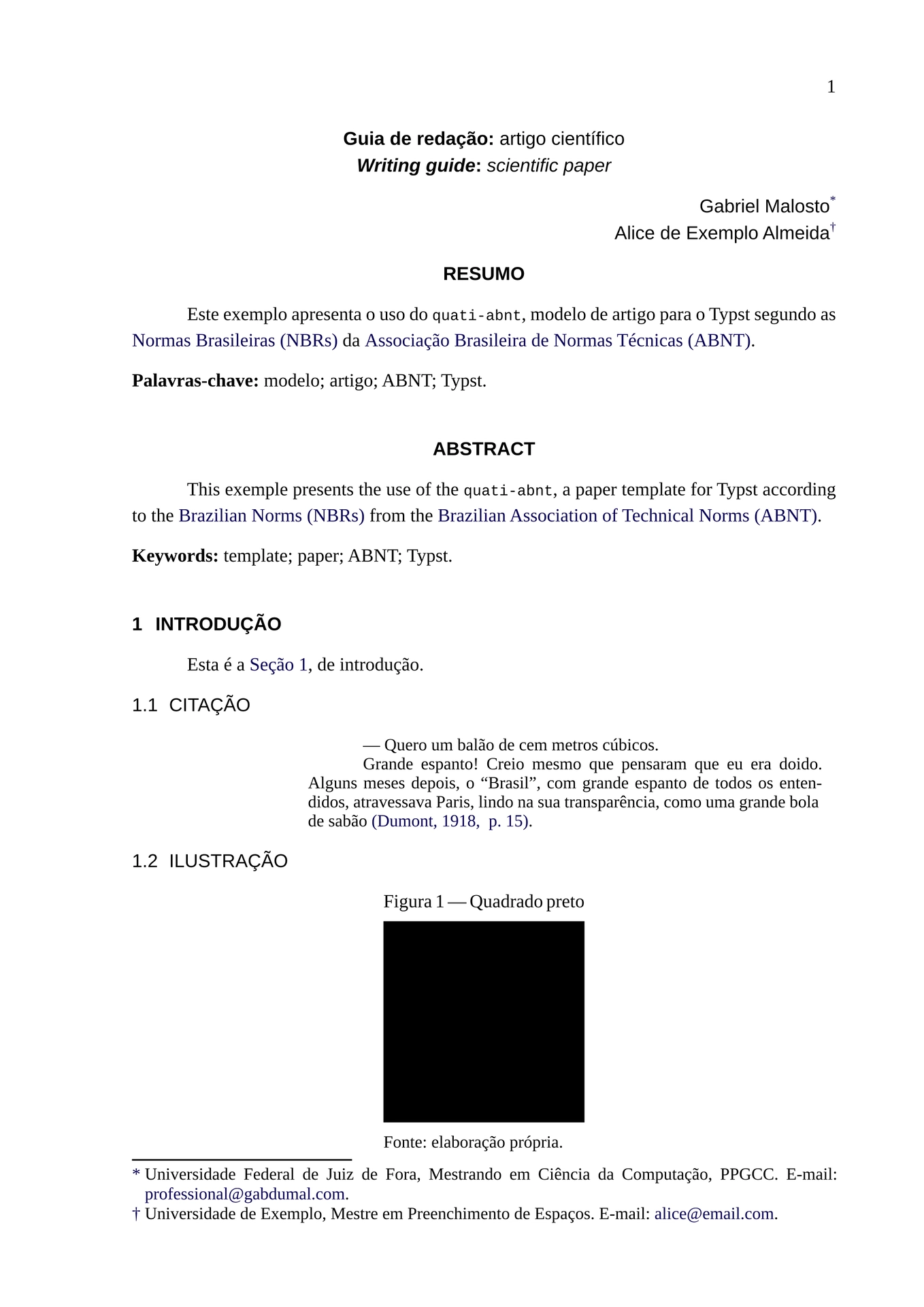
Compose documents according to ABNT standards.
Initialization
In order to create a new project using this template, you can either:
-
select this template on the Typst web app;
-
or use the following command when running typst locally.
typst init @preview/quati-abnt:0.2.0
This will create two folders: article, intended for scientific papers, and academic_work, intended for dissertations, theses, and monographs.
.
├── article
│   └── main.typ
└── academic_work
    └── main.typ
Each folder contains a main.typ file, which is the entry point for the document.
If you do not intend on using one of the templates, you can delete the corresponding folder.
After that, select the main.typ file on the desired template to render the document.
On the /packages.typ file inside each template folder, you will find the importing of the quati-abnt package.
#import "@preview/quati-abnt:0.2.0" as quati-abnt
Paper template
The article template is intended for scientific papers.
Main file
To render the paper, select the /main.typ file.
This file initializes the template, offering options to configure it.
#show: it => quati-abnt.link.template(
  it,
  // Define the color of links and cross-references.
  // Defina a cor dos links e das referências cruzadas.
  color_of_links: quati-abnt.link.color_of_links,
)
#show: it => quati-abnt.bibliography.template(it)
#show: it => quati-abnt.note.template(
  it,
  // Define the font family.
  // Defina a família tipográfica.
  font_family_for_notes: quati-abnt.common.style.font_family_sans,
  // Define whether to display editor notes.
  // Defina se deve exibir as notas de editor.
  should_display_notes: true,
)
#show: it => quati-abnt.article.template(
  it,

  // Define the font family to be used on each context.
  // Defina a família tipográfica a ser utilizada em cada contexto.
  font_family_for_common_text: quati-abnt.common.style.font_family_serif,
  font_family_for_highlighted_text: quati-abnt.common.style.font_family_sans,
  font_family_for_math_text: quati-abnt.common.style.font_family_math,
  font_family_for_monospaced_text: quati-abnt.common.style.font_family_mono,

  // Define whether to use larger text as typographic highlight instead of uppercase.
  // Defina se deve ser utilizada uma fonte maior como destaque tipográfico em vez de caixa-alta.
  should_use_larger_text_instead_of_uppercase_to_highlight: false,

  // Define whether to count pages and place its numbers at the headers.
  // Defina se deve contar as páginas e exibir seus números nos cabeçalhos.
  should_number_pages: true,
)
#show: it => quati-abnt.footnote.template(it)
Packages
Still on the root folder, you can include more Typst packages on the /packages.typ file.
This template depends on these packages, which are already re-exported to your project: glossarium.
Components
You can define your own components on the /components.typ file.
We have already set some exemples of editor notes for you to edit.
#let note_from_alice = (
  note: editor_note,
  it,
) => {
  let color = oklch(80.43%, 0.1, 278.25deg)
  note(
    prefixes: (
      (
        body: "Alice",
        fill: color,
        stroke: color.saturate(25%),
      ),
    ),
    it,
  )
}
Data
Set the following data on the /data/data.typ file:
- title;
- subtitle (optional);
- author(s).
Then, you can include your references on the data/bibliography.bib file.
If you want, you can set abbreviations, glossary entries, and symbols on the /data/glossary.typ file.
Also, you can set commonly used terms that should not be included in the glossary on the /data/terms.typ file.
Pre-textual elements
On the /content/pre_textual.typ file, you can set the title in a foreign language, which is optional.
Then, write the abstract and the keywords in the main language.
// ## Abstract. Resumo.
#let abstract_in_main_language = {
  (
    keywords_title: "Palavras-chave",
    keywords: (
      "modelo",
      "artigo",
      "ABNT",
      "Typst",
    ),
    title: "Resumo",
    body: [
      Este exemplo apresenta o uso do `quati-abnt`, modelo de artigo para o Typst segundo as @nbr:pl da @abnt.
    ],
  )
}
You can optionally set the abstract and keywords in foreign languages on the same file.
Content
Finally, you can write the content of your paper on the /content/textual/main.typ file.
Feel free to create more files and folders to organize your content, if you want.
You can include those files on the /content/textual/main.typ file using the #include command.
#include "./introduction.typ"
Post-textual elements
On the /content/post_textual.typ file, you can set the appendices, annexes, and an acknowledgment section.
All of these elements are optional.
Monograph template
The academic_work template is intended for dissertations, theses, and monographs.
The structure of this template is similar to the article template, but it has more pre-textual and post-textual elements.
This section only covers the differences between the two templates.
Data
Set the following data on the /data/data.typ file:
- title;
- subtitle (optional);
- author(s);
- advisor(s);
- members of the examination committee;
- organization (university);
- institution (faculty) (optional);
- department (optional);
- program (or course) (semi-optional);
- type of work (dissertation, thesis, or monograph);
- degree (semi-optional);
- degree topic;
- concentration area (optional);
- address;
- year;
- volume number (optional);
- approval date (optional).
If you prefer to write a custom nature paragraph, you can fill the custom_nature field with your own content.
In that case, the program and degree fields will be ignored.
Pre-textual elements
On the /content/pre_textual.typ file, you can write the contents of the errata page, the dedication page, the acknowledgments page, and the epigraph page.
All of these elements are optional. If you do not want to include one of them, just remove the respective inclusion command.
On the /content/abstract.typ file, you can write the abstract and keywords in the main language and in foreign languages.
Content
Finally, you can write the content of your work on the /content/textual/main.typ file.
Feel free to create more files and folders to organize your content, if you want.
You can include those files on the /content/textual/main.typ file using the #include command.
#include "./introduction.typ"
Its usual for a monograph to have these chapters:
- introduction (introdução);
- theoretical foundation (fundamentação teórica);
- material and methods (material e métodos);
- results (resultados);
- final considerations (considerações finais).
Post-textual elements
On the /content/post_textual.typ file, you can set the appendices and annexes.