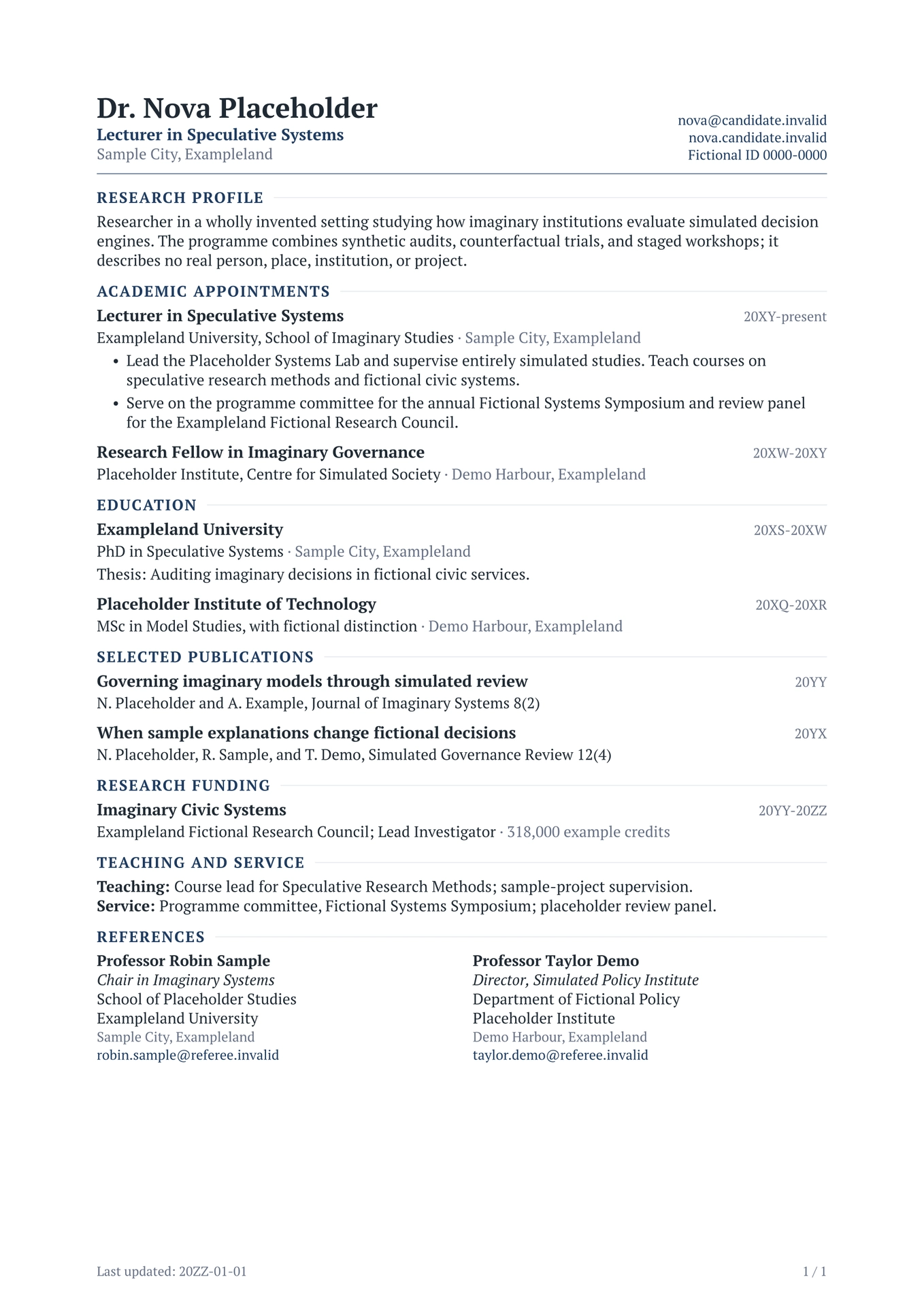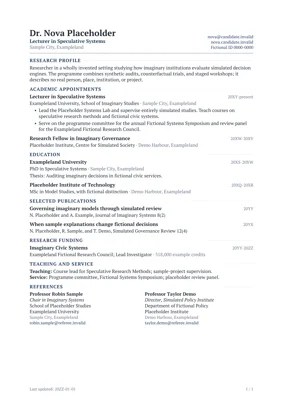
An academic-first Typst CV template: one serif family, one accent colour, a restrained type scale, and simple content helpers.
cvis the single entry point. It is the best default for long documents, printing, accessibility, and applicant tracking systems (ATS).cv(columns: 2, ...)is a compact one-page variant for human readers. Multi-column PDF extraction can interleave content, so do not use it when ATS parsing matters.
The examples use fictional people, institutions, publications, and awards.
For a matching letter and statement template, see
modernpro-coverletter. The two
packages share a design system and take the same profile shape, so a CV, a
cover letter, and a research statement read as one application. Each starter
keeps that dictionary inline so the document remains self-contained. An
optional photo is a CV-only presentation detail; letter and statement
templates ignore it.
Preview
Canonical academic CV

Compact two-column CV

Choose a layout
| Use case | Start from | Why |
|---|---|---|
| Academic applications, grants, promotion, or ATS upload | cv-single.typ |
One reading order, comfortable multi-page flow, and compact continuation headers |
| Conference bios, networking, or a one-page human-readable résumé | cv-double.typ |
More information above the fold in a compact visual summary |
When in doubt, use the single-column version. Keep the two-column version to one page and do not rely on it when automated PDF extraction matters.
Quick start
Create and compile a project with the Typst CLI:
typst init @preview/modernpro-cv:2.1.2
cd modernpro-cv
typst compile cv-single.typ
The starter contains:
modernpro-cv/
├── bib.bib
├── cv-double.typ
└── cv-single.typ
During editing, rebuild automatically with:
typst watch cv-single.typ
You can also select modernpro-cv from the template gallery in the Typst web
app.
First edit checklist
- Replace the placeholder identity at the top of
cv-single.typ. - Open
cv-single.typand delete any sections that do not apply. - Replace every fictional appointment, degree, publication, date, and claim.
- Compile the document and check page breaks, contact wrapping, and the final line of each page.
- Use
cv-double.typonly if you also need a compact one-page version.
The repository examples use explicit Placeholder entities from Exampleland and
reserved .invalid domains. Put real information only in your own downstream
document, not in a public template fork.
Minimal academic CV
profile is the only argument a typical CV needs. Define it at the top of the
same file so identity, content, and presentation stay together:
#import "@preview/modernpro-cv:2.1.2": *
#let profile = (
  name: [Dr. Nova Placeholder],
  role: [Lecturer in Speculative Systems],
  address: [Sample City, Exampleland],
  contacts: (
    (text: [nova\@candidate.invalid], link: "mailto:nova@candidate.invalid"),
    (text: [nova.candidate.invalid], link: "https://nova.candidate.invalid"),
    (text: [Fictional ID~0000-0000], link: "https://registry.example.invalid/0000-0000"),
  ),
)

#show: cv.with(profile: profile)

#section("Research Profile")
#summary[
  Researcher studying imaginary institutions and simulated decision engines.
]
#section-gap

#section("Academic Appointments")
#experience(
  title: "Lecturer in Speculative Systems",
  institution: [Exampleland University],
  location: "Sample City, Exampleland",
  date: "20XY-present",
)
#section-gap

#section("Education")
#education(
  institution: [Placeholder Institute],
  major: [PhD in Speculative Systems],
  date: "20XS-20XW",
  location: "Demo Harbour, Exampleland",
)
#section-gap

#section("Selected Publications")
#entry(
  title: [Governing imaginary models through simulated review],
  right: "20YY",
  meta: [N. Placeholder and A. Example, Journal of Imaginary Systems 8(2)],
)
Sections render in source order. Move a section to move it in the CV; delete it to hide it.
Recommended content workflow
Keep presentation decisions in the #show: cv.with(...) call and keep
application content below it:
- Put identity and contacts immediately above the
#showrule in the same file. - Use one
#section(...)for each academic category. - Use semantic helpers such as
experience,education, andentryinstead of manually aligning dates. - Write dates as short strings such as
"2023-present"so the right rail stays compact. - Add
#section-gaponce after a complete section; entry helpers already manage spacing between records.
For a long CV, begin with the default preset and let it flow to another page. Use the compact preset only after removing redundant content.
The four settings
Everything beyond profile is optional:
| Setting | Values | Purpose |
|---|---|---|
profile |
name, optional role, address, contacts, photo |
Who you are |
preset |
"compact", "default", "relaxed" |
The whole vertical rhythm |
accent |
any colour | The one colour in the document |
columns |
1 or 2 |
Single-column CV, or the compact variant |
#show: cv.with(
  profile: profile,
  preset: "compact",
  accent: rgb("#1e3a5f"),
)
"default"is the academic baseline: clear section hierarchy, comfortable entry spacing, a compact identity header."compact"is for unusually long CVs or strict page limits."relaxed"suits shorter dossiers and presentation copies.
A preset coordinates header rows, section-to-content spacing, entry rows, descriptions, body leading, and list spacing at once. Choose a preset rather than tuning gaps individually.
Design system
The same tokens drive modernpro-cv and modernpro-coverletter.
| Family | PT Serif, falling back to Libertinus Serif — one family, two weights |
| Sizes | 8.4-8.8pt dates and footer · 9.8-10pt body and metadata · 10.5pt entry titles · 18pt name |
| Colours | #1f2933 ink · #667085 muted · #1e3a5f accent · #dde3ea rules |
| Margins | 2.2cm left and right · fixed 2cm top, matching the letter template |
Entry layout is a left content block and a right date rail: the title and its institution sit on the left, the date alone occupies the right, and location joins the institution line. The right edge therefore stays a single clean column, and there is no zig-zag reading path.
Hierarchy comes from weight, case, italics, colour, and position — not from extra type sizes. Section headings are body-size, uppercase, bold, tracked, and followed by a rule; that is enough separation without introducing another step in the ladder.
Contacts
The adaptive header improvements described below are available in version 2.1.2.
Contacts are plain text by default, keeping the header quiet and PDF extraction clean. A contact can be linked or unlinked:
contacts: (
  (text: [nova\@candidate.invalid], link: "mailto:nova@candidate.invalid"),
  (text: [nova.candidate.invalid], link: "https://nova.candidate.invalid"),
  [Sample City, Exampleland],
)
Escape @ as \@ inside Typst content ([...]). Quoted strings such as
"nova@candidate.invalid" do not need that escape. Two or three concise contacts
keep the header short, but five is not a limit: add the items you need in the
order you want them to appear.
Sizing and wrapping
layout.header-height is a minimum, not a fixed height or a limit. It
defaults to 17 mm without a photo, or theme.photo-height (20 mm by default)
with a photo. Additional contacts and wrapped lines expand the header; the
divider and document body move down with it. Font sizes and row spacing stay
at their configured values.
Headers that fit retain their compact alignment. When content exceeds the minimum, side-by-side identity, contact, and photo blocks align at the top. Long email addresses and URLs can break at punctuation; an individual segment wider than its column can break between characters. The text is not truncated, no hyphens or invisible characters are added to copied labels, and link destinations stay unchanged.
Contact layouts
| Profile | layout.contact-layout |
First-page layout |
|---|---|---|
| Without a photo | "stacked" (default) |
Identity on the left; one contact per row on the right |
| Without a photo | "inline" |
Identity on the left; contacts flowing across lines on the right |
| With a photo | "stacked" (default) or "inline" |
Identity and inline contacts on the left; photo on the right |
| With a photo | "rail" |
Identity on the left; stacked contacts beside the photo on the right |
Inline items stay together when they fit the available width; a longer item wraps within that width. The photo rail limits contact width to preserve space for the name. These layouts apply to both single- and two-column CVs.
Optional icons
For a human-facing version, add an optional icon field. The template accepts
any Typst content and keeps the icon in a small fixed column, so the labels stay
aligned and remain fully searchable:
#import "@preview/fontawesome:0.6.2": fa-icon

contacts: (
  (
    icon: fa-icon("envelope", solid: true),
    text: [nova\@candidate.invalid],
    link: "mailto:nova@candidate.invalid",
  ),
  (
    icon: fa-icon("id-badge", solid: true),
    text: [Fictional ID~0000-0000],
    link: "https://registry.example.invalid/0000-0000",
  ),
)
The core template does not import an icon library. The example above uses
Font Awesome for Typst and
requires the corresponding Font Awesome desktop fonts. Omit icon for the
lowest-friction, ATS-first setup. Icons should supplement familiar labels, not
replace them.
Icons are centered by their visible glyph bounds within the label’s first line,
including when the label wraps. Font Awesome needs no top-edge adjustment;
existing icons with top-edge: "baseline" also remain supported.
Contacts without icons still line up with the other labels in a stacked list.
Optional profile photo
Pass a ready-to-render image as profile.photo. The default 16 x 20 mm portrait
fits a 4:5 frame with square corners:

#let profile = (
  name: [Dr. Nova Placeholder],
  role: [Lecturer in Speculative Systems],
  address: [Sample City, Exampleland],
  photo: image(
    "portrait.jpg",
    width: 16mm,
    height: 20mm,
    fit: "cover",
    alt: "Portrait of the fictional candidate",
  ),
  contacts: (
    (text: [nova\@candidate.invalid], link: "mailto:nova@candidate.invalid"),
  ),
)
The image is resolved in the CV document, then placed at the right edge of the
first-page header. This masthead is identical in single- and two-column CVs;
only the body grid changes. When a photo is present, identity and inline
contacts form one left-hand group while the portrait anchors the right edge.
The minimum header height defaults to the photo height, and the header can grow
further to fit its content. Use the photo rail recipe
to put stacked contacts beside the portrait instead.
The field accepts any Typst content, including a simple initials placeholder.
It is not repeated in continuation headers. Omit photo for ATS submissions
or applications where photographs are discouraged; cover letters and
statements keep the shared typography and rule without repeating the image.
Academic content helpers
Use one small helper for each kind of content:
| Helper | Purpose |
|---|---|
#section("Education") |
Start a section with the shared heading style |
#section-gap |
Add separation after a complete section |
#summary[...] |
Research profile or short overview |
#experience(title:, institution:, location:, date:, details:) |
Appointment, research role, teaching role, or service position |
#education(institution:, major:, date:, location:, description:) |
Degree or qualification |
#entry(title:, right:, meta:, location:, details:) |
Publication, grant, talk, project, or other entry |
#detail-line(title:, content:) |
Compact methods, tools, languages, or memberships line |
#award(award:, institution:, date:) |
Compact award entry |
#reference-list(references:) |
Two-column reference list |
In every entry helper, date (or right) goes to the date rail, and
institution/meta and location are joined on the line below the title.
experience, education, and entry add their own spacing after each entry.
Do not insert #item-gap between these helpers. #item-gap remains available
for custom content that is not produced by an entry helper.
A common academic sequence is:
- Research Profile
- Academic Appointments
- Education
- Publications
- Research Funding
- Teaching and Supervision
- Service
- Awards
- References
Use only the sections that strengthen the document.
Compact two-column variant
columns: 2 uses the same fonts, colour tokens, and content helpers as the
canonical CV. Only the page structure changes.
#import "@preview/modernpro-cv:2.1.2": *
#let profile = (
  name: [Dr. Nova Placeholder],
  role: [Lecturer in Speculative Systems],
  address: [Sample City, Exampleland],
  contacts: (
    (text: [nova\@candidate.invalid], link: "mailto:nova@candidate.invalid"),
    (text: [nova.candidate.invalid], link: "https://nova.candidate.invalid"),
  ),
)

#show: cv.with(
  profile: profile,
  columns: 2,
  left: [
    #section("Research Focus")
    #summary[Imaginary governance and simulated decision engines.]
    #section-gap

    #section("Methods")
    #detail-line(title: "Methods", content: [synthetic trials, mock audits])
  ],
  right: [
    #section("Academic Appointments")
    #experience(
      title: "Lecturer in Speculative Systems",
      institution: [Exampleland University],
      location: "Sample City, Exampleland",
      date: "20XY-present",
    )
  ],
)
Keep this variant concise and preferably to one page. The left and right columns are visually independent, but text extraction and screen readers may not preserve the intended reading order.
Common recipes
Hide the footer date
#show: cv.with(
  profile: profile,
  options: (last-updated: false),
)
Use inline contacts
Without a photo, this changes the right-hand contact column into a wrapping inline list. With a photo, inline contacts below the identity are already the default.
#show: cv.with(
  profile: profile,
  layout: (contact-layout: "inline"),
)
Place contacts beside a photo
Use a profile that includes photo, as in the example above:
#show: cv.with(
  profile: profile,
  layout: (contact-layout: "rail"),
)
The contact column can wrap, and the photo keeps its configured dimensions.
Without a photo, "rail" falls back to stacked contacts.
Give the header more room
#show: cv.with(
  profile: profile,
  layout: (header-height: 24mm),
)
This reserves at least 24 mm before the divider. Taller content still expands the header; reducing this value does not compress the contacts. For a matching CV and letter, use the same minimum with profiles and layouts that fit inside it. Different content or photo layouts can still require different heights.
Disable continuation headers
#show: cv.with(
  profile: profile,
  layout: (continue-header: false),
)
Continuation headers are useful for an academic CV that runs beyond one page. They repeat only the candidate name, document label, and page count—not the full contact block.
Advanced configuration
Most documents never need this section. When you do need a specific override, the grouped API keeps optional settings separate from content:
| Group | Settings |
|---|---|
theme |
font, colours (text, muted, heading, accent, rule), and individual size tokens |
layout |
preset, margin, continue-header, contact-layout, minimum header-height, individual rhythm gaps, plus columns and column-gutter for the two-column variant |
options |
last-updated, page-count, date |
#show: cv.with(
  profile: profile,
  theme: (
    font: "Libertinus Serif",
    accent: rgb("#1e3a5f"),
  ),
  layout: (
    preset: "default",
    margin: (left: 1.7cm, right: 1.7cm, top: 1.5cm, bottom: 1.5cm),
    continue-header: false,
  ),
  options: (
    last-updated: true,
    page-count: true,
    date: "2026-07-09",
  ),
)
For exceptional cases, the rhythm gaps map directly to the visual hierarchy:
section-content-gap separates a section heading from its first block,
entry-row-gap separates a bold entry title from its institution line,
description-gap separates that line from a description or bullet list, and
item-gap separates complete entries. The default preset intentionally leaves
more space inside a block than the compact preset so dense academic content
still scans as a sequence of distinct records.
continue-header defaults to true for cv and cv-single. The full identity
header appears only on the first page; later pages receive a compact header with
the candidate name, “Curriculum vitae”, and page count instead of repeating
contact details. cv-double keeps the historical false default because it is
intended as a one-page summary.
Optional section ordering
Direct source order is the simplest approach. If a generated workflow needs to
reorder or conditionally hide sections, use section-block and
render-sections:
#let sections = (
  section-block("profile", title: "Research Profile")[
    #summary[Research summary.]
  ],
  section-block("education", title: "Education")[
    #education(
      institution: [Placeholder Institute],
      major: [PhD in Speculative Systems],
      date: "20XS-20XW",
      location: "Demo Harbour, Exampleland",
    )
  ],
)

#render-sections(
  sections: sections,
  order: ("profile", "education"),
  include-remaining: false,
)
This is an advanced option; it is not required for an ordinary CV.
BibTeX publications
For a short selected-publications section, entry is usually easiest. To cite
records from bib.bib, list the citation keys and keep the hidden bibliography
at the end of the document:
#section("Publications")
+ @article-key
+ @another-key

#show bibliography: none
#bibliography("bib.bib", style: "chicago-author-date")
The legacy publication helper remains available. Because imported packages
cannot construct paths into the calling project, resolve the path in the CV
file before passing it to the helper:
#publication(path("bib.bib"), "chicago-author-date")
The helper also accepts raw bibliography bytes or an array of resolved paths and bytes. It rejects bare path strings because those would resolve inside the installed package rather than beside the CV document.
Legacy API
Nothing from 1.x was removed. cv-single and cv-double still work, as do the
flat arguments font-type, name, address, contacts, continue-header,
lastupdated, and pagecount, including string booleans such as "true".
layout: (density: ...) remains an accepted spelling of preset.
Older helper names are aliases:
descript->summaryjob->experiencetwoline-item->entryoneline-title-item,skill-line->detail-linereferences->reference-listsectionsep->section-gapsubsectionsep->item-gap
Use cv, the four settings, and the semantic helper names for new documents.
Upgrading from 1.x
Your existing documents keep compiling. They will look different: 2.0.0 replaces
the PT Sans / PT Serif pairing with a single serif family, rebuilds the size
ladder, moves location out of the bottom-right corner, and widens the page
margins to 2.2cm to match the letter template. To modernise a 1.x document,
replace cv-single.with with cv.with and layout: (density: "balanced") with
nothing at all — "default" is the default.
Troubleshooting
- The email causes a syntax error: escape
@as\@inside Typst content. - The header takes more space after adding contacts: it expands to keep
every item readable. A smaller
header-heightdoes not shrink its content; shorten labels or choosepreset: "compact"if space is tight. - Font Awesome icons do not render: install the corresponding desktop fonts
or remove the optional
iconfields. - The CV feels too dense: try
preset: "relaxed"before changing individual spacing tokens. - The CV exceeds a page limit: remove low-value detail first, then use
preset: "compact". - Copied PDF text is out of order: submit the single-column layout.
- A font is unavailable: use
theme: (font: "Libertinus Serif")for a broadly available serif fallback.
Local development
See the source repository’s development guide for working-template imports, examples, and header regression checks.
Release notes
See the changelog for version history and migration notes.
License
This template is released under the MIT License. See LICENSE.