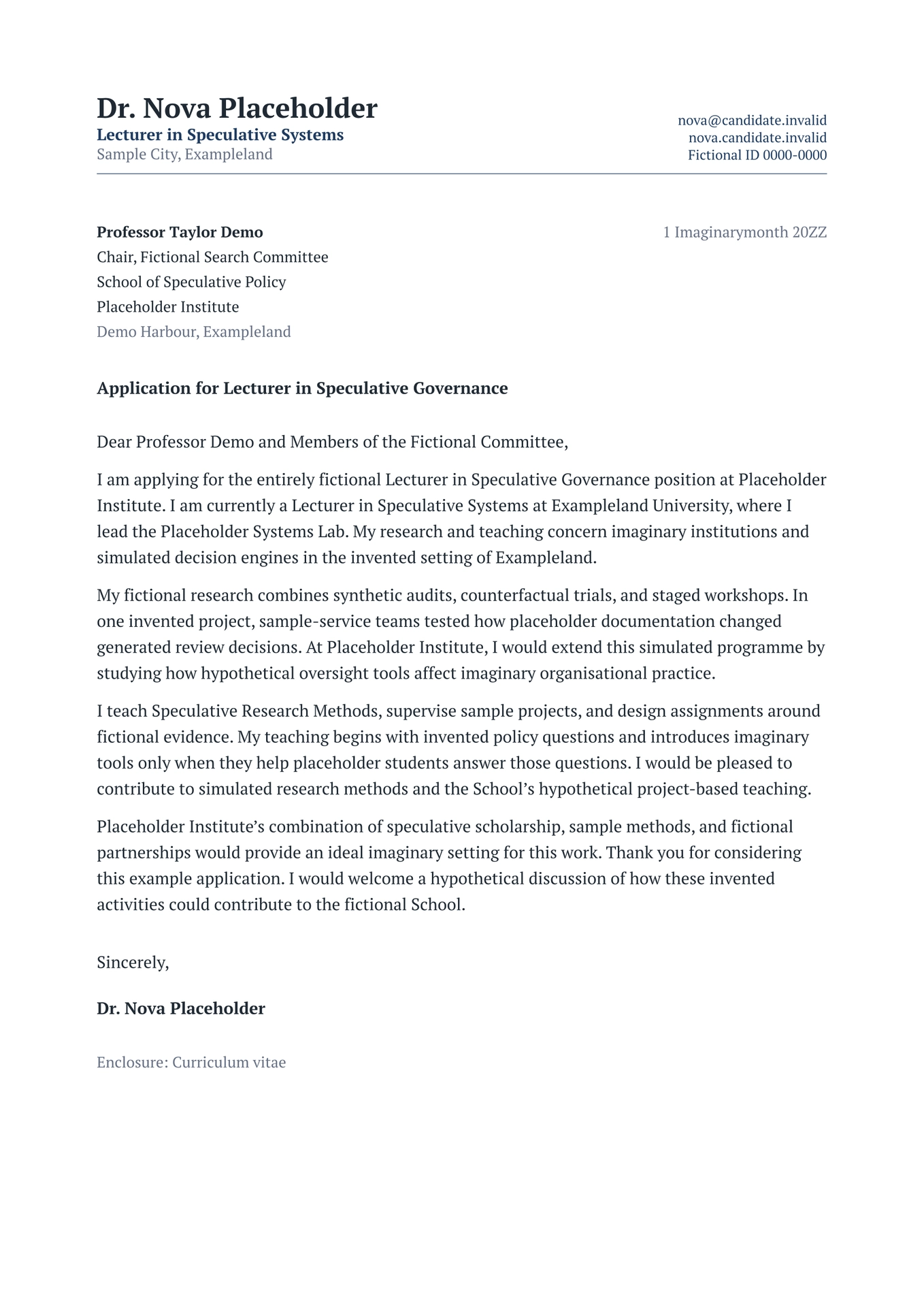
An academic-first Typst package for cover letters and research, teaching, or
personal statements. It shares its design system and profile shape with
modernpro-cv, so a CV, a
letter, and a statement read as one application while each source file remains
self-contained.
The default design is intentionally complete. Most users only need to provide their profile, the recipient, and the letter text.
All examples use explicit Placeholder entities from Exampleland and reserved
.invalid domains; none maps to a real person, place, institution, or project.
Preview
Academic cover letter

Research statement

Choose a document
| Document | Start from | Best for |
|---|---|---|
| Cover letter | coverletter.typ |
A role, fellowship, grant, or programme application addressed to a recipient |
| Statement | statement.typ |
Research, teaching, diversity, service, or personal statements with section headings |
Both documents keep an editable profile dictionary at the top of their own
file. Copy the same values when you want matching headers, without adding a
shared-file dependency.
Quick start
Create and compile a project with the Typst CLI:
typst init @preview/modernpro-coverletter:1.0.3
cd modernpro-coverletter
typst compile coverletter.typ
typst compile statement.typ
The generated project contains:
modernpro-coverletter/
├── coverletter.typ   <- recipient, letter body, and closing
└── statement.typ     <- title, headings, and statement body
Use typst watch coverletter.typ or typst watch statement.typ for automatic
recompilation while editing.
First edit checklist
- Replace the placeholder identity at the top of the document you are using.
- In
coverletter.typ, replace every recipient field and write the letter in short block paragraphs. - In
statement.typ, rename the title and headings to match the requested document. - Remove example claims rather than adapting them as if they were factual.
- Compile to PDF and inspect the header, first body line, closing, and page breaks.
Minimal academic cover letter
Keep your identity beside the letter content in the same source file:
#import "@preview/modernpro-coverletter:1.0.3": *

#let profile = (
  name: [Dr. Nova Placeholder],
  role: [Lecturer in Speculative Systems],
  address: [Sample City, Exampleland],
  contacts: (
    (text: [nova\@candidate.invalid], link: "mailto:nova@candidate.invalid"),
    (text: [nova.candidate.invalid], link: "https://nova.candidate.invalid"),
    (text: [Fictional ID~0000-0000], link: "https://registry.example.invalid/0000-0000"),
  ),
)

#show: coverletter.with(
  profile: profile,
  recipient: (
    name: [Professor Taylor Demo],
    role: [Chair, Fictional Search Committee],
    department: [School of Speculative Policy],
    organization: [Placeholder Institute],
    address: [Demo Harbour, Exampleland],
    date: [1 Imaginarymonth 20ZZ],
    subject: [Application for Lecturer in Speculative Governance],
    greeting: [Dear Professor Demo and Members of the Fictional Committee,],
  ),
)

Write the opening paragraph here.

Write the research, teaching, or professional case in short block paragraphs.

Close by explaining the fit and thanking the committee.
The default closing is Sincerely, followed by the profile name. Override it
only when needed:
closing: (
  salutation: [Best regards,],
  supplements: ([Enclosure: Curriculum vitae],),
)
The three settings
Everything beyond profile and recipient is optional:
| Setting | Values | Purpose |
|---|---|---|
profile |
name, optional role, address, contacts |
Who you are |
preset |
"compact", "default", "relaxed" |
The whole vertical rhythm |
accent |
any colour | The one colour in the document |
#show: coverletter.with(
  profile: profile,
  recipient: (name: [Recipient Name],),
  preset: "compact",
  accent: rgb("#1e3a5f"),
)
A preset coordinates header rows, recipient and subject spacing, title spacing, heading-to-body gaps, line spacing, and paragraph spacing at once. Choose a preset rather than tuning gaps individually.
Recipient fields
The recipient group uses ordinary letter terminology:
| Field | Purpose |
|---|---|
name |
Recipient or committee chair |
role |
Role or position |
department |
Department, school, or unit |
organization |
University, company, or institution |
address |
City or postal address |
postcode |
Optional separate postcode line |
date |
Letter date; omit it to use today’s date |
subject |
Sentence-case application subject |
greeting |
Opening greeting |
Every recipient field is optional. If date is omitted, the template inserts
today’s date; other empty fields leave no placeholder gaps. For an application,
provide at least the recipient or committee, organization, subject, and
greeting whenever they are known.
Statement template
statement uses the same profile, header, and visual identity. First- and
second-level Typst headings are styled automatically, so a research statement
stays easy to edit:
#import "@preview/modernpro-coverletter:1.0.3": *

#let profile = (
  name: [Dr. Nova Placeholder],
  role: [Lecturer in Speculative Systems],
  address: [Sample City, Exampleland],
  contacts: (
    (text: [nova\@candidate.invalid], link: "mailto:nova@candidate.invalid"),
    (text: [nova.candidate.invalid], link: "https://nova.candidate.invalid"),
  ),
)

#show: statement.with(
  profile: profile,
  title: [Fictional Research Statement],
)

= Imaginary research agenda
Introduce the question that connects the fictional programme.

= Simulated current programme
Describe the placeholder projects, methods, and contributions.

= Future work
Set out the next phase of the programme.
Use level-one headings (= Heading) for the major argument. Prefer three to
five descriptive sections over many short fragments. Statements add a compact
continuation header from page 2 by default.
Keep every document self-contained
The profile dictionary has the same shape as modernpro-cv, but each generated document keeps its own copy. An application folder therefore has no shared personal-data dependency:
application/
├── cv.typ
├── coverletter.typ
└── research-statement.typ
Copy the small #let profile = (...) block when starting another document.
This deliberate duplication makes every file portable and independently
compilable; update the copied values only when the application needs a
different role or contact order.
Shared academic design
The CV, cover letter, and statement use the same tokens.
| Family | PT Serif, falling back to Libertinus Serif — one family, two weights |
| Sizes | 8.8pt captions · 9.8pt recipient and address · 10.8pt body · 15pt statement title · 18pt name |
| Colours | #1f2933 ink · #667085 muted · #1e3a5f accent · #dde3ea rules |
| Margins | 2.2cm left and right · fixed 2cm top, matching modernpro-cv |
| Header | Split grid: name, role, and location left; stacked contacts right; accent rule below |
| Paragraph style | Left aligned, no first-line indent, block paragraphs |
The matching left and right margins align the endpoints of the header rule across the application. Its vertical position depends on the header’s minimum height and the space needed by its content.
Block paragraphs are easier to scan than justified text carrying both an indent and a blank gap. The default starter also avoids decorative icons, keeping text extraction and accessibility clean.
Advanced configuration
Most documents never need this section. When you do need a specific override, optional settings are grouped by purpose:
| Group | Use it for |
|---|---|
theme |
Fonts, semantic colours, sizes, and weights |
layout |
Margins, paragraph rhythm, header layout, and continuation behaviour |
closing |
Sign-off, signature spacing, and enclosures |
The semantic theme keys match modernpro-cv:
#let theme = (
  font: "PT Serif",
  text: rgb("#1f2933"),
  heading: rgb("#1f2933"),
  muted: rgb("#667085"),
  accent: rgb("#1e3a5f"),
  rule: rgb("#dde3ea"),
)
Common layout keys are:
| Key | Purpose | Default |
|---|---|---|
preset |
Coordinated document rhythm: "compact", "default", or "relaxed" |
"default" |
margin |
Page margins | Academic margins above |
first-line-indent |
Paragraph indent | 0em |
line-spacing |
Typst paragraph leading | 0.85em at the default preset |
paragraph-spacing |
Space between paragraphs | 1.55em at the default preset |
justify |
Fully justify body text | false |
header-style |
"split" or "centered" |
"split" |
contact-layout |
"stacked" or "inline" contacts in a split header |
"stacked" |
name-align |
Horizontal alignment of the name and role | left in split headers; center in centered headers |
address-align |
Horizontal alignment of the address | left in split headers; center in centered headers |
contact-align |
Horizontal alignment of contacts; icon lists keep labels aligned in their column | right in split headers; center in centered headers |
repeat-header |
Add a compact continuation header from page 2 | cover letter: false; statement: true |
page-numbering |
Add current and total page count to continuation headers | true |
header-height |
Minimum first-page identity area height; grows with content | 17mm |
contact-separator |
Separator between inline contact items | " · " |
date-format |
Format for an automatic date | [day] [month repr:long] [year] |
The full identity header is always part of the first page’s document flow. Its
position does not move when continuation behaviour changes. If repeat-header
is enabled, later pages receive only a compact name, document label, and page
count; contact details are not repeated or placed outside the accessible first
page structure. Statements enable this behaviour by default.
Contacts
The adaptive header improvements described below are available in version 1.0.3.
A contact may be linked, unlinked, or plain content, and may carry an optional
icon exactly as in modernpro-cv:
contacts: (
  (text: [name\@candidate.invalid], link: "mailto:name@candidate.invalid"),
  (text: [site.candidate.invalid], link: "https://site.candidate.invalid"),
  [Fictional ID 0000-0000],
)
Escape @ as \@ inside Typst content ([...]). Quoted strings such as
"name@candidate.invalid" do not need that escape. Two or three concise contacts
keep the header short, but five is not a limit: add the items you need in the
order you want them to appear. FontAwesome is optional and is not imported by
the package or starter.
Sizing and wrapping
layout.header-height is a minimum, not a fixed height or a limit. It
defaults to 17 mm. Additional contacts and wrapped lines expand the header;
the divider, recipient block or statement title, and body move down with it.
Font sizes and row spacing stay at their configured values.
Split headers that fit retain their bottom alignment. When content exceeds the
minimum, the identity and contact columns align at the top. Long email
addresses and URLs can break at punctuation; an individual segment wider than
its column can break between characters. The text is not truncated, no hyphens
or invisible characters are added to copied labels, and link destinations stay
unchanged. Optional icons are centered by their visible glyph bounds within
the label’s first line, including wrapped labels. Font Awesome needs no
top-edge adjustment; existing icons with top-edge: "baseline" also remain
supported.
Header layouts
layout.header-style |
layout.contact-layout |
First-page layout |
|---|---|---|
"split" (default) |
"stacked" (default) |
Identity on the left; one contact per row on the right |
"split" |
"inline" |
Identity on the left; contacts flowing across lines on the right |
"centered" |
Either value | Name, role, address, and inline contacts centered across the page |
Inline items stay together when they fit the available width; a longer item
wraps within that width. Centered headers always use inline contacts, so
contact-layout only selects a layout for split headers. All of these settings
work with both coverletter and statement. Profile photos remain a CV-only
feature.
Common recipes
Add enclosures
closing: (
  supplements: (
    [Enclosure: Curriculum vitae],
    [Enclosure: Research statement],
  ),
)
Use a centered header
This centers the name, role, address, and contacts without setting each alignment separately:
#show: coverletter.with(
  profile: profile,
  layout: (header-style: "centered"),
)
Use statement.with for a statement. Explicit name-align, address-align,
and contact-align settings still take precedence. For example, adding
address-align: left inside layout keeps only the address left-aligned.
Grouped layout settings take precedence over the corresponding legacy flat
arguments.
Use inline contacts in a split header
#show: coverletter.with(
  profile: profile,
  layout: (contact-layout: "inline"),
)
Give the header more room
#show: coverletter.with(
  profile: profile,
  layout: (header-height: 24mm),
)
This reserves at least 24 mm before the divider. Taller content still expands the header; reducing this value does not compress the contacts. For a matching CV and letter, use the same minimum with profiles and layouts that fit inside it. Different content or photo layouts can still require different heights.
Disable a statement continuation header
#show: statement.with(
  profile: profile,
  title: [Research Statement],
  layout: (repeat-header: false),
)
Use an explicit date
recipient: (
  date: [9 July 2026],
)
Legacy compatibility
Nothing was removed. The flat parameters font-type, name, address,
contacts, the colour parameters (primary-colour, headings-colour,
subheadings-colour, date-colour, link-colour), the type sizes, and the
spacing parameters all still resolve. layout: (density: ...) remains an
accepted spelling of preset.
The recipient aliases start-title and cl-title still map to greeting and
subject. institution remains an alias for organization, and position
remains an alias for role. The legacy salutation argument controls the
closing sign-off.
New documents should use profile, recipient, and the three settings shown in
the quick start.
Upgrading from 0.0.x
Your existing documents keep compiling, and they will change more than a visual
redesign alone would explain. In 0.0.x the body style was applied inside a
helper function that produced no content, so Typst scoped the rules to that
helper and discarded them: letters rendered at Typst’s 11pt default rather than
the configured body-size, and line-spacing, paragraph-spacing, justify,
first-line-indent, and link-colour had no effect at all. Those settings now
work. If you had compensated for the old behaviour with manual overrides,
remove them.
Troubleshooting
- The email causes a syntax error: escape
@as\@inside Typst content. - The header takes more space after adding contacts: it expands to keep
every item readable. A smaller
header-heightdoes not shrink its content; shorten labels or choosepreset: "compact"if space is tight. - A centered header still has left- or right-aligned text: remove explicit
name-align,address-align, orcontact-alignoverrides to use the centered defaults. - The first page looks crowded: shorten the contact block and recipient address before selecting the compact preset.
- A statement heading is too close to a page break: keep it as a Typst heading; the template marks styled headings as sticky.
- The letter unexpectedly becomes two pages: remove repetition first, then
try
preset: "compact". - A font is unavailable: set
theme: (font: "Libertinus Serif").
Local development
See the source repository’s development guide for working-template imports, examples, and header regression checks.
License
This template is released under the MIT License. See LICENSE.