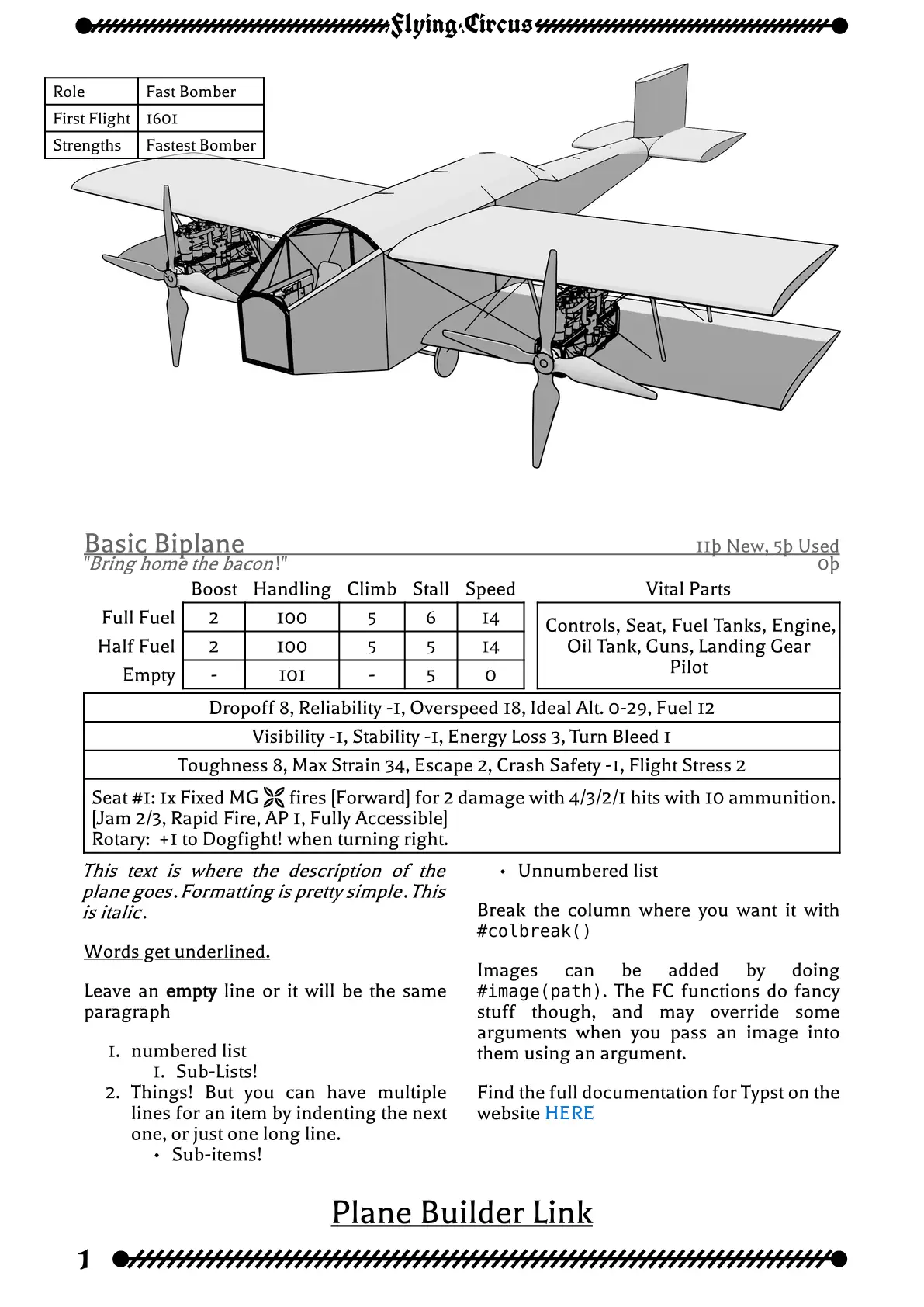
Do you want your homebrew to have the same fancy style as the Flying Circus book? Do you want a simple command to generate a whole aircraft stat page, vehicle, or even ship? I’ll bet you do! Take a look at the Flying Circus Aircraft Catalog Template.
Acknowledgments and Useful Links
Download the fonts from HERE. Install them on your computer, upload them to the Typst web-app (anywhere in the project is fine) or use the Typst command line option --font-path to include them.
Based on the style and work (with the permission of) Erika Chappell for the Flying Circus RPG.
Integrates with the Plane Builder. Just click the Catalog JSON button at the bottom to save what you need for this template.
Same with the Vehicle Builder.
Or check out the Discord server.
Getting Started
These instructions will get you a copy of the project up and running on the typst web app.
#import "@preview/flyingcircus:4.0.0": *

#show: FlyingCircus.with(
  Title: title,
  Author: author,
  CoverImg: image("images/cover.png"),
  Dedication: [It's Alive!!! MUAHAHAHA!],
)

#let myplanelink = "https://tetragramm.github.io/PlaneBuilder/index.html?json=AAEAjATAdA7MCwAhAhgZwJYGMAEj0AcAbZAOwFNgBAK4WgMFsfqcZBfZoHQAlACwHsSybAFl+AF34AnAEbIArtgBaYMNgAcABl75gAJGABcYACBa1GkzYAIVhw4B-h8FsAoex8-ngPAUNES0nKKKmpaOsAAwADq0QCSPnyCwmKSsgrKqhraurRmlACCUABmxQACAAmMAJBUAPwAAbSNzU32bEwWTp5mHL1RXvb9PZ2mjLa2HhPskXaj3p6zNZaDy6ssAKCe1BZsFuszTJMHSxwA4CdMpwf21JHUdPuMO-uvHk83B0A"

#FCPlane(FCParseLink(myplanelink), Nickname:"My First Plane")[This is where I describe my plane's lore!]
Usage
The first thing is to use the FlyingCircus template. The Title and Author are self-explanatory, I hope. Cover Image is optional, and if present is stretched to the entire first page of the document. Description is what kind of book this is. It goes right above the title. Dedication goes below the spacer, and is just a place for text.
The body-only option skips all the front matter and just applies the formatting.
body is the variable the captures the rest of the document when you use the template with the show rule, as below.
#import "@preview/flyingcircus:4.0.0": *

/// Defines the FlyingCircus template
///
/// - Title (str): Title of the document. Goes in metadata and on title page.
/// - Author (str): Author(s) of the document. Goes in metadata and on title page.
/// - CoverImg (image): Optional Image to make the first page of the document.
/// - Description (str): Text to go with the title on the title page. Default: "Aircraft Catalogue"
/// - Dedication (str): Dedication to go down below the title on the title page. Default: ""
/// - body-only (bool): Whether to skip the cover, title, and contents pages.
/// - body (content)
/// -> content

// Example
#show: FlyingCircus.with(
  Title: title,
  Author: author,
  CoverImg: image("images/cover.png"),
  Dedication: [It's Alive!!! MUAHAHAHA!],
)
New in 4.0.0: The FCParseLink function. It uses the webassembly plugin that implements the plane builder to parse out the data, construct all the stats of the airplane, and output the value into the required json structure. You can edit that in typst, as shown below, to customize what is actually displayed.
/// Defines the parsing of Plane Builder links into json files using the webassembly implementation of the builder.
/// link (str): The link to be parsed.  Should be of the form "https://tetragramm.github.io/.*/?json=.*"
/// locale (str): Values "de", "fr", "es", or "en". Defaults to en. Changes the language of the vital parts and armament sections  May change other sections later? Not sure.
#let lnk = "https://tetragramm.github.io/PlaneBuilder/index.html?json=AAEAjATAdA7MCwAhAhgZwJYGMAEj0AcAbZAOwFNgBAK4WgMFsfqcZBfZoHQAlACwHsSybAFl+AF34AnAEbIArtgBaYMNgAcABl75gAJGABcYACBa1GkzYAIVhw4B-h8FsAoex8-ngPAUNES0nKKKmpaOsAAwADq0QCSPnyCwmKSsgrKqhraurRmlACCUABmxQACAAmMAJBUAPwAAbSNzU32bEwWTp5mHL1RXvb9PZ2mjLa2HhPskXaj3p6zNZaDy6ssAKCe1BZsFuszTJMHSxwA4CdMpwf21JHUdPuMO-uvHk83B0A"

#let plane-json = FCParseLink(lnk)
#plane-json.insert("Armament", "Puny pea-shooters");
#FCPlane(plane-json)[]
Next is the FCPlane function for making plane pages.
/// Defines the FlyingCircus Plane page.  Always on a new page. Image optional.
///
/// - Plane (dictionary): dictionary representing the plane stats.
/// - Nickname (str): Nickname to go under the aircraft name.
/// - Img (image | none): Image to go at the top of the page. Set to none to remove. Defaults to the "Default Image"
/// - BoxText (dictionary): Pairs of values to go in the box over the image. Does nothing if Img=none.
/// - BoxAnchor (str): Which anchor of the image to put the box in?  Sample values are "north", "south-west", "center".
/// - DescriptiveText (content): This is where you put the lore.
/// -> content


// Example
#FCPlane(
  json("Basic Biplane_stats.json"),
  Nickname: "Bring home the bacon!",
  Img: image("images/Bergziegel_image.png"),
  BoxText: ("Role": "Fast Bomber", "First Flight": "1601", "Strengths": "Fastest Bomber"),
  BoxAnchor: "north-east",
)[
#lorem(100)
]
The FCVehicleSimple is for when you want to put multiple vehicles on a page.
/// Defines the FlyingCircus Simple Vehicle.  Not always a full page. Image optional.
///
/// - Vehicle (dictionary): dictionary representing the Vehicle stats.
/// - Img (image): Image to go above the vehicle. (optional)
/// - DescriptiveText (content)
/// -> content
#FCVehicleSimple(json("Sample Vehicle_stats.json"))[#lorem(120)]
FCVehicleFancy is a one or two page vehicle that looks nicer but takes up more space.
/// Defines the FlyingCircus Vehicle page.  Always on a new page. Image optional.
/// If the Img is provided, it will take up two facing pages, otherwise only one, but a full page, unlike the Simple.
///
/// - Vehicle (dictionary): dictionary representing the Vehicle stats.
/// - Img (image | none): Image to go at the top of the first page. Set to none to remove.
/// - TextVOffset (length): How far to push the text down the page. Want to do that inset text thing the book does? You can, the text can overlap with thte image.  Does nothing if no Img provided.
/// - BoxText (dictionary): Pairs of values to go in the box over the image. Does nothing if no Img provided.
/// - BoxAnchor (str): Which anchor of the image to put the box in?  Sample values are "north", "south-west", "center".
/// - FirstPageContent (content): Goes on the first page. If no image is provided, it is not present.
/// - AfterContent (content): Goes after the stat block. Always present.
/// -> content

// Example
#FCVehicleFancy(
  json("Sample Vehicle_stats.json"),
  Img: image("images/Wandelburg.png"),
  TextVOffset: 6.2in,
  BoxText: ("Role": "Fast Bomber", "First Flight": "1601", "Strengths": "Fastest Bomber"),
  BoxAnchor: "north-east",
)[
#lorem(100)
][
#lorem(100)
]
Last of the vehicles, FCShip is for boats like Into the Drink.
/// Defines the FlyingCircus Ship page.  Always on a new page. Image optional.
///
/// - Ship (dictionary): dictionary representing the Ship stats.
/// - Img (image | none): Image to go at the top of the page. Set to none to remove.
/// - DescriptiveText (content): Goes below the name and above the stats table.
/// - notes (content): Goes in the notes section.
/// -> content

// Example: No builder for Ships, so you'll have to put it in your own JSON, or just a dict, like this.
#let ship_stats = (
  Name: "Macchi Frigate",
  Speed: 5,
  Handling: 15,
  Hardness: 9,
  Soak: 0,
  Strengths: "-",
  Weaknesses: "-",
  Weapons: (
    (Name: "x2 Light Howitzer", Fore: "x1", Left: "x2", Right: "x2", Rear: "x1"),
    (Name: "x6 Pom-Pom Gun", Fore: "x2", Left: "x3", Right: "x3", Rear: "x2", Up: "x6"),
    (Name: "x2 WMG", Left: "x1", Right: "x1"),
  ),
  DamageStates: ("", "-1 Speed", "-3 Guns", "-1 Speed", "-3 Guns", "Sinking"),
)

#FCShip(
  Img: image("images/Macchi Frigate.png"),
  Ship: ship_stats,
)[
  #lorem(100)
][
  #lorem(5)
]
Additional functions include FCWeapon
/// Defines the FlyingCircus Weapon card. Image optional.
///
/// - Weapon (dictionary): dictionary representing the Weapon stats.
/// - Img (image | none): Image to go above the card. Set to none to remove.
/// - DescriptiveText (content): Goes below the name and above the stats table.
/// -> content

//Example
#FCWeapon(
  (Name: "Rifle/Carbine", Cells: (Hits: 1, Damage: 2, AP: 1, Range: "Extreme"), Price: "Scrip", Tags: "Manual"),
  Img: image("images/Rifle.png"),
)[
Note that you can set the text in the cell boxes to whatever you want.
]
KochFont:
/// Sets the tex to the Koch Fette FC font for people who don't want to remember the font name.
///
/// - body (content)
/// - ..args: Any valid argument to the text function
/// -> content

// Example
#KochFont(size: 18pt)[Vehicles]
and HiddenHeading, which is for adding to the table of contents without actually putting words on the page.
//If we don't want all our planes at the top level of the table of contents.  EX: if we want
// - Intro
// - Story
// - Planes
//   - First Plane
// We break the page, and create a HiddenHeading, that doesn't show up in the document (Or a normal heading, if that's what you need)
//Then we set the heading offset to one so everything after that is indented one level in the table of contents.
#pagebreak()
#HiddenHeading[= Vehicles]
#set heading(offset: 1)


New in Version 3.2.0, the FCPlaybook (+utilities), FCNPCShort, and FCAirshipShort

//This creates pages like the playbook. Largely customizable, for say, chariots of steel versions.
// - Name (str) The name of the Playbook
// - Subhead (str) The text that goes with the name in the header
// - Character (content) This is the entire left column
// - Questions (content) This is the top section of the right column, for motivation and trust questions.
// - Starting (content) Middle section of the right column. Starting Assets, Burdens, Planes, Vices, ect
// - Stats (content) Bottom section of the right column. Just the four FCPStatTable calls (and a colbreak, probably)
// - StatNames () Define the stats to draw circles for on the top part of the 2nd page
// - Triggers (content) List of triggers, includes section, because not all playbooks use the same text there.
// - Vents (content) List of Vents, customizable like Triggers
// - Intimacy (content) Bottom section of the left column, for the intimacy move
// - Moves (content) The entire right column of the second page
//
// Utilities for use with FCPlaybook
// - FCPRule()  The full-column horizontal line
// - FCPSection(name: str)[content] The section break
//    - name (str) The fancy font name on the lft side of the section line, can be blank.
//    - content The italicized text on the right side of the line, can be blank.
// - FCPStatTable(name, tagline, stats) For creating Stat tables
//    - name (str) The name of the profile, to be rendered in smallcaps
//    - tagline (str) The tagline of the profile, italicized
//    - stats (dict) A dictionary of stats ex (Hard:"+2") Keys are first row, values are second row, no restrictions otherwise.
#FCPlaybook(
  Name: str,
  Subhead: str,
  Character: content,
  Questions: content,
  Starting: content,
  Stats: content,
  StatNames: (),
  Triggers: content,
  Vents: content,
  Intimacy: content,
  Moves: content,
)

// This creates a short NPC profile like that in the back of the aircraft catalogue
// - plane (dict) Contains the keys
//      - Name
//      - Nickname
//      - Price (optional)
//      - Upkeep (optional)
//      - Used (optional)
//      - Speeds
//      - Handling
//      - Structure
// - img (image) Image to draw
// - img_scale (number) What scale to draw the image, relative to the column size
// - img_shift_dx (percent) How far to shift the image in the x direction
// - img_shift_dy (percent) How far to shift the image in the y direction
// - content The decriptive text to go above the stat block
#FCShortNPC(
  plane,
  img: none,
  img_scale: 1.5,
  img_shift_dx: -10%,
  img_shift_dy: -10%,
  content
)


// This creates a short airship profile like that in the back of the aircraft catalogue
// - airship (dict) Contains the keys
//      - Name
//      - Nickname
//      - Price (optional)
//      - Upkeep (optional)
//      - Used (optional)
//      - Speed
//      - Lift
//      - Handling
//      - Toughness
// - img (image) Image to draw
// - img_scale (number) What scale to draw the image, relative to the column size
// - img_shift_dx (percent) How far to shift the image in the x direction
// - img_shift_dy (percent) How far to shift the image in the y direction
// - content The decriptive text to go above the stat block
#FCShortAirship(
  airship,
  img: none,
  img_scale: 1.5,
  img_shift_dx: -10%,
  img_shift_dy: -10%,
  content
)