Between myriads of instances of the same font, multi-file output, multiple bibliographies, and support for more than one PDF standard at once, Typst 0.15 is all about multiplicity.
 by Laurenz Mädje
 Typst 0.15, our latest and largest release to date, brings long-desired support for variable fonts to Typst, pushes the experimental HTML export further with MathML and multi-file support, solidifies existing features like bibliography management and PDF standards support, and improves Typst in tons of other ways.
In this release cycle, we've also heavily invested into foundational systems to keep making Typst easier to adopt and use. In an effort to expand and improve our documentation, we've ported it to Typst and now also publish a print version of it. We're also, for the first time, including a comprehensive migration guide in the changelog. On the compiler side, we've been working on clearer, more actionable diagnostics and hints (with the new introspection warnings being just one of them). And for future Typst releases, we've started work on even smoother upgrades through migration tooling and automatic compatibility behavior of packages.
Contents
In this blog post, we'll take a closer look at some of the highlights of this release:
- Variable fonts
- MathML
- Bundle export
- Multiple bibliographies
- Multiple PDF standards at once
- Layout convergence diagnostics
- Print version of the documentation
To get started with Typst 0.15…
- …in the web app: Just open any of your projects! You'll get a prompt offering you to upgrade to the latest version.
- …on the command line: Run
typst updatein your terminal or, if you haven't installed Typst previously, download the latest version of the CLI.
For a comprehensive overview of all changes in the release, visit the changelog. If you're looking to upgrade your document to Typst 0.15, you can also skip ahead to its Migration guide.
Variable fonts
Typefaces often come with different design variants suitable for different design elements in a document. A common baseline is to have four fonts in a family: A regular one, a bold one, an italic one, and a bold-italic one. Beyond this, many fonts ship with more weights, different stretches (also called widths), or variants intended for different point sizes. Classically, each of the variants comes in a different font file. This can easily lead to situations where a font family comes with a ton of files and yet it still lacks the exact desired variant.
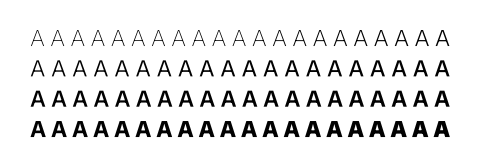
This is where variable fonts come in. They let font designers express glyph outlines and metrics in a parametric way, such that different weights, widths, and more can be derived from a single outline definition. The different tweakable parameters of a variable font are called variation axes. There are a few standard axes for classic design options like italics, slant, weight, stretch, and optical sizing (adjustments based on point size). Typst will automatically configure those based on the style, weight, stretch, and size parameters of the text function:
#set par(justify: true)
#set text(font: "Mona Sans")

#for weight in range(
  100,
  900,
  step: 10,
  inclusive: true,
) [
  #text(weight: weight)[A]
]
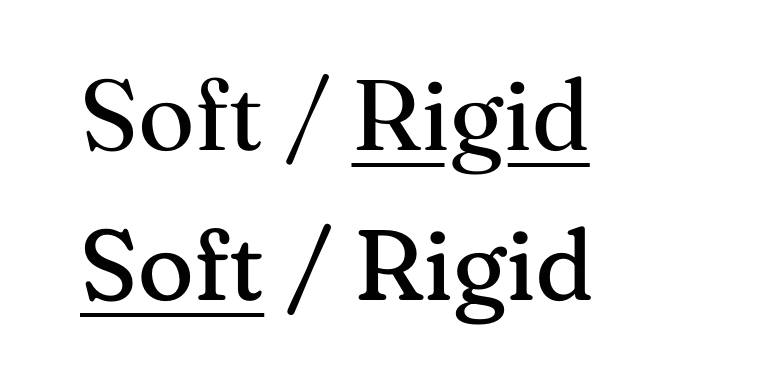
On top, fonts can define completely custom variation axes, for example an axis that tweaks the softness of the font. Below, we tweak the font's SOFT variation axis (custom axes are typically all uppercase):
#set text(
  font: "Fraunces",
  size: 50pt,
)

#text(variations: (SOFT: 0))[
  Soft / #underline[Rigid]
]

#text(variations: (SOFT: 100))[
  #underline[Soft] / Rigid
]
What's in a font?
To get the most out of a variable font, you need to know which design variations it supports. To help you with this, we've revamped tooltips and autocomplete in the web app and the output of typst fonts in the CLI so that you know what kind of variations are available in the font of your choice. We've also hunted down the variable versions of all fonts in the web app that provide such a version. Projects that use Typst 0.15 will automatically use them while Typst 0.14 and below will continue using the static versions.

$ typst fonts --variants
Fraunces
  ├ fonts/Fraunces[SOFT,WONK,opsz,wght].ttf (Variable)
  │   Style: Normal
  │   Stretch: 100%
  │   Weight: 100-900 (Default: 900)
  │   Optical Size: 9pt-144pt (Default: 9pt)
  │   SOFT: 0-100 (Default: 0)
  │   WONK: 0-1 (Default: 1)
  └ fonts/Fraunces-Italic[SOFT,WONK,opsz,wght].ttf (Variable)
      ...
MathML
If you've already played around with Typst's HTML export before, you might've noticed that it would just completely ignore equations. A pretty good workaround was available by using html.frame and rendering equations to SVG. However, this turns the equation inaccessible and unselectable.
With Typst 0.15, we've added native support for equations via MathML. MathML encodes an equation's structure and semantics. MathML equations keep text selectable, can be read out aloud with a screen reader, and be rendered at high resolution by browsers.
MathML is supported across all major browsers, but the rendering quality varies somewhat. If absolute visual consistency is crucial for you, rendering to SVG may still prove more suitable, but otherwise, using the native MathML output is highly preferable as it makes your math accessible to more audiences.
Here's an example of an equation and how Typst renders it:
$ sum_(i in NN) 1 + i $

And here's how your browser renders that same equation exported to MathML with Typst's HTML export:
Bundle export
When we first released Typst, PDF was the only supported export format. In Typst 0.5, we added PNG export and in Typst 0.8 SVG export. Those two were still very close to PDF export in that they all hook in after Typst has fully laid out the document. Then, in Typst 0.13, we added experimental support for HTML export. This is a structurally very different output format, as it needs to hook in earlier, with layout being fully delegated to the browser.
As of Typst 0.14, HTML export was limited to emitting a single file. This means that websites with multiple pages required some external orchestration. In our effort to port the documentation on https://typst.app/docs to Typst itself, we needed a way to export multiple HTML pages from a single Typst project.
The original idea was to build something that allows precisely that—emitting multiple HTML pages, likely via some form of html.output element. But while designing the feature, we've discovered a beautiful generalization: Why add this new element and restrict the feature to HTML? We already have an element that can represent an entire HTML document: The document element.
With the new bundle export, the document element takes on this new role and is complemented by a new asset element. A document takes content that is exported with one of Typst's other export formats. Meanwhile, an asset takes raw byte data of your choice that will be written to disk as-is. Both elements take the desired output path as their first argument.
Here's an example with three output files:
#document("index.html", title: [Home])[
  #title()
  #link(<blog>)[Go to blog]
]

#document("blog.html", title: [Blog])[
  #title()
  Welcome to my blog!
] <blog>

#asset("robots.txt", "Disallow: *")
Here, both documents are using the HTML export format because the provided path has the extension .html. A document can use any of Typst's single-file export formats (PDF, PNG, SVG, or HTML).
One other new feature in Typst 0.15 that's very useful in combination with bundle export is the within selector that scopes an introspection down to the descendants of a specific element. Introspections are by default global to a full bundle. With this selector, you can scope them down to a specific document.
We're expecting bundle export to be used most with websites, but there are other use cases. For example, you could create a PDF and a sidecar file with presentation speaker notes. And I'm sure some of you will abuse the asset element as an output channel to do raw computation with Typst. 😄
Please note that, like HTML export, bundle export is considered experimental. To enable it in the CLI, pass --features bundle or set TYPST_FEATURES=bundle. When combining it with HTML export, specify both separated with a comma (i.e. bundle,html). In the web app, bundle export is not yet supported.
Multiple bibliographies
With over 90 upvotes, support for multiple bibliographies is almost in the all-time top ten of Typst feature requests. While native support was missing, the community had stepped in with not one, but two packages (alexandria and pergamon).
Typst 0.15 finally adds native support for multiple bibliographies. If you just start adding multiple bibliographies to your document, Typst will automatically assign the citations to them in a way that covers common use cases. Specifically, by default, a citation will be picked up by the closest following bibliography that contains its citation key, or if no such bibliography follows, the closest preceding bibliography that contains the key.
With this, you can realize ...
- ... by-chapter bibliographies: Just add bibliographies to the ends of your chapters and the citations will be picked up accordingly.
- ... by-topic bibliographies: Create different
.yamlor.bibfiles for the different topics and add bibliographies using them to your document. Each citation will automatically be assigned to the bibliography that contains its key.
Depending on your citation style, you may or may not want to use a shared numbering for the bibliographies; this can be controlled with the new group parameter on the bibliography function.
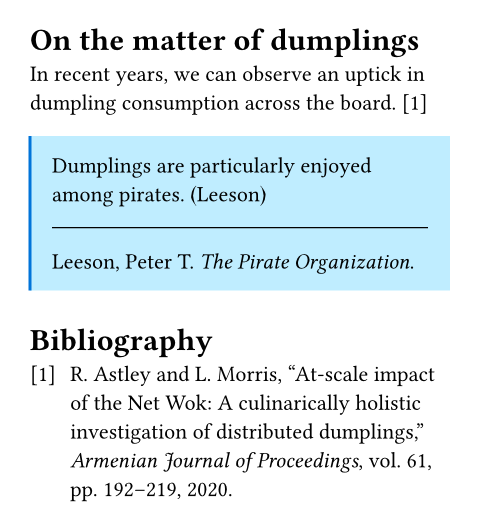
If you need even more control, you can write a selector that defines precisely which citations a particular bibliography should pick up. With this feature, you can go crazy. Why not define a separate bibliography for each info box in your document?
#let info(body) = block(
  stroke: (left: 1.5pt + blue),
  fill: aqua.lighten(50%),
  inset: 1em,
  context {
    body
    show divider: set block(
      spacing: 1.2em,
    )
    divider()
    bibliography(
      "works.bib",
      title: none,
      target: selector(cite).within(
        here(),
      ),
      style: "mla",
    )
  }
)

= On the matter of dumplings
In recent years, we can observe an
uptick in dumpling consumption across
the board. @netwok

#info[
  Dumplings are particularly
  enjoyed among pirates. @arrgh
]

#bibliography("works.bib")
Multiple PDF standards at once
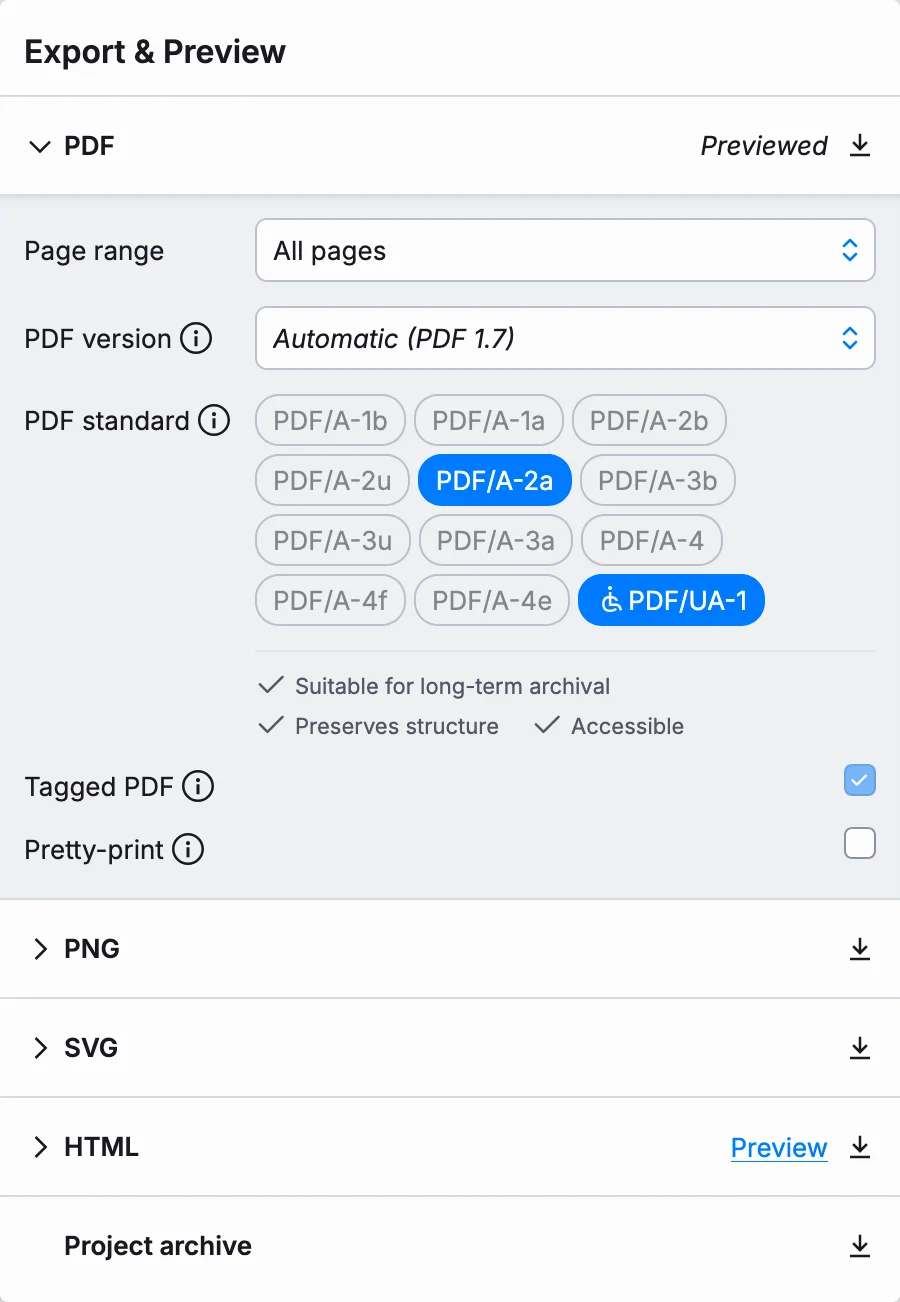
In Typst 0.12, we added initial support for PDF/A export and in Typst 0.14, we extended it and added support for PDF/UA. What wasn't yet supported, however, is exporting a file complying with both at the same time.
With Typst 0.15, we're lifting this limitation. This means you can now produce a file that is both highly suitable for long-term storage (e.g. PDF/A-2a) and universally accessible (PDF/UA-1) at the same time.
Layout convergence diagnostics
Documents are fundamentally intradependent. What I mean by this is that some typical document elements depend on information that is only known after the document is laid out. The prime example is an outline (table of contents): It contains page numbers and those are only known after layout is complete. At the same time, the length of the outline affects the page numbers. And as if that wasn't enough, the length of the outline can depend on the concrete page numbers. (For a visual explanation of this problem, take a look at the relevant segment of my recent talk at RustWeek.)
Typst resolves such intradependencies by compiling your document multiple times, until the output stabilizes. Unfortunately though, the output (a) isn't guaranteed to stabilize and (b) it is, in the general case, impossible to know whether it will stabilize at all. For this reason, Typst gives up after a fixed number of attempts. Then, you'll get a warning that the "layout did not converge in five attempts."
So far, this was all you got. If you had just made a change, you could still reasonably try to backtrack and see what went wrong. But if you let the warning sit for a while, figuring out the cause later could prove very difficult. Then, the only option would be to rip out parts of the document and observe when the warning would stay and when it would go away.
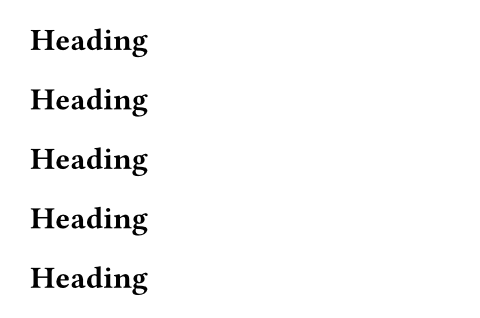
With Typst 0.15, we're adding new diagnostics to help you pin down the cause of convergence issues more quickly. Below is an example of a non-converging document and the new diagnostic Typst generates for it. The problem in this example is that we're querying for all heading elements, and then generating one more element than we've observed. With this setup, the document grows by one heading in each iteration, with no chance of stabilization.
#context {
  let elems = query(heading)
  let count = 1 + elems.len()
  count * [= Heading]
}
warning: document did not converge within five attempts
 = hint: see 1 additional warning for more details
 = hint: see https://typst.app/help/convergence for help

warning: number of heading elements did not stabilize
  ┌─ main.typ:2:14
  │
2 │   let elems = query(heading)
  │               ^^^^^^^^^^^^^^
  │
  = hint: the following numbers of elements were observed:
    - run 1: 0
    - run 2: 1
    - run 3: 2
    - run 4: 3
    - run 5: 4
    - final: 5
Print version of the documentation
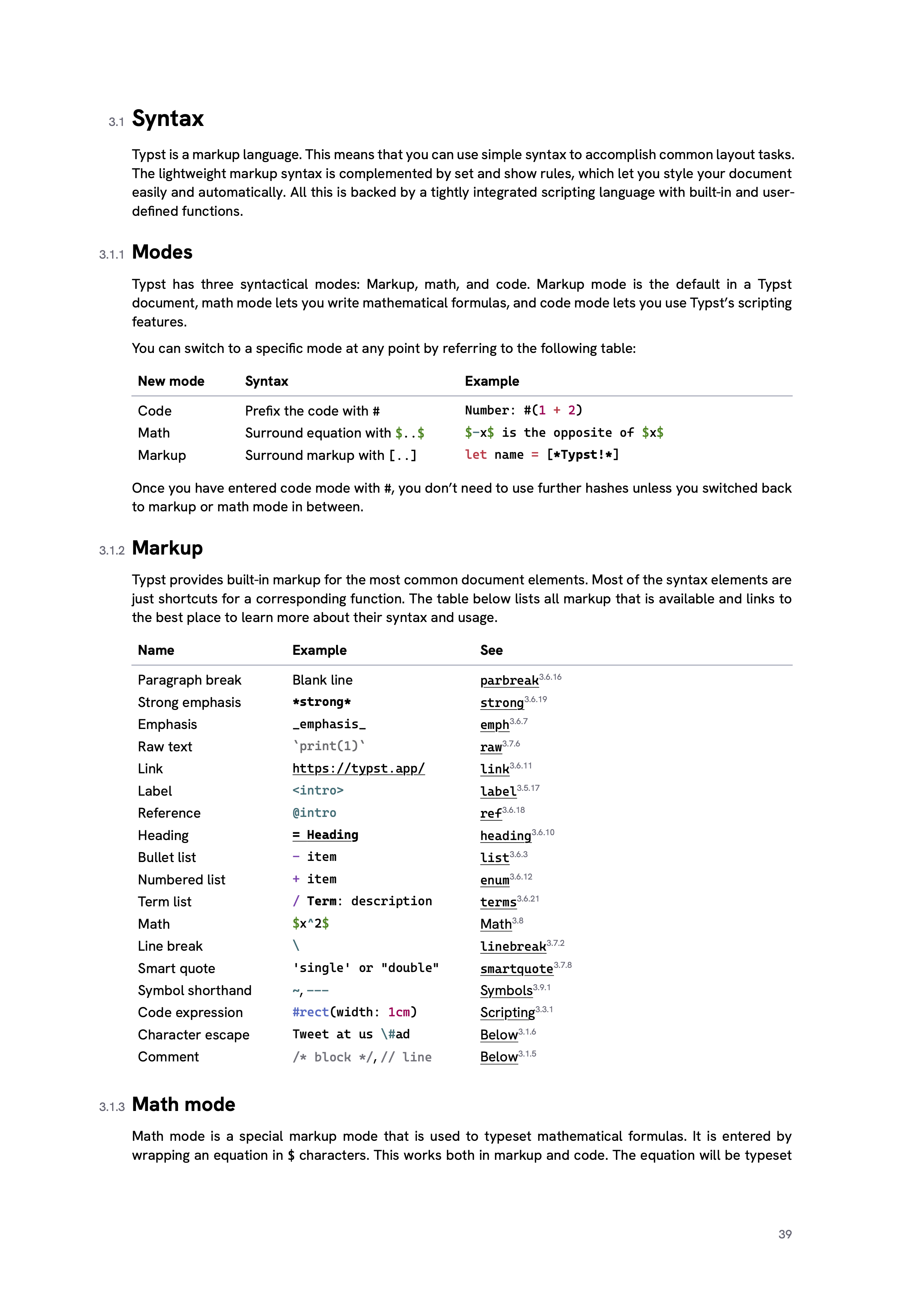
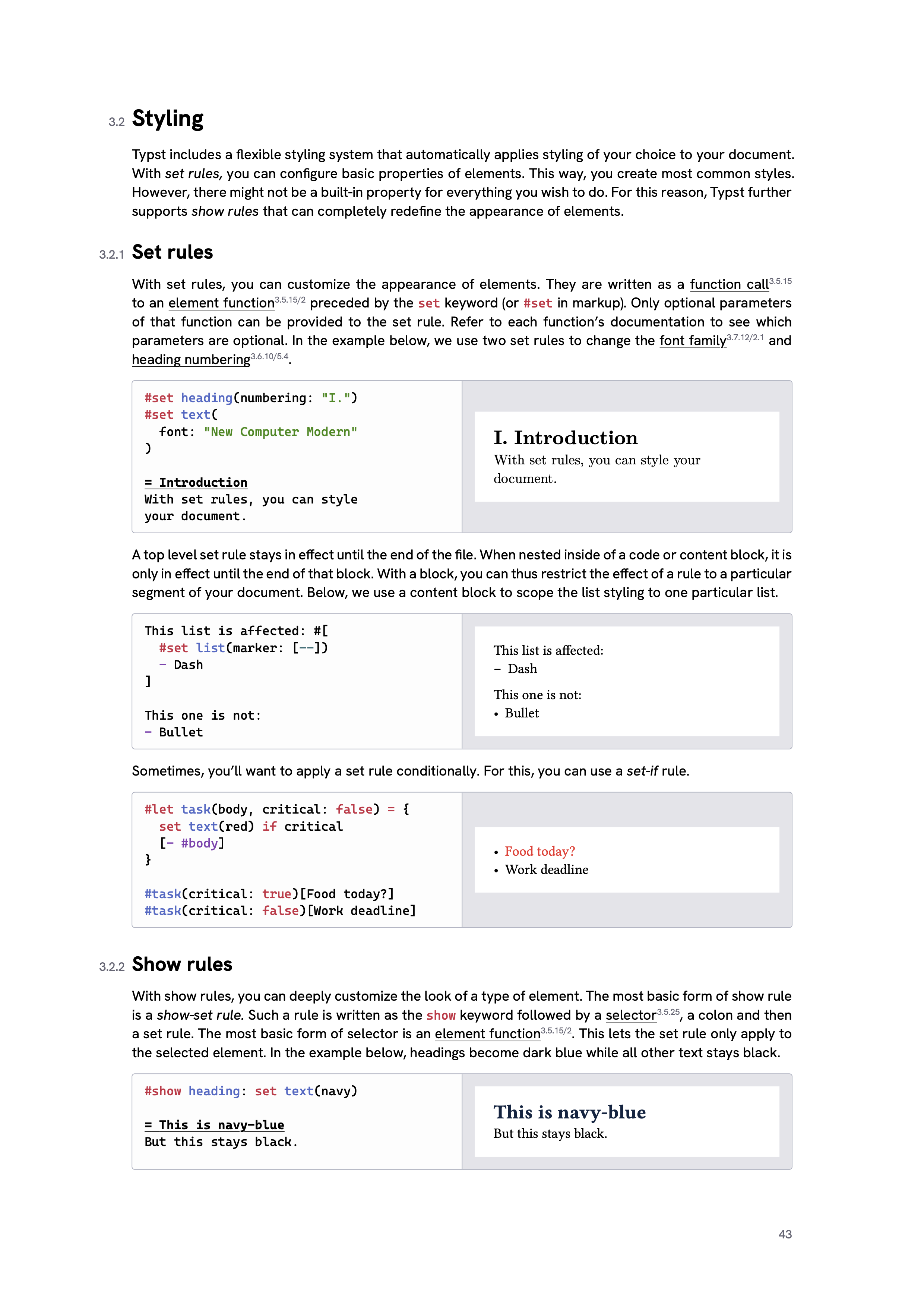
Last but not least is something I'm personally quite excited about. During the last release cycle, we've done a ton of work behind the scenes to port our entire documentation system to Typst. This means that everything you see on https://typst.app/docs/ is now generated with Typst's bundle and HTML export features. What it also means is that it became fairly straight-forward for us to produce a print version of the documentation as a standalone PDF file.
On the one hand, this is very useful as an offline reference. On the other hand, it's a testament to Typst's ability to publish to print and the web from the same source!
That's a wrap
These were just the top highlights of the release. There's much more packed into Typst 0.15, comprehensively listed in the changelog.
We're looking forward to hearing about your experiences with the new version! A great place to share them is in the next community call, which will take place on Discord on Friday, July 17th.
Finally, I'd like to use this opportunity to give a big shoutout to two contributors in particular: To @mkorje, who contributed MathML support, and to @isuffix, who is time and again finding ways to making Typst more user-friendly and polished (some of which are yet to land)!
