Create project in app
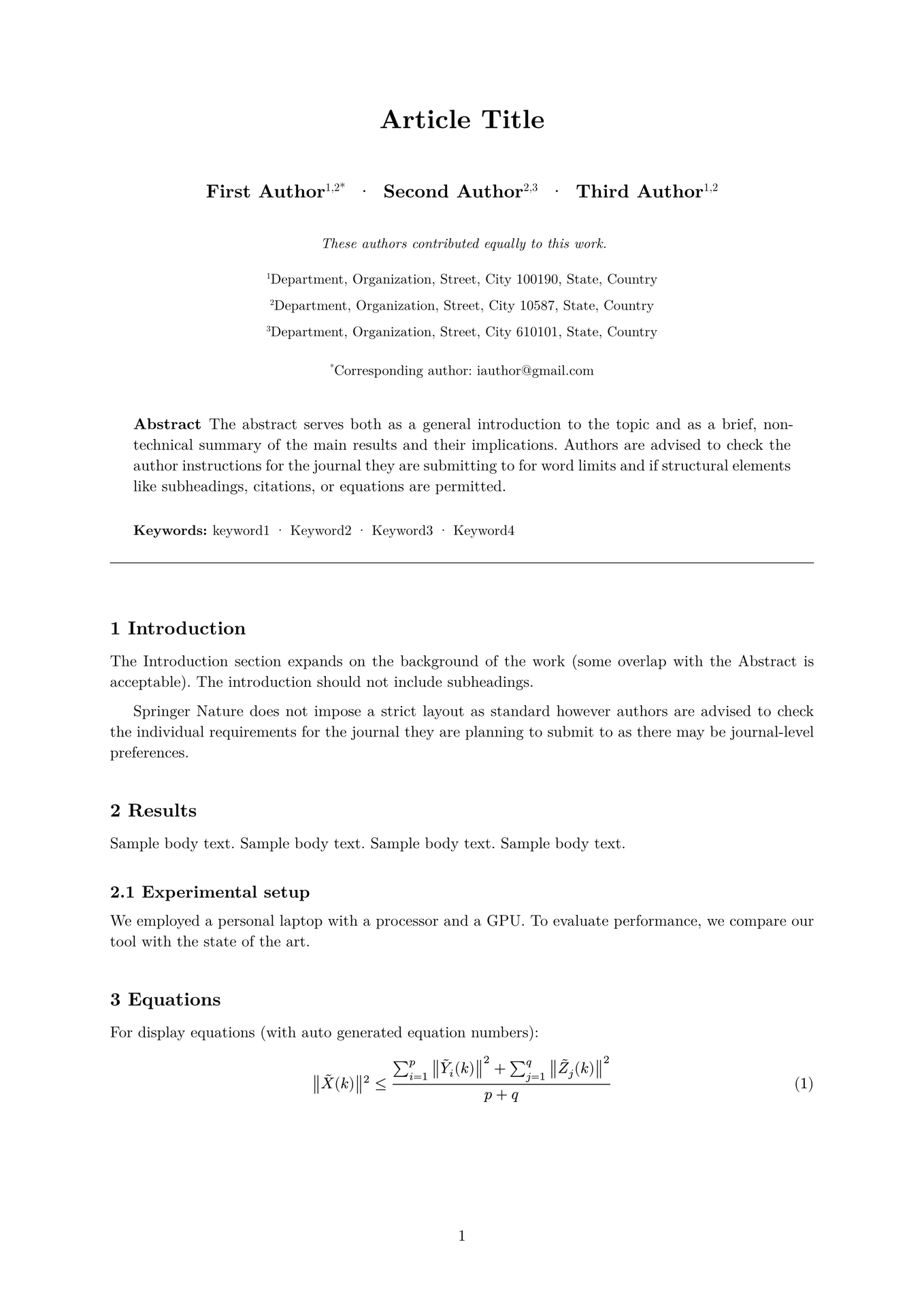
A Typst template for Springer Nature journal articles, matching the official sn-jnl LaTeX class (Version 3.1, December 2024).
Usage
Initialize a new project from this template:
typst init @preview/stellar-springer-nature:0.1.0
Or import in an existing project:
#import "@preview/stellar-springer-nature:0.1.0": article, bmhead

#show: article.with(
  title: [My Article Title],
  authors: (
    (name: "First Author", affiliations: (1,), corresponding: true, email: "author@example.com"),
    (name: "Second Author", affiliations: (2,)),
  ),
  affiliations: (
    (id: 1, department: "Physics", institution: "MIT", address: "Cambridge, MA, USA"),
    (id: 2, institution: "University of Oxford", address: "Oxford, UK"),
  ),
  abstract: [Your abstract text here.],
  keywords: ("keyword1", "keyword2", "keyword3"),
)

= Introduction

Your content here...
Template Parameters
article
| Parameter | Type | Description |
|---|---|---|
title |
content | Article title (required) |
short-title |
str | Short title for running headers |
authors |
array | Author dictionaries (see below) |
affiliations |
array | Affiliation dictionaries (see below) |
abstract |
content | Article abstract |
keywords |
array of str | Keyword list |
pacs |
content | PACS classification codes |
msc |
content | MSC classification codes |
Author Dictionary
(
  name: "Author Name",        // Required
  affiliations: (1, 2),       // Required: affiliation IDs
  email: "email@example.com", // Optional
  corresponding: true,        // Optional: marks corresponding author with *
  equal-contrib: "These authors contributed equally.",  // Optional
  orcid: "0000-0000-0000-0000",  // Optional
)
Affiliation Dictionary
(
  id: 1,                       // Required: numeric ID
  department: "Department",    // Optional
  institution: "University",   // Required
  address: "City, Country",    // Optional
)
bmhead
Use for backmatter headings (equivalent to LaTeX \bmhead{}):
#bmhead[Acknowledgements]

We thank our reviewers for their helpful comments.

#bmhead[Supplementary information]

Supplementary data is available online.
Unnumbered Sections
For unnumbered sections like “Declarations” (equivalent to LaTeX \section*{}):
#heading(numbering: none)[Declarations]

- *Funding*: Not applicable
- *Data availability*: Available upon request
Features
- Single-column submission format matching Springer Nature guidelines
- Numbered headings (1, 1.1, 1.1.1)
- Author affiliations with superscript numbering
- Corresponding author marking
- Equal contribution notes
- Booktabs-style tables (no vertical rules)
- Numbered equations
- Figure/table captions with bold labels (Fig. 1, Table 1)
- PACS and MSC classification support
- Backmatter headings via
bmhead
Supported Reference Styles
The template uses Typst’s built-in bibliography support. Specify your preferred style:
#bibliography("refs.bib", title: "References")
The default rendering uses numbered references, matching sn-mathphys-num. For author-year styles, consult the Typst bibliography documentation.
LaTeX Equivalents
LaTeX (sn-jnl) |
Typst (stellar-springer-nature) |
|---|---|
\title[short]{full} |
title:, short-title: |
\author*[1,2]{\fnm{} \sur{}} |
authors: with corresponding: true |
\affil[1]{\orgdiv{}, \orgname{}, \orgaddress{}} |
affiliations: array |
\abstract{} |
abstract: |
\keywords{} |
keywords: |
\section{} / \subsection{} |
= Heading / == Heading |
\section*{} |
#heading(numbering: none)[...] |
\bmhead{} |
#bmhead[...] |
\backmatter |
Not needed (use bmhead directly) |
\bibliography{} |
#bibliography("refs.bib") |
\cite{} |
@key or #cite(<key>) |