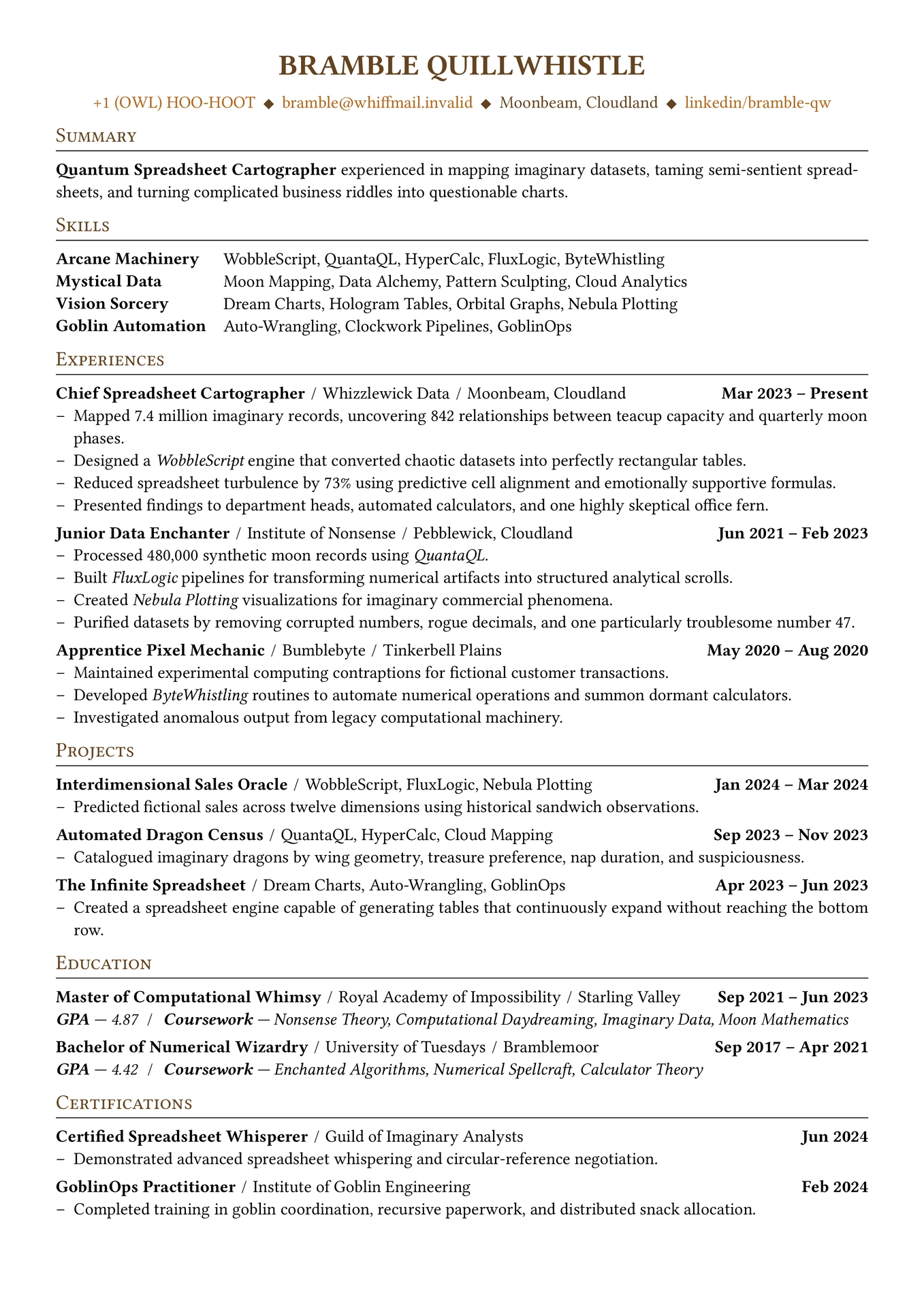



A modular, data-driven, and minimal Typst resume framework designed to make customization simple.

Features
- Structured resume sections for contact information, summary, skills, experience, projects, education, and certifications.
- Configurable typography, spacing, colours, margins, list markers, and alignment.
- Automatic formatting of dates, metadata, and section headings.
- Built-in support for LinkedIn, GitHub, email, phone, and arbitrary contact fields.
- Reorderable output sections.
- Optional page breaks for individual entries.
- Minimal interface designed to keep resume content separate from presentation.
Installation
Create a new Typst project using the package or import it directly:
#import "@preview/monofolio:0.1.1": *
The package exposes the resume configuration and content functions directly.
Basic Usage
Configure the appearance of the resume with resume.with:
#import "@preview/monofolio:0.1.1": *

#show: resume.with(
  contact-info-position: center,
  contacts-separator: [#h(0.45em)◆#h(0.45em)],
  inline-separator: [#h(0.35em)/#h(0.35em)],
  link-color: rgb("#B5651D"),
  accent-color: rgb("#654321"),
  font: "Libertinus Serif",
  font-size: 11pt,
  line-spacing: 0.65em,
  entry-spacing: 0.325em,
  page-margin: 0.5in,
  list-marker: [--],
  justify: true,
)
Add the resume content using the provided functions:
#contact-info(
  name: [Bramble Quillwhistle],
  phone: [+1 (OWL) HOO-HOOT],
  email: [bramble@example.invalid],
  address: [Moonbeam, Cloudland],
  linkedin: [bramble-qw],
)

#summary[
  #strong[Quantum Spreadsheet Cartographer] experienced in mapping
  imaginary datasets and turning complicated business riddles into
  questionable charts.
]

#skillset(
  category: [Arcane Machinery],
  skills: [WobbleScript, QuantaQL, HyperCalc, FluxLogic],
)

#experience(
  title: [Chief Spreadsheet Cartographer],
  company: [Whizzlewick Data],
  location: [Moonbeam],
  start-date: [Mar 2023],
  end-date: [Present],
  [Mapped millions of imaginary records and uncovered previously
  undocumented relationships between fictional business metrics.],
  [Designed data-processing workflows that transformed chaotic
  datasets into structured analytical tables.],
)

#project(
  name: [Interdimensional Sales Oracle],
  info: [WobbleScript, FluxLogic],
  start-date: [Jan 2024],
  end-date: [Mar 2024],
  [Predicted fictional sales across twelve dimensions using
  historical sandwich observations.],
)

#education(
  degree: [Master of Computational Whimsy],
  school: [Royal Academy of Impossibility],
  location: [Starling Valley],
  start-date: [Sep 2021],
  end-date: [Jun 2023],
  gpa: [4.87],
)

#certification(
  name: [Certified Spreadsheet Whisperer],
  issuer: [Guild of Imaginary Analysts],
  date: [Jun 2024],
  [Demonstrated advanced spreadsheet whispering and
  circular-reference negotiation.],
)
Finally, print the sections in the desired order:
#print-contact
#print-summary
#print-skills
#print-experience
#print-projects
#print-education
#print-certifications
The data definitions and printed sections are independent, so the output order can be changed without moving the resume data.
Configuration
The resume.with function accepts the following options.
| Option | Default | Description |
|---|---|---|
contact-info-position |
center |
Alignment of contact information. |
contacts-separator |
[#h(0.45em)◆#h(0.45em)] |
Separator between contact fields. |
inline-separator |
[#h(0.35em)/#h(0.35em)] |
Separator between inline metadata fields. |
link-color |
#B5651D |
Colour used for links. |
accent-color |
#654321 |
Colour used for headings and accents. |
font |
"libertinus serif" |
Font used throughout the document. |
font-size |
11pt |
Base document font size. |
line-spacing |
0.65em |
Paragraph leading. |
entry-spacing |
0.325em |
Vertical space between section entries. |
page-margin |
0.5in |
Page margin. |
list-marker |
[--] |
Marker used for resume accomplishments. |
justify |
true |
Whether paragraph text is justified. |
Contact Information
#contact-info(
  name: [Bramble Quillwhistle],
  phone: [+1 (OWL) HOO-HOOT],
  email: [bramble@example.invalid],
  address: [Moonbeam, Cloudland],
  linkedin: [bramble-qw],
  github: [bramble-qw],
)
name is required. The other standard contact fields are optional.
Supported fields include:
phoneemailaddresslinkedingithub
Additional named arguments can be supplied for custom contact fields:
#contact-info(
  name: [Bramble Quillwhistle],
  email: [bramble@example.invalid],
  portfolio: [https://example.invalid],
)
URL values are automatically formatted using their domain as the displayed text. Custom anchors can also be supplied using Typst’s link function.
Summary
Add a professional summary with summary:
#summary[
  A concise description of your background, experience,
  and professional focus.
]
Skills
Create skill categories with skillset:
#skillset(
  category: [Arcane Machinery],
  skills: [WobbleScript, QuantaQL, FluxLogic],
)
Multiple skill categories can be added independently.
Experience
Add professional experience with experience:
#experience(
  title: [Chief Spreadsheet Cartographer],
  company: [Whizzlewick Data],
  location: [Moonbeam],
  start-date: [Mar 2023],
  end-date: [Present],
  [Mapped imaginary datasets and uncovered fictional relationships.],
  [Built automated data-processing workflows.],
)
The following arguments are available:
titlecompanylocationstart-dateend-datenew-page- Positional accomplishment entries
Set new-page: true to force an entry to begin on a new page:
#experience(
  title: [Senior Data Enchanter],
  company: [Institute of Nonsense],
  new-page: true,
  [Transformed imaginary datasets into structured analytical records.],
)
Projects
Projects use the project function:
#project(
  name: [Interdimensional Sales Oracle],
  info: [WobbleScript, FluxLogic],
  start-date: [Jan 2024],
  end-date: [Mar 2024],
  [Built a predictive model for fictional sales activity.],
)
Available arguments:
nameinfostart-dateend-datenew-page- Positional accomplishment entries
Education
Add education with education:
#education(
  degree: [Master of Computational Whimsy],
  school: [Royal Academy of Impossibility],
  location: [Starling Valley],
  start-date: [Sep 2021],
  end-date: [Jun 2023],
  gpa: [4.87],
  coursework: [Nonsense Theory, Imaginary Data, Moon Mathematics],
)
Available arguments:
degreeschoollocationstart-dateend-dategpacourseworknew-page
Certifications
Add certifications with certification:
#certification(
  name: [Certified Spreadsheet Whisperer],
  issuer: [Guild of Imaginary Analysts],
  date: [Jun 2024],
  [Demonstrated advanced spreadsheet whispering skills.],
)
Available arguments:
nameissuerdatenew-page- Positional highlight entries
Output Sections
Each resume section has a corresponding print function:
#print-contact
#print-summary
#print-skills
#print-experience
#print-projects
#print-education
#print-certifications
These can be placed in any order. For example:
#print-contact
#print-summary
#print-experience
#print-skills
#print-education
#print-projects
#print-certifications
This allows the same resume data to be presented using different section orders without modifying the underlying content.
Complete Example
A complete working example is available in the package template.
License
This project is licensed under the MIT License. See LICENSE for the full license text.