Create project in app

同济大学本科生毕业设计(论文)· Typst 模板





中文 | English
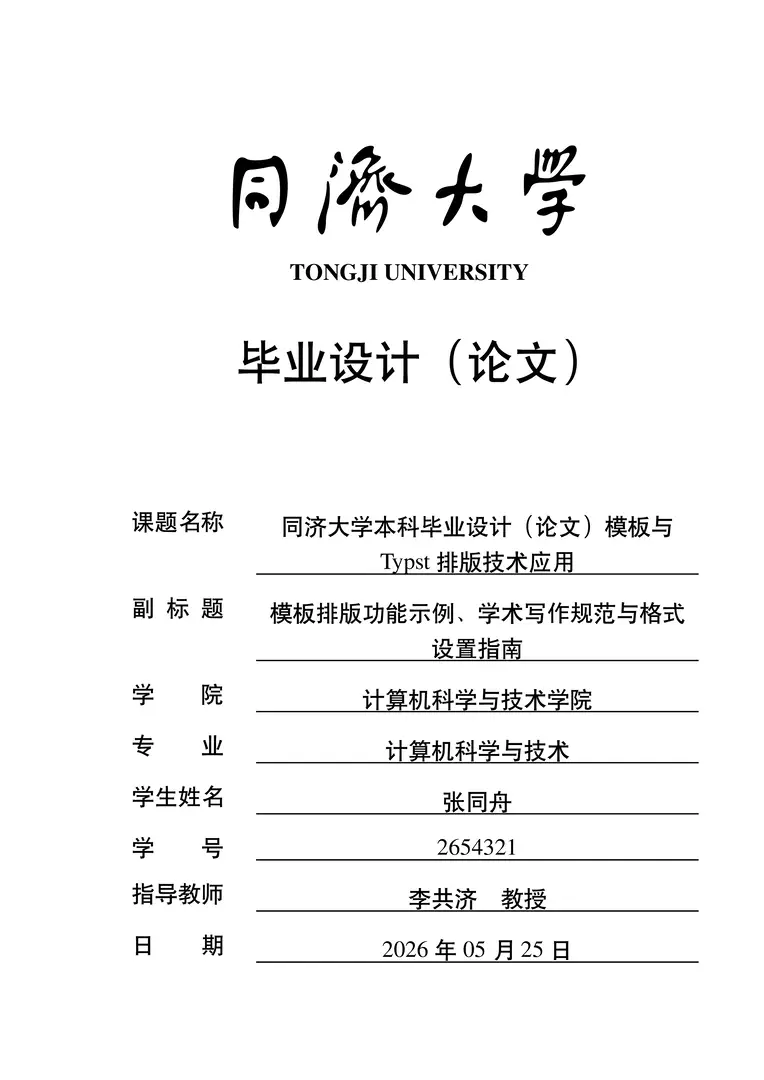
同济大学本科毕业设计(论文)Typst 模板。
注意 | Caution 本模板仍处于测试阶段,格式与功能可能随 Typst 版本更新而变动。Typst 项目本身也在快速迭代中,部分排版细节(如中文字体渲染、CJK 间距等)尚未完全稳定。
正式使用请优先选择 LaTeX 模板,该模板经过多届学生验证,格式严格对齐官方规范。Typst 模板同步更新,但目前仅供体验与测试。
快速开始
在线 Web App
在 Typst Web App 中选择 Start from a template,搜索 modern-tongji-thesis。
本地使用
1. 安装 Typst
# macOS
brew install typst

# 或参照官方文档安装
# https://github.com/typst/typst#installation
2. 选择字体集
在 template/chapters/metadata.typ 中填写封面与信息说明页信息,在 template/chapters/00_abstract.typ 中填写中英文摘要与关键词。其他选项在 template/main.typ 中设置。
所有字体集均使用 TeX Gyre Termes(Times New Roman 的开源替代,Typst Web App 内置,Linux:
apt install fonts-texgyre或下载 ZIP)作为中英文混排的 Latin 衬线字体。
| 平台 | 推荐 fontset | 说明 |
|---|---|---|
| macOS | "mac" |
Songti SC / Heiti SC 系统字体 |
| Windows | "windows" |
SimSun / SimHei 系统字体 |
| Linux | "fandol" |
Fandol + TeX Gyre Termes(CTAN 下载) |
| Adobe / 方正 | "adobe" / "founder" |
从 cjk-fonts-for-ctex 下载 |
3. 编译
# 下载字体(首次使用)
./fonts/download-fonts.sh

# 编译
typst compile template/main.typ thesis.pdf --root . --font-path ./fonts
模板配置
项目文件组织
与 LaTeX 模板保持一致的目录结构:
| 文件 | 用途 |
|---|---|
template/main.typ |
编译入口,配置文档类选项(field、fontset、twoside、bib-path 等) |
template/chapters/metadata.typ |
封面信息、信息说明页数据、摘要页标题覆盖(可选) |
template/chapters/00_abstract.typ |
中英文摘要内容与关键词 |
文档类选项
在 template/main.typ 中配置:
#import "../modern-tongji-thesis/tongjithesis.typ": *
#import "chapters/metadata.typ": *
#import "chapters/00_abstract.typ": *

// -- 文档类选项 --
#let field = "science"      // "science" 理工科(默认) / "humanities" 文科
#let fontset = "fandol"     // fandol / windows / mac / adobe / founder
#let bib-path = "bib/note.bib"
#let twoside = false        // false 单面打印(默认) / true 双面打印

#show: thesis.with(
  // 封面信息(来自 metadata.typ)
  school: school, major: major, id: id, student: student,
  advisor: advisor, title: title, subtitle: subtitle,
  title-english: title-english, subtitle-english: subtitle-english,
  date: date,

  // 摘要(来自 00_abstract.typ)
  abstract: abstract, keywords: keywords,
  abstract-english: abstract-english, keywords-english: keywords-english,

  // 信息说明页(来自 metadata.typ)
  infotype: infotype, infoabstract: infoabstract,
  infodrawings: infodrawings, infowordcount: infowordcount,
  infothesiswords: infothesiswords, infomaterials: infomaterials,

  // 摘要页标题覆盖(来自 metadata.typ,可选)
  abstract-title: abstract-title, abstract-subtitle: abstract-subtitle,
  abstract-title-english: abstract-title-english,
  abstract-subtitle-english: abstract-subtitle-english,

  // 文档类选项
  field: field, fontset: fontset,
  bib-content: read(bib-path), twoside: twoside,
)
主要选项说明
| 选项 | 类型 | 默认值 | 说明 |
|---|---|---|---|
field |
string |
"science" |
"science" 理工科,章节编号 1 / 1.1 / 1.1.1;"humanities" 文科,章节编号 一、/(一)/ 1. |
fontset |
string |
"fandol" |
字体集:fandol / windows / mac / adobe / founder |
twoside |
bool |
false |
双面打印模式:启用后装订线交替出现在左右侧,页眉/页脚内容也相应切换 |
bib-path |
string |
— | 参考文献数据库文件路径(.bib) |
infotype |
string |
"thesis" |
成果类型:"thesis" 毕业论文 / "design" 毕业设计 / "engineering" 工程设计 |
开源协议
MIT License。
欢迎提交 Issue 或 PR。详见 CONTRIBUTING.md。
联系方式
- Discussions
- QQ 群:
1013806782