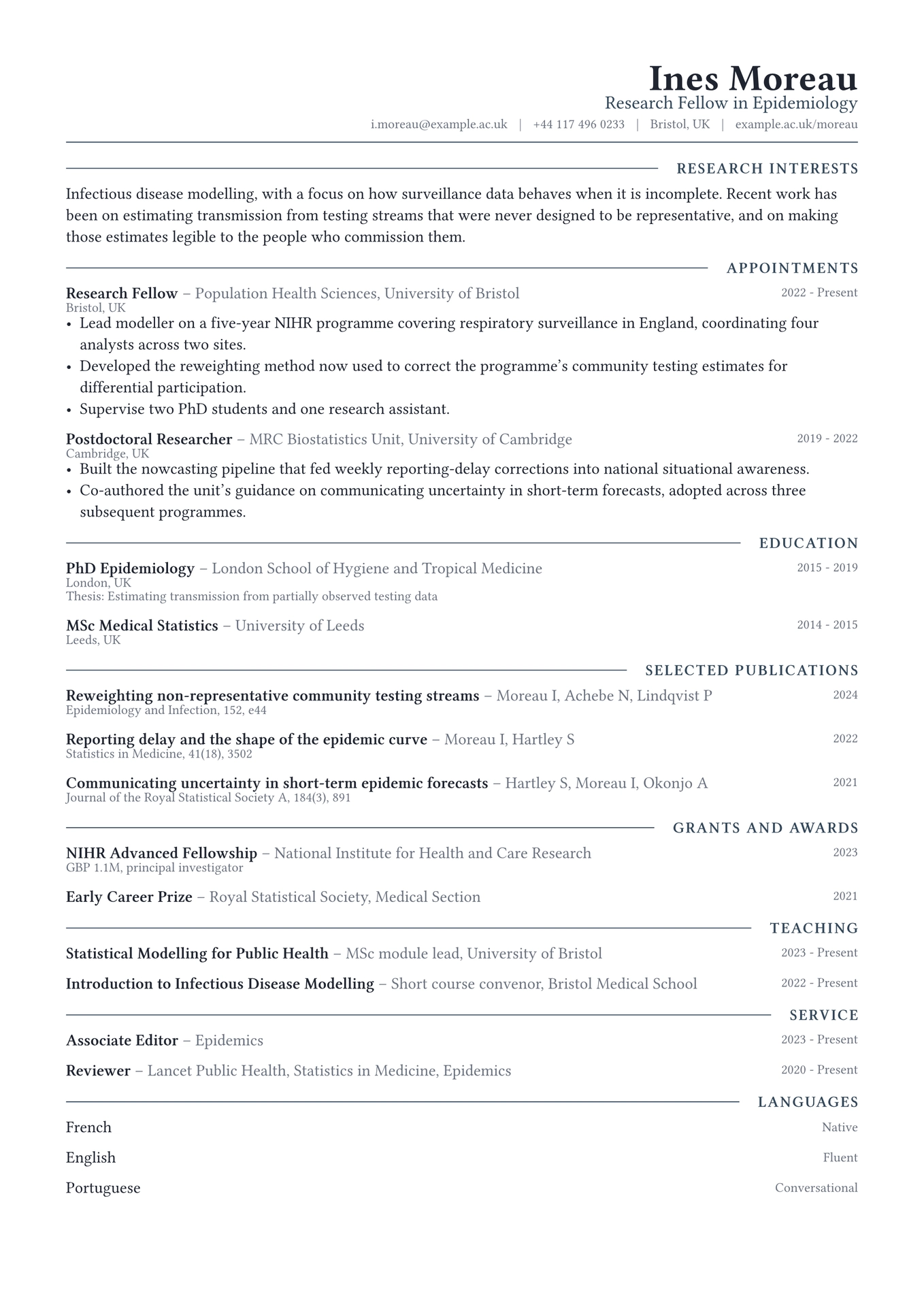
The masthead sets flush right. Everything below it sets flush left. That single asymmetry is the design: the eye lands on the name in the top corner, drops to the first section label, and then has one straight edge to follow all the way down. It is a quieter way to give a page a focus than a rule or a filled band.
The rest is conventional, and has to be. A mirrored axis only reads as a decision when nothing else competes with it.

Getting started
In the Typst app, open the package page and choose Create project in app.
On the command line:
typst init @preview/meridian-cv:0.1.0 my-cv
typst compile my-cv/main.typ
Meridian is set in Libertinus Serif, which ships with Typst, so it compiles identically everywhere with nothing to install.
Using it as a package
#import "@preview/meridian-cv:0.1.0": *

#let accent = "#33475a"

#show: resume.with(
  author: "Ines Moreau",
  font: "Libertinus Serif",
)

#masthead(
  author: "Ines Moreau",
  profession: "Research Fellow in Epidemiology",
  accent-color: accent,
  contact: [i.moreau\@example.ac.uk #h(0.6em) | #h(0.6em) Bristol, UK],
)

#cv-section("Appointments", accent-color: accent)

#meridian-entry(
  title: "Research Fellow",
  subtitle: "Population Health Sciences, University of Bristol",
  dates: "2022 - Present",
  location: "Bristol, UK",
)[
  - Something you did, with the number that makes it land.
]
The package exports resume, masthead, cv-section, meridian-entry and
meridian-language.
meridian-entry takes title, subtitle, dates, location and meta, all
optional, followed by the body. Leave any of them out and the row closes up
rather than leaving a gap, which is what makes it work for publication and grant
lists as well as for jobs: a citation is a title, an author line, a year and a
journal in meta, with no body at all.
Adding a portrait
masthead takes an optional photo, which fills the empty left side of the
header that the right-aligned stack leaves behind. photo takes image bytes, not a path. Typst resolves a bare path string
relative to the file holding the image() call, which here is inside the
package, so a string would be looked for in the package directory and not
beside your document. read sidesteps that:
#masthead(
  author: "Ines Moreau",
  photo: read("portrait.jpg", encoding: none),
  photo-size: 2.4cm,
  photo-radius: 50%,
)
Set photo-radius: 0% for a square crop. With no photo, the header renders
the right-aligned stack alone and nothing shifts.
Customising
| Parameter | Default | Notes |
|---|---|---|
accent-color |
"#33475a" |
The profession line, the section labels and the masthead rule. Pass it to masthead and cv-section, as the sample does. |
font |
"Libertinus Serif" |
Any installed family. A sans face works, but the mirrored masthead was drawn for a serif. |
font-size |
10.5pt |
The rest of the scale is derived from this. |
paper |
"a4" |
"us-letter" also works. |
margin |
1.5cm |
Applied on all four sides. |
License
The package source is MIT. Everything under template/, which is the part you
edit and publish as your own CV, is MIT-0, so nothing has to travel with it.
Maintained by JobSprout, where this design is also available as a hosted CV builder.