Featured Template
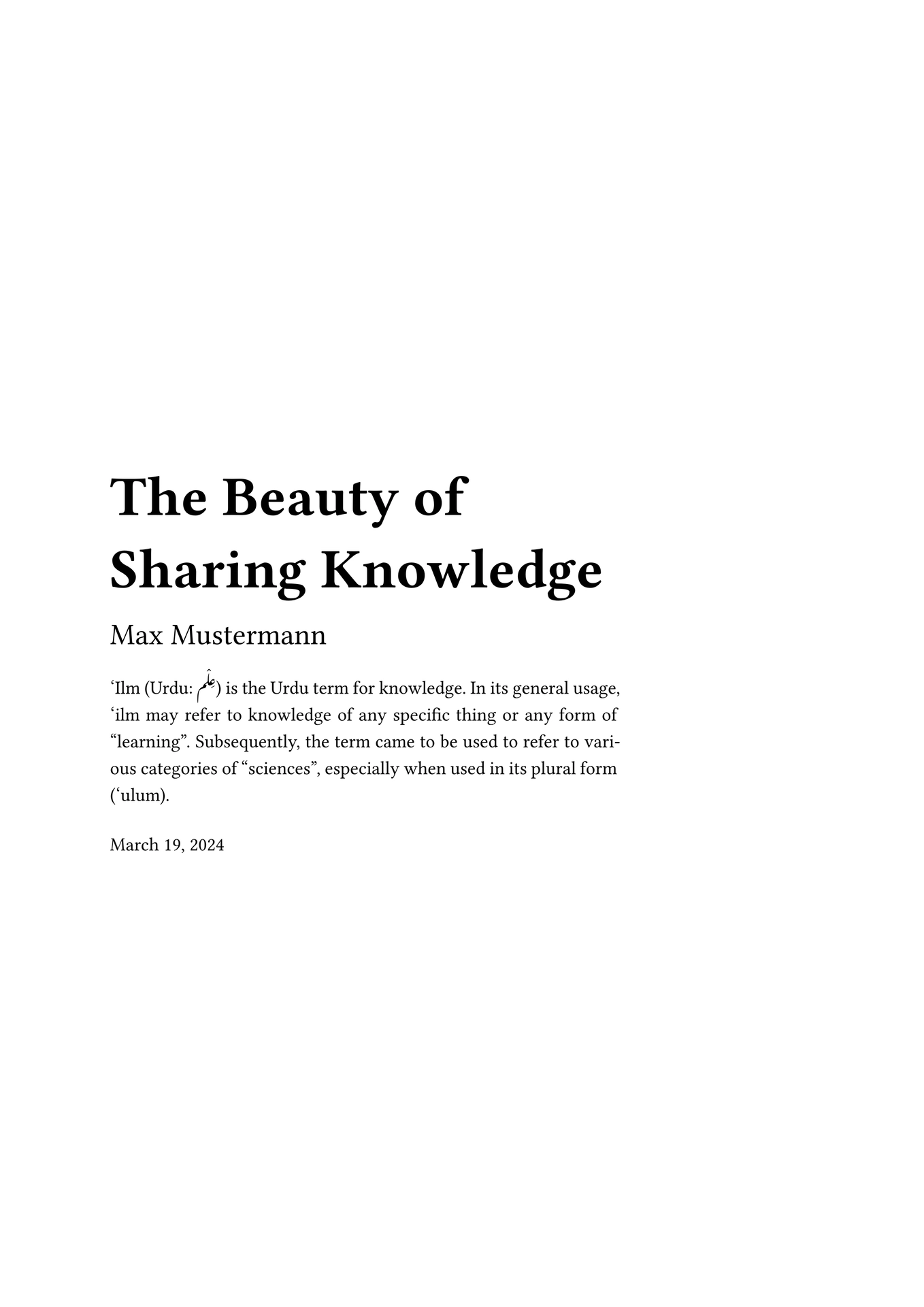
‘Ilm (Urdu: عِلْم) is the Urdu term for knowledge. It is pronounced as /ə.ləm/.
A versatile, clean and minimal template for non-fiction writing. The template is ideal for class notes, reports, and books.
It contains a title page, a table of contents, and indices for different types of figures; images, tables, code blocks.
Dynamic running footer contains the title of the chapter (top-level heading).
See the example.pdf file to see how it looks.
Usage
You can use this template in the Typst web app by clicking “Start from template” on the
dashboard and searching for ilm.
Alternatively, you can use the CLI to kick this project off using the command:
typst init @preview/ilm
Typst will create a new directory with all the files needed to get you started.
The template will initialize your package with a sample call to the ilm function in a
show rule. If you, however, want to change an existing project to use this template, you
can add a show rule like this at the top of your file:
#import "@preview/ilm:3.0.0": *

#set text(lang: "en")

#show: ilm.with(
  title: [Your Title],
  authors: "Max Mustermann",
  abstract: [#lorem(30)],
)

#cover-page()

#outline()

// Your content goes here.
This template uses IBM Plex Mono for raw text (inline code and code blocks) and Lato for headings. Both fonts are available in the Typst web app. When compiling locally, install these fonts on your system so the template looks exactly as designed. Otherwise, it will fall back to default fonts, which don’t look as good.
Configuration
The template exports the ilm function with several named arguments (read: options). This function also accepts a single, positional argument for the body.
The language setting for text (
langparameter oftextfunction) should be defined before theilmfunction so that headings such as table of contents and bibliography will be defined as per the text language. See example above.
Options
The list below shows a brief description for each option. For a detailed explanation of these options, see the example.pdf file.
-
title
type: content
default:[Your Title]
description: The title for your work. -
authors
type:none, string, or array
default:("Author Name",)
description: The author(s) of your work. Set tononeor()to omit authors from the cover page. A string represents a single author; an array displays authors on separate lines with font size automatically scaled. -
paper-size
type: string
default:"a4"
description: Specify a paper size string to change the page size. -
date
type: datetime ornone
default:datetime.today()
description: The date that will be displayed on the cover page. Set tononeto disable date. -
date-format
type: string
default:"[month repr:long] [day padding:zero], [year repr:full]"
description: The format for the date that will be displayed on the cover page. By default, the date will be displayed asMMMM DD, YYYY. -
abstract
type: content ornone
default:none
description: A brief summary/description of your work. This is shown on the cover page. Set tononeto disable. -
chapter-pagebreak
type: bool
default:true
description: Setting this tofalsewill prevent numbered chapters from starting on a new page. -
external-link-circle
type: bool
default:true
description: Setting this tofalsewill disable the maroon circle that is shown next to external links. -
footer
type: string ornone
default:"page-number-alternate-with-chapter"
description: Footer style for page numbering. Set tononeto disable footer entirely. Available styles:"page-number-alternate-with-chapter"(alternating sides with chapter name),"page-number-left-with-chapter","page-number-right-with-chapter","page-number-center","page-number-left","page-number-right".
Components & Functions
'Ilm exports several standalone functions and components to compose your document:
-
cover-page()
Displays the cover/title page using metadata (title,authors,date,date-format,abstract) configured inilm. -
appendix(body)
Applies appendix styling to headings withinbody. It resets the heading counter, switches to alphabetical numbering (A.1), and sets the supplement to[Appendix]. Can be used as a container (#appendix[...]) or as a show rule (#show: appendix). -
list-of-figures(..args)
Renders an outline of figure images. Accepts any parameter supported by Typst’soutline. Defaults totitle: [List of Figures]. -
list-of-tables(..args)
Renders an outline of figure tables. Accepts any parameter supported by Typst’soutline. Defaults totitle: [List of Tables]. -
list-of-listings(..args)
Renders an outline of raw/code blocks. Accepts any parameter supported by Typst’soutline. Defaults totitle: [List of Listings]. -
blockquote(body)
Rendersbodystyled as an indented, highlighted blockquote. -
smallcaps(body, all: false)
Displays small caps with tuned letter tracking, wrapping Typst’sstd.smallcaps. -
upper(body)
Displays uppercase text with tuned letter tracking, wrapping Typst’sstd.upper.