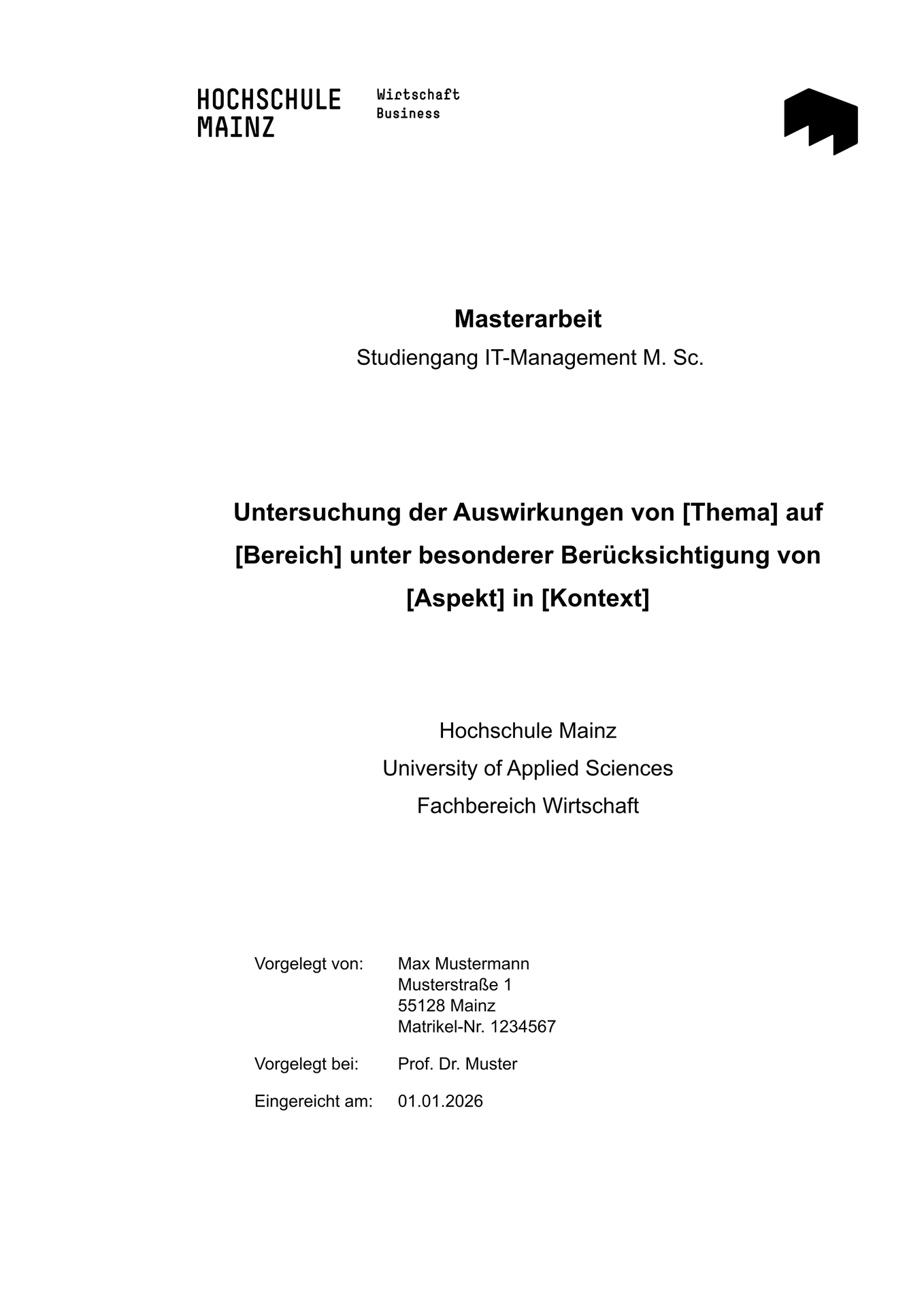
A Typst template for theses (Bachelor’s and Master’s theses, Hausarbeiten, Praxisberichte) at the Hochschule Mainz (HSMZ). It follows the “Leitfaden zur Anfertigung von Hausarbeiten, Praxisberichten, Bachelor- und Masterarbeiten” (April 2025) of the Fachbereich Wirtschaft.
Note: This template is not an official template of the Hochschule Mainz. According to the guidelines, the requirements of your supervisor and the Prüfungsamt take precedence. Always clarify the formal requirements (e.g. citation style, Management Summary and/or Abstract, AI declaration option) with your supervisor.
Usage
Initialize a new thesis with typst init:
typst init @preview/hsmz-thesis-unofficial:0.4.0
or select the template in the Typst web app. This creates the following files:
| File | Content |
|---|---|
main.typ |
Thesis data, settings and the main text with examples for citations, footnotes, tables, figures, formulas, code and cross-references |
summary.typ |
Abstract and Management Summary |
acronyms.typ |
Acronyms for the list of abbreviations |
appendix.typ |
Appendix (each level 1 heading is one appendix: Anhang A, Anhang B, …) |
literature.bib |
Bibliography (BibLaTeX or Hayagriva) |
assets/sample-signature.png |
Placeholder for your scanned signature |
assets/sample-figure.svg |
Example figure (delete it together with the example text) |
Features
The template creates the components of the thesis in the order required by the guidelines:
- Sperrvermerk (restriction notice, optional)
- Title page
- Eigenständigkeitserklärung (declaration of originality) with the three AI options
- Management Summary and/or Abstract (without page numbers)
- Table of contents, list of figures, list of tables, list of abbreviations, list of symbols and list of formulas (Roman page numbers; each list only if the thesis contains figures, tables, abbreviations, symbols or formulas)
- Main text (Arabic page numbers starting at 1), followed by the word count of the main text
- Bibliography, list of appendices and appendix (Roman page numbers, continued)
Formatting according to the guidelines: A4, Arial 11 pt, 1.5 line spacing, justified text with hyphenation, margins top/bottom 2 cm, left 4.5 cm, right 1.5 cm, footnotes with a hanging indent, captions above figures and tables (APA style), citation style APA.
German and English are supported (language: "de" or "en"). The restriction notice and the declaration of
originality are always in German, as required by the university.
Configuration
All parameters are passed to hsmz-thesis-unofficial.with(...) in main.typ:
| Parameter | Description | Default |
|---|---|---|
thesis-type |
e.g. "Bachelorarbeit", "Masterarbeit", "Praxisbericht", "Hausarbeit" |
required |
title |
Title of the thesis | required |
faculty |
Fachbereich | "Wirtschaft" |
degree-program |
Degree program including the degree, e.g. "Betriebswirtschaftslehre B. Sc." |
required |
submission-date |
Submission date, preferably as a date: datetime(year: 2025, month: 12, day: 1) (printed as “01.12.2025”, or “1 December 2025” in English). A string is printed as it is. |
required |
supervisor |
Supervisor including the academic degree, e.g. "Prof. Dr. Norma Neugier" |
required |
author |
Dictionary with name, matriculation-number, address: (street, zip, city) and optionally signature-image (scanned signature; without it, space for a handwritten signature is left) |
required |
language |
"de" or "en" |
"de" |
ai-declaration-option |
Option of the declaration of originality agreed with your supervisor: 1 (AI tools allowed, brief documentation), 2 (AI tools allowed, extensive documentation) or 3 (AI tools prohibited) |
required |
acronyms |
Dictionary of acronyms, see acronyms.typ; without acronyms, the list of abbreviations is left out |
(:) |
symbols |
List of (symbol, description) pairs for the list of symbols, e.g. (($alpha$, [Signifikanzniveau]),); the list is only shown if it isn’t empty |
() |
bibliography |
bibliography("literature.bib") |
required |
company |
Company or institution for the restriction notice | required if show-restriction-notice is true |
confidentiality-period |
End of the confidentiality period for the restriction notice, as a date or string like submission-date |
required if show-restriction-notice is true |
appendix |
Content of the appendix, or none |
none |
abstract |
Content of the Abstract (max. 250 words) | [] |
management-summary |
Content of the Management Summary (max. 500 words) | [] |
show-restriction-notice |
Show the Sperrvermerk | true |
show-abstract |
Show the Abstract | true |
show-management-summary |
Show the Management Summary | false |
show-word-count |
Show the word count at the end of the main text | true |
draft |
Draft mode: watermark, list of open todos in front, no scanned signature (see Draft mode) | false |
font |
Font or list of fonts (fallbacks) | ("Arial", "Liberation Sans", "Arimo") |
citation-style |
Any citation style supported by Typst | "apa" |
print-only-used-acronyms |
Only list acronyms that are used in the text | true |
show-full-bibliography |
List all entries of the bibliography file, not only cited ones (the guidelines require only cited ones) | false |
Bachelor’s and Master’s theses need at least a Management Summary or an Abstract; compilation fails if both are
switched off and thesis-type contains “Bachelor” or “Master”. Practice-oriented theses usually have a Management
Summary, research-oriented ones an Abstract, and some have both.
Draft mode
While you are writing, set draft: true. Every page then gets an “ENTWURF” watermark, the scanned signature is left
out, and a list of all open todos (with links to their pages) is placed in front of the document. Mark open items in
the text with todo:
Die Digitalisierung verändert den Mittelstand. #todo[Quelle ergänzen]
Draft mode also checks the length of the texts. If the Management Summary has more than 500 words or the Abstract more than 250 words, a red note below the text says so. For Bachelor’s and Master’s theses, the word count at the end of the main text is shown together with the guideline of the Leitfaden (10.000 or 12.000 words). These checks only appear in draft mode, so that the final version isn’t affected if your supervisor allows different lengths.
Todos are highlighted and not included in the word count. When you set draft: false for the final version,
compilation fails as long as todos remain, and the error message lists their pages.
Fonts
The guidelines require Arial. If Arial is not installed, the metric-compatible fonts Liberation Sans or Arimo are used.
In the Typst web app, or if none of these fonts is installed, upload the font files to your project or choose a
different font with the font parameter.
Acronyms
Acronyms are managed with the acrostiche package. Define them in
acronyms.typ and use them with #acr("IT") (singular) or #acrpl("IT") (plural). The first use is written out
in full, and only used acronyms are printed in the list of abbreviations.
Figures and tables
Captions are placed above figures and tables. Use figure-note for the note below them, which should include the
source (or “Eigene Darstellung”):
#figure(
  table(
    columns: 2,
    [Jahr], [Quote],
    [2000], [19,6],
  )
    + figure-note[Eigene Darstellung, basierend auf Statistisches Bundesamt (2021, S. 73).],
  caption: [Erwerbstätigenquote 60–64-Jähriger],
) <tab:quote>
Symbols
If you use symbols (e.g. in formulas), list them with the symbols parameter. They appear in the list of symbols in
the given order:
symbols: (
  ($alpha$, [Signifikanzniveau]),
  ($n$, [Stichprobengröße]),
),
Formulas
Formulas in their own paragraph ($ ... $ with spaces) are numbered on the right and listed in the list of formulas,
which only appears if the thesis contains numbered formulas. Reference them with a label, e.g. @eq:pythagoras
(output: “Formel 1”). To leave out a single formula, write
#math.equation(block: true, numbering: none, $ ... $).
$ a^2 + b^2 = c^2 $ <eq:pythagoras>
Word count
The guidelines require the number of words of the main text at its end. Figures, tables and citations are not
counted. To exclude other content, attach the label <no-wc> to it, e.g. #[Nicht gezählter Text] <no-wc>. The count
is computed with wordometer and is an approximation (for example,
acronyms inserted with #acr are not counted). Check it against the requirements of your supervisor.
Collaboration
This project is open for collaboration. If you have suggestions, improvements, or would like to contribute, please feel free to open an issue or submit a pull request on GitHub. Changes are listed on the releases page, and the release process is described in RELEASING.md.
Other Projects
This template is for Typst, but if you are looking for a LaTeX template for the Hochschule Mainz, you can use the HSMZ-Thesis-Template by Jonas Bingel.
License
The source code of this template is licensed under the MIT License.
The logo of the Hochschule Mainz (logo_hsmz.svg) is not covered by the MIT License. It is a trademark of the
Hochschule Mainz and may only be used according to the terms of use below.
Terms of Use of the Hochschule Mainz Logo (German)
This section is a copy of the official terms of use for the logo of the Hochschule Mainz. It is provided here for reference purposes only. Within this template, the logo is intended for use by students and doctoral candidates.
Wort-Bild-Marke der Dachmarke
Das Logo der Hochschule Mainz besteht aus der Wort-Marke „Hochschule Mainz“, der abstrakten Bild-Marke „M“, sowie dem internationalen Zusatz „University of Applied Sciences“. Die Wort-Marke steht in der Regel auf Medien links oben. Die Hochschule Mainz verwendet übergreifend ein Logo (Wort-Bild-Marke). Die Möglichkeit der Fachbereichskennungen entnehmen Sie bitte dem Corporate Design-Manual.
Wer darf das Logo wann und wie nutzen?
Beim Logo der Hochschule Mainz handelt es sich um eine Wort-Bild-Marke. Sie genießt Markenschutz. Die Nutzungs- und Verwertungsrechte liegen ausschließlich bei der Hochschule Mainz.
Es dürfen lediglich die von der Hochschule Mainz erstellten Vorlagen genutzt werden. Das Logo muss stets scharf und sauber dargestellt sein und darf nicht verzerrt werden. Eine andere Anordnung, das Nachzeichnen oder Nachsetzen der Wort-Bild-Marke sind nicht zulässig. Die Regeln des Corporate Designs der Hochschule Mainz sind zu berücksichtigen.
Dienstliche Verwendung
Das Logo der Hochschule Mainz darf von allen Beschäftigten, Professorinnen und Professoren, Lehrbeauftragten sowie gastweise tätigen Lehrkräften genutzt werden. Es wird im dienstlichen Schriftverkehr eingesetzt, z.B. auf Briefen, Visitenkarten, Berichten, Protokollen und Formularen.
Das Logo findet außerdem Anwendung in Printmedien, im Internet auf den offiziellen Webseiten sowie auf Merchandising-Produkten.
Die Nutzung des Logos ist erwünscht bei Postern, Flyern und Power Point-Präsentationen sowie sonstigen Präsentationen, die im Rahmen von Lehre und Forschung sowie der dienstlichen Tätigkeit erstellt werden. Dies gilt z.B. für Veranstaltungen, auf denen Mitarbeiterinnen und Mitarbeiter als Repräsentanten der Hochschule Mainz auftreten und/oder Forschungsergebnisse präsentieren. Die Nutzung des Logos ist außerdem erwünscht in Publikationen, die im dienstlichen Rahmen und Auftrag erstellt und/oder herausgegeben werden.
Verwendung durch Studierende und Promovierende
Die Logo-Nutzung ist auch Studierenden oder Promovierenden im Rahmen des Studiums gestattet. Hierzu zählt insbesondere die Nutzung des Logos auf Postern, Flyern und Power Point- Präsentationen sowie Haus- und Abschlussarbeiten. Ausgenommen ist die Nutzung des Logos im Rahmen der Veröffentlichung von Haus- und Abschlussarbeiten, wenn die entsprechende Prüfungsleistung nicht bestanden wurde.
Die Logo-Nutzung ist auch studentischen Projekten an der Hochschule Mainz gestattet, wenn
das Projekt als Studienleistung anerkannt wird. das Projekt durch Haushaltsmittel der Hochschule Mainz unterstützt wird. es eine vertragliche Vereinbarung zwischen dem Projektteam und der Hochschule Mainz gibt.
Verwendung durch Kooperationspartner
Die Nutzung des Logos der Hochschule Mainz durch Kooperationspartner ist zulässig, wenn es sich um eine vertraglich festgelegte Kooperation handelt und der Kooperationsvertrag eine solche Nutzung ausdrücklich vorsieht. Im Rahmen der Vertragsgestaltung sind die näheren Bestimmungen der Nutzung festzulegen, insbesondere
dass sich die Hochschule Mainz das Recht vorbehält, die Nutzungserlaubnis jederzeit zu widerrufen, wenn die Nutzung nicht der vertraglich festgelegten Logo-Nutzung entspricht. dass nur die Vorlagen der Hochschule Mainz genutzt und das Logo nicht verändert oder verfälscht werden dürfen bzw. darf. dass grundsätzlich das im CD- Manual der Hochschule Mainz zum Download zur Verfügung gestellte Logo zu nutzen ist.
Verwendung durch Dritte
Sollte keine der vorgenannten Voraussetzungen zur Logo-Nutzung erfüllt sein, so bedarf die Verwendung des Logos einer schriftlichen Zustimmung. Sie wird von der Abteilung Presse und Kommunikation der Hochschule Mainz auf Anfrage per E-Mail erteilt. Dieser muss das entsprechende Kommunikationsmittel vor der Nutzung des Logos zur Überprüfung der Einhaltung der Corporate Design-Vorgaben vorgelegt werden.
Zustimmung
Eine Zustimmung setzt voraus, dass die Logo-Nutzung im Zusammenhang mit den Aufgaben und/oder Interessen der Hochschule Mainz steht und keine Beeinträchtigung des Ansehens der Hochschule durch die Nutzung zu erwarten ist. Die Hochschule Mainz kann eine einmal erteilte Zustimmung jederzeit ohne Angabe von Gründen zurückziehen.