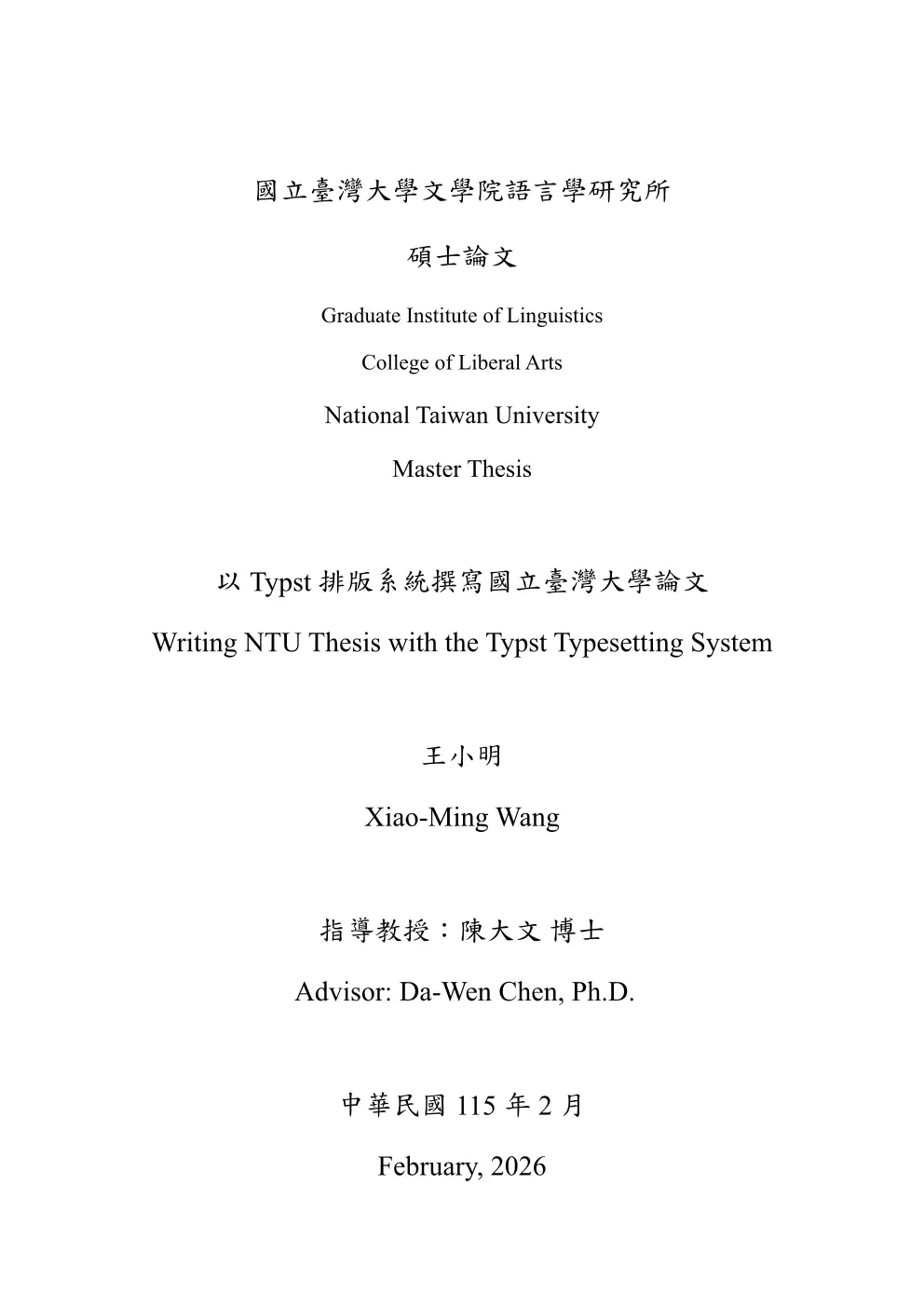
An unofficial Typst thesis template for National Taiwan University (國立臺灣大學).
Inspired by the ntu-thesis LaTeX template and follows the official formatting guidelines. The project is named after the iconic Fu Bell on campus.
Quick Start
typst init @preview/fubell:0.2.0 my-thesis
cd my-thesis
typst compile main.typ
Or clone this repository and compile the example directly:
typst compile --root . template/main.typ
Typst Web App Usage
You can use Fubell directly on the Typst web app (no local CLI required):
- Create a new project at https://typst.app.
- In
main.typ, import@preview/fubell:0.2.0and configure#show: thesis.with(...)(see the Usage snippet below). - Add files for any
includepaths you use, or replace thoseincludelines with inline content. - Keep
watermark: none(default), or upload your ownassets/watermark.pngand setwatermark: image("assets/watermark.png"). - Set
font-profile: "web"for cleaner fallback behavior on Typst web app.
Project Structure
fubell/
├── lib.typ                  # Package entrypoint (exports `thesis`, `appendix`)
├── src/
│   ├── config.typ           # Page geometry, fonts, spacing defaults
│   ├── cover.typ            # Cover page layout
│   ├── certification.typ    # Oral defense certification page
│   ├── front-matter-page.typ # Abstract & acknowledgement pages (zh/en)
│   ├── outline-page.typ     # ToC, List of Figures/Tables
│   └── appendix.typ         # Appendix numbering helper
├── template/                # Scaffolded into user projects
│   ├── main.typ             # Thesis entry point (edit this)
│   ├── assets/              # Your images, watermark, certification scan
│   ├── bibliography/
│   │   └── refs.bib         # Bibliography
│   └── sections/
│       ├── abstract-zh.typ
│       ├── abstract-en.typ
│       ├── acknowledgement-zh.typ
│       ├── acknowledgement-en.typ
│       ├── chapters/
│       │   └── introduction.typ
│       └── appendices/
│           └── appendix-a.typ
├── scripts/
│   └── stage-release.sh     # Builds the Typst Universe submission directory
├── typst.toml               # Package manifest
├── ROADMAP.md               # Development roadmap
└── CHANGELOG.md
Usage
#import "@preview/fubell:0.2.0": thesis, appendix

#show: thesis.with(
  university: (zh: "國立臺灣大學", en: "National Taiwan University"),
  college:    (zh: "電機資訊學院", en: "College of EECS"),
  institute:  (zh: "資訊工程學系", en: "Dept. of CSIE"),
  title: (
    zh: "論文中文標題",
    en: "Thesis English Title",
  ),
  author:  (zh: "王小明", en: "Xiao-Ming Wang"),
  advisor: (zh: "陳大文 博士", en: "Da-Wen Chen, Ph.D."),
  student-id: "R12345678",
  degree: "master", // or "phd"
  lang: "zh", // or "en" — controls outline titles and document language
  font-profile: "submission", // or "web" / "portable"
  // font-en: ("Times New Roman", "TeX Gyre Termes"), // optional override
  // font-zh: ("BiauKaiTC", "TW-MOE-Std-Kai"), // optional override
  date: (year-zh: "113", year-en: "2024", month-zh: "6", month-en: "June"),
  keywords: (
    zh: ("關鍵字一", "關鍵字二"),
    en: ("keyword one", "keyword two"),
  ),

  abstract-zh: include "sections/abstract-zh.typ",
  abstract-en: include "sections/abstract-en.typ",
  acknowledgement-zh: include "sections/acknowledgement-zh.typ", // optional
  acknowledgement-en: include "sections/acknowledgement-en.typ", // optional

  bibliography-file: bibliography("bibliography/refs.bib"),
  watermark: none, // optional: e.g. image("assets/watermark.png") (user-provided)
  doi: none, // optional DOI string, e.g. "doi:10.6342/NTU2024XXXXX"
  // certification-pdf: read("cert.pdf", encoding: none), // optional: replace auto page with scanned PDF
)

#include "sections/chapters/introduction.typ"

// Appendices — switches numbering to "Appendix A" / "附錄A"
#show: appendix
= Survey Data       // → "附錄A Survey Data" (zh) or "Appendix A Survey Data" (en)
== Raw Results      // → "A.1 Raw Results"
Appendices
Use #show: appendix after your main chapters to switch heading numbering to appendix style. The prefix adapts to the document language:
lang |
Level 1 | Level 2+ |
|---|---|---|
"zh" |
附錄A | A.1 |
"en" |
Appendix A | A.1 |
// after your last chapter
#show: appendix
= Supplementary Data
== Experiment Details
Watermark (Optional)
The template defaults to watermark: none, so no watermark file is required.
If you want to add the NTU watermark:
- Download it from the official source: https://www.lib.ntu.edu.tw/doc/CL/watermark.pdf
- Convert it to PNG and place it in your project, for example
assets/watermark.png - Set
watermark: image("assets/watermark.png")in#show: thesis.with(...)
Language
The lang option (default "zh") controls the document language and structural titles (Table of Contents, List of Figures, List of Tables). Set lang: "en" for English headings. Cover and certification pages remain bilingual regardless of this setting.
Line spacing follows NTU guidelines: 1.5 間距 for Chinese (lang: "zh") and double spacing for English (lang: "en").
External Certification PDF (Optional)
By default the template auto-generates the 口試委員會審定書 (certification page) with signature blanks. After your oral defense, you can replace it with a scanned PDF of the signed page:
#show: thesis.with(
  // ... other options ...
  certification-pdf: read("certification-scan.pdf", encoding: none),
  certification-pdf-page: 1,       // page to embed (default: 1)
  certification-pdf-fit: "contain", // "contain", "cover", or "stretch"
)
When certification-pdf is set:
- The auto-generated certification page is skipped entirely.
- The scanned PDF is rendered full-bleed (zero margins, no watermark, no DOI footer, no page number overlay).
- The TOC entry for 口試委員會審定書 is still emitted so the table of contents remains correct.
When certification-pdf is none (default), the other two options (certification-pdf-page, certification-pdf-fit) are silently ignored.
Caveats
- Typst’s PDF-as-image feature requires the source PDF version to be ≤ the export target version. If compilation fails, re-export your scanned PDF as PDF 1.7 or lower.
- PDF-as-image is not supported when exporting with PDF/A or PDF/UA standards enabled.
- Tags and accessibility metadata from the source PDF are not preserved.
Fonts
The template supports font profiles so users can choose between submission-accurate fonts and web/CI-friendly fallbacks.
| Profile | Use case | English stack | Chinese stack |
|---|---|---|---|
"submission" (default) |
Local submission build | Times New Roman → TeX Gyre Termes → STIX Two Text | BiauKaiTC → DFKai-SB → TW-MOE-Std-Kai → Kaiti TC → Kaiti SC |
"web" |
Typst web app | TeX Gyre Termes → STIX Two Text → Times New Roman | TW-MOE-Std-Kai → Kaiti TC → Kaiti SC → BiauKaiTC → DFKai-SB |
"portable" |
CI / reproducible open-font-first build | Libertinus Serif → New Computer Modern → Times New Roman | TW-MOE-Std-Kai → Noto Serif CJK TC → Noto Serif TC → BiauKaiTC |
You can also bypass profiles and set font-en / font-zh directly in thesis.with(...).
Currently bold/italic do not work for many Chinese Kai fonts; workarounds with stroke and skew are being considered.
Caveats — Typst web app
Times New Roman and 標楷體 are proprietary fonts that are not available on the Typst web app. The template will automatically fall back to:
- TeX Gyre Termes for English — the closest open-source match to Times New Roman (Typst Issue #416).
- TW-MOE-Std-Kai (教育部標準楷書) for Chinese — available natively on the Typst web app.
The output will look very similar but not byte-identical to a local build with the proprietary fonts installed. For official submission, it is recommended to compile locally with Times New Roman and 標楷體 installed.
For web projects, prefer font-profile: "web".
Font diagnostics (local CLI)
-
Check the effective font configuration selected by the template:
typst query --root . main.typ "<fubell-font-config>" --one --format yaml -
See font warnings in a compact format:
typst query --root . main.typ "<heading>" --field body --diagnostic-format short -
Run a strict fallback check with system fonts disabled:
typst query --root . main.typ "<heading>" --field body --diagnostic-format short --ignore-system-fonts -
Inspect installed font families on your machine:
typst fonts
If you see unknown font family warnings, either install that font locally or switch font-profile / font-en / font-zh to fonts available in your environment.
Contributing
Issues and pull requests are welcome! If you spot a formatting bug, have a feature idea, or want to pick up something from the roadmap — please go for it :) Contributions that implement new features are especially appreciated.