Create project in app






📖 目录
简介
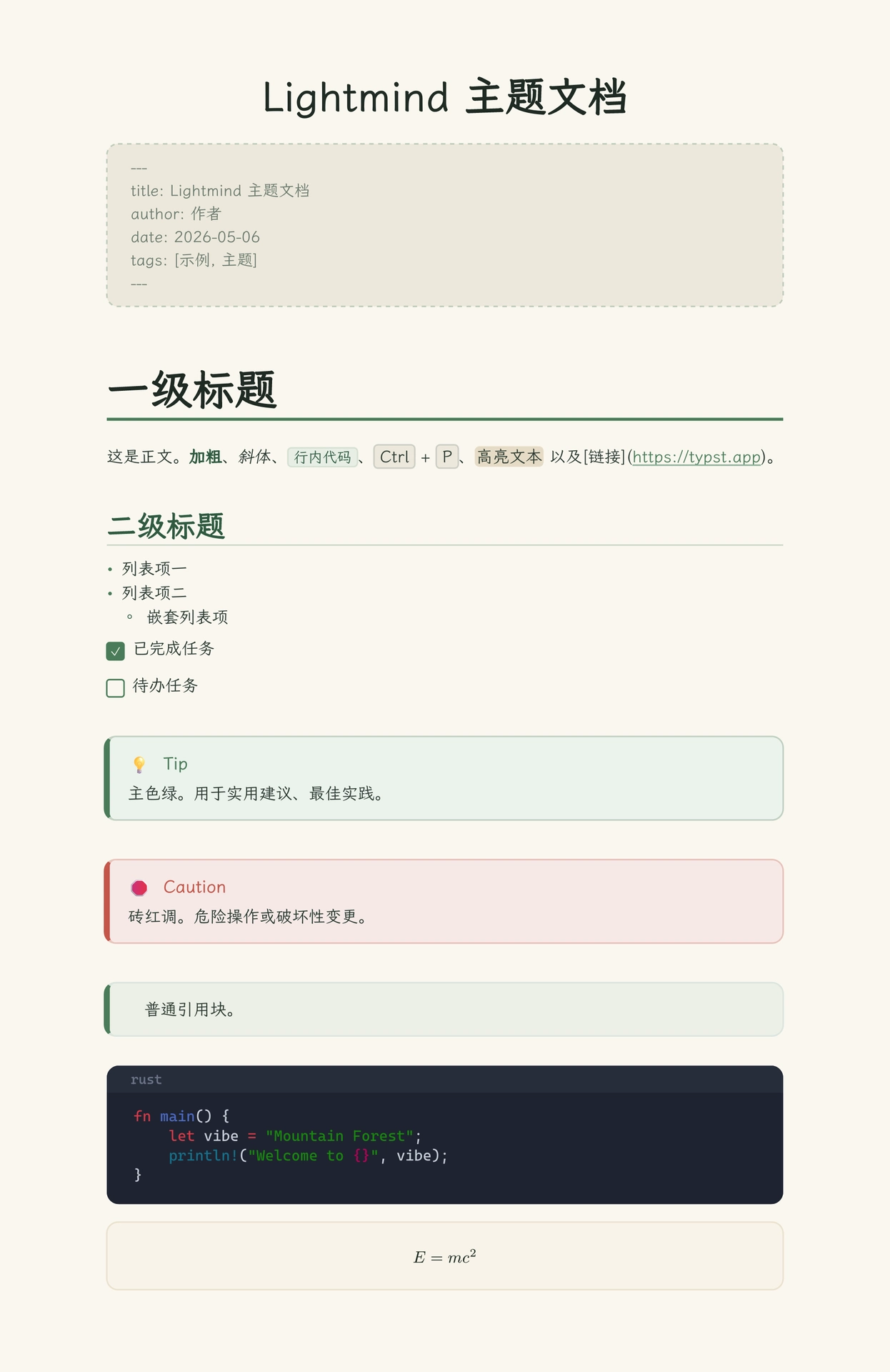
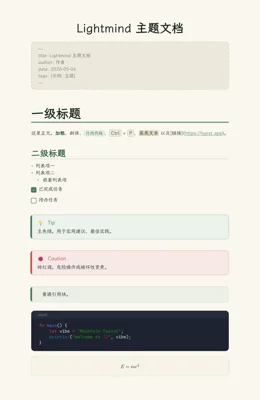
Lightmind 是一个山林森林绿调的中文文档主题,由同名 Typora 主题改写而来,适合笔记、博客、文档与演示。米黄纸面承托文字、深海军蓝代码块、圆角公式卡片,支持亮色 / 暗色双模式,以及 Markdown 风格排版:YAML 前置元信息、GitHub 风格警告块、任务列表、键位样式等。
Lightmind is a forest-green Chinese document theme with light and dark modes, adapted from the Typora theme of the same name. It suits notes, blogs, documentation and presentations, and ships with Markdown-style typesetting: YAML front matter, GitHub-style admonitions, task lists, keycaps, rounded code blocks and formula cards.
特性
- 🌲 山林森林绿配色,米黄纸面 + 深海军蓝代码块
- 🌗 亮色 / 暗色双模式(自动跟随
dark-mode参数) - 📝 Markdown 风格排版:YAML 前置元信息、警告块、任务列表、键位
- 📐 圆角公式卡片、柔和底色目录、点状引导线
- 🎨 中文伪粗体 / 伪斜体(基于
@preview/cuti) - 🧩 可复用的辅助函数:
frontmatter、mark、kbd、task、quote
截图
安装
使用模板初始化一个新项目:
typst init @preview/fernmind:0.1.0
或在已有文档中引入主题:
#import "@preview/fernmind:0.1.0": lightmind, frontmatter, mark, kbd, task
需要 Typst 0.13+(推荐 0.15+)。
使用
#show: doc => lightmind(
  title: "我的文档",
  // dark-mode: true,   // 启用暗色主题
  doc,
)

#frontmatter(
  title: "Lightmind 主题演示",
  author: "SunMoonTrain",
  date: "2026-05-06",
  tags: ("theme", "markdown", "demo"),
)
选项
lightmind() 的全部参数:
| 参数 | 说明 | 默认值 |
|---|---|---|
title |
文档标题(居中大标题),none 则不显示 |
none |
dark-mode |
是否启用暗色主题 | false |
font |
正文字体(回退链) | ("LXGW WenKai", "Source Han Serif SC") |
code-font |
代码字体(回退链) | ("Cascadia Code", "LXGW WenKai") |
show-code-lang |
是否显示代码块语言标签 | true |
allow-page-breaks |
是否允许分页;false 时输出为无限长单页 |
true |
plain-image-alts |
使用默认图片样式(不套圆角边框)的图片 alt 列表 |
() |
equation-numbering |
行间公式自动编号格式(如 "(1)");none 不编号 |
none |
辅助函数
#frontmatter(title: ..., author: ..., date: ..., tags: (...), banner: ("cover.png", 150pt)):YAML 风格元信息块(支持任意键值对,banner显示顶部横幅)#mark[...]:高亮文本#kbd[...]:键位样式#task(checked: true)[...]:任务列表项#quote(attribution: "note" \| "tip" \| "important" \| "warning" \| "caution")[...]:GitHub 风格警告块
示例:
#frontmatter(
  title: "Lightmind 主题演示",
  author: "SunMoonTrain",
  date: "2026-05-06",
  tags: ("theme", "markdown", "demo"),
  banner: ("cover.png", 150pt),
)

#quote(attribution: "tip")[ 主色绿。用于实用建议、最佳实践。 ]

#task(checked: true)[写主题大纲]
#task(checked: false)[跨平台测试]
目录
在文档中插入目录,例如 #outline(title: "目录")。目录以柔和底色卡片 + 左侧绿色色条呈现,一级条目加粗、子级弱化并自动缩进,条目带点状引导线与页码,标题自动套用一级标题样式;暗色模式下自动跟随主题。
完整效果
贡献
欢迎提交 Issue 与 Pull Request!
- 🐛 报告问题:https://github.com/childishtree/fernmind/issues
- 🚀 提交代码:https://github.com/childishtree/fernmind/pulls
- 📦 主题仓库:https://github.com/childishtree/fernmind
许可证
MIT License,Copyright © 2026 Childish_tree。详见 LICENSE。