deixis 


Typeset decoupled annotations, visual connectors, and spatial highlights in Typst.

deixis is a unified layout engine for inline notes, footnotes, endnotes, margin notes, inset notes, and inline spatial highlights with visual connectors.
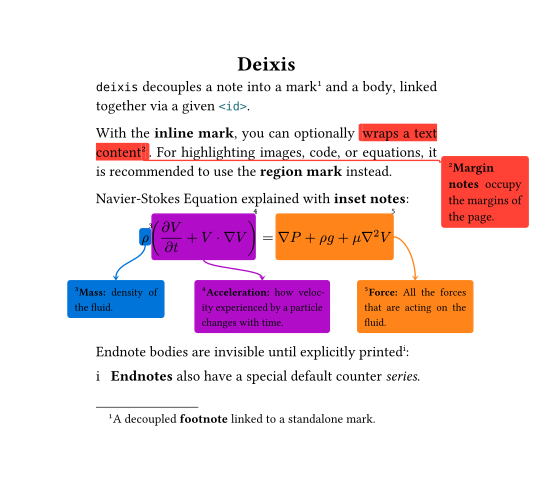
✨ Main Features
- Marks:
- Inline mark
- Phantom mark (invisible inline mark)
- Region mark
- Notes:
- Cross-reference & bi-directional backlinks
- Note outline
- Minipage
📢 News
Read the Changelog 📖 to see what is new in the latest version!
📦 Installation
From Typst Universe
This package is available in the Typst Universe, you can download and use it by simply adding the following line to your document.
#import "@preview/deixis:0.1.1": *
Local Use
For local use, first you need to clone the repo and run the install script:
git clone https://github.com/inspiros/typst-deixis
python scripts/install.py
This Python script stores the package files in the right location following the instructions here. Once installed, you can import the package with:
#import "@local/deixis:0.1.1": *
🚀 Usage and Examples
For detailed information, please see the manual (PDF).
Quick Start
No deixis functionality can be used before applying this setup show rule:
#show: deixis-setup-notes
⚠️ Warning
deixisuses the page foreground/background for rendering notes. If you have your custom foreground/background, it needs to be set before#show: deixis-setup-notes.
Anatomy of a Note
deixis notes are decoupled by nature.
To create a complete note, you need to put a mark with -mark functions, and a note body with -body functions. They are linked together via id.
Alternatively, you can call wrapper functions, which internally generate a unique id and delegate the tasks to appropriate mark-only and body-only functions.
Note that not all notes have a wrapper function.
|
|
| Decoupled approach | Wrapper approach |
Inline Mark and Inline Note
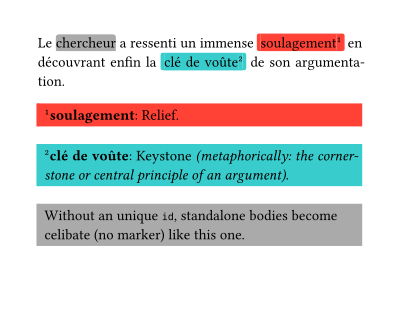
Show Typst Source Code
#set par(justify: true)

Le
#deixis-inline-mark(  // celibate mark
  inline-mode: "underline",
  stroke: gray,
  fill: gray.transparentize(90%),
)[chercheur]
a ressenti un immense
#deixis-inline-mark(id: <soulagement>,
  stroke: red,
  fill: red.transparentize(95%),
)[soulagement]
en découvrant enfin la
#deixis-inline-mark(id: <cle-de-voute>,
  stroke: teal,
  fill: teal.transparentize(95%),
)[clé de voûte]
de son argumentation.

#deixis-inline-note-body(id: <soulagement>)[
  *soulagement*: Relief.
]
#deixis-inline-note-body(id: <cle-de-voute>)[
  *clé de voûte*: Keystone _(metaphorically: the cornerstone or central principle of an argument)_.
]
#deixis-inline-note-body(  // celibate note
  stroke: gray,
  fill: gray.transparentize(95%),
)[
  Without an unique `id`, standalone bodies become celibate (no marker) like this one.
]
Footnote
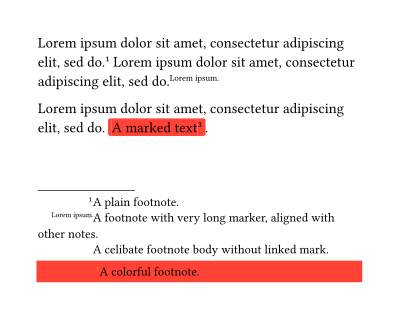
Show Typst Source Code
#lorem(10)
#deixis-footnote[A plain footnote.]
#lorem(10)
#deixis-footnote(marker: lorem(2))[
  A footnote with very long marker, aligned with other notes.
]
#deixis-footnote-body[
  A celibate footnote body without linked mark.
]

#lorem(10)
#deixis-footnote(
  marker-style: (body: it => text(fill: orange, super(it))),
  stroke: red,
  fill: red.transparentize(95%),
  container-func: deixis-alert-container,
)[A marked text][A colorful footnote.].
Endnote
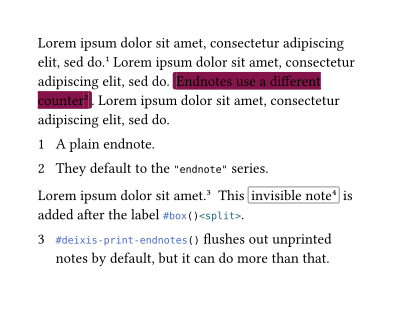
Show Typst Source Code
#lorem(10)
#deixis-endnote[A plain endnote.]
#lorem(10)
#deixis-endnote(
  stroke: maroon,
  fill: maroon.transparentize(90%),
)[
  Endnotes use a different counter
][
  They default to the `"endnote"` series.
].
#lorem(10)
// print all previous notes
#deixis-print-endnotes()

#lorem(5)
#deixis-endnote[
  ```typst #deixis-print-endnotes()``` flushes out unprinted notes by default, but it can do more than that.
]
#box()<split>
This
#deixis-endnote(
  stroke: gray,
  fill: none,
)[
  invisible note
][
  This note is not supposed to be printed.
]
is added after the label ```typst #box()<split>```.
// print with filter
#deixis-print-endnotes(before: <split>)
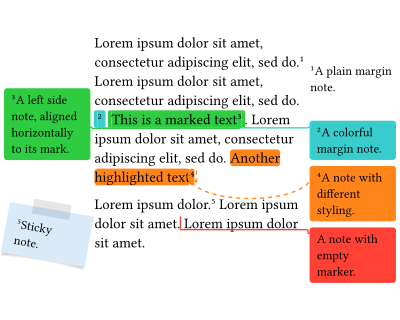
Margin Note
Show Typst Source Code
#lorem(10)
#deixis-margin-note[A plain margin note.]
#lorem(10)
// use rect container for subsequent notes
#deixis-set(container-func: (margin-note: rect))
#deixis-margin-note(
  stroke: teal,
  fill: teal.transparentize(95%),
  link: "right-angle",
)[][A colorful margin note.]
#deixis-margin-note(
  stroke: green,
  fill: green.transparentize(95%),
  link: "right-angle",
  mark-align: (mark: horizon, body: horizon),
)[This is a marked text][A left side note, aligned horizontally to its mark.].
#lorem(10)
#deixis-margin-note(
  inline-mode: "highlight",
  stroke: (link: stroke(paint: orange, dash: "dashed"), body: orange),
  fill: (mark: orange.transparentize(80%), body: orange.transparentize(95%)),
  side: right,
  link: "curve",
)[Another highlighted text][A note with different styling.].

#import "@preview/colorful-boxes:1.4.3": stickybox

#lorem(3)
#deixis-margin-note(
  fill: blue.lighten(85%),
  container-func: (body, ..args) => stickybox(body, fill: args.at("fill"), rotation: args.at("rotation", default: 0deg)),
  rotation: 10deg,  // all unknown named parameters are passed to container-func
)[Sticky note.]
#lorem(5)
#deixis-margin-note(
  marker: "",
  stroke: red,
  fill: red.transparentize(95%),
  link: "right-angle",
)[A note with empty marker.]
#lorem(5)
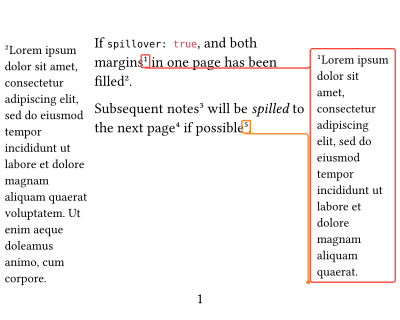
Spillover
Show Typst Source Code
If ```typc spillover: true```, and both margins
#deixis-margin-note(
  stroke: red,
  link: "right-angle",
  container-func: rect,
)[
  #lorem(20)
]
in one page has been filled
#deixis-margin-note[
  #lorem(28)
].

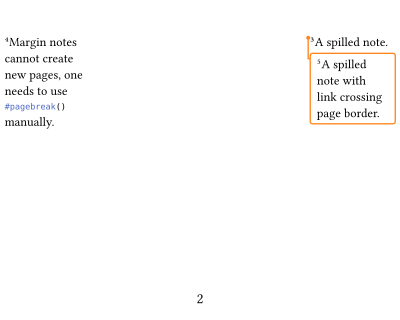
Subsequent notes
#deixis-margin-note[
  A spilled note.
]
will be _spilled_ to the next page
#deixis-margin-note[
  Margin notes cannot create new pages, one needs to use ```typst #pagebreak()``` manually.
]
if possible
#deixis-margin-note(
  stroke: orange,
  link: "right-angle",
  container-func: rect,
)[
  A spilled note with link crossing page border.
].

#pagebreak()
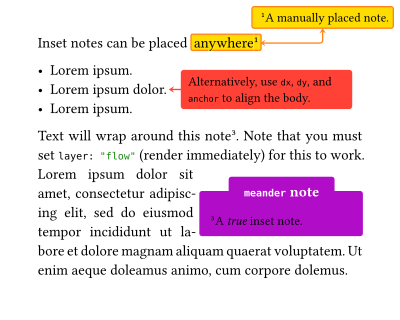
Inset Note
Show Typst Source Code
Inset notes can be placed
#deixis-inset-note(
  stroke: orange,
  fill: yellow.transparentize(90%),
  link: "right-angle",
  link-ports: (mark: right, body: bottom),
  link-marks: "both",
  placement: body => deixis-absolute-place(top + right, dx: -5pt, dy: 5pt, body),
)[anywhere][A manually placed note.]

- #lorem(2)
- #lorem(3)#deixis-inset-note(
  marker: none,
  stroke: red,
  fill: red.transparentize(95%),
  link: "straight-line",
  link-marks: "mark",
  width: 4.5cm,
  dx: 1em,
  dy: 0pt,
  anchor: (mark: right + horizon, body: left + horizon),
  layer: "flow",
)[Alternatively, use `dx`, `dy`, and `anchor` to align the body.]
- #lorem(2)

#import "@preview/meander:0.4.2"
#import "@preview/colorful-boxes:1.4.3": outline-colorbox

#let note-body = deixis-inset-note-body(
  id: <meander>,
  width: 50%,
  stroke: purple,
  fill: purple.transparentize(95%),
  layer: "flow",  // important !!!
  container-func: (body, ..args) => outline-colorbox(body,
    color: (stroke: args.at("stroke").paint, fill: args.at("fill")),
    stroke: args.at("stroke").thickness,
    title: args.at("title", default: [Note])),
  title: [`meander` note],
)[A _true_ inset note.]
#meander.reflow({
  import meander: *

  placed(horizon + right, note-body)
  container()
  content[
    #set par(justify: true)
    Text will wrap around this note
    #deixis-inline-mark(id: <meander>).
    Note that you must set ```typc layer: "flow"``` (render immediately) for this to work.
    #lorem(29)
  ]
})
Pin and Region Mark
Pin
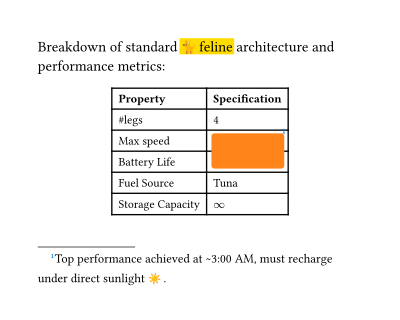
To create region marks, deixis relies on #deixis-pin, an idea similar to the pinit package.
A region is defined as the minimum rectangle covering an array of input pins, taking padding into account.
Each pin holds its own padding, defaults to "text", which means to pad the region around it similar to an inline mark with inline-mode: "box".
Show Typst Source Code
Breakdown of standard #deixis-pin("feline-l")#emoji.cat#[feline]#deixis-pin("feline-r") architecture and performance metrics:
#deixis-region-mark(
  stroke: none,
  fill: yellow.transparentize(50%),
  radius: 0pt,
  pins: ("feline-l", "feline-r"),
  layer: "background",
)

#{
  set text(size: 0.8em)
  figure(
    table(
      align: left + horizon,
      columns: (auto, auto),

      table.header([*Property*], [*Specification*]),
      [\#legs], [4],
      [Max speed], [#deixis-pin("tab-tl")48 km/h],
      [Battery Life], [16--18 hours#deixis-pin("tab-br", padding: (bottom: 0.2em, right: 1em))],
      [Fuel Source], [Tuna],
      [Storage Capacity], [$infinity$]
  ))
}
#deixis-footnote(
  mark-type: "region",
  marker-style: it => text(fill: blue, super(it)),
  stroke: orange,
  fill: orange.transparentize(95%),
  pins: ("tab-tl", "tab-br"),
)[Top performance achieved at #sym.tilde.basic#[]3:00 AM, must recharge under direct sunlight #emoji.sun.]
Attach Pins
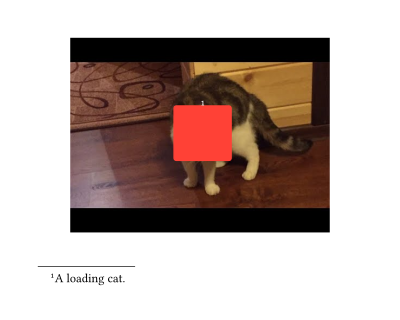
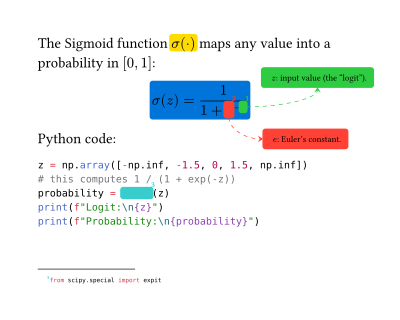
#deixis-attach allows you to attach pins on a wrapped content by:
- Providing a dictionary of pins and their attributes.
- If no pins provided, it automatically attaches two pins, one on the top-left corner and one on the bottom-right corner, both with
0ptpadding. - Alternatively, pins can be placed with pattern matching
[prefix]pinname[postfix]. The prefix and postfix patterns can be set using#deixis-set-pin-pattern. This is very useful for highlighting code.
|
|
| Cat | Sigmoid |
Show Typst Source Code for Cat
#align(center,
  deixis-attach(
  pins: (
    cat-top-left: (dx: 40%, dy: 35%),
    cat-bottom-right: (dx: 62%, dy: 63%),
  )
)[
  #image("assets/loading-cat.jpg", width: 80%)
])

#deixis-region-mark(
  id: <cat>,
  pins: ("cat-top-left", "cat-bottom-right"),
  marker-style: (mark: it => text(fill: white, super(it))),
  marker-position: top + center,
  stroke: red,
  fill: red.transparentize(90%),
)
#deixis-footnote-body(
  id: <cat>,
)[A loading cat.]
Show Typst Source Code for Sigmoid
The Sigmoid function
#deixis-region-mark(
  stroke: yellow,
  fill: yellow.transparentize(95%),
  inline: true,
  layer: "background",
)[$sigma(dot)$]
maps any value into a probability in $[0, 1]$:

#align(center,  // wrapped equations cannot auto align center
  deixis-region-mark(
  stroke: blue,
  fill: blue.transparentize(95%),
  padding: "text",
  layer: "background",
)[
$ sigma(z) = frac(1, 1 + #deixis-pin("e-left")e#deixis-pin("e-right")^(-#deixis-pin("z-left")z#deixis-pin("z-right"))) $
])
#deixis-set(
  body-style: it => text(size: 0.6em, it),
  side-strategy: "strict",
  container-func: (margin-note: rect),
)
#deixis-inset-note(
  pins: ("z-left", "z-right"),
  marker-style: it => text(fill: green, super(it)),
  stroke: (rest: green, link: stroke(paint: green, thickness: 0.5pt, dash: "dashed")),
  fill: green.transparentize(95%),
  link: "curve",
  link-ports: (body: bottom),
  link-marks: "body",
  dx: 1em,
  dy: -2em,
)[
  $z$: input value (the "logit").
]
#deixis-inset-note(
  pins: ("e-left", "e-right"),
  marker-style: it => text(fill: red, super(it)),
  stroke: (rest: red, link: stroke(paint: red, thickness: 0.5pt, dash: "dashed")),
  fill: red.transparentize(95%),
  link: "curve",
  link-ports: (mark: bottom, body: left),
  link-marks: "body",
  dx: 2em,
  dy: 2em,
)[
  $e$: Euler's constant.
]
Python code:

#deixis-set-pin-pattern(
  prefix: "deixispin",
  postfix: "deixis",
)
#deixis-attach(
```python
z = np.array([-np.inf, -1.5, 0, 1.5, np.inf])
# this computes 1 / (1 + exp(-z))
probability = deixispine0deixisexpitdeixispine1deixis(z)
print(f"Logit:\n{z}")
print(f"Probability:\n{probability}")
```
)
#deixis-footnote(
  pins: ("e0", "e1"),
  marker-style: it => text(fill: teal, super(it)),
  stroke: teal,
  fill: teal.transparentize(95%),
)[```python from scipy.special import expit```]
Routing Links
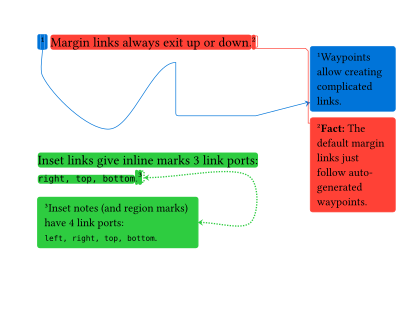
deixis provides margin note and inset note with a simple link drawing mechanism.
You can use link-waypoints, link-ports, and link-marks to configure the link.
Show Typst Source Code
#deixis-margin-note(
  stroke: blue + 0.5pt,
  fill: blue.transparentize(95%),
  link: "curve",
  link-waypoints: (
    (0pt, 20pt),
    (50pt, 40pt),
    (50pt, -50pt),
    "right-angle",  // change link type
    (60pt, 40pt),
    "straight-line",
  ),
  link-marks: "body",
  container-func: rect,
)[][
  Waypoints allow creating complicated links.
]
#deixis-margin-note(
  inline-mode: "highlight",
  stroke: red + 0.5pt,
  fill: red.transparentize(95%),
  link: "chamfer",
  container-func: rect,
)[
  Margin links always exit up or down.
][
  *Fact:* The default margin links just follow auto-generated waypoints.
]

#v(70pt)
#deixis-inset-note(
  inline-mode: "highlight",
  width: 120pt,
  stroke: stroke(paint: green, dash: "densely-dotted"),
  fill: green.transparentize(95%),
  link: "ccr",
  link-waypoints: (
    // component anchor + alignment keywords
    (80pt, "mark-right"),
    (0pt, "body-right"),
  ),
  link-ports: (mark: right, body: right),
  link-marks: "both",
  layer: "flow",
)[
  Inset links give inline marks 3 link ports:\
  `right, top, bottom`.
][
  Inset notes (and region marks) have 4 link ports:\
  `left, right, top, bottom`.
]
Update Default Parameters
Most of the parameters of a note function can be updated using #deixis-set.
In fact, some parameters can only be updated this way.
To update note-specific or component-specific parameters, pass a dictionary with the following keywords:
- Note/mark type-scope keywords:
inline-markphantom-markregion-markinline-notefootnoteendnotemargin-note: (applies to both#deixis-margin-noteand#deixis-sidenote)inset-noterest: applies to the rest
- Component-scope keywords:
markbodylinknodes: applies to mark and bodyrest: applies to the rest
It is possible to nest note-scope and component-scope keywords, but not to mix them in the same dictionary.
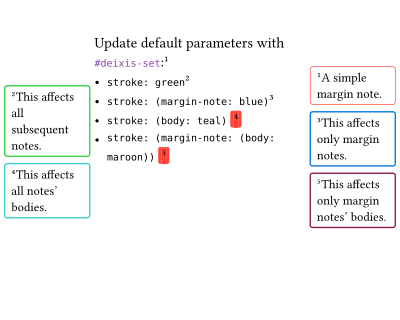
Show Typst Source Code
#deixis-set(container-func: (margin-note: rect))

Update default parameters with ```typst #deixis-set```:
#deixis-margin-note[A simple margin note.]
- ```typc stroke: green```
  #deixis-set(stroke: green)
  #deixis-margin-note[This affects all subsequent notes.]
- ```typc stroke: (margin-note: blue)```
  #deixis-set(stroke: (margin-note: blue))
  #deixis-margin-note[This affects only margin notes.]
- ```typc stroke: (body: teal)```
  #deixis-set(stroke: (body: teal))
  #deixis-margin-note[][This affects all notes' bodies.]
- ```typc stroke: (margin-note: (body: maroon))```
  #deixis-set(stroke: (margin-note: (body: maroon)))
  #deixis-margin-note[][This affects only margin notes' bodies.]
Cross-reference and Backlink
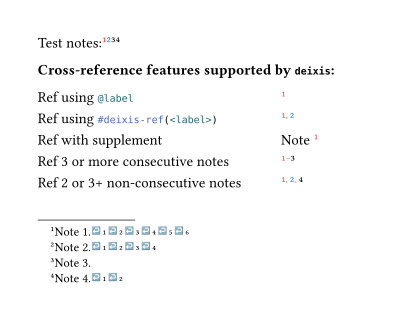
Show Typst Source Code
Test notes:
#deixis-footnote(
  label: <note-1>,
  backlink: true,
  marker-style: (mark: it => text(fill: red, super(it))),
)[Note 1.]
#deixis-footnote(
  label: <note-2>,
  backlink: "always",  // equivalent to true
  marker-style: (mark: it => text(fill: blue, super(it))),
)[Note 2.]
#deixis-footnote(
  label: <note-3>,
  backlink: "none",  // equivalent to false
)[Note 3.]
#deixis-footnote(
  label: <note-4>,
  backlink: "multiple",  // only if they are ref-ed at least once
)[Note 4.]

*Cross-reference features supported by `deixis`:*
#grid(
  align: left,
  columns: (3fr, 1fr),
  row-gutter: 0.8em,
  stroke: none,
  [Ref using ```typst @label```], [#deixis-ref(<note-1>)],
  [Ref using ```typst #deixis-ref(<label>)```], [#deixis-ref(<note-1>, <note-2>)],
  [Ref with supplement], [@note-1[Note]],
  [Ref 3 or more consecutive notes], [#deixis-ref(<note-1>, <note-2>, <note-3>)],
  [Ref 2 or 3+ non-consecutive notes], [#deixis-ref(<note-1>, <note-2>, <note-4>)]
)
Counter and Series
Each note belongs to a counter series.
All deixis notes default to the "default" series except for #deixis-endnote which default to the "endnote" series.
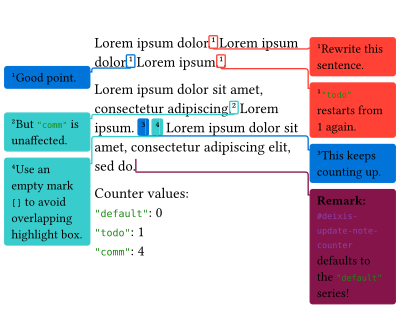
Show Typst Source Code
#let todo = deixis-margin-note.with(
  series: "todo",
  stroke: red,
  fill: red.transparentize(95%),
  link: "right-angle",
  container-func: rect,
)
#let first-author = deixis-margin-note.with(
  series: "comm",
  stroke: blue,
  fill: blue.transparentize(95%),
  link: "right-angle",
  container-func: rect,
)
#let second-author = deixis-margin-note.with(
  series: "comm",
  stroke: teal,
  fill: teal.transparentize(95%),
  link: "right-angle",
  container-func: rect,
)
#let remark = deixis-margin-note.with(
  marker: "",
  series: "remark",
  stroke: maroon,
  fill: maroon.transparentize(95%),
  link: "right-angle",
  container-func: rect,
)

#lorem(3)
#todo[Rewrite this sentence.]
#lorem(3)
#first-author[Good point.]
#lorem(2)
#deixis-update-note-counter(0, series: "todo")
#todo[```typc "todo"``` restarts from 1 again.].

#lorem(7)
#second-author[But ```typc "comm"``` is unaffected.]
#lorem(2)
#deixis-update-note-counter(0)  // no effect
#first-author[][This keeps counting up.]
#second-author[][Use an empty mark `[]` to avoid overlapping highlight box.]
#lorem(10)
#remark[*Remark:* ```typst #deixis-update-note-counter``` defaults to the ```typc "default"``` series!]

Counter: \
```typc "default"```: #context deixis-note-counter(series: "default") \
```typc "todo"```: #context deixis-note-counter(series: "todo") \
```typc "comm"```:  #context deixis-note-counter(series: "comm")
Note Outline
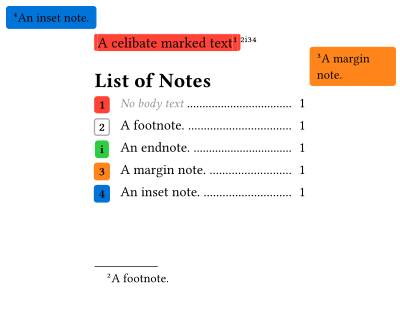
Show Typst Source Code
#deixis-inline-mark(
  id: <celibate>,  // linked to no note body
)[A celibate marked text]
#deixis-footnote(
  stroke: gray,
)[A footnote.]
#deixis-endnote(
  stroke: green,
  fill: green.transparentize(95%),
  numbering: "i",
)[An endnote.]
#deixis-margin-note(
  stroke: orange,
  fill: orange.transparentize(95%),
  container-func: rect,
)[A margin note.]
#deixis-inset-note(
  stroke: blue,
  fill: blue.transparentize(95%),
  placement: body => deixis-absolute-place(top + left, dx: 5pt, dy: 5pt, body),
)[An inset note.]

#deixis-note-outline(
  fill: repeat[.],
  include-celibates: "mark",
)
Minipage
Minipages (basically just glorified blocks) serve as an environment to sandbox notes. They maintains their own counter system (but can be synced with the page or together), default note parameters, and can be nested.
Since deixis notes are decoupled and each component can target different minipages, the rules are:
- The mark dictates the counter (numbering).
- The body dictates the rendering context of the body.
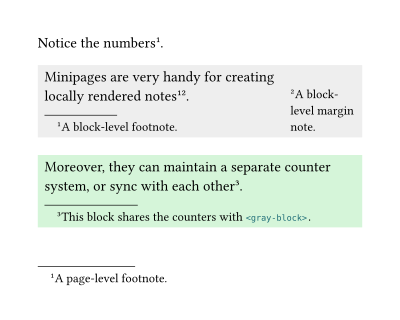
Show Typst Source Code
Notice the numbers#deixis-footnote[A page-level footnote.].
#deixis-block(
  id: <gray-block>,
  fill: gray.lighten(80%),
  inset: (right: 2cm, rest: 5pt),
)[
  Minipages are very handy for creating locally rendered notes
  #deixis-footnote[A block-level footnote.]
  #deixis-margin-note[A block-level margin note.].
]

#deixis-block(
  sync-counters-with: <gray-block>,
  fill: green.lighten(80%),
  inset: 5pt,
)[
  Moreover, they can maintain a separate counter system, or sync with each other #deixis-footnote[This block shares the counters with ```typst <gray-block>.```].
]
🙌 Acknowledgements
This package has some similar functionalities inspired by existing packages:
- drafting: Inline mark, inline note, and margin note, without numbering.
- dashy-todo: Margin note, without numbering.
- marge: Margin note, without links.
- pinit: Equivalent to region mark and inset note, without numbering.
- Rik’s endnote: An early attempt to implement endnote.
🤝 Contributing
Any contribution would be greatly appreciated. Here is how you can contribute:
- Report Bugs & Request Features by openning an issue on our GitHub Issues.
- Submit Pull Requests if you want to fix a bug or add a feature yourself.
- Show your Support: If you find
deixisuseful, please consider giving the repository a ⭐.
⚖️ License
MIT licensed, see LICENSE.