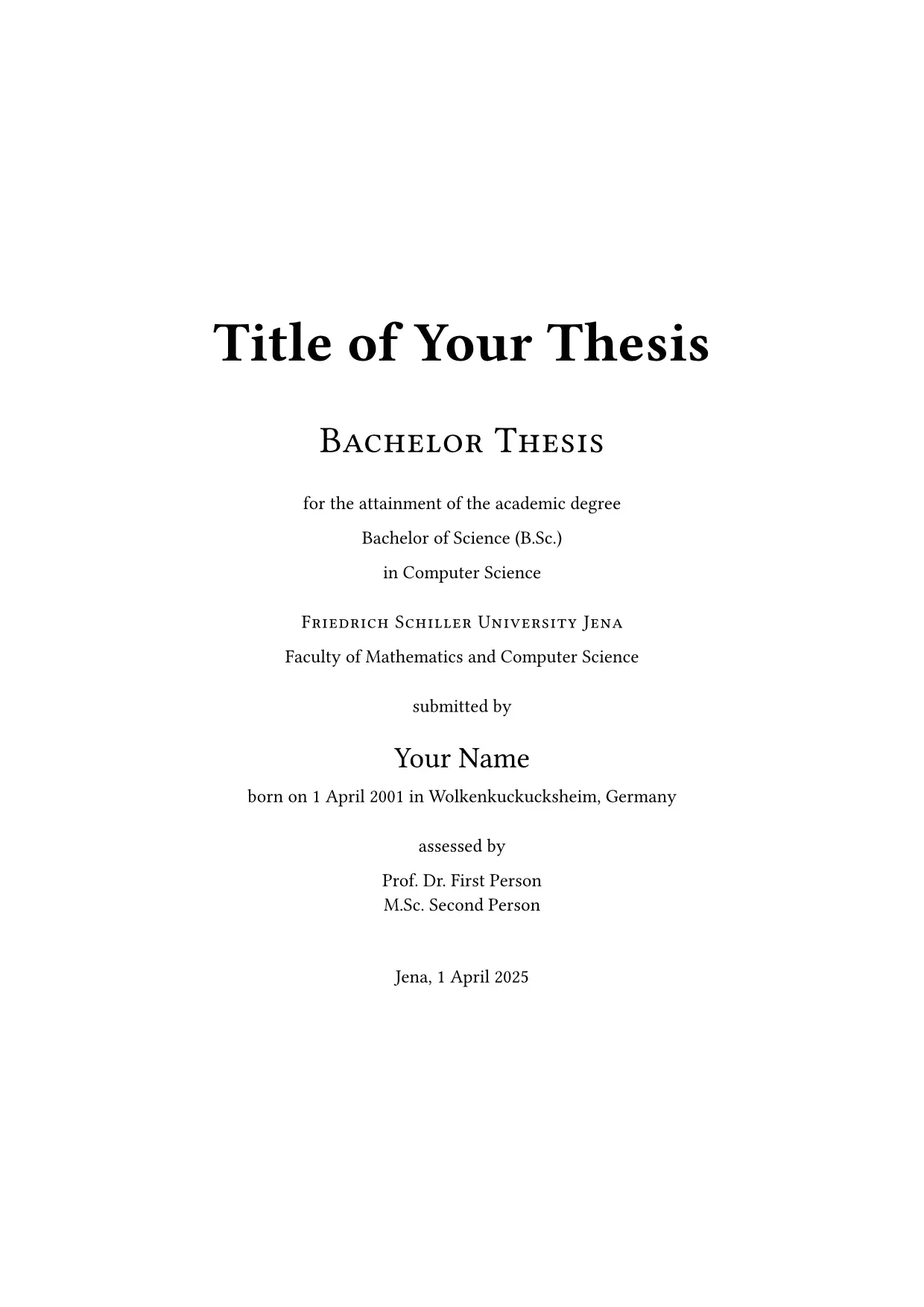
A Typst template for Bachelor and Master theses at the Faculty of Mathematics and Computer Science (FMI) of the Friedrich Schiller University Jena.
It follows the Gestaltungshinweise zu Abschlussarbeiten an der Fakultät für Mathematik und Informatik. It creates the cover page(s) with all mandatory information, the page numbering, the table of contents, lists of figures, tables and listings, a list of abbreviations, the appendix and the declaration of academic integrity.

Warning: This template is not affiliated with the University of Jena. The university logo is not included in this package, because it is the property of the University of Jena. See Getting the logo for how to download it.
Usage
Create a new project from the template, either in the Typst web app (“Start from template”) or on the command line:
typst init @preview/community-fmi-jena-thesis
Or use it in an existing document:
#import "@preview/community-fmi-jena-thesis:0.3.0": *

#set text(lang: "en") // or "de"

#show: fsu.with(
  title: [Title of Your Thesis],
  author: "Your Name",
  uni-logo: image("Bildmarke_blue_23cm.png", width: 10cm),

  cover-english: (
    faculty: "Faculty of Mathematics and Computer Science",
    university: "Friedrich Schiller University Jena",
    type-of-work: "Bachelor Thesis",
    academic-degree: [Bachelor of Science (B.Sc.)],
    field-of-study: "Computer Science",
    author-info: "1 April 2001 in Wolkenkuckucksheim, Germany",
    assessor: [Prof. Dr. First Person],
    place-and-submission-date: "Jena, 1 April 2025",
  ),

  abstract: [Abstract here.],
  // Mandatory unless the thesis is written in German:
  abstract-german: [Zusammenfassung hier.],
  abbreviations: (
    ("API", "Application Programming Interface"),
  ),
  bibliography: bibliography("bib.yaml"),
)

= Introduction
...
Getting the logo
The logo is only available to members of the university, so you have to download it yourself:
- Open Templates in Corporate Design and scroll down to the login form.
- Log in with your URZ username and password.
- Open Logo-Vorlagen → Uni Jena – Bild-Wort-Marke → 23cm → png.
- Download Uni Jena – Bildmarke_blue_23cm and save it as
Bildmarke_blue_23cm.pngnext to yourmain.typ. - Uncomment the
uni-logoline inmain.typ:uni-logo: image("Bildmarke_blue_23cm.png", width: 10cm),
The same folder also has black and white versions and a manual on how to use the logo.
Tip: You get a German cover page with
cover-german, which takes the same keys. Pass bothcover-germanandcover-englishto get both.
Parameters
| Parameter | Default | Description |
|---|---|---|
title |
[Your Title] |
Title of the thesis. |
author |
"Author" |
Your name. |
paper-size |
"a4" |
Paper size. |
uni-logo |
none |
Content shown at the top of the cover page(s), e.g. image("Bildmarke_blue_23cm.png", width: 10cm). |
cover-german |
none |
German cover page, see the keys below. |
cover-english |
none |
English cover page, see the keys below. |
abstract |
none |
Abstract, shown on its own page. |
abstract-german |
none |
German abstract (“Zusammenfassung”), shown after abstract. Mandatory if the thesis is not written in German (PO § 20 Abs. 8); otherwise the document does not compile. |
preface |
none |
Preface, shown after the table of contents. |
table-of-contents |
outline(depth: 2) |
The table of contents, or none. |
appendix |
none |
Appendix content. Use == headings for its sections; they are numbered A, B, C, … |
abbreviations |
() |
Array of (short, long) pairs or a dictionary (short: long). Every occurrence of an abbreviation in the text links to the list of abbreviations. |
expand-first-abbreviation |
true |
Write the first occurrence of an abbreviation as “long (short)”. |
bibliography |
none |
The result of bibliography(...). |
declaration |
auto |
Declaration of academic integrity. auto picks English or German based on the text language, none omits it, and content replaces it. |
chapter-pagebreak |
true |
Start every chapter on a new page. The Gestaltungshinweise require every part of the thesis to start on a new page. |
two-sided |
true |
Start chapters and front matter on odd pages, for double-sided printing. |
print |
false |
Produce the print version: turns off show-todos and turns on use-print-margins. |
show-todos |
auto |
Show todos, side notes and the list of todos after the table of contents. auto follows print (on for screen, off for print). |
use-print-margins |
auto |
Use print-margin instead of screen-margin. auto follows print. |
screen-margin |
(x: 3cm, y: 3cm) |
Page margins of the screen version. The default gives the same text area as the print version, so lines and pages break at the same places in both. |
print-margin |
auto |
Page margins of the print version. auto uses the margins recommended by the examination office: left (inside) 40 mm, right (outside) 20 mm, top and bottom 30 mm. |
primary-color |
rgb("#007a8b") |
Colour of headings, boxes, todos and lines. The default is the colour of the Faculty of Mathematics and Computer Science; all other colours are derived from it. |
heading-color |
auto |
Colour of headings and their numbers, e.g. black for plain headings. auto uses primary-color. |
element-color |
auto |
Colour of boxes, todos, side notes, table lines and inline code, e.g. luma(90) for grey ones. auto uses primary-color. |
figure-index, table-index, listing-index |
(enabled: false, title: auto) |
Lists of figures, tables and code listings. They are only shown if the document contains such figures. |
The cover page dictionaries accept these keys, all optional: faculty, university, type-of-work, academic-degree, field-of-study, author-info (date and place of birth), assessor and place-and-submission-date.
Headings and other text inserted by the template follow the document language (#set text(lang: "de") or "en").
Important: The English declaration of academic integrity is the university’s English version; the German text is based on the university’s German version. Check both against the current form of your examination office (available in Hanfried) before you submit your thesis. If it differs, pass your own text via
declaration.
From the first chapter on, every page shows the title and your name at the top (except pages that start a chapter) and the page number at the bottom. Blank pages and the declaration stay empty.
Elements
The package also exports these elements for your text:
| Element | Description |
|---|---|
definition[...], example[...], notice[...], hint[...], task[...], solution[...] |
Tinted boxes with a line on the left. title: [...] adds a name (“Definition — Graph”). With figured: true the box is numbered and can be referenced: #definition(figured: true)[...] <def-graph>, then @def-graph gives “Definition 1”. |
sentence[...] |
A numbered example sentence, “(1) …”. A reference to it shows “(1)”. |
todo[...] |
A highlighted note for things still to do. All todos are listed, with links, at the bottom of the table of contents. |
sidenote[...] |
A short note in the outer page margin. |
blockquote(source: [...])[...] |
An indented quotation with its source below. Inline quotes with a source, #quote(attribution: [...])[...], put the source into a footnote. |
make-box(kind, name, ...) |
Makes your own box, see custom.typ. |
Todos and side notes disappear in the print version, or with show-todos: false.
Customizing the template
New projects created from the template come with a file called custom.typ. It is the place for your own changes, for example:
- a different look for links,
- your own version of
todo, - a different heading numbering or font size,
- new boxes, like one for theorems.
custom.typ explains step by step how it works and contains ready-made examples. To use an example, delete the // at the start of its lines. Because the file belongs to your project, your changes stay when you update the template to a newer version.
In short, there are two kinds of changes:
- Functions (
#let todo(it) = ...). A function incustom.typwith the same name as one of the template replaces it, becausemain.typimportscustom.typafter the template. - Rules (
setandshow). Put them insidecustom-rulesincustom.typ.main.typapplies them to your chapters with#show: custom-rules, and they win over the template’s own rules:#let custom-rules(body) = { show link: set text(fill: blue) // blue links set heading(numbering: "1.1") // "1.1" instead of "1.1." body }
If you started from an older version of the template and have no custom.typ, create it with the content above and add these two lines to main.typ: #import "custom.typ": * directly after the template import, and #show: custom-rules directly after #show: fsu.with(...).
To learn more about rules, see the Typst styling guide.
Recommended packages
The template works without other packages. These packages from Typst Universe work well for theses:
great-theoremsfor definitions, theorems and proofscodlyfor nicer code listingsequatefor sub-numbered equationspintoritafor diagrams
Credits
The boxes, todos, side notes, the hanging heading numbers, the quotations and the header and footer are adapted from the seminar paper of grape-suite by Tristan Pieper (MIT License, see elements.typ).
License
The template code is licensed under MIT-0. The University of Jena’s name, logo and fonts belong to the University of Jena.