Perform all your calculations inside the document with automatic error propagation, unit modification, and significant-figures handled by Zero-Calc.
Basic Usage
It’s built directly on top of Zero, so make sure you use the same version number. The zcalc namespace can replace regular calc function calls in most cases. Use zero quantities or numbers to perform calculations or pass in floats, strings or content, which will be parsed using zero. The units are automatically adapt and uncertainties will be combined properly.
#import "@preview/zero:0.7.0": *
#import "@preview/zero-calc:0.7.0": *
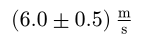
#zcalc.div(m[30+-0.3], s[5+-0.4])
Calculation History and Error Propagation
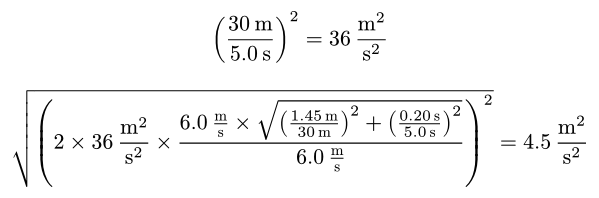
You can use the results of operations to do further calculations. Every zcalc result carries its full dependency graph. display.method-result reconstructs that as a math equation showing how the value was calculated and display.error-method-result does the same for the uncertainty.
#let value = zcalc.div(m[30+-1.45], s[5.0+-0.20]) // 30 / 5 = 6
#let value = zcalc.pow(value, 2)                  // 6^2 = 36

#display.method-result(value)
#display.error-method-result(value)
Defining and using equations
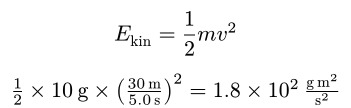
Beyond basic arithmetic Zero-Calc also understands typst math equations by using Parsely under the hood. Define equations once and call them by giving the necessary parameters. Feel free to combine this with zcalc operations.
#let kinetic-energy-math = $E_"kin" = 1/2 m v^2$
#let kinetic-energy-function = equation.define(kinetic-energy-math)
#let value = kinetic-energy-function(m: g[10], v: zcalc.div(m[30], s[5.0]))

#kinetic-energy-math
#display.method-result(value)
Constants
Constants usually don’t affect the amount of significant figures. The example above would strictly speaking only have one significant figure because our 2 sig-figs inputs are overpowered by the less precise factor of 1/2 with strictly speaking just 1 sig-fig. In equations defined in math mode all numbers are considered constants by default and do not affect the amount of significant figures. You can use the mathematical constants with zcalc.pi etc. or manually define constants like this
#let avogadro = zcalc.const(num("6.022e+23"))
Modifying Equation Trees and Isolating Variables
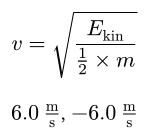
You can parse a math equation into a tree and even isolate a variable (for simple equations). The result is a list of possible values.
#let kinetic-energy-tree = equation.to-tree(kinetic-energy-math)
#let velocity-tree = equation.isolate-variable(kinetic-energy-tree, $v$)

#display.equation(velocity-tree.first())
#equation.calculate-tree(velocity-tree, m: g[10], E-kin: g-m2-s-2[180])
Zero-Calc for packages
Use the zero-calc.impl namespace to access internal methods. The utility.normalise-quantity method automatically converts zero quantities, strings, content or floats to a serialised format which can easily be displayed using the utility.display function. When writing packages you might not always need the displaying capabilities of zero-calc, or might just need them at the end when returning a value to the user. In that case you can use the impl.operations namespace which is mostly symmetrical to the zcalcnamespace but returns dictionaries which can be passed into further operations without needing to be packed and unpacked in content. To manipulate units use impl.units.
List of supported operations
- zcalc.add(summand1, summand2, …)
- zcalc.sub(minuend, subtrahend1, subtrahend2, …)
- zcalc.abs(value)
- zcalc.neg(value)
- zcalc.mul(factor1, factor2, …)
- zcalc.div(dividend, divisor)
- zcalc.pow(base, exponent)
- zcalc.exp(exponent)
- zcalc.root(radicand, index)
- zcalc.sqrt(radicand)
- zcalc.log(value, base)
- zcalc.ln(value)
- zcalc.sin(angle)
- zcalc.cos(angle)
- zcalc.tan(angle)
- zcalc.asin(value)
- zcalc.acos(value)
- zcalc.atan(value)
- zcalc.pi
- zcalc.e
- zcalc.tau
- zcalc.inf
All of these calculations may also be used in mathematical equations. Any other unknown symbols will be understood as variables.