YAES is Yet Another Exercise Sheet. It is a minimalist template providing a simple way to create exercise sheets for university classes.
Getting started
typst init @preview/yaes
Configuration
#import "@preview/yaes:0.1.0": *
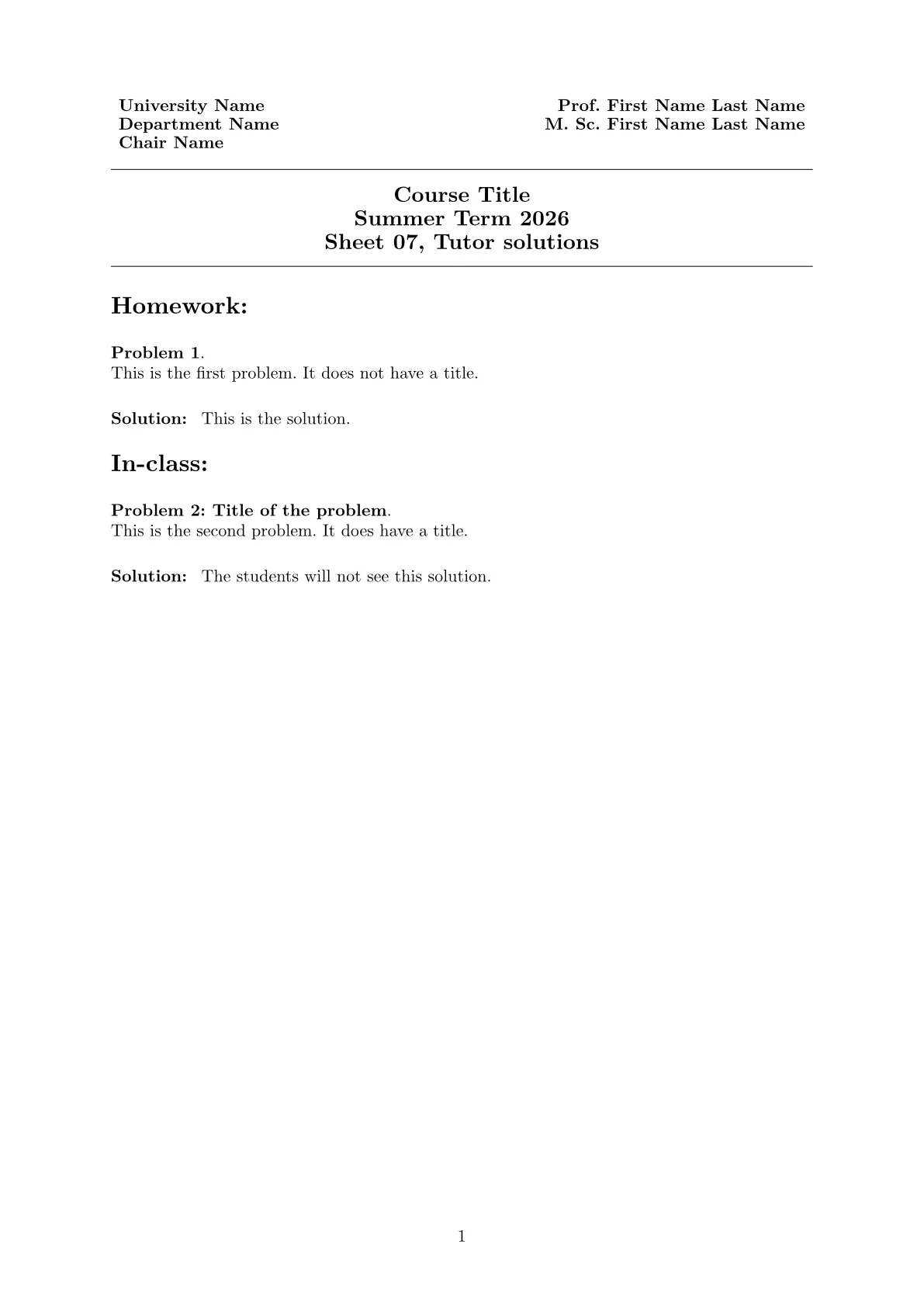
Creating the title section of an exercise sheet
The following command creates a title section of the exercise sheet.
The arguments department-info and teachers take an array of arbitrary length, with the array elements shown below each other, the former aligned to the left, and the latter aligned to the right.
They are followed by the actual title of the sheet, including the Course title, the semester, and the number of the exercise sheet.
#show: exercise-sheet.with(
    department-info: ("University Name", "Department Name", "Chair Name"),
    teachers: ("Prof. First Name Last Name", "M. Sc. First Name Last Name"),
    course: "Course Title",
    semester: "Summer Term 2026",
    number: 7
)
Additionally, one may declare the sheet to be a catalogue, e.g. of all problems from an entire semester.
This is done by setting catalogue: true, and one then omits the number.
One may also add a deadline and / or submission date as a string.
Creating problems
A problem can simply be created using
#problem[
    This is the first problem.
    It does not have a title.
]
Problems are always enumerated. One may add a title to the problem, for example:
#problem(title: "Title of the problem")[
    This is the second problem.
    It does have a title.
]
Solutions can be added right after the problem is finished. The do not have titles and are not enumerated.
#solution[
    This is the solution.
]
One may decide, however, whether or not the solution should be shown on the solution sheet handed out to the students afterwards. The reasoning is that not all solutions are to appear on the solution sheet, as the students should be encouraged to attend the exercise sessions, in which the solutions are discussed. The tutors, however, will receive an exercise sheet including all solutions. See also the following section for compilation options.
#solution(student: false)[
    The students will not see this solution.
]
By default, student is set to true.
Compilation options
Up to three different versions of a single exercise sheet are supported, namely:
- Exercise (E), the document distributed to the students. Naturally, this version does not include any solutions to the problems.
- Solution (S), the document the students receive after the sheet was submitted or was discussed. This
- Tutor solution (T), the document handed out to tutors that give an exercise class. This version should include all solutions.
The default version is the tutor solution, including all solutions to the problems. One may obtain the other versions of the document by setting an input at compilation, for example:
typst compile --input art=E main.typ main_E.pdf
typst compile --input art=S main.typ main_S.pdf
typst compile --input art=T main.typ main_T.pdf