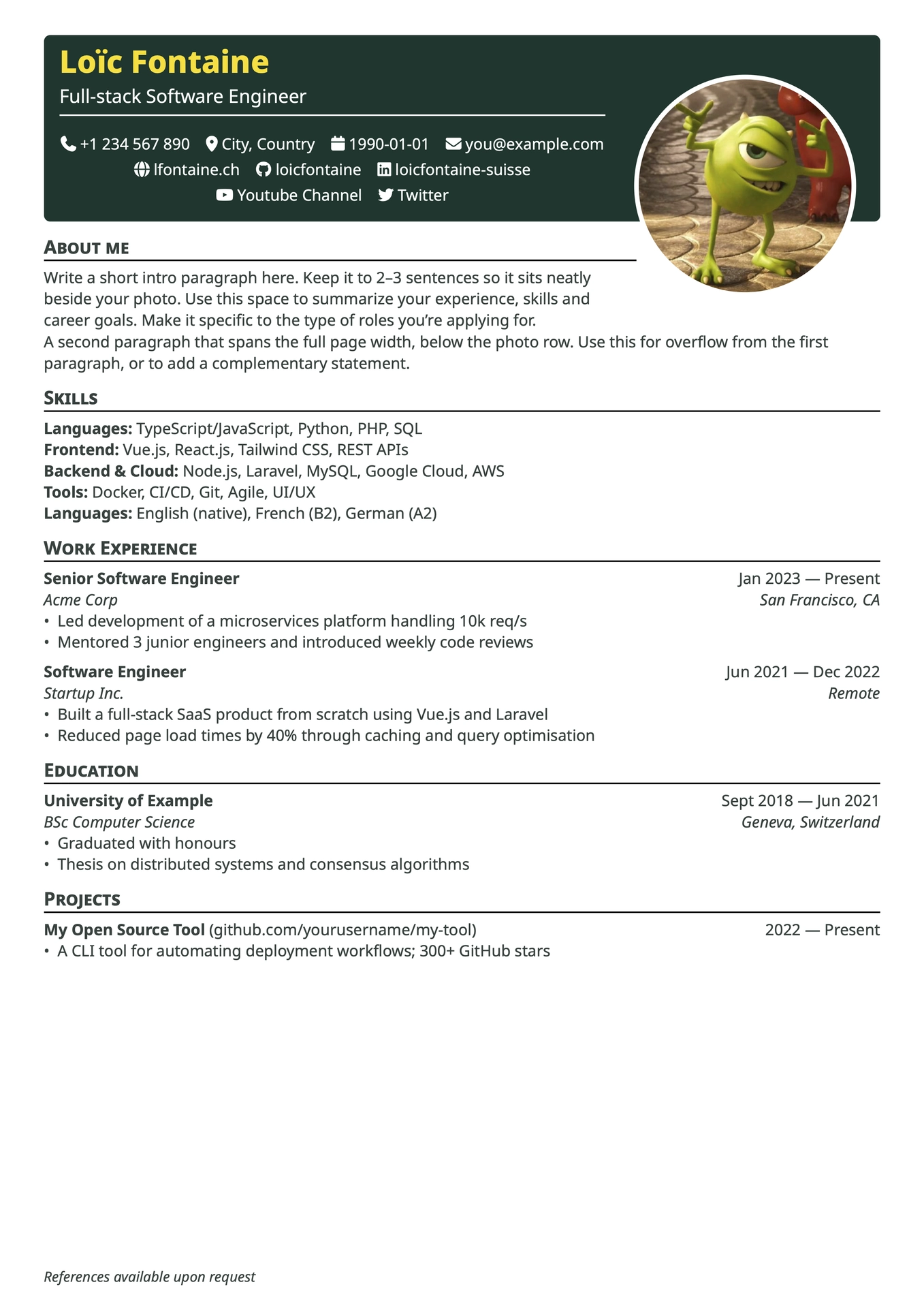
A clean and modern Typst resume template based on Basic Resume, with a bold header banner, contact icons, and a flexible two-column intro section.

Features
- ATS-friendly — design-forward without sacrificing machine readability
- Bold header banner with name, title, and contact row
- Font Awesome icons for contact information (optional toggle)
- Fully customizable colors (header, name, headings, text, photo border)
- Smart banner height estimation based on contact items
- Optional footer reference line pinned at the bottom of the page
- Section helpers —
work,edu,project,certificates,extracurriculars
Quick start
Before compiling locally, install Noto Sans and the Font Awesome fonts. On the Typst web app, upload their .otf files to a fonts/ directory in your project. The Font Awesome import below is required when using custom icons.
#import "@preview/vivid-cv:0.2.0": *
#import "@preview/fontawesome:0.6.2": fa-icon

#show: resume.with(
  author: "Jane Doe",
  title: "Full-Stack Engineer",
  font: "Noto Sans",

  email: "jane@example.com",
  github: "janedoe",
  linkedin: "jane-doe",
  phone: "+1 234 567 890",
  location: "Zurich, Switzerland",
  personal-site: "janedoe.dev",
  custom: (
    (
      text: "@janedoe",
      icon: fa-icon("mastodon"),
      link: "https://mastodon.social/",
    ),
  ),

  about-title: "About me",
  about-beside: [
    Passionate engineer with 5+ years of experience
    building web applications from design to deployment.
  ],

  reference: "References available upon request",

  header-color: "#06332a",
  lang: "en",
)

== Work Experience

#work(
  title: "Senior Engineer",
  company: "Acme Corp",
  dates: dates-helper(start-date: "Jan 2022", end-date: "Present"),
  location: "Zurich, Switzerland",
)
- Led migration from monolith to microservices
Parameters
Identity & contact
| Parameter | Type | Default | Description |
|---|---|---|---|
author |
string | "" |
Full name |
title |
string | "" |
Job title / tagline |
pronouns |
string | "" |
Optional pronouns |
birthdate |
string | "" |
Date of birth |
location |
string | "" |
City, country |
email |
string | "" |
|
phone |
string | "" |
Phone number |
github |
string | "" |
GitHub username |
linkedin |
string | "" |
LinkedIn username |
personal-site |
string | "" |
Website (without https://) |
orcid |
string | "" |
ORCID ID |
custom |
array | () |
Additional contact items |
custom accepts a list of named tuples with text, icon, and link. The
link value is a prefix prepended to text, which is useful for links such as
social handles; set icon to none when no icon is needed.
custom: (
  (
    text: "janedoe",
    icon: fa-icon("youtube", solid: true),
    link: "https://youtube.com/@",
  ),
),
Intro section
| Parameter | Type | Default | Description |
|---|---|---|---|
about-title |
string | "About me" |
Section title (set "" to hide) |
about-beside |
content | [] |
Text displayed beside the photo (~3 lines max) |
about-below |
content | [] |
Full-width text below the photo row (set [] to hide) |
Photo
| Parameter | Type | Default | Description |
|---|---|---|---|
show-photo |
bool | true |
Toggle photo column |
photo |
image | image("photo.jpg") |
Image function |
photo-size |
length | 140pt |
Diameter of circular photo |
Colors
| Parameter | Type | Default | Description |
|---|---|---|---|
header-color |
string | "#06332a" |
Banner background |
name-color |
string | "#ffdf2b" |
Name color |
heading-color |
string | "#ffdf2b" |
Section heading color |
text-color |
string | "#303f3c" |
Body text and link color |
photo-border |
string | "ffffff" |
Photo border color |
Typography & layout
| Parameter | Type | Default | Description |
|---|---|---|---|
font |
string | "Noto Sans" |
Font family |
author-font-size |
length | 20pt |
Name size |
font-size |
length | 10pt |
Body text size |
paper |
string | "a4" |
Paper size |
lang |
string | "en" |
Language (affects hyphenation) |
icon |
bool | true |
Enable Font Awesome icons |
reference |
string | "" |
Footer line (empty = hidden) |
nb-lines-override |
int / none | none |
Number of contact rows to force in the banner |
Section helpers
#work(title: "", company: "", dates: "", location: "")

#edu(institution: "", degree: "", dates: "", location: "", consistent: false)
// consistent: true → dates top-right, same layout as work entries

#project(role: "", name: "", url: "", dates: "")

#certificates(name: "", issuer: "", url: "", date: "")

#extracurriculars(activity: "", dates: "")

#dates-helper(start-date: "Jan 2020", end-date: "Present")
// → "Jan 2020 — Present" ; omit start-date for a single date
Tips
Multilingual support — set lang for correct hyphenation and use any string for about-title:
lang: "fr",
about-title: "À propos",
Two-paragraph intro — use about-beside for a short text beside the photo, and about-below for a second paragraph spanning the full width below it:
about-beside: [Short intro that sits beside the photo.],
about-below:  [Longer second paragraph, full page width.],
No photo — set show-photo: false for a full-width layout.
Banner height wrong? — the template estimates the number of contact rows automatically. If a long URL or an unusual font causes a different number of rows to wrap, set nb-lines-override to the number of rows actually used:
nb-lines-override: 2,
Fonts and icons
The template uses the fontawesome Typst package for its contact icons. To render these icons locally, install the Font Awesome fonts on your system. You can download them from Font Awesome.
When using the Typst web app, add a fonts/ directory to your project and upload the .otf files from the Font Awesome download there. This makes the fonts available to the web compiler.
Custom contact icons use fa-icon from the same package. Import it in the file where you define your resume:
#import "@preview/fontawesome:0.6.2": fa-icon

custom: (
  (
    text: "@janedoe",
    icon: fa-icon("mastodon"),
    link: "https://mastodon.social/",
  ),
),
The example uses Noto Sans. If you compile locally with font: "Noto Sans", install Noto Sans on your system. In the Typst web app, upload its font files to the same fonts/ directory instead. You may choose another installed font by changing the font parameter.
Local development — before publishing, import directly from the source:
#import "../src/lib.typ": *
Credits
Based on Basic Resume by stuxf, using the fontawesome Typst package.
License
MIT