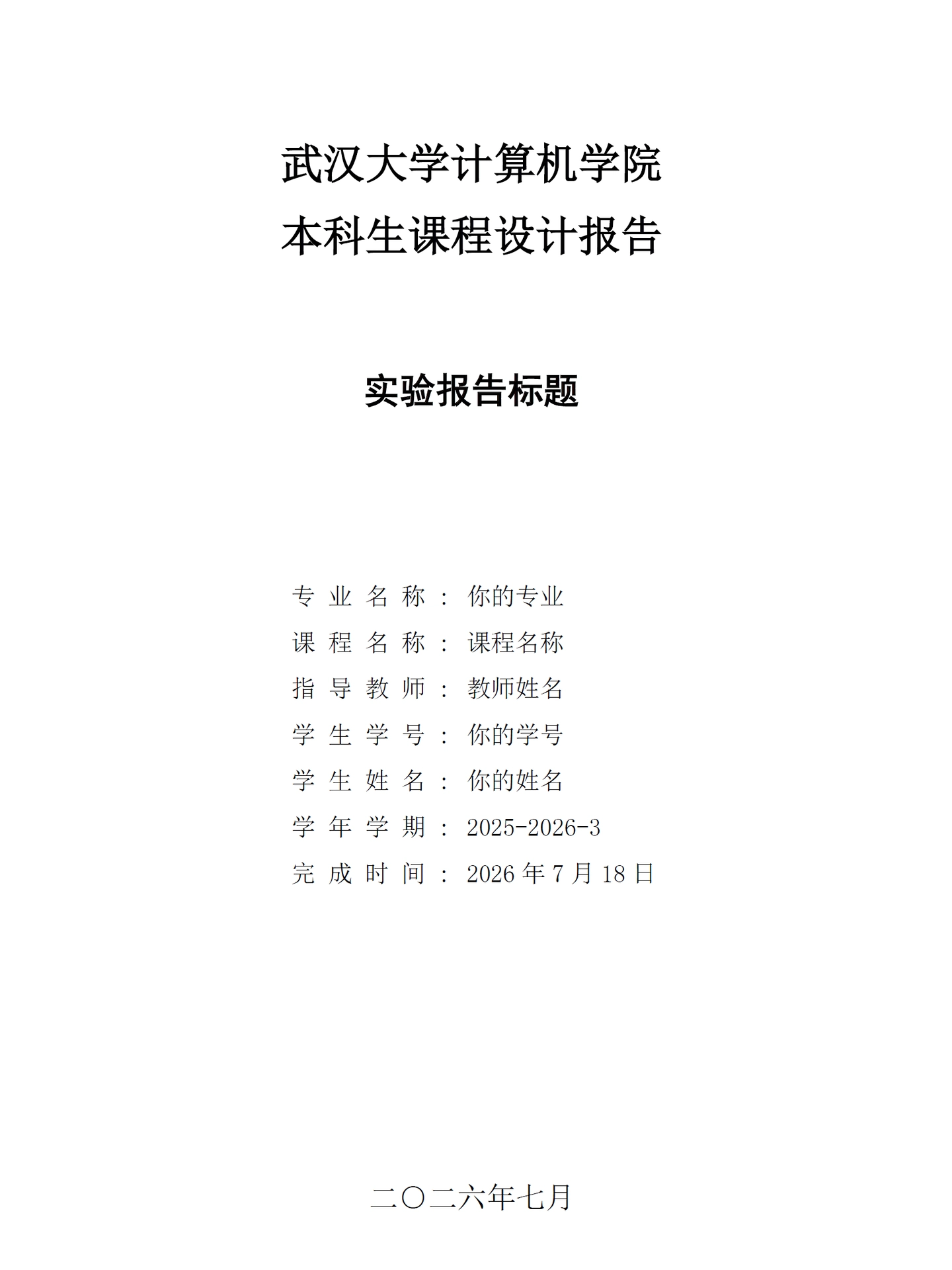
An unofficial Typst template for undergraduate course lab reports at Wuhan University (WHU), School of Computer Science. It provides a cover page, declaration page, table of contents, styled code blocks (inline + block), appendix support, and a teacher comment section — ready to use out of the box.
基于 Typst 的武汉大学计算机学院本科生课程设计报告模板(非官方),提供封面页、原创性声明页、目录、代码块样式(行内 + 块级)、附录、教师评语等开箱即用的功能。
Usage
#import "@preview/unofficial-whu-lab-report:0.1.1": *

#show: whu-report.with(
  title: "操作系统课程设计",
  major: "Computer Science",
  course-name: "Operating System",
  instructor: "Professor Cai",
  student-id: "2024302114514",
  student-name: "QianQiuXingChen",
  semester: "2025-2026-3",
  deadline: "2026年7月18日",
  grade: true,
  date: "二○二六年七月",
  show-declaration: true,
  signature: image("signature.png"),
)

= 概述

content... / 内容...
Parameters / 模板参数
Cover & Meta / 封面与元信息
| Parameter | Type | Default | Description |
|---|---|---|---|
school |
str | "武汉大学计算机学院" |
College/department name / 学院名称 |
category |
str | "本科生课程设计报告" |
Report category title / 报告类别 |
title |
str | none | Specific report title / 报告名称 |
major |
str | none | Major name / 专业名称 |
course-name |
str | none | Course name / 课程名称 |
instructor |
str | none | Instructor name / 指导教师 |
student-id |
str | none | Student ID / 学号 |
student-name |
str | none | Student name / 学生姓名 |
semester |
str | none | Academic semester / 学年学期 |
deadline |
str | none | Report deadline / 报告日期(详细) |
grade |
bool | false |
Show grade field on cover / 是否在封面显示成绩栏 |
date |
str | none | Report date (e.g. "二○二六年七月") / 报告日期 |
Declaration / 原创性声明
| Parameter | Type | Default | Description |
|---|---|---|---|
show-declaration |
bool | false |
Include declaration/originality page / 是否显示声明页 |
declaration-text |
content | none | Custom declaration text / 自定义声明文本 |
signature |
image | none | Signature image for declaration page / 声明页签名图片 |
Typography & Styling / 排版与样式
| Parameter | Type | Default | Description |
|---|---|---|---|
font-size |
length | 12pt |
Base text size / 正文字号 |
cn-serif |
str,array | ("Times New Roman", "SimSun", "Latin Modern Roman", "Songti SC") |
Serif font for body text / 衬线字体(正文) |
cn-sans |
str,array | ("Times New Roman", "SimHei", "Latin Modern Sans", "Heiti SC") |
Sans-serif font for headings / 无衬线字体(标题) |
mono-font |
str,array | ("Jetbrains Mono", "Fira Code", "Consolas", "Ubuntu Mono", "Microsoft YaHei") |
Monospace font for code / 等宽字体 |
math-color |
color | purple |
Math equation color / 公式颜色 |
code-theme |
str | "../assets/code.tmTheme" |
Syntax highlighting theme path / 代码高亮主题路径 |
Table of Contents / 目录
| Parameter | Type | Default | Description |
|---|---|---|---|
show-toc |
bool | true |
Include table of contents / 是否显示目录 |
toc-title |
str,content | "目 录" |
TOC title / 目录标题 |
toc-depth |
int | 3 |
TOC depth / 目录深度 |
Standalone Functions / 独立函数
cover() — Cover Page / 封面页
Renders the cover page independently. Accepts the same parameters as the cover section of whu-report: school, category, title, major, course-name, instructor, student-id, student-name, semester, deadline, grade, date.
封面将会独立渲染,接受调用者传递的参数:标题、课程名称等。
#import "@preview/unofficial-whu-lab-report:0.1.1": cover

#cover(
  title: "操作系统课程设计",
  major: "Computer Science",
  course-name: "Operating System",
  instructor: "Professor Cai",
  student-id: "2024302114514",
  student-name: "QianQiuXingChen",
  semester: "2025-2026-3",
  date: "二○二六年七月",
)
declaration-page() — Declaration Page / 原创性声明页
Renders the declaration/originality page independently.
独立渲染原创性声明页,
| Parameter | Type | Default | Description |
|---|---|---|---|
decl-body |
content | none | Custom declaration text / 自定义声明文本 |
signature |
image | none | Signature image / 签名图片 |
date |
str | none | Signature date / 签名日期 |
#import "@preview/unofficial-whu-lab-report:0.1.1": declaration-page

#declaration-page(
  signature: image("signature.png"),
  date: "2026年7月18日",
)
teacher-comment() — Teacher Comment / 教师评语评分
Renders a teacher comment & grading section at the end of the report.
渲染位于报告末尾的教师评语评分部分。
#import "@preview/unofficial-whu-lab-report:0.1.1": teacher-comment

#teacher-comment()
Appendix Style / 附录编号
Use appendix-style to switch to appendix numbering (A.1, A.2, …):
使用 appendix-style 来切换附录编号。
#pagebreak()
#show: appendix-style
= 附录
== 代码段
Code Block Styling / 代码块样式
Both inline code and block code are styled automatically when using whu-report:
- Inline code: monospace font with a red-brown text color and light gray rounded background.
- Block code: monospace font with a light card background, subtle border, and rounded corners. The language label is displayed above the block.
Set code-theme to a .tmTheme file path for syntax highlighting (defaults to ../assets/code.tmTheme).
使用 whu-report 时,行内代码和代码块会自动应用样式:
- 行内代码:等宽字体,红棕色文字,浅灰色圆角背景。
- 代码块:等宽字体,浅色卡片背景,细边框,圆角。语言标签显示在代码块上方。
通过设置 code-theme 为 .tmTheme 文件路径来启用语法高亮(默认为 ../assets/code.tmTheme)。
Font Dependencies / 字体依赖
For the best rendering, install the following fonts:
为了最佳渲染效果,请安装以下字体:
| Font | Used For |
|---|---|
| SimSun (宋体) | Body text, cover info / 正文、封面信息 |
| SimHei (黑体) | Cover title, headings / 封面标题、章节标题 |
| Times New Roman | Latin fallback in serif & sans / 拉丁字符回退 |
| Jetbrains Mono | Code blocks / 代码块 |
| Fira Code | Code fallback / 代码回退 |
| Latin Modern Roman | Serif fallback / 衬线回退 |
| Latin Modern Sans | Sans-serif fallback / 无衬线回退 |
macOS users can rely on the built-in Songti SC / Heiti SC as fallbacks. On other platforms, ensure SimSun and SimHei are installed.
macOS 用户可以依赖内置的 Songti SC 与 Heiti SC 作为回退;其他平台的用户需保证 SimSun 和 SimHei 均已安装。
License
MIT