


Quickly display and format hazard and precautionary statements.
Usage
Easily Display Hazard and Precautionary statements in four languages (english, french italian and german):
#import "@preview/typsium-ghs:0.1.2":*

#h-statement(310)\
#p-statement(310)\
#hp("P305+P351+P338", only-statement:true)

Use the display statements method to quickly display a bunch of statements you copied from wikipedia or other sources. It will automatically separate and detect statements.
#display-statements("H315,H319 - P273 - P302 + P352 - P305 + P351 + P338")

There are variants for some statements:
#p-statement(310, only-statement: true)\
#p-statement(310, variant:1)\
#p-statement(310, variant:2)
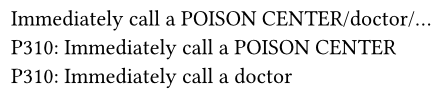
You can also add parameters when needed:
#h-statement(370)\
#h-statement(370, parameters:"the lungs")\
#h-statement(370, parameters:("the lungs", "when inhaled"))\
#h-statement(370, variant:1)\
#h-statement(370, variant:1, parameters:"when inhaled")\

Use the #ghs(<number>) command to display a GHS pictogram, to get more information about each pictogram use #ghs-info
#import "@preview/typsium-ghs:0.1.2": *
#grid(
  columns: 9,
  ..range(1,10).map(x=> ghs(x))
)
