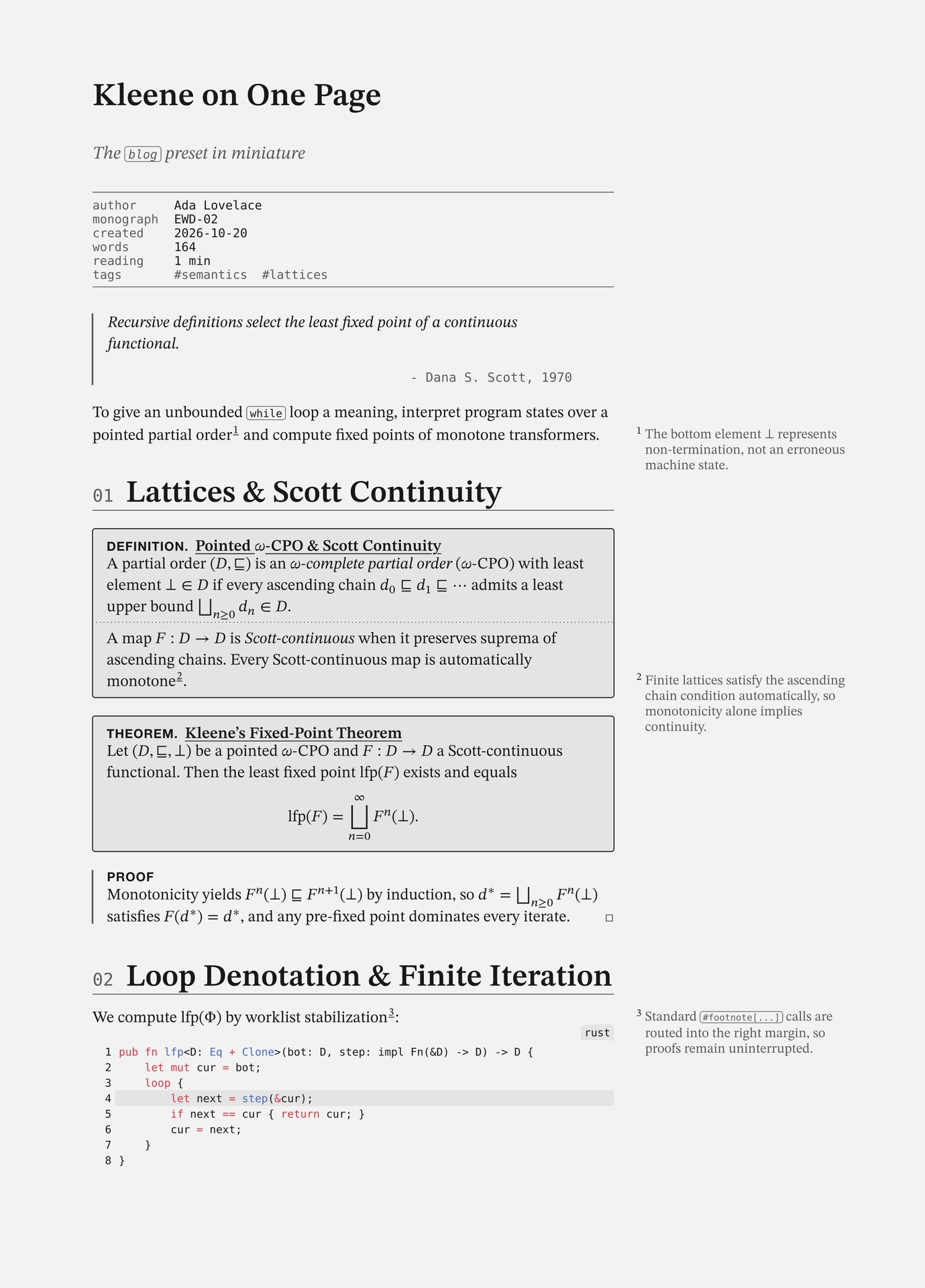
Build static sites and blogs from Typst documents: typed HTML, .typ source transparency, zero-JS CSS i18n, XML sitemaps & feeds, and a monochrome scholarly blog preset.



Light (oklch monochrome) |
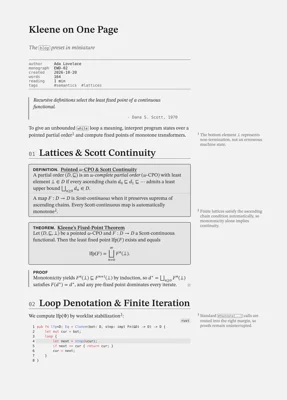
Dark (light-dark()) |
|---|---|
 |
 |
thyme builds static sites from Typst’s native bundle and typed html targets. The standard typst CLI does the work: typst compile and typst watch need no wrapper CLI and no client-side JavaScript.
The core is zero-CSS and unopinionated. Import it (#import "@preview/thyme:0.1.0": *) to build a site with your own stylesheet. The blog preset adds a monochrome scholarly theme: native MathML, right-margin sidenotes and citations, static /tags/ archives, backlinks, Obsidian frontmatter, theorem and proof environments, and two-column print output.
The public surface is eight names in core and thirty-nine in blog. Everything else in src/ is a module-level function that site and the presets call; the module paths are stable, the names inside them are not. See docs/api.md.
Highlights
- Pure
typstCLI workflow:typst watch --features html,bundle -f bundle site.typ distruns Typst’s built-in live-reloading dev server;typst compileemits the complete production web root in one pass. - No HTML builder of its own. Markup that plain Typst content cannot express goes through Typst’s built-in typed
html.*constructors —html.elem("div", attrs: (class: "note"), body). Nothing to learn, nothing to keep correct, andmath,@labellinks and components interpolate as usual. - Tadi Web
.typSource Transparency: Mounting pages via capabilitypath(...)(src: path("site.typ"),#mount(path("contact.typ")),#post(path("posts/foo.typ"))) co-emits verbatim.typsource files (/site.typ,/contact.typ,/posts/foo.typ) and adds a monospace.typlink in the top bar. - Single-URL Zero-JS CSS i18n &
hreflangAlternates: Write#tr(en: [...], de: [...])inline or look up keys from a@preview/linguify-compatiblelang.tomldictionary (#tr("key", from: toml("lang.toml")));thymeemits a CSS:root:has(#thyme-lang-de:checked)switcher (en · de) in the top bar only on pages with two or more languages, honorsset text(lang: ...)in paged PDFs, and supports multi-URLalternatesacross<head>andsitemap.xml. - SEO, Full-HTML Syndication & Academic Metadata: Emits valid
sitemap.xml,404.html, and summary or full semantic HTML RSS 2.0 (rss.xml) & Atom 1.0 (atom.xml) feeds (feed-content: "summary" | "full") via@preview/syndicate, plus opt-in OpenGraph (og:*) and Google Scholar Highwire (citation_*)<meta>tags. - Scholarly
blogPreset: Perceptualoklch/light-dark()monochrome palette, unified STIX Two Text (smcp/c2scsmall caps) + STIX Two Math + Helvetica Neue + Commit Mono stacks (font-faces: auto | none | str, deterministic zero-local()@font-facerules, and one-line self-hosting viafont-base: "/fonts/"+font-version), AST-normalized native MathML (applied automatically — crisp inline$F(e)$&$F(d^*)withoutmeasure()or SVG hacks), content-hashedcss/style.css?v=<hash>, conditional copy-button JS (copy-button: auto— zero<script>on codeless pages),@preview/margesidenotes +#mcitemargin bibliography citations, static/tags/<tag>/archive pages,#toc(), compile-time#backlinks(), post navigation,spicky-style math/proof environments,zebraw,tablem, andcheq.
Quick Start
1. Scholarly Blog (blog Preset)
Scaffold a ready-to-compile blog with typst init:
typst init @preview/thyme:0.1.0 my-blog
cd my-blog
typst compile --features html,bundle --format bundle site.typ public
Or wire site.typ by hand:
#import "@preview/thyme:0.1.0": *
#import "@preview/thyme:0.1.0": blog

#show: blog.site.with(
  description: "Notes on programming languages, formal methods, and systems.",
  url: "https://blog.example.org",
  author: "Ada Lovelace",
  src: path("site.typ"),
)

= `folio`

Notes on programming languages, formal methods, mathematics, and systems.

#blog.links(
  direction: "row",
  link("https://example.org")[example.org],
  [@rss[rss]],
  [@atom[atom]],
)

== Posts

#blog.post(path("posts/fixed-points.typ")) <fixed-points>
#blog.post(path("posts/minimal-bundles.typ")) <minimal-bundles>
2. Custom Portfolio / Landing Site (Unopinionated Core)
Bring your own styles.css with zero preset styles injected (see examples/portfolio/):
#import "@preview/thyme:0.1.0": *

#show: site.with(
  url: "https://example.org",
  title: "Ada Lovelace",
  description: "Symbolic computation and analytical engines.",
  stylesheets: (path("styles.css"),),
  src: path("site.typ"),
  wrap-main: false,
)

#file("pgp.txt", path("pgp.txt"))
#mount(path("contact.typ")) <contact>

#html.elem("header", attrs: (class: "hero"), {
  html.elem("p", attrs: (class: "eyebrow"),
    tr(en: [Symbolic Computation], de: [Symbolische Berechnung]))
  html.h1("Ada Lovelace")
  html.p[Bernoulli schedules in $O(n^2)$ operations · #link(<contact>)[contact]]
})
robots.txt and llms.txt
Both files have formats this package would only guess at, so it does not write them. You provide the file and point at it; the bytes are copied into the bundle root unchanged.
#show: site.with(
  url: "https://example.org",
  robots: path("robots.txt"),
  llms: path("llms.txt"),
)
Leave either unset and no file is emitted. There is no third state: a site either carries the file you wrote or it carries nothing.
robots-txt(...) is exported if you want a starting point for a robots.txt. Run it, look at
the output, then keep the file it produces. llms.txt is a short
Markdown file, so it is easier to write directly than to generate.
Serving .typ Sources Inline (Content-Type: text/plain)
To ensure browsers display co-emitted .typ sources inline in a tab rather than downloading them, configure your static web server to send Content-Type: text/plain; charset=utf-8 for *.typ. With static-web-server (sws.toml):
[[advanced.headers]]
source = "**/*.typ"
headers = { Content-Type = "text/plain; charset=utf-8", Content-Disposition = "inline" }
Stability & Versioning
thyme follows Semantic Versioning. Because Typst packages
are pinned per-version (@preview/thyme:0.1.0), upgrading is always an explicit, reviewable change
in the imports next to typst.toml. Nothing is fetched at compile time beyond the version you
name.
What the version number promises:
| Surface | Guarantee |
|---|---|
Names re-exported by #import "@preview/thyme:0.1.0": * |
Stable across 0.x patch releases; renamed only in a minor release, with the old name gone (no deprecation aliases; see below). |
Names re-exported by #import blog: * |
Same as above. |
Everything else in src/ (module-level functions) |
Not public. Importable, and the module paths are stable, but the names change whenever the engine or a preset needs them to. |
Named arguments of site, blog.site, webpage, post, mount, file |
Stable across patch releases. Additive parameters are non-breaking. |
Emitted file layout (index.html, 404.html, .typ siblings, sitemap.xml, rss.xml, atom.xml, tags/, plus robots.txt / llms.txt when you pass path(...)) |
Stable; new optional outputs only behind opt-in options. |
CSS class names (blog-*, thyme-*) |
Treat as semi-public. They are used for theming and styling, so a change ships with a CHANGELOG note. |
Anything prefixed _ in src/ |
Private. No guarantee; may change in any release. |
Deliberately no deprecation aliases
Renames in thyme are hard renames: the old name is removed in the same release that adds the
new one. Accumulating aliases would make the public surface grow without bound and make it
impossible to tell which spelling is canonical. The CHANGELOG records every rename, and a frozen
downstream can simply stay pinned to its existing version — the compile-time package model makes a
rename a non-event for anyone who is not actively upgrading.
Documentation & Examples
- API Surface (
docs/api.md): the exported surface of the core and theblogpreset, grouped by purpose. - Package Reference Manual (
docs/manual.pdf): API documentation generated from source doc-comments with@preview/tidy:0.4.3. template/: starter monochrome blog (typst init @preview/thyme:0.1.0).examples/portfolio/: zero-CSS corethymesite using a customstyles.css, plus nativehtml.elem,#tr(en: ..., de: ...),fileandwebpage.examples/blog/: ablog.siteshowcase with bilingualen/deswitching (#tr(...)andlang.toml), co-located folder assets (posts/state-machine/{site.typ,dfa.svg}), mountedwebpagesubpages (about.typ), full-HTML Atom and RSS feeds, static/tags/archives,#toc(),#mcite(...)margin citations, compile-time backlinks, post navigation, and OpenGraph and Google Scholar<meta>tags.
License
Dual-licensed under MIT AND MIT-0 (LICENSE):
- Library source (
src/): MIT - Starter template & examples (
template/,examples/): MIT-0 (No Attribution)
Contributing
Hacking on thyme
just check verifies the whole repository: the three example sites, the unit tests and the
manual. It uses the compiler version pinned in typst.toml and does not write to the worktree.
just fmt           # format every .typ file
just fmt --check   # verify formatting without writing
just lint          # ruff over the Python, typstyle over the Typst
just check         # the full gate; read-only, writes nothing
just preview       # template/ + examples/ into a browsable preview/
typstyle is not part of the Typst CLI. Install it with
cargo install typstyle --version 0.15.2 --locked.
The CI setup action pins the same version, so local and CI formatting cannot drift.
Releasing
To publish a version, run just release X.Y.Z. The version is the only argument; the recipe
derives the vX.Y.Z tag from it. The recipe checks that version against typst.toml and
CHANGELOG.md, requires a clean worktree, and requires your branch to match origin. It then
runs the full gate, rebuilds docs/manual.pdf and thumbnail.png, commits, and pushes the
commit and the tag together. The commit is Release X.Y.Z and the tag thyme X.Y.Z, so the
release never stops to ask for a message; the changelog section is only used for the release
notes. The tag starts
.github/workflows/release.yaml, which publishes a GitHub Release with docs/manual.pdf
attached and pushes the submission branch to your fork. It then tries to open the Typst
Universe PR. The typst org does not let a fine-grained token do that, so when it is refused the
job writes the compare link to its summary and one click finishes the submission.
A fine-grained token cannot open a pull request into typst/packages at all, because the
organisation restricts who may. just release therefore prints the compare link and the
filled-in PR text once it has pushed, and the workflow prints the same text when it is
refused. Both fill in .github/universe-pr.md from typst.toml. Open the link, paste the
body, and the PR is done. just release --pr reprints it later without releasing anything.
Releasing is one command, with a read-only mode so you can validate before you tag:
just release 0.1.0 --check     # version vs typst.toml vs CHANGELOG.md, nothing written
just release 0.1.0             # the gate, then commit, tag v0.1.0, and push
just release --notes           # the CHANGELOG section, as CI publishes it