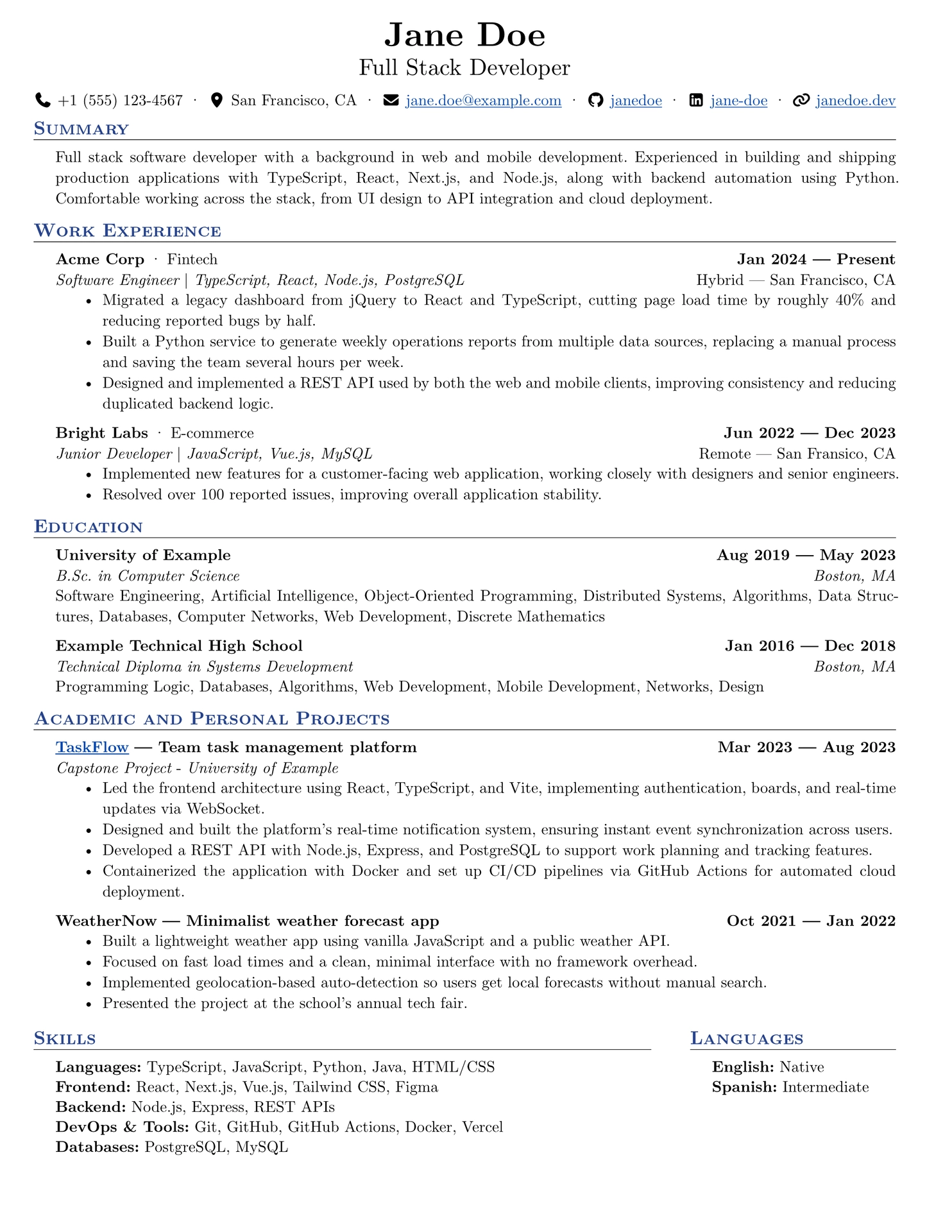
Modular, ATS-friendly résumé template for software developers.
Quick start
typst init @preview/tech-focused-resume:0.1.1
This creates a ready-to-edit résumé project. To use the package in an existing document, import its public definitions:
#import "@preview/tech-focused-resume:0.1.1": *
Minimal example
The resume function configures the page and applies the résumé layout to the
content that follows it. Pass it to a show rule with resume.with(...):
#import "@preview/tech-focused-resume:0.1.1": *

#show: resume.with(
  header-info: (
    author: (
      name: "Jane Doe",
      headline: "Software Engineer",
    ),
    contact: (
      info: (
        email: "jane.doe@example.com",
        github: "janedoe",
      ),
    ),
  ),
  style: (
    accent-color: "#26428b",
    paper: "a4",
  ),
)

#section("Summary")[
  Software engineer focused on building reliable web applications.
]

#section("Work Experience")[
  #work(
    company: "Acme Corp",
    title: "Software Engineer",
    dates: dates-helper(start-date: "2022", end-date: "Present"),
    tech-stack: "TypeScript, React, Node.js",
    modality: "Remote",
    location: "São Paulo, Brazil",
  )[
    - Built and maintained production web applications.
    - Improved delivery workflows through automation.
  ]
]
Configuration
resume
resume accepts the following dictionaries:
| Parameter | Description |
|---|---|
header-info |
Configures the author and contact information shown at the top of the page. |
style |
Configures the accent color, font, paper size, font size, and page margins. |
config |
Sets the document language and regional conventions. |
document-metadata |
Sets the PDF title, description, and keywords. |
The main header-info options are:
| Parameter | Description |
|---|---|
style |
Header arrangement: "row" or "column". |
author.name |
Name displayed in the header. |
author.headline |
Professional headline displayed below the name. |
author.position |
Author alignment: left, center, or right. |
author.uppercase |
Whether to uppercase the name and headline. |
contact.info |
Contact values such as email, github, linkedin, phone, location, and personal-site. |
contact.show-icons |
Whether to display icons next to contact values. |
contact.show-sensitive-info |
Whether to display phone and location. |
contact.position |
Contact alignment: left, center, right, or horizon. |
contact.gap |
Spacing between contact values when not using horizon. |
The style options are accent-color, font, paper, font-size, and
margin. The margin dictionary accepts top, bottom, left, and right.
The default language and region are "en" and "us".
Components
All components accept a content block where indicated, so entries can contain paragraphs, lists, links, or other Typst content.
section and grid-section
Use section(title)[content] for a full-width section. Use
grid-section(columns: ..., gutter: ..., sections: (...)) to place multiple
sections side by side. Each item in sections is normally created with
section("Title")[content].
work
#work(
  company: "Acme Corp",
  company-category: "Fintech",
  title: "Software Engineer",
  tech-stack: "TypeScript, React",
  dates: "Jan 2022 — Present",
  modality: "Hybrid",
  location: "New York, NY",
  columns: (1.5fr, 1fr),
)[
  - Describe an achievement.
]
edu
#edu(
  institution: "University of Example",
  degree: "B.Sc. in Computer Science",
  dates: "2018 — 2022",
  location: "Boston, MA",
)[
  Relevant coursework or academic achievements.
]
project
project supports an optional role, URL, tagline, relation, and relation type.
#project(
  name: "TaskFlow",
  tagline: "Team task management platform",
  role: "Lead Developer",
  url: "https://github.com/janedoe/taskflow",
  dates: "2023",
  relation: "University of Example",
  relation-type: "Capstone Project",
)[
  - Describe the project and its impact.
]
certificates
#certificates(
  name: "AWS Certified Cloud Practitioner",
  issuer: "Amazon Web Services",
  date: "March 2025",
  url: "https://aws.amazon.com/certification",
)
extracurriculars
#extracurriculars(
  activity: "Open-source contributor",
  dates: "2021 — Present",
)
skills and languages
Use these components with a list. They remove list markers while preserving
inline formatting such as *bold labels*:
#skills[
  - *Languages:* TypeScript, Python, SQL
  - *Tools:* Git, Docker, GitHub Actions
]

#languages[
  - *English:* Fluent
  - *Portuguese:* Native
]
dates-helper
dates-helper(start-date: ..., end-date: ...) joins two dates with an em dash.
It is useful for keeping date formatting consistent:
#let dates = dates-helper(start-date: "Jan 2022", end-date: "Present")
Dates: #dates
Fonts
The package does not distribute fonts. The selected font must be available in
the user’s Typst environment. The default is Calibri; the included example
uses New Computer Modern, which can be replaced with any installed font.
Credits
Based on basic-resume by stuxf, and adapted from simple-technical-resume by steadyfall. Also inspired by RenderCV.
Third-party assets
The icons in src/assets/icons/ are from Font Awesome Free
(v7.3.1) by Fonticons, Inc., licensed under
CC BY 4.0.
They are not covered by this package’s license.
License
The package library in src/ is licensed under the MIT License. See
LICENSE.
The starter files in template/ are licensed under the MIT-0 License. See
LICENSE-MIT-0. This allows users to modify and redistribute
their initialized projects without attribution requirements.
The Font Awesome icons in src/assets/icons/ are third-party assets and are
licensed separately under CC BY 4.0 as described above.