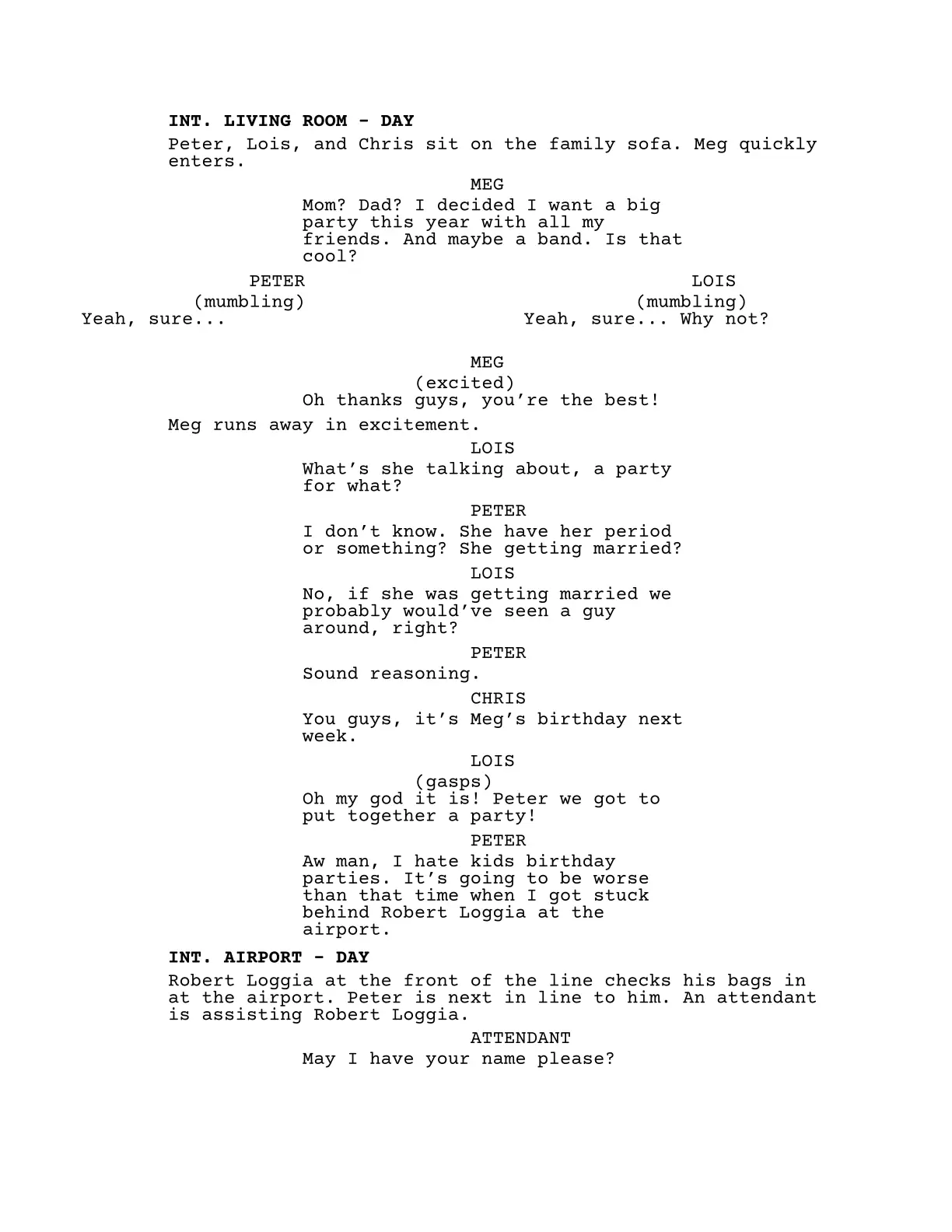
Format TV and film screenplay drafts with helpers for scene headings, dialogue, montages, and transitions. The main feature is automatic dialogue continuation across page breaks: split dialogue receives a (MORE) marker before the break and a repeated character cue with (CONT'D) on the following page.
The formatting is based primarily on the Academy of Motion Picture Arts and Sciences’ screenplay formatting sample and StudioBinder’s screenplay formatting guide.
#import "@preview/screen-scripted:0.1.0": *

/*
  Season 5, episode 10 of "Family Guy"

  Certain copyrighted materials appear in this work
  without permission from the copyright holder and is
  used under a good-faith claim of fair use
*/
#show: scripted.with(
  title: "Stuck Behind Robert Loggia",
  authors: "Seth Macfarlane",
  date: datetime(month: 8, day: 20, year: 2026),
  version: "0.0.1",
  info: [
    probablysethsemail\@domain.com \
    (555) 555-5555
  ],
  config: (
    /*
      Enable/disable input checking for some package functions
      Example: Sluglines should only expect "INT" or "EXT"
    */
    check-strict: true,
    /*
      Control the slugline formatting
    */
    bold-slugs: true,
    /*
      Set to "false" for manual dialogue continuation.
    */
    dialogue-cont: true,
    /*
      Some templates use "--" whereas others use "-". Choose
      whichever version you prefer
    */
    slug-dashes: "single",  // "single" | "double"
    /*
      Customize the continued-dialogue marker if needed
    */
    cont-str: "CONT'D",
  )
)

/*
  The "character" function prepares variables ready to be
  reused throughout the document, which is ideal for placeholder
  names, or names that may change later.
*/
#let (char1, char1-fl) = character("Peter", "Griffin")
#let (char2, char2-fl, char2-full) = character("Lois", "Patrice", "Griffin")
#let (char3, char3-fl) = character("Chris", "Griffin")
#let (char4, char4-fl) = character("Robert", "Loggia")
#let (char5) = character("Meg")

#slugline[int][living room][day]

#char1, #char2, and #char3 sit on the family sofa. Meg quickly enters.

#dialogue[#char5][
  Mom? Dad? I decided I want a big party this year with all my friends. And maybe a band. Is that cool?
]

#dual-dialogue(
  dialogue[#char1][
    (mumbling) \
    Yeah, sure\...
  ],
  dialogue[#char2][
    (mumbling) \
    Yeah, sure\... Why not?
  ]
)

#dialogue[#char5][
  (excited) \
  Oh thanks guys, you're the best!
]

Meg runs away in excitement.

// Below is not rendered in the sample image and is used
// to highlight additional features

/*
  There's also helpful shorthands that can be optionally used
*/
#d[#char1][  // dialogue
  Ugh\...
]

#sl[e][griffin house][d]  // slugline with EXT and DAY shorthands
#t[cut to]  // transition
#sl[i][kitchen][d]  // slugline with INT and DAY shorthands

Stewie prepares mail to be sent out while Brian reads the newspaper.

Fonts
Courier Prime is the recommended font for this package. DejaVu Sans Mono is the fallback font if Courier Prime is not detected in the system font library.
If Courier Prime is not installed in your system by default, it is highly recommended to download it from either:
Functions
scripted
scripted(
  title: "",
  authors: (),
  date: datetime.today(),
  version: "",
  info: [],
  config: (:),
  body,
)
Applies the screenplay layout to body, including the title page, US Letter page dimensions, margins, page numbering, and screenplay typography. It is normally used as a show rule with #show: scripted.with(..).
title: The screenplay title shown on the title page.authors: One author as a string, or multiple authors as an array of strings.date: Adatetimedisplayed on the title page.version: An optional draft or version label. An empty string hides it.info: Contact or other identifying content placed at the bottom of the title page.config: A dictionary containing any of the configuration options. Unspecified options use their defaults.body: The screenplay content. A show rule supplies this argument automatically.
slugline
slugline(intext, location, time)
intext: The interior or exterior marker, normallyINTorEXT.IandEare accepted as shorthands.location: The scene location.time: The scene time.DandNare accepted as shorthands forDAYandNIGHT.
All three arguments are automatically capitalized. Formatting and validation are controlled by check-strict, bold-slugs, and slug-dashes. The shorthand function is sl.
minislug
minislug(location)
location: The short scene heading to display.
The location is automatically capitalized and follows the bold-slugs setting. The shorthand function is ms.
dialogue
dialogue(name, ext: "", cont: false, body)
name: The character cue. It is automatically capitalized.ext: An optional cue extension such as"V.O."or"O.S.".cont: Whether the first cue should be marked with the configured continuation text.body: The dialogue content. This is a required content argument.
When dialogue-cont is true, dialogue that crosses a page boundary is handled automatically: (MORE) is placed at the bottom of the earlier page, and the character cue is repeated with the configured continuation text on the next page. Set dialogue-cont to false to manage page-break continuation manually with cont: true.
#dialogue("Alex", ext: "V.O.")[
  This dialogue body may continue across a page break.
]
The shorthand function is d.
dual-dialogue
dual-dialogue(d1, d2)
d1: The dialogue content displayed in the left column.d2: The dialogue content displayed in the right column.
Creates a two-column block for simultaneous dialogue. Pass a dialogue call for each argument.
montage
montage(desc, body)
desc: A short description used in the montage heading. It is automatically capitalized.body: The montage content. This is a required content argument.
An END MONTAGE marker is added after the body automatically.
transition
transition(tr)
tr: The transition text, such asCUT TOorFADE OUT.
The transition is automatically capitalized and right-aligned. The shorthand function is t.
character
character(..args)
Creates reusable variants of a character name. It accepts one to three name strings:
- One string returns the first name.
- Two strings return
(first, first-last). - Three strings return
(first, first-last, first-middle-last).
// Example usage
#let (alice, alice-fl, alice-full) = character("Alice", "Barney", "Miller")

#alice      // outputs "Alice"
#alice-fl   // outputs "Alice Miller"
#alice-full // outputs "Alice Barney Miller"
Configuration
check-strict
When true, functions such as slugline reject unconventional values. The default is true.
bold-slugs
Controls whether scene headings are bold. The default is true.
dialogue-cont
Controls automatic dialogue continuation across page breaks. When true, the package inserts (MORE) and repeats the continued character cue automatically. Set it to false to manage continuation with the cont argument to dialogue. The default is true.
slug-dashes
Accepts "single" or "double" and controls the dash used by slugline and montage. The default is "double".
cont-str
Sets the text used for continued dialogue cues. The default is "CONT'D".
Barebones Template
#import "@preview/screen-scripted:0.1.0": *

#show: scripted.with(
  title: "YOUR TITLE HERE",
  authors: ("NAME 1", "NAME 2"),
  date: datetime.today(),
  version: "0.0.1",
  info: [
    YOUR-EMAIL\@domain.com \
    (555) 555-5555
  ],
  config: (
    check-strict: true,
    bold-slugs: true,
    dialogue-cont: true,
    slug-dashes: "single",
    cont-str: "CONT'D",
  )
)

#slugline[INT][ROOM][DAY]

You sit at your desk, ready to write something for the world to see.