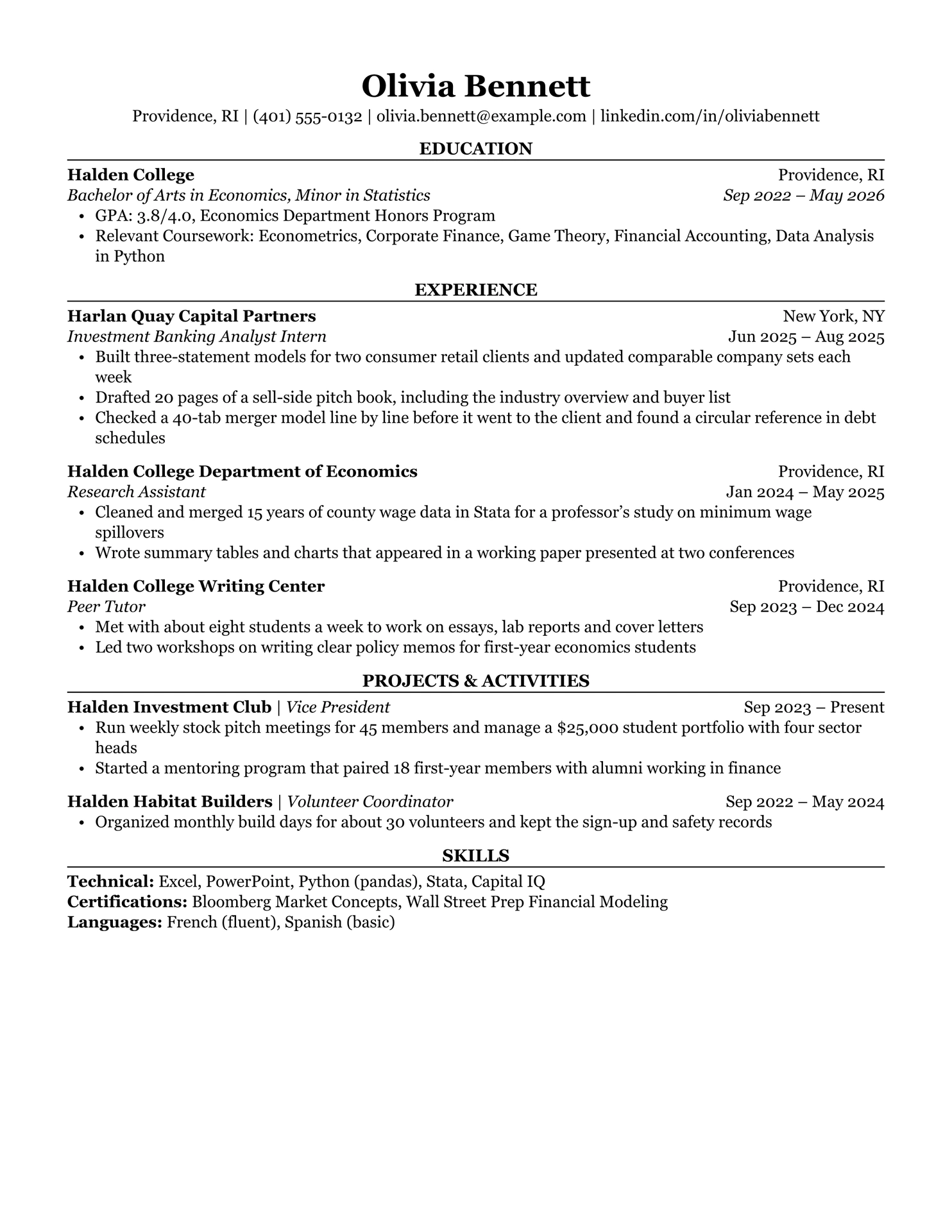
A one-page resume in the layout a lot of university career offices recommend: serif type, centered headings over a thin rule, education first. It’s a Typst port of the Classic template from ReadableResume, where the same design is available for Google Docs and Word.
Everything sits in one column and reads top to bottom. There are no tables, text boxes or icons, so applicant tracking systems get the text out in the right order.
Getting started
In the Typst web app, click Start from template and search for
readable-classic.
On the command line:
typst init @preview/readable-classic:0.1.0 my-resume
cd my-resume
typst compile main.typ
Usage
#import "@preview/readable-classic:0.1.0": *

#show: resume.with(
  name: "Olivia Bennett",
  contact: (
    "Providence, RI",
    "(401) 555-0132",
    "olivia.bennett@example.com",
    "linkedin.com/in/oliviabennett",
  ),
)

= Education

#education(
  school: "Halden College",
  location: "Providence, RI",
  degree: "Bachelor of Arts in Economics",
  date: "Sep 2022 – May 2026",
)[
  - GPA: 3.8/4.0, Economics Department Honors Program
]

= Experience

#experience(
  company: "Harlan Quay Capital Partners",
  location: "New York, NY",
  title: "Investment Banking Analyst Intern",
  date: "Jun 2025 – Aug 2025",
)[
  - Built three-statement models for two consumer retail clients
]

= Projects & Activities

#activity(name: "Halden Investment Club", role: "Vice President", date: "Sep 2023 – Present")[
  - Run weekly stock pitch meetings for 45 members
]

= Skills

#skills((
  Technical: "Excel, PowerPoint, Python (pandas), Stata",
  Languages: "French (fluent), Spanish (basic)",
))
Section headings are ordinary Typst headings and get set in capitals for you. Bullets are ordinary Typst lists. A paragraph under a heading, such as a short summary, is set as body text.
One thing that catches people out: $ starts math in Typst, so write \$25,000
in a bullet.
Functions
resume: page setup and the header with your name and contact line. Apply it with#show: resume.with(...).education(school, location, degree, date): school and location on the first line, degree and dates in italics on the second.experience(company, location, title, date): company and location first, then the job title in italics with the dates.activity(name, role, date): a single line, “Name | Role” with the dates on the right. For clubs, volunteering and projects.skills(lines): takes a dictionary and prints one line per entry with the label in bold.
The entry functions take named arguments, all optional. Leave one out and it
just isn’t printed. Bullets go in the trailing [...] block, which you can also
leave off.
resume parameters
| Parameter | Default | Notes |
|---|---|---|
name |
"" |
Set in 20 pt bold. |
contact |
() |
Strings, joined by vertical bars. Emails and web addresses become links. |
paper |
"us-letter" |
"a4" works too. |
margin |
auto |
0.6 in on US Letter, 15 mm on anything else. |
font |
("Georgia", "Libertinus Serif") |
The first one installed is used. |
font-size |
10.5pt |
The name and headings scale with it. |
Fonts
The design uses Georgia, which comes with Windows and macOS, so on those systems
it looks exactly like the original with nothing to install. Where Georgia isn’t
available, such as Linux or the Typst web app, Typst warns about the missing
font and falls back to Libertinus Serif, which ships with Typst. For something
closer to Georgia there, upload Gelasio (free on Google Fonts, drawn to
Georgia’s proportions) and set font: "Gelasio".
License
lib.typ is MIT. The template/ folder, which is the part you edit and send
out as your own resume, is MIT-0, so nothing has to stay in your finished
resume. The person, schools and companies in the sample are made up.