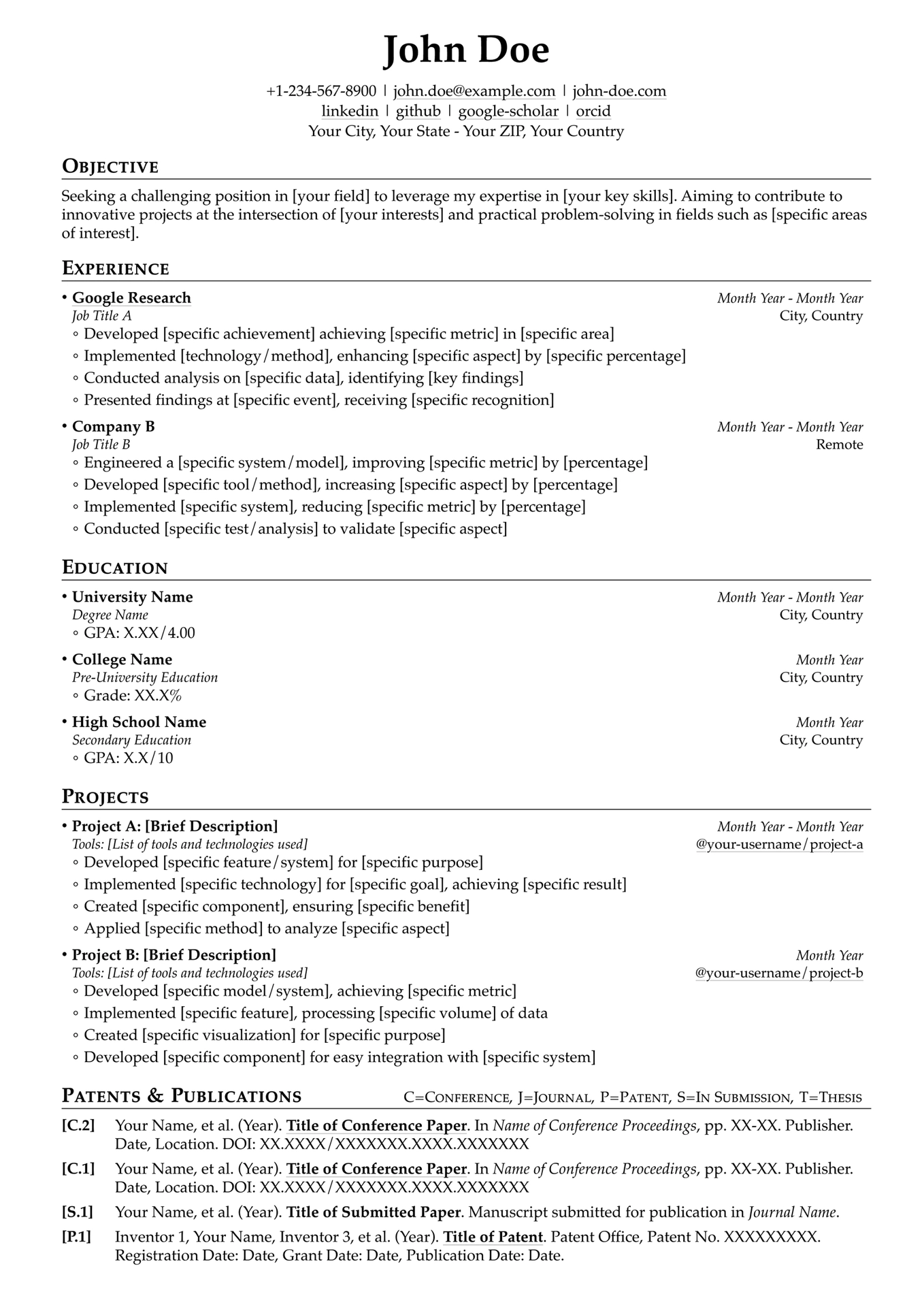
A professional, highly configurable academic CV template built with Typst. We hope this template helps you create a standout academic CV. Good luck with your academic endeavors!

|

|

|
| P1 | P2 | P3 |
You can find the examples in examples/main.pdf.
- Clean & professional design — Organized layout suitable for various academic disciplines, with customizable sections for education, experience, publications, awards, and more
- Powered by Typst — Faster compilation, simpler syntax, and easier setup than LaTeX; works locally or in the Typst online editor with no package installation
- Friendly, composable API — Modular primitives and templates (
r2c2-entry-list,publication-entry-list, etc.) that can be mixed and reused with minimal boilerplate - Refined spacing & typography — Fine-tuned vertical spacing (automatically adjusts based on font size) for headings, paragraphs, lists, and entries to maintain consistent visual rhythm across sections
- Elegant link styling — Links use a subtle light-gray underline instead of colored text, keeping the focus on content while remaining identifiable; an optional lightweight SVG link icon is available for compact link indicators
- Fully configurable — All settings (fonts, margins, heading styles, list spacing, link appearance) are exposed as named parameters with sensible defaults
Quick Start
Use the following CLI command to initialize a new project from this template:
typst init @preview/pro-academic-cv
Or search for pro-academic-cv on Typst Universe to use it directly in the online editor.
Interface Reference
resume — Page & Document Setup
The top-level show rule that configures the entire document. All parameters have sensible defaults and can be overridden individually.
#show: resume.with(
  margin: (left: 1.4cm, right: 1.2cm, top: 0.8cm, bottom: 1cm),
  font-settings: (
    font-family: "Palatino",
    font-size: 10pt,
    author-font-size: 25pt,
    lang: "en",
  ),
  par-settings: (
    leading: 0.5em,
    spacing: 0.5em,
  ),
  list-settings: (
    bullet-list-spacing: 0.7em,
    numbered-list-spacing: 0.7em,
  ),
  link-line-settings: (
    stroke: 0.5pt + luma(200),
    offset: 2pt,
  ),
  heading-settings: (
    above-spacing: 1.2em,
    below-spacing: 0.6em,
    section-title-size: 1.1em,
    section-title-weight: "semibold",
    section-note-size: 0.8em,
    section-note-weight: "light",
    section-line-above-spacing: -0.85em,
    line-length: 100%,
    line-stroke: 0.04em + black,
  ),
  author-info: (
    name: "John Doe",
    primary-info: [+1-234-567-8900 | john.doe\@example.com | john-doe.com],
    secondary-info: [linkedin | github | google-scholar | orcid],
    tertiary-info: "Your City, Your State - Your ZIP, Your Country",
  ),
  author-position: center,
)
| Parameter | Type | Description |
|---|---|---|
margin |
dictionary | Page margins (left, right, top, bottom) |
font-settings |
dictionary | Font family, sizes, and language |
par-settings |
dictionary | Paragraph leading and spacing |
list-settings |
dictionary | Bullet and numbered list spacing |
link-line-settings |
dictionary | Underline stroke and offset for hyperlinks |
heading-settings |
dictionary | Section title size, weight, line style, and spacing |
author-info |
dictionary | Name and up to three rows of contact info |
author-position |
alignment | Header alignment (default: center) |
link-icon — Inline Link Icon
Renders an SVG link icon inline with text. Useful for compact link indicators in entry headers.
#link("https://example.com")[#link-icon()]
#link("https://example.com")[#link-icon(color: blue, height: 1em, baseline: 15%)]
| Parameter | Type | Default | Description |
|---|---|---|---|
color |
color | rgb("#1a405d") |
Icon stroke color |
height |
length | 0.9em |
Icon height |
baseline |
ratio | 20% |
Vertical baseline shift |
Section Heading Notes
Section headings support an inline note via the (note: ...) syntax:
== Patents~&~Publications (note:C=Conference, J=Journal, P=Patent)
This renders the main title in small caps on the left and the note text in lighter weight on the right.
Primitives
Low-level building blocks used directly or composed into templates.
row2col — Two-Column Row
A single row with left-aligned and right-aligned content.
#row2col([Left content], [Right content])
single-line-entry — Single-Line Entry
A labeled entry with a bold label, inline value, and right-aligned content. Use for memberships, certifications, and simple dated items.
#single-line-entry("Programming Languages:", [Python, Rust, Go], [])
#single-line-entry([Certification A], [], [Month Year])
| Parameter | Type | Default | Description |
|---|---|---|---|
label |
content | — | Bold label text |
value |
content | — | Inline value after the label |
rcontent |
content | — | Right-aligned content |
label-args |
dictionary | (weight: "bold") |
Override label text style |
rc-args |
dictionary | (size: 0.9em, style: "italic") |
Override right-content text style |
multi-line-list — Multi-Line List
Renders items as a bullet or numbered list.
#multi-line-list(
  [Item 1],
  [Item 2],
)
#multi-line-list(list-type: "enum", [First], [Second])
| Parameter | Type | Default | Description |
|---|---|---|---|
list-type |
string | "list" |
"list" for bullets, "enum" for numbered |
list-args |
dictionary | (:) |
Extra arguments passed to list() |
enum-args |
dictionary | (:) |
Extra arguments passed to enum() |
multi-line-text — Multi-Line Text
Renders content items separated by line breaks (no bullets).
#multi-line-text(
  [Line 1],
  [Line 2],
)
r2c2-entry-header — Two-by-Two Entry Header
A two-row, two-column header block. Top-left is bold, others are italic/smaller.
#r2c2-entry-header(
  top-left: [Company Name],
  top-right: [2020 - 2024],
  bottom-left: [Software Engineer],
  bottom-right: [San Francisco, CA],
)
| Parameter | Type | Default Style | Description |
|---|---|---|---|
top-left |
content | bold | Primary title (company, school, project) |
top-right |
content | 0.9em, italic | Date range |
bottom-left |
content | 0.9em, italic | Subtitle (role, degree) |
bottom-right |
content | 0.9em | Location or link |
*-args |
dictionary | — | Override text style for any quadrant |
r2c2-entry — Entry with List Items
Combines an r2c2-entry-header with a bullet (or numbered) list of detail items underneath.
#r2c2-entry(
  entry-header-args: (
    top-left: [Google Research],
    top-right: [2022 - Present],
    bottom-left: [Research Scientist],
    bottom-right: [Mountain View, CA],
  ),
  list-items: (
    [Developed a novel approach to ...],
    [Published 3 papers in top venues],
  ),
)
| Parameter | Type | Default | Description |
|---|---|---|---|
entry-header-args |
dictionary | — | Arguments forwarded to r2c2-entry-header |
list-items |
array | () |
Array of content items |
list-type |
string | "list" |
"list" for bullets, "enum" for numbered |
list-args |
dictionary | (spacing: 0.5em) |
Extra arguments for list() |
enum-args |
dictionary | (spacing: 0.5em) |
Extra arguments for enum() |
personal-info — Personal Info Block
A multi-line text block for a single person’s contact information.
#personal-info(
  [Prof. Jane Smith],   // name
  [Associate Professor], // title
  [MIT CSAIL],           // org
  [jane\@mit.edu],      // email
  [+1-555-0100],        // phone
  [Thesis Advisor],     // note
)
Templates
Higher-level components that compose primitives into repeatable section patterns.
r2c2-entry-list — Entry List
Renders a vertical stack of r2c2-entry items. Use for experience, education, projects, awards, leadership, and volunteer sections.
#r2c2-entry-list(
  (
    entry-header-args: (:),
    list-items: (:),
  ),
  (
    entry-header-args: (:),
    list-items: (:),
  ),
)
| Parameter | Type | Default | Description |
|---|---|---|---|
spacing |
length | 0.8em |
Vertical gap between entries |
..entries |
variadic | — | Each entry is a dictionary forwarded to r2c2-entry |
publication-entry-list — Publication List
Auto-numbered publication list grouped by category prefix (e.g., C for Conference, J for Journal).
#publication-entry-list(
  (
    (category: "C", value: [Author et al. (2024). *Title*. In _Proc. ..._.]),
    (category: "C", value: [Author et al. (2023). *Title*. In _Proc. ..._.]),
    (category: "J", value: [Author et al. (2023). *Title*. _Journal_, ...]),
    (category: "P", value: [Inventor et al. (2023). *Patent Title*. ...]),
  ),
)
| Parameter | Type | Default | Description |
|---|---|---|---|
entries |
array | — | Array of (category: str, value: content) dictionaries |
number-style |
string | "descending" |
"descending": most recent = highest number; "ascending": first = 1 |
column-gutter |
length | 1.3em |
Gap between label and content columns |
row-gutter |
length | 0.9em |
Vertical gap between entries |
label-width |
length/auto | auto |
Width of the label column |
personal-info-list — Personal Info List
Renders a list of personal-info blocks. Use for reference sections.
#personal-info-list(
  (
    (name: [Prof. Jane Smith], title: [Associate Professor], org: [MIT], email: [jane\@mit.edu], phone: [+1-555-0100], note: [Thesis Advisor]),
    (name: [Dr. John Doe], title: [Senior Engineer], org: [Google], email: [john\@google.com], phone: [+1-555-0200], note: [Manager]),
  ),
)
| Parameter | Type | Default | Description |
|---|---|---|---|
items |
array | — | Array of personal info dictionaries |
spacing |
length | 1em |
Vertical gap between entries |
list-type |
string | "enum" |
"enum" for numbered, "list" for bullets |
Dependency Graph
Shows how primitives compose into templates.
Primitives                          Templates
──────────                          ─────────

row2col ◄─────────┐
                   ├── r2c2-entry-header ◄── r2c2-entry ◄── r2c2-entry-list
                   │
single-line-entry ◄┘
                        (used directly with multi-line-list)

multi-line-text ◄────── personal-info ◄──── personal-info-list

multi-line-list          (used directly in sections)

publication-entry-list   (standalone template, uses grid internally)

link-icon                (standalone primitive, used inline)
Detailed composition:
| Template | Depends on (Primitives) |
|---|---|
r2c2-entry-header |
row2col |
r2c2-entry |
r2c2-entry-header |
r2c2-entry-list |
r2c2-entry → r2c2-entry-header → row2col |
personal-info |
multi-line-text |
personal-info-list |
personal-info → multi-line-text |
publication-entry-list |
(self-contained, uses grid) |
Contributing
Contributions are welcome! Please feel free to submit issues and pull requests.
License
This project is licensed under the MIT License.
Original Template Attribution
This Typst template is derived from the Academic CV Template - Overleaf, Online LaTeX Editor by Dubasi Pavan Kumar, originally written in LaTeX and licensed under the Creative Commons Attribution 4.0 International License (CC BY 4.0).