Declarative raytracing in Typst
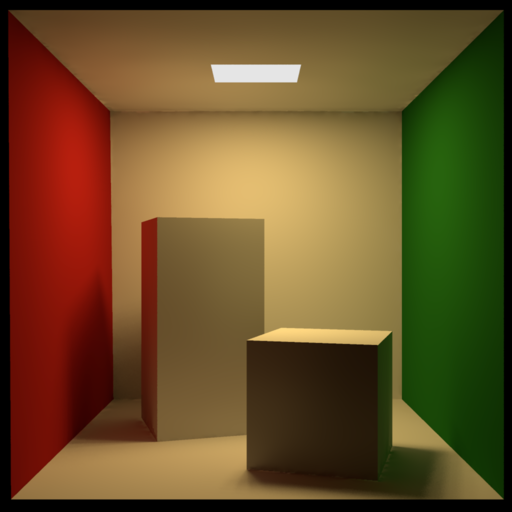
A Typst plugin that embeds the
POV-Ray 3.8 ray-tracer, compiled to
WebAssembly via Emscripten. Write a POV-Ray
scene in your .typ document and get a rendered PNG.
Feel free to read the documentation to see more examples and options.
Usage
#import "@preview/povrayst:0.1.0": pov, render
#show raw.where(lang: "povray"): pov

```povray
camera { location <0, 2, -5> look_at 0 }
light_source { <4, 6, -4> rgb 1.2 }
sphere { 0, 1 pigment { rgb <1, 0.4, 0.15> } }
```

// Or load from a file:
#render(read("scene.pov"))
pov(code, ..kwargs) accepts the scene as a raw block or a string;
render(scene, ..kwargs) accepts a string only (use it with
read()). Both take the same ~25 keyword arguments (width, height,
quality, antialiasing, gamma, tracing depth, partial-render section,
includes, …).
Syntax highlighting
The package ships povray.sublime-syntax
covering the full POV-Ray SDL, exposed through the highlight show
rule. Apply it once at the top of your document:
#import "@preview/povrayst:0.1.0": pov, render, highlight
#show: highlight
#show raw.where(lang: "povray"): pov
After this, every fenced ```povray ``` block in the document
(including the ones rendered via the pov show rule above) is
highlighted by Typst’s syntect integration — no extra file to copy.
Config reference
Every keyword argument to render() / pov(), its default, and the
POV-Ray option it maps to (verbatim from POV-Ray’s .ini /
command-line reference).
Passing none suppresses the flag so POV-Ray’s own default stays in
force. The plugin always sets +FN (PNG), -D (no display), and
Work_Threads=1.
| kwarg | default | POV-Ray option | effect |
|---|---|---|---|
| Includes | |||
includes |
(:) |
Typst-side #include expansion |
dictionary {name: content} spliced before parsing |
| Output resolution | |||
width |
800 |
Width |
image width in pixels |
height |
600 |
Height |
image height in pixels |
| Quality | |||
quality |
9 |
Quality (0–11) |
0 ambient only, 2 +shadows, 5 +reflection, 9 full radiosity |
| Antialiasing | |||
antialias |
true |
Antialias=on/off |
master switch for adaptive supersampling |
aa-threshold |
0.3 |
Antialias_Threshold |
colour delta that triggers extra samples; lower = smoother |
aa-method |
2 |
Sampling_Method (1/2/3) |
1 fixed grid, 2 adaptive recursive, 3 generic oversampling (3.8+) |
aa-depth |
3 |
Antialias_Depth (1–9) |
recursion depth; up to depth² samples/pixel |
aa-jitter |
true |
Jitter=on/off |
randomise sub-pixel positions to break up aliasing |
aa-jitter-amount |
none |
Jitter_Amount |
jitter magnitude 0.0–1.0 |
aa-gamma |
none |
Antialias_Gamma |
gamma used when comparing sub-sample colours |
| Gamma | |||
display-gamma |
none |
Display_Gamma |
gamma the final image is rendered for |
file-gamma |
none |
File_Gamma |
gamma assumed for rgb <...> colour literals in the scene |
| Tracing | |||
max-trace-level |
none |
Max_Trace_Level |
cap on reflection / refraction ray depth |
bounding |
none |
Bounding=on/off |
toggle automatic bounding-slab acceleration |
bounding-threshold |
none |
Bounding_Threshold |
minimum children before an auto-bound is built |
remove-bounds |
none |
Remove_Bounds=on/off |
discard user bounded_by when POV-Ray’s own bound is tighter |
split-unions |
none |
Split_Unions=on/off |
split non-overlapping union children into separate bounds |
| Partial render | |||
start-row |
none |
Start_Row |
render only this pixel-row range |
end-row |
none |
End_Row |
(integers ≥ 1 or fractions 0…1) |
start-column |
none |
Start_Column |
pixel-column range |
end-column |
none |
End_Column |
|
| Output encoding | |||
output-alpha |
false |
Output_Alpha=on/off |
emit RGBA PNG; use with background { color rgbt <...,1> } |
compression |
none |
Compression (0–9) |
PNG deflate level, 0 none, 9 max |
| Escape hatch | |||
extra |
() |
raw command strings appended verbatim | any flag from POV-Ray’s .ini / CLI reference |