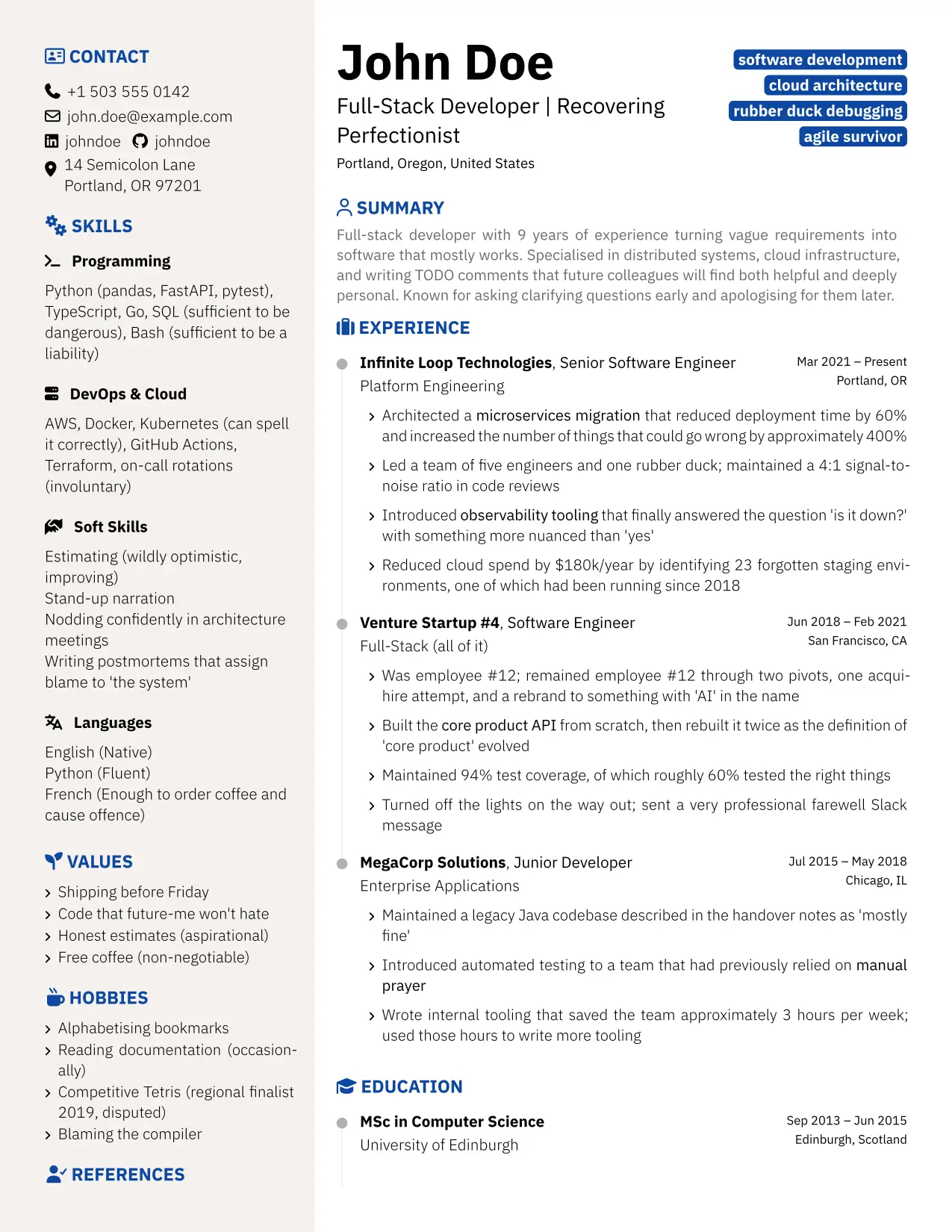
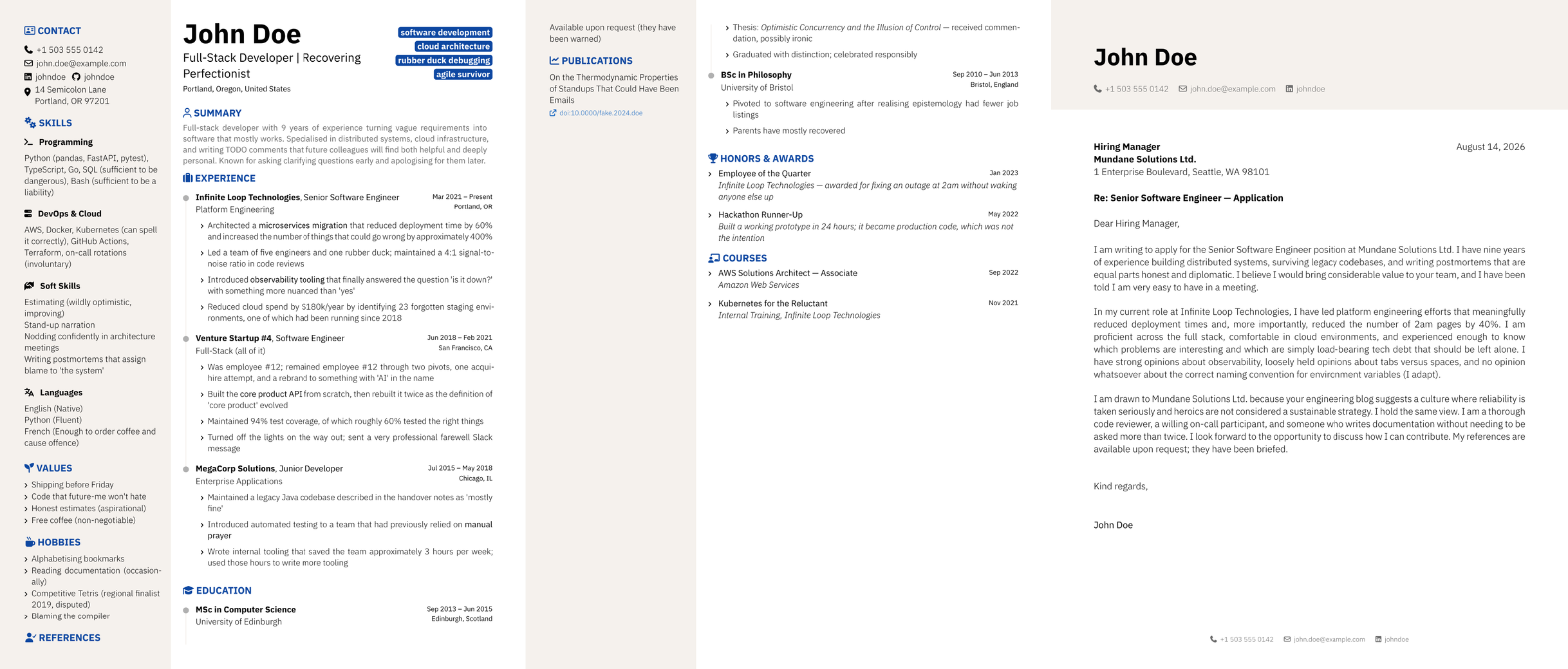
A Typst package for not-a-boring CV - data-driven, fully configurable, two-column layout


A data-driven CV and cover letter package for Typst. You write your resume in a .yml (or .toml) data file - the template reads it and renders the PDF. Layout, language, section order, icons and per-company variants are all driven from the data, so day to day you only edit data. The cv.typ / letter.typ files in your project are entrypoints you compile; you can also edit them for advanced options (colours, fonts, social-network mapping), but you never touch the package itself (src/).
Features
- Data-driven - your whole CV lives in
cv.yml/letter.yml; no source edits - YAML or TOML - pick either, identical output
- Configurable from the data - layout, locale, section order, titles and icons all set in a
meta:block - ATS-friendly layouts - a single-column
ats-splitand a full-width header band, plus tagged PDF/UA-1 output - Per-company variants - a file
inherit:s a base and overrides only what changes - Schema-backed - editor autocomplete/validation,
make validate, and a generated field reference
Prerequisites
-
Typst CLI - follow the official instructions.
-
Fonts - polycv requires two font families installed as system fonts:
IBM Plex Sans
# Debian/Ubuntu (Bookworm+)
sudo apt install fonts-ibm-plex

# Manual (all platforms)
mkdir -p ~/.local/share/fonts/ibm-plex
curl -L https://github.com/IBM/plex/releases/latest/download/OpenType.zip \
  | unzip -j - "ibm-plex-sans/fonts/complete/ttf/*.ttf" -d ~/.local/share/fonts/ibm-plex/
fc-cache -f
Font Awesome 7 Free
Download the Free for Desktop package from fontawesome.com/download, then:
mkdir -p ~/.local/share/fonts/font-awesome-7
# extract the downloaded archive, then:
cp path/to/fontawesome-free-*-desktop/otfs/*.otf ~/.local/share/fonts/font-awesome-7/
fc-cache -f
Quick start
1. Create your project
typst init @preview/polycv:0.2.1
This creates a polycv/ folder containing your data files (cv.yml, letter.yml, and their .toml equivalents) and the template entrypoints (cv.typ, letter.typ, application.typ). You edit the data files; the .typ files you only compile.
Tip - editor validation. The data files carry a
$schemaheader, so an editor with the YAML (Red Hat) or Tombi (TOML) extension autocompletes and validates every field as you type.
2. Fill in your data
Edit cv.yml:
cv:
  name: "Jane Smith"
  headline: "Software Engineer"
  email: "jane@example.com"
  phone: "+1 555 000 0000"
  summary: "Brief professional summary."
  profiles:
    - network: LinkedIn
      username: janesmith
  experience:
    - company: "Acme Corp"
      position: "Senior Engineer"
      start_date: "2021-03"
      end_date: "present"
      highlights:
        - "Built thing"
        - "Improved other thing"
Prefer TOML? Edit cv.toml instead (same fields) and add --input fmt=toml when you compile. Edit letter.yml similarly for your cover letter. FIELDS.md lists every available field with its type and a one-line description.
3. Build
typst compile cv.typ
typst compile letter.typ
typst compile application.typ        # CV + letter in one PDF
Your data is validated as it compiles - an invalid field stops the build and names it (e.g. /meta/locale), everywhere including the web app. An optional Makefile is available for local use (make builds incrementally, make watch live-previews); FIELDS.md lists every field. Bilingual CV? It’s just two files - the prefix before the first - picks the template, so name them cv-en.yml and cv-fr.yml (set locale in each, see below); both build automatically. Same for letters (letter-en.yml, …).
Configure from your data (meta:)
Presentation is controlled by an optional meta: block at the top of your data file - layout, language, section order, titles and icons. No .typ editing.
meta:
  photo: photo.jpg     # path to your photo (relative to the data file)
  locale: fr           # section titles + month names in French
  layout: header-band  # basic | ats-split | header-band (see below)
cv:
  name: "Jane Smith"
  # ...
Pick a layout
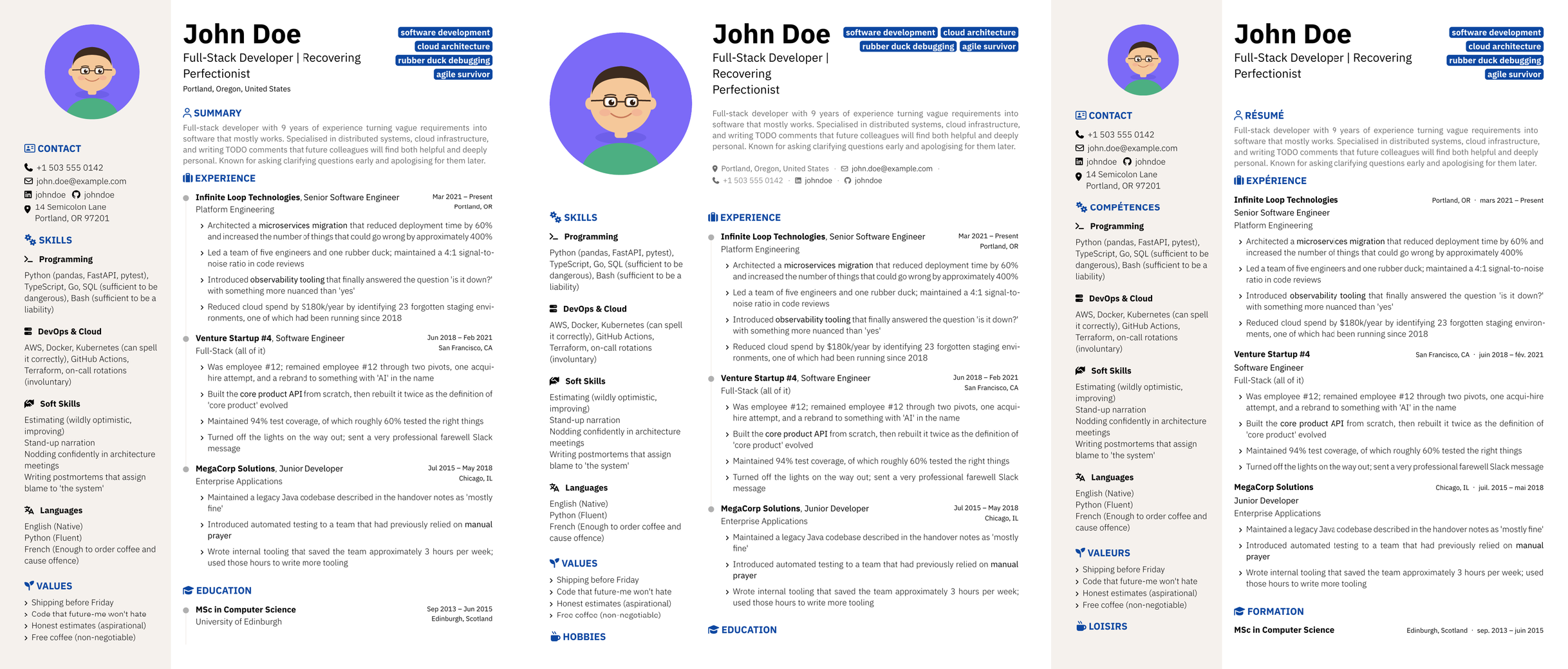
Left to right, all from the same data: Standard | Header band with the summary inside the band | ATS split rendered in French with inline entry dates and no timeline.
| Layout | meta: value |
Description |
|---|---|---|
| Basic | layout: basic (default) |
Name and headline atop the main column; photo and contact in the tinted sidebar |
| Header band | layout: header-band |
Full-width header: round photo, name, headline and a one-line contact row; no sidebar tint |
| ATS split | layout: ats-split |
Two-column header (photo left, name/headline right), sidebar keeps its tint; friendliest to ATS parsers |
Tune the header further (all work in any layout): summary-in-header: true moves the summary into the header; contact-in-header: true moves the contact line into the header instead of the sidebar; photo-size: 95 sets the photo diameter (percent of sidebar width); keywords-lines: 3 spreads keyword badges over 3 lines (0 = one per line).
Language
locale: fr translates the section titles and month names to French (en is the default). Other languages: keep your own titles via section-titles, or set month-names in the template (see Advanced).
Sections: order, placement, titles, icons
Every section can be reordered, moved between the two columns, retitled, or given a different icon - all from meta::
meta:
  # Order and column placement. Omit a section to hide it. A section listed in
  # sidebar-sections renders as a compact block instead of the wide timeline.
  sidebar-sections: ["photo", "contact", "education", "skills", "hobbies"]
  main-sections:    ["summary", "experience", "awards", "volunteering", "courses"]
  # Rename / re-icon any section (icons are FontAwesome 7 names):
  section-titles:
    awards: "PRIZES & RECOGNITION"
  section-icons:
    awards: medal
    hobbies: person-running
Skill groups
Skill groups live under cv.skills, keyed by a stable name. The heading and icon travel with the group, so they stay put across languages (no name-keyed icon map to translate). meta.skill-order picks which groups show, and in what order - omit a key to hide it; drop skill-order entirely to show them all in data order.
cv:
  skills:
    programming: { title: Programming, icon: terminal, items: "Python, Go, SQL" }
    languages:   { title: Languages,   icon: language, items: ["English", "French"] }
meta:
  skill-order: [languages, programming]
The key is the identifier (used by skill-order and inheritance); title is the display heading (defaults to the key). Because groups are keyed, a variant can rename a group or change its icon by name, and you can add new groups on the fly.
Customize for a company
A tailored CV is just another data file that inherits a base and overrides only what differs. Add cv-acme.yml:
inherit: cv.yml                                     # or cv-fr.yml - path relative to this file
cv:
  headline: "Backend Engineer - Distributed Systems"
  keywords: ["Go", "Kubernetes", "observability"]   # replaces the base list
  experience:
    - highlights:
        - ~                                          # keep base highlight 0
        - "Rephrased for Acme"                       # replace highlight 1
make builds it to cv-acme.pdf like any other file - no special command. The parent is deep-merged: dictionaries by key, arrays by index, other values replaced, and ~ (null) at an array position keeps the base item. Inheritance can chain (cv-acme.yml -> cv-fr.yml -> cv.yml), and editing a base rebuilds only the files that inherit it. Cover letters work the same way (letter-acme.yml with inherit: letter.yml).
All meta: keys
photo, photo-size, locale (en/fr), layout (basic/ats-split/header-band), summary-in-header, contact-in-header, keywords-lines, entry-inline-meta (company + location/dates on the title line), show-timeline (dots/line on experience & education), sidebar-sections, main-sections, section-titles, section-icons, skill-order. Any of these can also be passed on the command line, e.g. typst compile cv.typ --input layout=header-band (command-line inputs win over meta:).
Advanced: template parameters
A few knobs aren’t exposed through meta:: colours, social-network mapping, non-French locales, fonts and per-icon overrides. Set them as arguments to the cv(...) / letter(...) call in your project’s cv.typ / letter.typ - the entrypoints you already have. You still never edit the package under src/.
#show: cv.with(
  // ... keep your existing arguments ...
  theme: (secondary: rgb("#B71C1C"), sidebar-bg: rgb("#FFF8F8")),
  profiles-config: (
    LinkedIn:  (icon: "linkedin", url-base: "https://linkedin.com/in/"),
    GitHub:    (icon: "github",   url-base: "https://github.com/"),
    Portfolio: (icon: "globe",    url-base: "https://"),
  ),
)
The
meta:keys above (layouts, sections, titles, icons…) are themselvescv()parameters, so they can equally be set here - but for those, prefermeta:in the data file.
Theme / colours
#show: cv.with(theme: (secondary: rgb("#B71C1C"), sidebar-bg: rgb("#FFF8F8")))
| Key | Default | Description |
|---|---|---|
primary |
#000000 |
Main text colour |
secondary |
#0D47A1 |
Section titles and keyword badges |
accent |
#000000 |
Dates, entry summaries, headline |
links |
#1565C0 |
Hyperlinks |
sidebar-bg |
#F5F1ED |
Sidebar tint (standard and ats-split layouts) |
summary |
#6B6B6B |
Summary text and header contact line |
header-bg |
white |
Header band background (none = transparent) |
header-rule |
none |
Horizontal rule under the header band |
sidebar-rule |
none |
Vertical rule between the columns (header-band layouts) |
Header-band layouts drop the sidebar tint; set header-rule and/or sidebar-rule to a colour (e.g. rgb("#D5D5D5")) to draw separators instead.
Locale (other languages)
locale: fr in meta: covers French. For another language, set the month names and date separator directly:
#show: cv.with(
  // ... keep your existing arguments ...
  month-names:    ("jan.", "fév.", "mars", "avr.", "mai", "juin",
                   "juil.", "août", "sep.", "oct.", "nov.", "déc."),
  date-separator: " – ",
)
Other CV parameters
| Parameter | Default | Description |
|---|---|---|
photo-size |
70% |
Photo diameter as a fraction of sidebar width (ignored by the header band) |
bullet-icon |
"angle-right" |
Icon for all list bullets |
address-icon |
"location-dot" |
Icon for the address field |
doi-icon |
"external-link" |
Icon on publication DOI links |
justify-sidebar |
false |
Justify text in the sidebar |
skill-icons |
(defaults) | Map skill-group names to icons |
text-size |
(defaults) | Override any font size by key |
font-weight |
(defaults) | Override any font weight by key |
Letter parameters
| Parameter | Default | Description |
|---|---|---|
footer-items |
("phone", "email", "linkedin") |
Fields shown in the page footer |
contact-icons |
(defaults) | Icon names for contact fields |
contact-url-bases |
(defaults) | URL prefixes for email/linkedin/github |
Project files
typst init gives you these. Edit the data files; compile (but don’t rewrite) the .typ entrypoints.
| File | Role |
|---|---|
cv.yml / cv.toml |
Your CV data (personal info, experience, education, meta:…) |
letter.yml / letter.toml |
Your cover-letter data (sender, recipient, body) |
cv.typ |
Entrypoint: renders the CV via #show: cv.with(...) |
letter.typ |
Entrypoint: renders the cover letter |
application.typ |
Entrypoint: CV followed by the letter in one PDF |
Developing polycv
For contributing to the package itself (not needed to use it).
git clone https://github.com/bbinet/polycv
cd polycv
make build          # compile every content/ file (incremental)
make watch          # live-preview all content/ files + re-validate on change (WATCH=one file)
make build-examples # compile the shipped sample data only
make build-layouts  # compile the header layout variants side by side
make validate       # validate data files against schema.cue (cue vet)
make yaml-reference # print an annotated reference of every CV field
Personal data files go in content/ (gitignored). The prefix before the first - selects the template: cv-<slug>.yml -> cv.typ, letter-<slug>.yml -> letter.typ. make build compiles every such file and validates it against the schema first (resolving any inherit: chain, so a customized file is checked as the complete CV it produces).
Dependencies
| Tool | Purpose |
|---|---|
typst |
Compiler |
make |
Build orchestration |
cue |
Schema authoring + data validation (make schema, make validate) |
jq |
Schema key ordering (make schema) |
python3 |
Inherit resolver for validation + field reference (make validate, make yaml-reference) |
bump-my-version |
Version bumping (make bump-patch) |
cspell |
Spell checking (make spell) |
imagemagick |
Pixel-diffing the YAML vs TOML output (make test-yaml) - optional |
A shell.nix is provided for a reproducible environment with all tools and font paths pre-configured.
Releasing
A release is cut with a single command and published to the Typst package registry automatically:
make release-patch # or release-minor / release-major
That target runs bump-my-version, which rewrites the version in every file it
tracks (typst.toml, the template imports, the schema URLs in the sample data,
the README badge and the typst init command - the full list lives in
.bumpversion.toml), commits that change, and creates a v<version> tag. It
then pushes the commit and the tag. Start from a clean working tree, since the
bump makes its own commit.
Pushing a v*.*.* tag triggers .github/workflows/release.yml, which:
- creates the GitHub release for the tag;
- builds the package directory
packages/preview/polycv/<version>/(the repo minus dev-only files - see the exclude list in the workflow) and drops it into a branch of thebbinet/typst-packagesfork; - force-pushes that branch, which opens or updates in place the pull
request against
typst/packages- the registry behind@preview. Force-pushing (rather than recreating the branch) keeps an already-open PR and refreshes it instead of closing it.
Once that PR is reviewed and merged upstream, @preview/polycv:<version>
becomes installable for everyone.
Dry run / pipeline test: tag a pre-release - a version containing -, e.g.
v0.3.0-rc.1. The workflow still builds and pushes to the fork (so you can
verify the tag trigger end to end) but skips the GitHub release and the upstream
PR. The workflow can also be launched manually from the Actions tab
(workflow_dispatch) with a version input and a dry-run toggle.
Claude Code (nono sandbox)
If you use Claude Code with the nono sandbox, a ready-made profile is included at .claude/nono-profile-claude-typst.json. It grants the sandbox access to the Typst package cache and system fonts.
cp .claude/nono-profile-claude-typst.json ~/.config/nono/profiles/claude-typst.json
nono run --profile claude-typst -- claude
Inspirations
- brilliant-CV - a well-crafted Typst CV package that inspired the overall structure and development workflow of this project
- hipster-cv - a LaTeX CV template that inspired the two-column sidebar design
- acadennial-cv - a Typst academic CV template
Credits
polycv began as a fork of nabcv (not-a-boring CV) by xrsl, and keeps its clean two-column, data-driven foundation. The main additions since:
- YAML as well as TOML for the data files, with identical output
- A
metablock to configure the layout from data alone - locale (incl. a French preset), section order and placement, per-section titles and icons - ATS-friendly layouts - an
ats-splitsingle-column mode and a horizontal header band (photo / summary / contact variants) for better text extraction - Tagged PDF/UA-1 output for accessibility and reliable ATS parsing
- A
volunteeringsection, inline entry metadata, and a toggleable timeline - A schema (CUE -> JSON Schema) driving editor autocomplete,
make validate, andmake yaml-reference(a generated, annotated list of every field) - Per-company customization via
inherit:- a variant file overrides only what changes and deep-merges over its parent - Incremental Makefiles, including an optional one for your own project, that rebuild only what changed (and, on a parent edit, only its inheritors)