


Draw diagrams for Cyber Threat Intelligence (CTI) analysis.
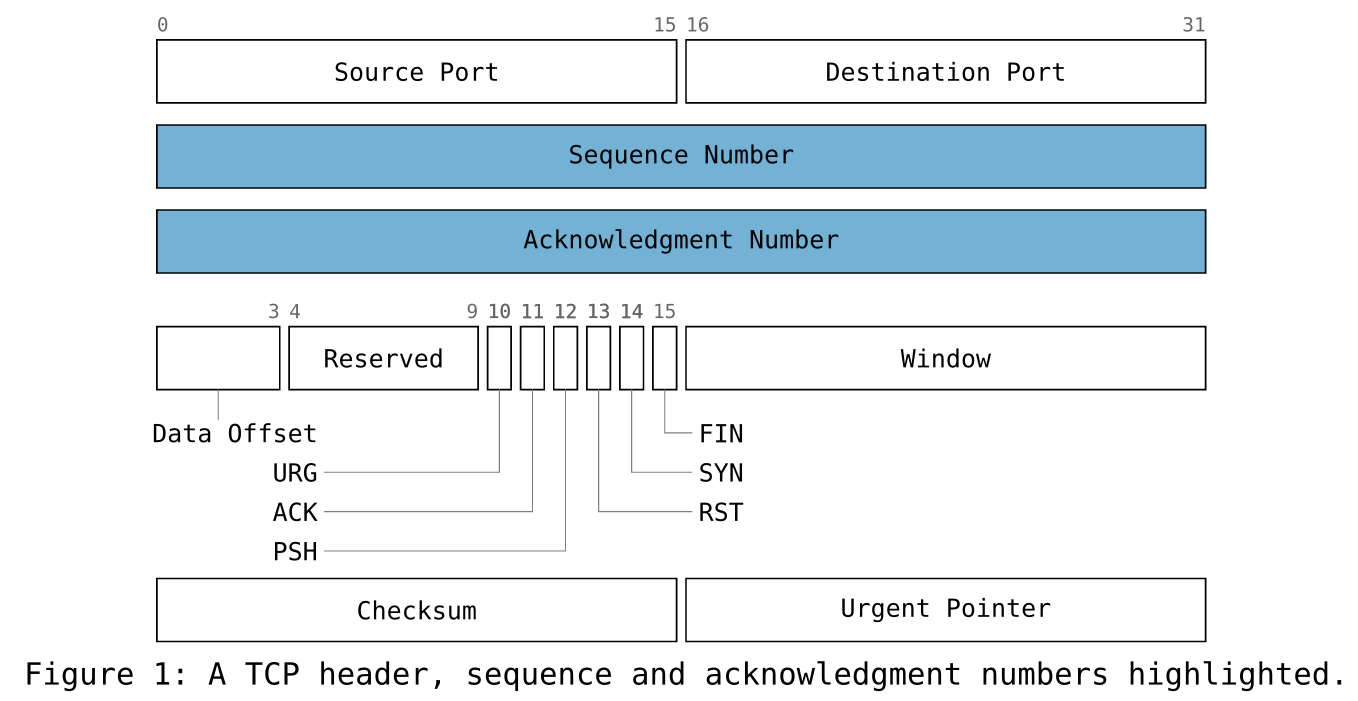 packet · protocol header |
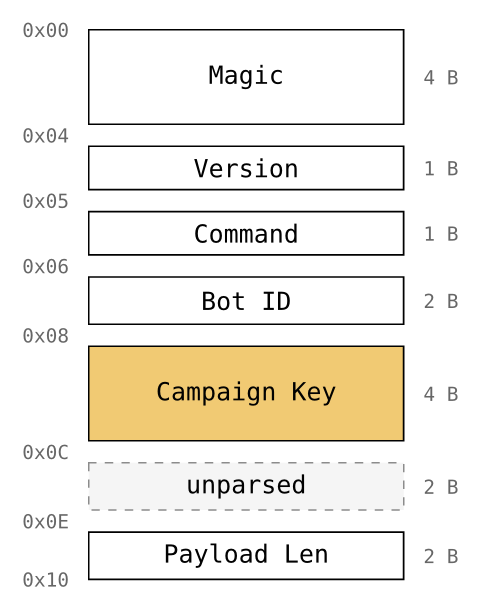 struct · memory map |
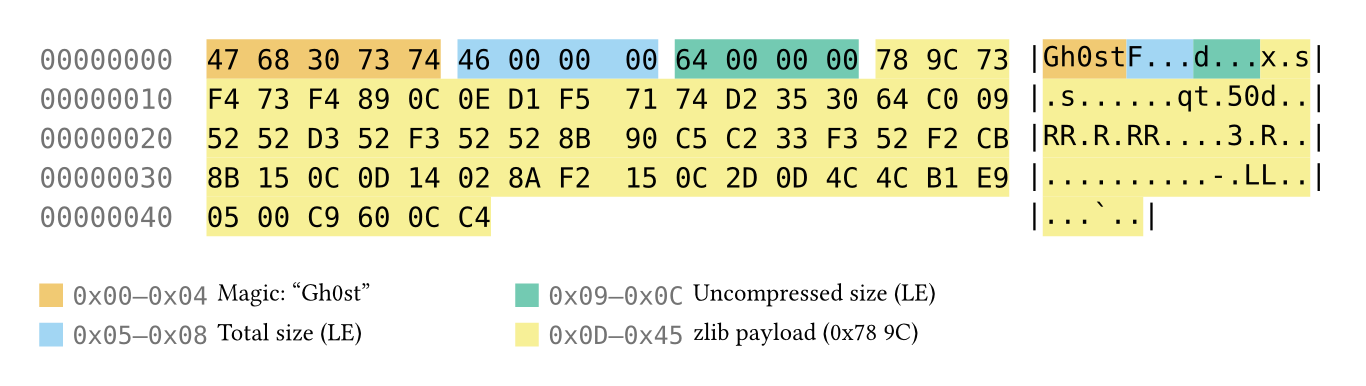 hexdump · annotated bytes |
|
a TCP header (narrow flags fan out as leader callouts), a malware C2 config as a memory map, and a Gh0st RAT check-in annotated in a hexdump.
Installation
Import pivot from the preview namespace and the Typst compiler fetches it (and CeTZ) on first build. There’s no manual install step:
#import "@preview/pivot:0.1.0": packet, struct, hexdump
Using pivot
Currently, there are 3 diagrams available; packet, struct, and hexdump. They share
one vocabulary — bytes(n), bits(n), gap(n), reserved(n), with at: (offset)
and fill: (highlight). You describe the entity (widths and labels); pivot derives
the offset, row, and ruler number.
The gallery diagrams above are built from calls like these:
A packet — the TCP header, with the sequence and acknowledgment numbers
highlighted (the narrow flag bits become leader callouts automatically):
#import "@preview/pivot:0.1.0": packet, struct, hexdump, bytes, bits, gap, palette

#packet(
  bytes(2)[Source Port], bytes(2)[Destination Port],
  bytes(4, fill: palette.blue)[Sequence Number],
  bytes(4, fill: palette.blue)[Acknowledgment Number],
  bits(4)[Data Offset], bits(6)[Reserved],
  bits(1)[URG], bits(1)[ACK], bits(1)[PSH], bits(1)[RST], bits(1)[SYN], bits(1)[FIN],
  bytes(2)[Window],
  bytes(2)[Checksum], bytes(2)[Urgent Pointer],
)
struct — a malware C2 beacon header as a memory map:
#struct(
  bytes(4)[Magic],
  bytes(1)[Version], bytes(1)[Command], bytes(2)[Bot ID],
  bytes(4, fill: palette.orange)[Campaign Key],
  gap(16)[unparsed], bytes(2)[Payload Len],
)
hexdump — a Gh0st RAT C2 check-in, fields annotated in the captured bytes:
#hexdump(
  data: read("ghost-checkin.bin", encoding: none),
  bytes(5, at: 0x00, fill: palette.orange)[Magic: "Gh0st"],
  bytes(4, at: 0x05, fill: palette.sky)[Total size (LE)],
  bytes(4, at: 0x09, fill: palette.green)[Uncompressed size (LE)],
  bytes(57, at: 0x0d, fill: palette.yellow)[zlib payload (0x78 9C)],
)
Diagrams
Available Diagrams
packet |
Flat protocol-header view — fields wrap into rows under a bit ruler; narrow labels become leader callouts. |
struct |
Vertical memory map — box height tracks byte size, hex offsets down the side, sub-byte fields expand in place. |
hexdump |
Real bytes with an ASCII gutter, fields highlighted in place and keyed in a colour legend. |
All three share one field vocabulary (bytes / bits / gap / reserved) over
the same model, so views of the same bytes can’t disagree.
Diagram Roadmap
Alphabetical order, i.e., not the order in which they will be released.
| ATT&CK matrix | Technique coverage as a grid. |
| Attack tree | A hierarchical representation of paths an adversary could take to achieve a goal. |
| Bowtie | A event at the center, threats on the left, consequences on the right, annotated with preventive and mitigating barriers. |
| Diamond Model | The four vertices: adversary, capability, infrastructure, victim. |
| Flowchart | A step-by-step view of a process and its decision points. |
| Knowledge graph | Typed entities as nodes joined by labelled edges. |
| Pyramid of Pain | Indicator types ranked by adversary cost. |
| Sequence | A time-ordered view of interactions between parties. |
| Timelines | Events on an ordered axis — horizontal, vertical, or snaked. |
Accessibility
Readability is the default. Pivot exposes palette.[colour] allowing you to use the 8-colour Okabe–Ito colour-blind-safe
palette:
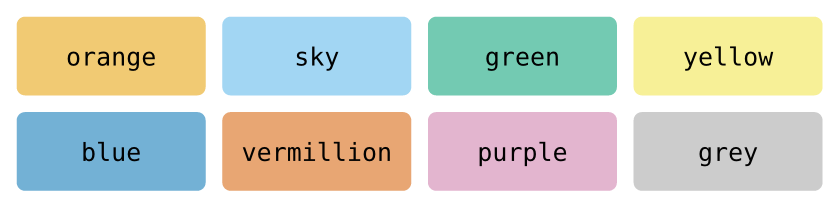
The rest of the defaults stay legible and adjustable:
- Inherits the document font. Field labels use your document’s font. The bit ruler and hexdump grid pin to the bundled monospace (DejaVu Sans Mono) to keep columns aligned.
- Sizes are theme tokens.
label-size,bit-size, andhexdump-sizescale up for legibility, e.g.theme: themes.default + (label-size: 12pt).
Documentation
Full docs are in progress. For now,
examples/ has a
runnable example for every diagram.
Adding a caption to a diagram
Captions come from Typst’s own figure function. The default caption gap is a little tight,
a slightly wider #set figure(gap: 1em) reads better:
#set figure(gap: 1em) // a little more room than the 0.65em default

#figure(
  packet(
    bytes(2)[Source Port], bytes(2)[Destination Port],
    bytes(4)[Sequence Number],
  ),
  caption: [TCP header (excerpt)],
)
Built on CeTZ
pivot renders with CeTZ, licensed under LGPL-3.0-or-later. CeTZ is neither vendored nor modified; the Typst compiler fetches it independently at build time.
License
Apache-2.0. See NOTICE for attribution.