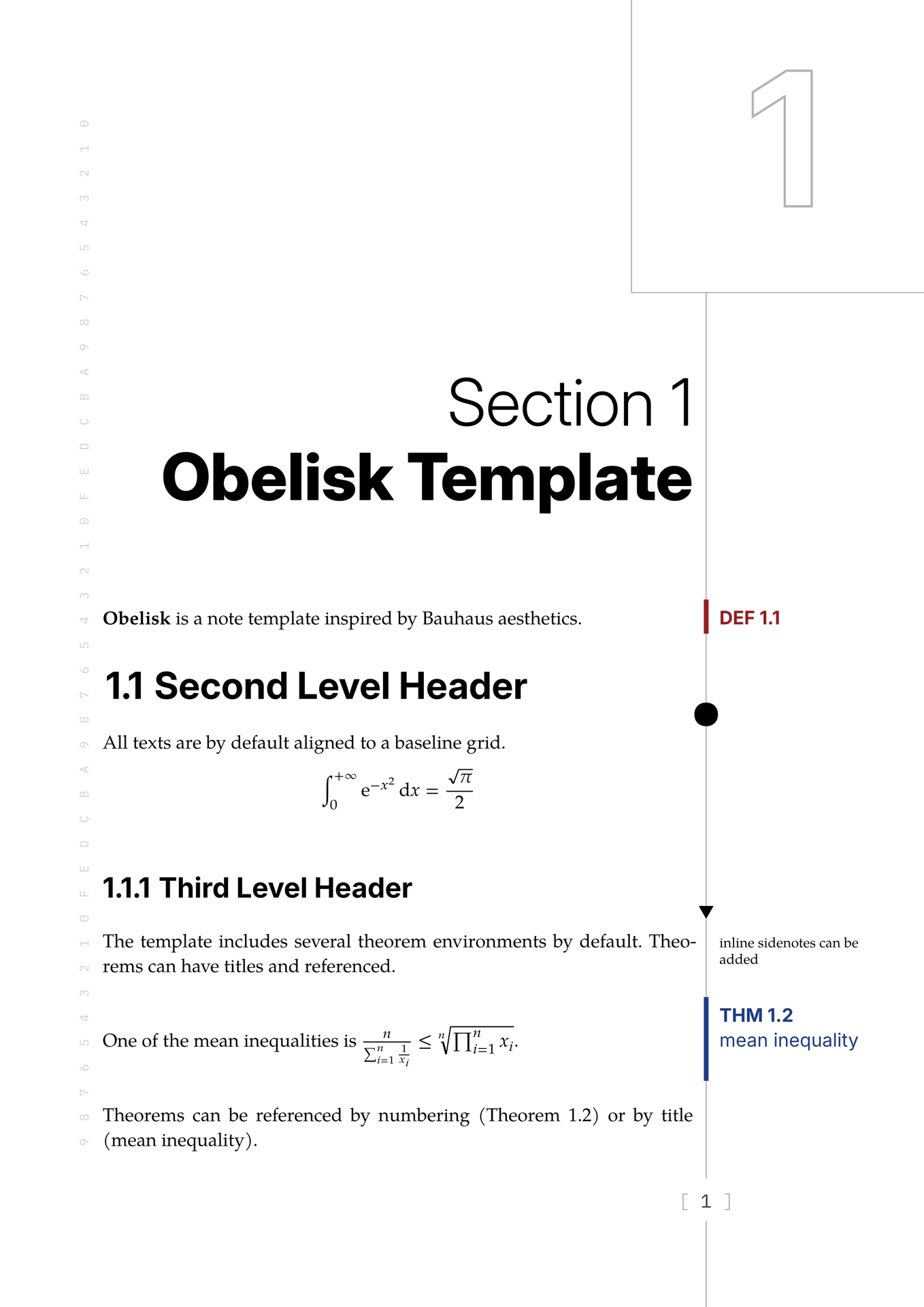
A high-precision Typst document template engineered for mathematical monographs, course notes, and technical publications. Inspired by the strict geometric discipline of Bauhaus and Russian Constructivism, Obelisk treats typography as an architectural problem — locking every element, heading, and block to a cohesive structural canvas.
Key Philosophies
-
Bauhaus-Inspired Aesthetic: Rejects decorative fluff in favor of heavy typography, active negative space, and dynamic layout vectors.
-
The Absolute Baseline Grid: Every single line of text, heading, and block element automatically snaps to a rigid vertical rhythm.
-
Print & Publication Ready: Engineered natively for physical printing. Features asymmetrical, alternating margins with a dedicated ledger column for sidenotes and technical markers.
-
Zero-Configuration Onboarding: Despite the complex geometric arithmetic running under the hood, Obelisk requires no elaborate layout scaffolding or boilerplate setup. It compiles instantly out of the box with highly refined, production-ready defaults—allowing you to focus entirely on writing your mathematics without wrestling with document configuration.
Core Features & Layout Architecture
-
Built-in Theorem Environments: pre-configured environments for mathematical exposition (Theorems, Lemmas, Corollaries, and Proofs). Define your own using the exposed
#make-environment. -
Grid-Aligned Blocks (
#bblock): Standard block elements can easily throw off a baseline grid due to fractional padding or stroke widths. Obelisk exposes the baseline blockbblockcomponent, which automatically calculates and pads structural boxes so that the following text snaps perfectly back onto the running baseline. By default, all block equations are wrapped in#bblock. -
Intentional Page Breaks (
#blank-page): When preparing documents for double-sided publication, forcing a section to start on an odd page can leave an empty facing page. Theblank-pagefunction inserts a clean break and prints an authoritative, technical layout marker. By default, all top level headings break to an odd page using#black-page. -
Customizable: Customize page sizes and margins, baseline step sizes, fonts, and more. Obelisk comes out of the box with a carefully designed default configuration, allowing you to tweak the underlying structural metrics without breaking the core grid alignment arithmetic. Customization is still in early stage; more options are coming in the future. See below for a guide to customization.
Example
#import "@preview/obelisk:0.2.0": *

#show: init

= Obelisk Template

#definition[
  *Obelisk* is a note template inspired by Bauhaus aesthetics.
]

== Second Level Header

All texts are by default aligned to a baseline grid.

$ integral_0^(+oo) "e"^(-x^2) dif x=sqrt(pi)/2 $

Math blocks are also automatically aligned.

=== Third Level Header

The template includes several theorem environments by default. #sidenote[inline sidenotes can be added] Theorems can have titles and referenced.

#theorem[mean inequality][
  One of the mean inequalities is $n/(sum_(i=1)^n 1/x_i)<=root(n, product_(i=1)^n x_i).$
]<thm:mean-ineq>

Theorems can be referenced by numbering (@thm:mean-ineq) or by title (@thm:mean-ineq[!]).
Customization Guide
Obelisk exposes its architectural engine through a centralized configuration dictionary. To apply your customizations, replace show: init with show: init.with(<your configurations>).
1. Layout Configuration
paper: (width, height, two-sided),
margin: (s, e, t, f),
side: (half-gutter, margin),
texts: (size, ascender, step),
-
paper: Maps the absolute dimensions of the physical canvas.width/height: Explicit length dimensions. Defaults to A4 size.two-sided: whether to use a two-sided layout. Defaults totrue.
-
margin: Uses logical binding scopes to handle alternating page layouts dynamically.s/e: Spine (Inside) and Face (Outside) horizontal margins. The layout engine flips these on odd and even pages to maintain binding gutters. In single-sided mode, they are right and left margins respectively.t/f: Top and Foot (Bottom) vertical margins, defining the boundaries where the baseline grid activates and terminates.
-
side: Manages the geometry of the margin ledger.half-gutter: Half of the gutter between the body text and the side margin body. Equals the gutter between the body text and the vertical separating line.margin: The outer margin for the sidenotes.
-
texts: The core parameters of the vertical baseline grid.size: The default font size for the document body text (configured to12ptby default).ascender: The explicit vertical (ascender) height of the font.step: The absolute grid increment (configured to16ptby default), or the default line height. All block vertical paddings, headings, and margins must be integer multiples of this value.
2. Font Configuration
fonts: (body, math, sans, mono)
By default, Obelisk uses TeX Gyre Pagella (Math) for body and math fonts, Inter for sans and IBM Plex Mono for mono. These fonts are already included in the web app.
For font replacements, we recommend:
- For the sans font: use heavy, geometric, or unextended modern grotesques. We recommend: Switzer, Inter, IBM Plex Sans.
- For the mono font: use high-legibility coding typefaces. We recommend: IBM Plex Mono, Jetbrains Mono.
3. Decoration Configuration
deco: (line-number)
headers: (h2: (sym, dy, size), h3: (sym, dy, size))
-
deco: configures decorations.line-number: toggle show line number or not. Defaulttrue.
-
headers: configures H2 and H3 headers.sym: the symbol to place on the vertical line.dy: for some large symbols the symbol will be a bit off the horizontal line. Nudge this parameter to bring it back. Default:0pt.size: the size factor of the headings. Default:2for H2,1.5for H3.
Known Issues
-
Inline math equations are aligned using a box to adjust its height. However, once it is wrapped inside a box, it becomes unbreakable, so inline long equations may fail to break lines. Also, it may break some packages that rely on the layout of the equation, like
fletcher. Currently the workaround is that if there is no need to adjust its height, then don’t wrap it in a box. This should work most of the time; for extra tall equations, manual adjusting might be needed. -
The Typst engine will try to automatically increase line height when a inline math equation is particularly tall or deep. This behaviour could sometimes cause the line to shift a little. To fix this, you can adjust the
texts.descenderfield to a value such that tall equations are automatically handled by the template, rather than the Typst engine. For most scenario, the default value0ptshould work decently except for some extreme cases. -
Theorem blocks rely on measuring the height of the sidenote. However the current measuring mechanism is somewhat broken and sometimes returns the wrong height for very long paragraphs, a little less than the actual height. Manual adjusting might be needed; you can use
v-step(size)(size being an integer) to insert spaces. This should not be needed for short texts.