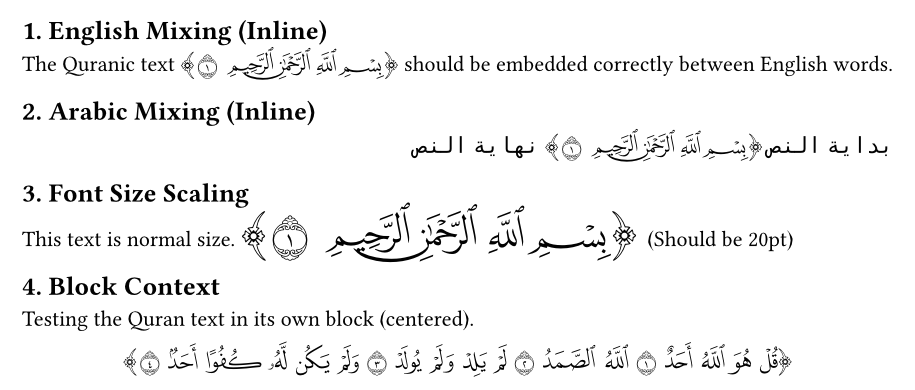
A Typst package for rendering Quranic text according to the Madinah Mushaf. It utilizes the authentic handwriting of calligrapher Uthman Taha from the King Fahd Complex for the Printing of the Holy Quran, providing precise control over suras, verses, and individual words.
Documentation
For visual usage examples, please refer to the Manual.
Features
- High Quality: Uses fonts from the King Fahd Complex.
- Granular Control: Render specific Suras, Verses, or Words.
- Ranges: Support for ranges of verses and words.
- Multi-Qira’at: Supports Hafs (حفص) and Warsh (ورش).
- Bilingual API: Full support for both English and Arabic function names.
Installation
Import the package in your Typst file:
#import "@preview/naifs-islamic-research-toolkit:0.1.0": quran, set-qiraa, set-bracket
// Or for Arabic API
#import "@preview/naifs-islamic-research-toolkit:0.1.0": قرآن, ضبط-القراءة, تفعيل-الأقواس
Fonts Requirement
This package requires specific fonts to render the Quranic text. These fonts can be found in fonts/.
Do not rename the font files. The package expects exact filenames (e.g., QCF4_Hafs_01_W.ttf). If the files are renamed, the package will fail to find the fonts and the text will not render.
You must make them available to Typst using one of the following methods:
- System Fonts: Install the fonts found in
fonts/hafs/andfonts/warsh/globally on your operating system. - Specify Font Path: If you prefer not to install them globally, you can point Typst to the fonts directory using the
--font-pathargument when compiling:
typst compile --font-path ./fonts your-file.typ
Usage
Basic Usage
Render a full Sura:
#quran(sura: 112)
Render a specific Verse:
#quran(sura: 1, verse: 1)
Advanced Selection
Render a range of Verses (e.g., from verse 1 to 4):
#quran(sura: 1, verse: (1, 4))
Render a specific Word in a Verse:
#quran(sura: 1, verse: 1, word: 2)
Render a range of Words in a Verse:
#quran(sura: 1, verse: 1, word: (1, 3))
Qira’at
The package supports Hafs (default) and Warsh.
You can set the Qiraa globally:
#set-qiraa("warsh")
#quran(sura: 93, verse: 4)
Or specify it for a single call:
#quran(sura: 93, verse: 4, qiraa: "warsh")
Brackets
By default, the output is wrapped in decorative Quranic brackets. You can control this behavior globally or for individual calls.
Disable brackets globally:
#set-bracket(false)
#quran(sura: 1, verse: 1)
Control for a single call:
#quran(sura: 1, verse: 1, bracket: false)
Arabic API
You can use the Arabic function names for a fully localized experience:
#قرآن(سورة: 1, آية: 1)

// تغيير القراءة
#ضبط-القراءة("ورش")
#قرآن(سورة: 93, آية: 4)

// التحكم في الأقواس
#تفعيل-الأقواس(false)
#قرآن(سورة: 112, أقواس: true)
Credits
- Fonts and Text: King Fahd Complex for the Printing of the Holy Quran.