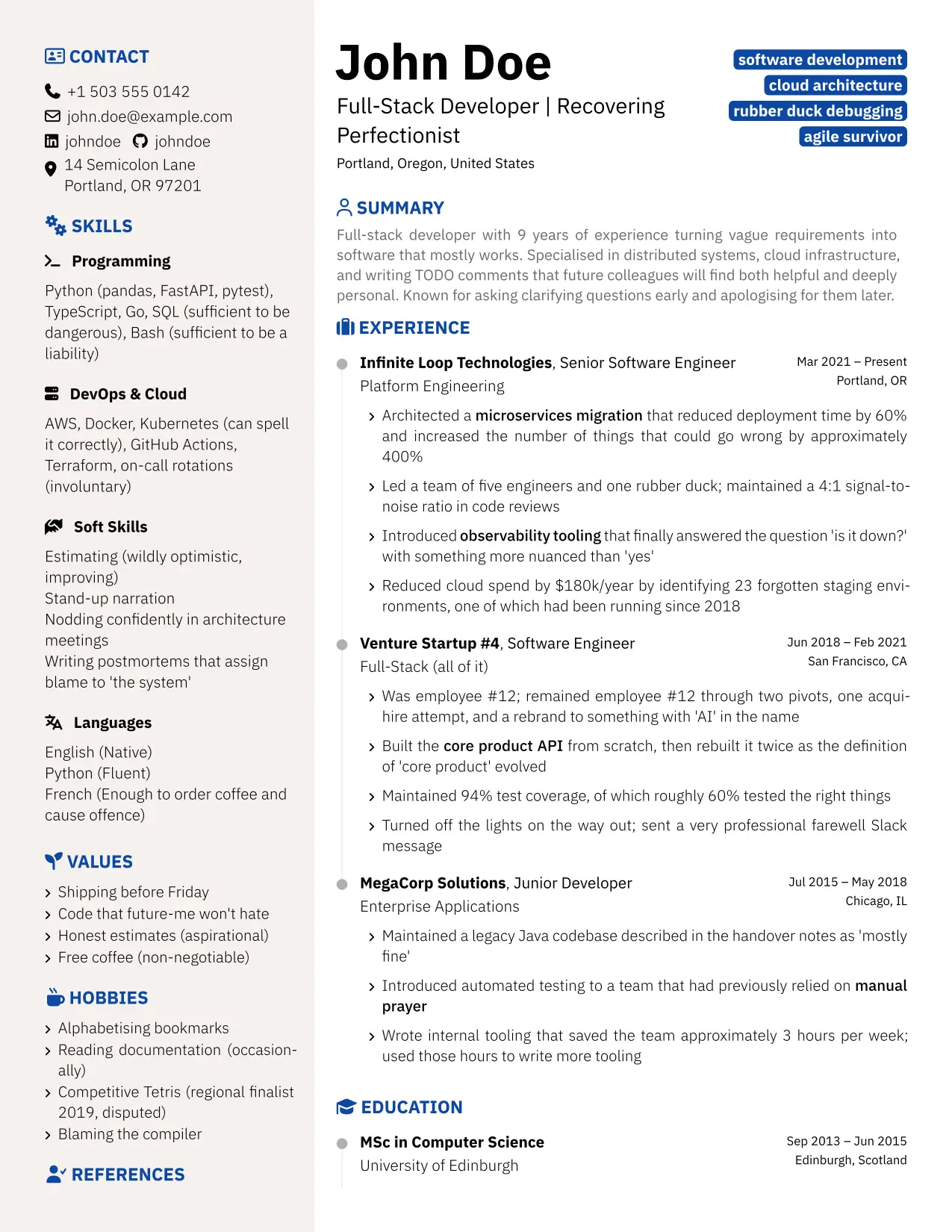

A Typst package for not-a-boring CV — data-driven, fully configurable, two-column layout


A data-driven CV and cover letter package for Typst. All personal data lives in .toml files; the template .typ files stay clean and untouched. The package exposes two functions — cv and letter — composable into a single application.typ.
Features
- TOML-driven — personal data in
.tomlfiles, no source edits needed - Two templates —
cvandletter, composable into a singleapplication.typ - Configurable sections — reorder or drop any sidebar or main-column section
- Any social network —
profiles-configmaps network name → icon + URL base - i18n — override
month-namesanddate-separatorfor any locale - Typst-idiomatic — named parameters,
#show: cv.with(...)pattern
Prerequisites
- Typst CLI — follow the official instructions.
- Fonts — nabcv requires two font families:
- IBM Plex Sans — Google Fonts
- Font Awesome 7 Free — fontawesome.com/download
Quick Start
1. Initialize
typst init @preview/nabcv:0.1.0
This creates a nabcv/ folder with cv.typ, letter.typ, application.typ and their data files.
2. Install the Tombi VS Code extension (optional)
Tombi provides schema-aware autocompletion and validation for cv.toml and letter.toml. Both files are validated by schema/schema.json.
3. Fill in your data
Edit cv.toml:
[cv]
name     = "Jane Smith"
headline = "Software Engineer"
email    = "jane@example.com"
phone    = "+1 555 000 0000"
summary  = "Brief professional summary."

[[cv.profiles]]
network  = "LinkedIn"
username = "janesmith"

[[cv.experience]]
company    = "Acme Corp"
position   = "Senior Engineer"
start_date = "2021-03"
end_date   = "present"
highlights = ["Built thing", "Improved other thing"]
Edit letter.toml similarly for your cover letter.
4. Compile
typst compile cv.typ
typst compile letter.typ
typst compile application.typ
Templates
| File | Description |
|---|---|
cv.typ |
Standalone CV using #show: cv.with(...) |
letter.typ |
Standalone cover letter using #show: letter.with(...) |
application.typ |
CV followed by letter in a single PDF |
cv.toml |
CV data (personal info, experience, education, …) |
letter.toml |
Letter data (sender, recipient, body paragraphs) |
Customization
All customization is done through named parameters in the template .typ file. Nothing in src/ needs to be touched.
Section order
#show: cv.with(
  ...,
  sidebar-sections: ("contact", "skills", "values", "references"),
  main-sections:    ("experience", "education", "summary", "courses"),
)
Omit a key to hide that section entirely.
Section titles & icons
#show: cv.with(
  ...,
  section-titles: (awards: "PRIZES & RECOGNITION", experience: "WORK HISTORY"),
  section-icons:  (awards: "medal", experience: "briefcase"),
)
Icon names are FontAwesome 7 identifiers.
Social profiles
#show: cv.with(
  ...,
  profiles-config: (
    LinkedIn:  (icon: "linkedin",  url-base: "https://linkedin.com/in/"),
    GitHub:    (icon: "github",    url-base: "https://github.com/"),
Portfolio: (icon: "globe",     url-base: "https://"),
  ),
)
Locale / i18n
#show: cv.with(
  ...,
  month-names:    ("jan.", "fév.", "mars", "avr.", "mai", "juin",
                   "juil.", "août", "sep.", "oct.", "nov.", "déc."),
  date-separator: " – ",
)
Theming
#show: cv.with(
  ...,
  theme: (secondary: rgb("#B71C1C"), sidebar-bg: rgb("#FFF8F8")),
)
Other parameters
| Parameter | Default | Description |
|---|---|---|
bullet-icon |
"angle-right" |
Icon for all list bullets |
address-icon |
"location-dot" |
Icon for address field |
doi-icon |
"external-link" |
Icon on publication DOI links |
show-timeline |
true |
Toggle the experience/education timeline |
justify-sidebar |
false |
Justify text in the sidebar |
skill-icons |
(defaults) | Map skill group names to icons |
text-size |
(defaults) | Override any font size by key |
font-weight |
(defaults) | Override any font weight by key |
For the letter:
| Parameter | Default | Description |
|---|---|---|
footer-items |
("phone", "email", "linkedin") |
Fields shown in the page footer |
contact-icons |
(defaults) | Icon names for contact fields |
contact-url-bases |
(defaults) | URL prefixes for email/linkedin/github |
Inspirations
- brilliant-CV — a well-crafted Typst CV package that inspired the overall structure and development workflow of this project
- hipster-cv — a LaTeX CV template that inspired the two-column sidebar design
- acadennial-cv — a Typst academic CV template