江苏大学本科毕业论文Typst 模板 | Typst Template for Jiangsu University Undergraduate Thesis
注:该模板用于江苏大学本科毕业论文(非官方)。
功能特性
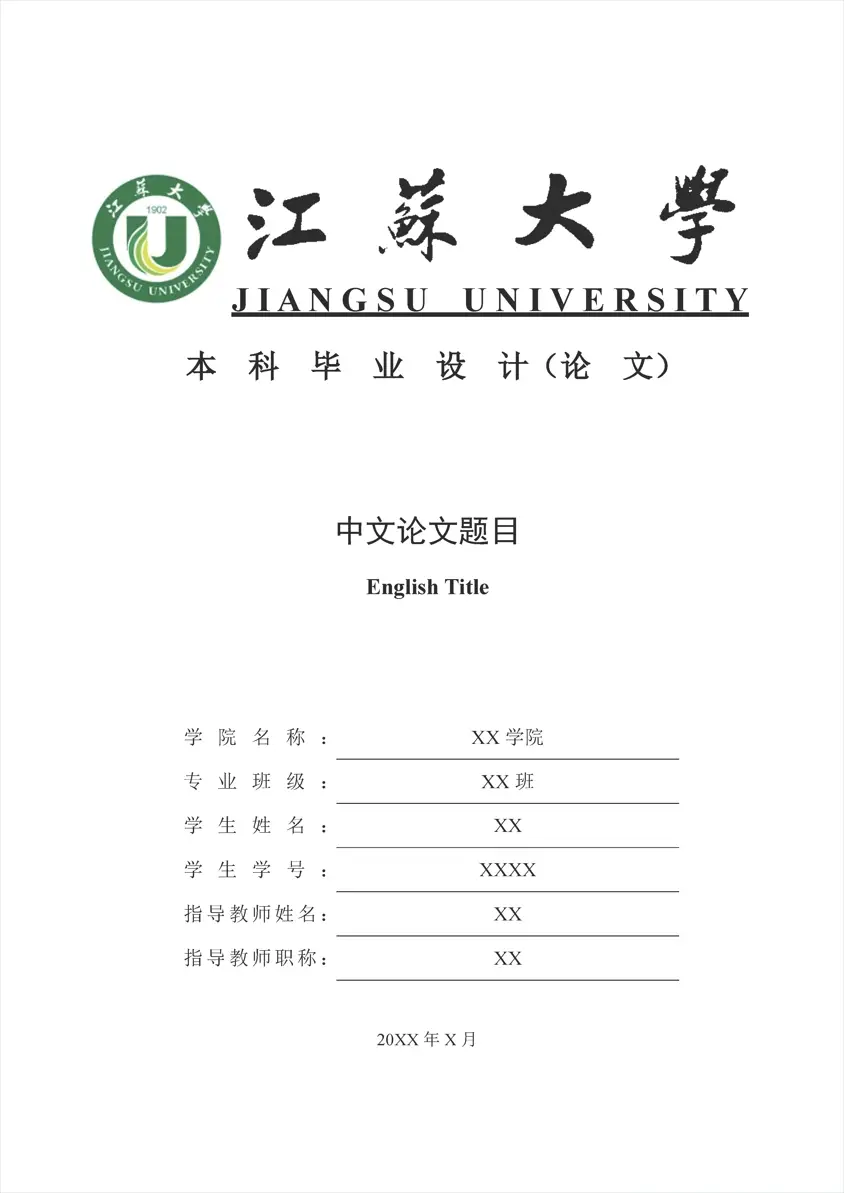
- 封面(校徽 + 校名标 + 中英文题目 + 学院 / 班级 / 姓名 / 学号 / 指导教师 / 职称 / 年月)
- 原创性声明页
- 中文摘要(含关键词)
- 英文摘要(ABSTRACT + KEY WORDS)
- 自动目录(三级标题,点线填充)
- 盲审模式
- 正文(中文章节编号 第X章 / 1.1 / 1.1.1)
- 页眉页脚自动切换(前置部分罗马数字,正文阿拉伯数字)
- 中英文混排字体方案(宋体 / 黑体 / 楷体 / Times New Roman)
- 图表环境(
img/tbl,自动编号与交叉引用) - 公式、代码块(Consolas)
- GB/T 7714-2015 参考文献(numeric 样式)
- 致谢、附录
获取模板
方式一:从 Typst Universe 创建(推荐)
typst init @preview/modern-jsu-thesis:0.1.1 my-thesis
cd my-thesis
将在 my-thesis 目录下创建一个干净的项目:
my-thesis/
├── main.typ        # 论文入口:填写信息、撰写正文
├── refs.bib        # BibTeX 参考文献库
└── figures/        # 插图目录
方式二:克隆 GitHub 仓库
git clone https://github.com/han0126/modern-jsu-thesis.git
cd modern-jsu-thesis
如果需要完整源代码对论文模板进行更多定制,可以选择克隆仓库。其中,控制论文格式的源代码是根目录下的 template.typ,随包分发的资源在sources/。
使用说明
在 main.typ 中通过 jsu-thesis 函数配置论文信息,各参数以命名参数传入:
#import "@preview/modern-jsu-thesis:0.1.1": *		// 导入样式
#import "@preview/modern-jsu-thesis:0.1.1": template as jsu-thesis

#show: jsu-thesis.with(
  zh-title: "中文论文题目",
  zh-keywords: ("关键词1", "关键词2", "关键词3"),
  zh-abstract: [摘要内容……],

  en-title: "English Title",
  en-keywords: ("Keyword 1", "Keyword 2", "Keyword 3"),
  en-abstract: [English abstract……],

  college: [XX学院],            // 学院名称
  class: [XX班],                // 班级
  author: [XX],                 // 姓名
  number: [XXXX],               // 学号
  instructor: [XX],             // 指导教师姓名
  post: [XX],                   // 指导教师职称
  year: [20XX],
  month: [X],

  anonymity: false               // 盲审模式
)
| 参数 | 说明 |
|---|---|
zh-abstract |
中文摘要正文 |
zh-title |
中文论文题目 |
zh-keywords |
中文关键词(3–5 个) |
en-abstract |
英文摘要正文 |
en-title |
英文论文题目 |
en-keywords |
英文关键词 |
college |
学院名称 |
class |
专业班级 |
author |
学生姓名 |
number |
学号 |
instructor |
指导教师姓名 |
post |
指导教师职称 |
year |
年份 |
month |
月份 |
anonymity |
盲审模式 |
添加章节
直接使用 Typst 标准标题语法,一级标题自动分页并居中排版:
= 绪论

正文内容……

== 研究背景

=== 国内现状
注:引言、参考文献、致谢、附录四个部分涉及特殊格式(无数字标号),所以需要使用下述方式作为一级标题
#heading(numbering: none)[引言]
插入图片
模板提供 img 函数,自动处理编号与图名:
#img(
  image("figures/your-image.png", width: 60%),
  caption: [图片说明],
)
插入表格
#tbl(
  table(
    columns: (1fr, 1fr),
    align: center + horizon,
    stroke: none,
    table.hline(stroke: 1.5pt),
    table.header()[*表头1*][*表头2*],
    table.hline(stroke: 0.8pt),
    [内容1], [内容2],
    table.hline(stroke: 1.5pt),
  ),
  caption: [三线表样例],
)
公式
#equation(
  $
    max {F({t_1},{t_2})} = sum^3_(i=1) sum^5_(j=1) T(i,j) dot x_(i j)
  $
)
注:如要使用img、tbl等图标、公式样式,需引用下述代码:
#import "@preview/modern-jsu-thesis:0.1.1": *
参考文献
编辑 refs.bib 后,在正文中引用:
据研究显示#cite(<key>)
文末的参考文献列表已配置 GB/T 7714-2015 numeric 样式:
#bibliography("refs.bib", style: "gb-7714-2015-numeric", title: none)
字体配置
本模板所用到的字体族名如下:
| 用途 | 字体族名 |
|---|---|
| 宋体 | SimSun |
| 黑体 | SimHei |
| 楷体 | KaiTi |
| 英文 / 数字 | Times New Roman |
常见问题
Q:编译时提示 unknown font family: simsun / simhei / times new roman?
从克隆的仓库直接编译时会出现,因为字体路径未指定。加上 --font-path fonts 即可。从 @preview 创建的项目不会遇到此问题。
Q:想自定义章节结构?
用户项目的 main.typ 是自包含的,直接增删 = 一级标题 即可。若需要更细的拆分,可自行 #include 其他 .typ。
致谢
感谢 Typst 社区在中文排版方面的工作。
numbly提供计数支持:numblycuti提供宋体类word描边加粗:cuticumcm-muban作为母版改进:CUMCM-typst-template
支持项目
如果这个模板对你有帮助,请:
- 给项目点个 Star
- 提交 Bug报告和功能建议
- Fork并改进模板
- 分享给更多需要的同学
许可证(License)
本项目中的 Typst 模板源代码依据 MIT 许可证进行授权。
模板内置的校徽(sources/logo.png)和校名字标(sources/jsu.png)为江苏大学标识资源,属于受商标权、著作权保护的资源文件,不在 MIT 许可证授权范围内,其知识产权归相关权利人所有。上述资源仅限用于学位论文排版的学术、非商业用途,除法律法规另有规定或已获得相关授权外,不得对上述资源进行再分发、修改或用于其他用途。使用者需自行确认其对资源的使用符合江苏大学的有关规定及适用法律法规。
The Typst template source code is licensed under the MIT License.
The school logo (sources/logo.png) and school name (sources/jsu.png) built into the template are the logo resources of Jiangsu University, which are resource files protected by trademark rights and copyrights, and are not within the scope of MIT license authorization, and their intellectual property rights are owned by the relevant rights holders. The above resources are only used for academic and non-commercial purposes in typesetting dissertations, and shall not be redistributed, modified or used for other purposes unless otherwise stipulated by laws and regulations or authorized by relevant authorities. Users need to confirm that their use of resources conforms to the relevant regulations of Jiangsu University and applicable laws and regulations.