A Typst package for typesetting randomized multiple-choice exams.
mcx.typ is an independent implementation for Typst.
It is inspired by the user-facing functionality of the LaTeX package mcexam, and is redesigned specifically for Typst’s typesetting and scripting model.
Features
- Define multiple-choice questions and answers.
- Generate multiple versions of an exam with randomized question and answer order.
- Options to control shuffling behavior:
- No shuffling.
- Shuffle all questions and answers.
- Shuffle questions while grouping related questions together.
- Shuffle only answers.
- Permute all answers.
- Permute all but the last
nanswers (e.g., “None of the above”). - User-defined permutation order.
- No shuffling.
- Options to control shuffling behavior:
- Produce answer keys.
- Support for code blocks within questions and answers.
Quick Start
Below is an example of how to use mcx to create a simple multiple-choice exam with two questions, generate two versions of the exam, and produce an answer key with a concept review sheet for permutation verification.
Example
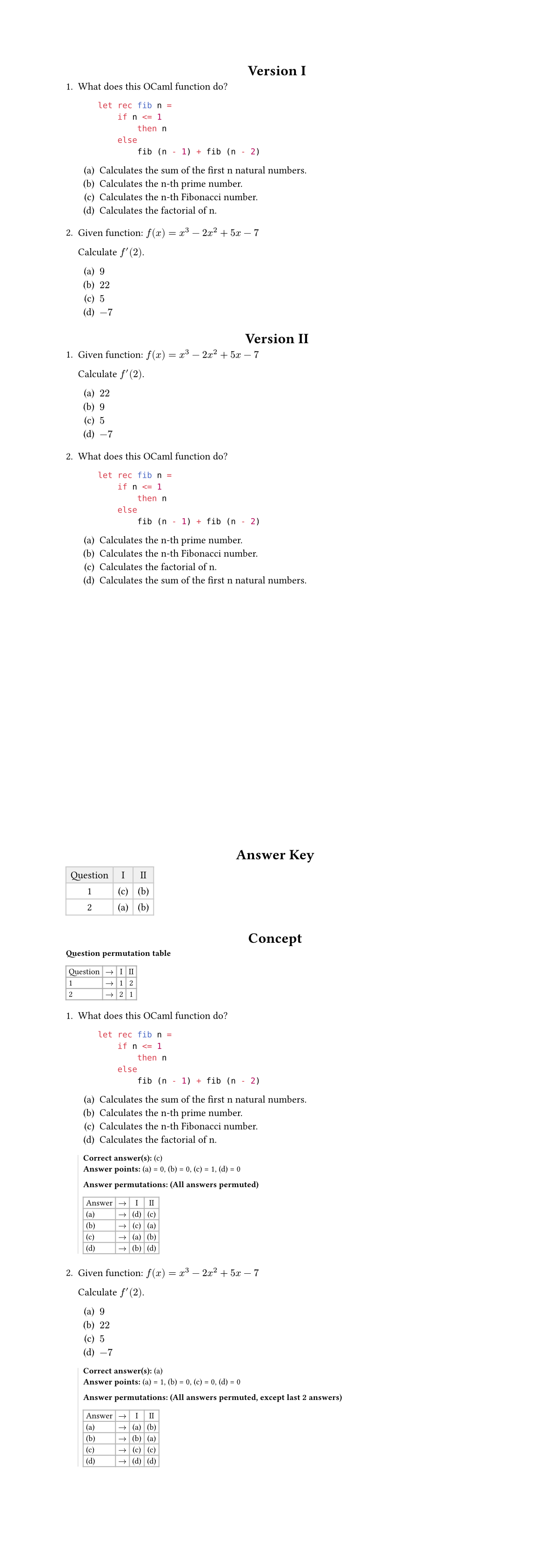
Show code
#import "@preview/mcx:0.1.0": *

#let qs = (
  mc-question(
    [
      What does this OCaml function do?

      ```ocaml
          let rec fib n =
              if n <= 1
                  then n
              else
                  fib (n - 1) + fib (n - 2)
      ```
    ],
    (
      mc-answer([Calculates the n-th Fibonacci number.], mark: "correct"),
      mc-answer([Calculates the factorial of n.]),
      mc-answer([Calculates the n-th prime number.]),
      mc-answer([Calculates the sum of the first n natural numbers.]),
    ),
    permute: "permuteall",
  ),
  mc-question(
    [
      Given function: $f(x) = x^3 - 2x^2 + 5x - 7$

      Calculate $f'(2)$.
    ],
    (
      mc-answer([$9$], mark: "correct"),
      mc-answer([$22$]),
      mc-answer([$5$]),
      mc-answer([$-7$]),
    ),
    permute: (type: "fixlastn", n: 2),
  )
)

#mc-questions(qs, output: "exam", number-of-versions: 2, version: 1, seed: 6)

#mc-questions(qs, output: "exam", number-of-versions: 2, version: 2, seed: 6)

#pagebreak()
#mc-questions(qs, output: "key", number-of-versions: 2, seed: 6)

#mc-questions(qs, output: "concept", number-of-versions: 2, seed: 6)
See tests/example.typ for a complete example.
Usage
Import the package using
#import "@preview/mcx:0.1.0": *
The full documentation is available in the manual.