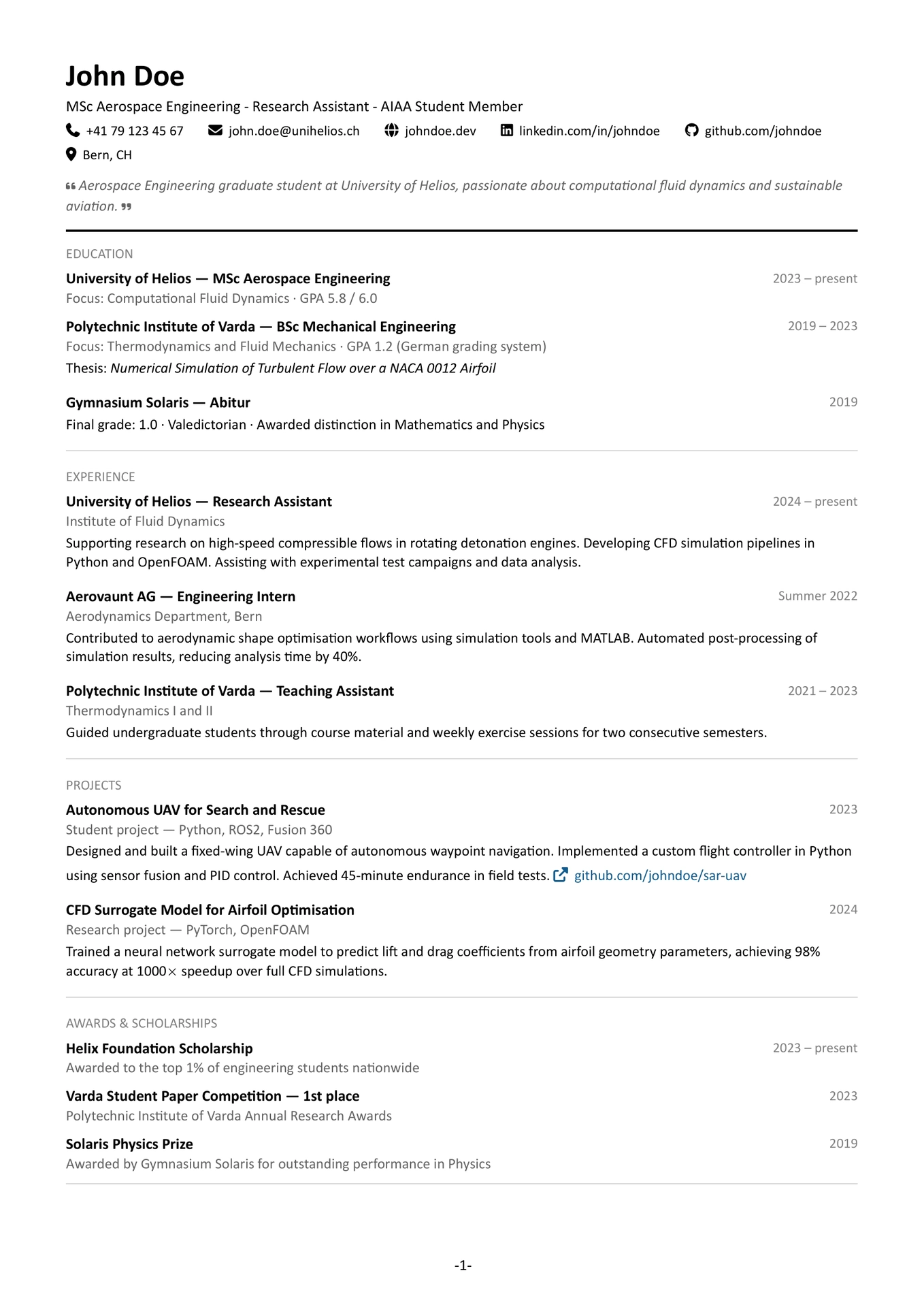
A clean, modular CV template for Typst with FontAwesome icons, customizable accent colors, and support for academic publications.

Features
- Clean, professional design with a clear visual hierarchy
- FontAwesome icons for contact information
- Customizable accent colors for skill highlights and links
- Optional bio section with quote styling
- Support for academic publications with DOI links
- Automatic page numbering
- Modular structure — separate template and content files
Example
See cv.pdf.
Requirements
This template requires the FontAwesome desktop fonts to render icons correctly. Please refer to the fontawesome package documentation for installation instructions.
Usage
Import
#import "@preview/luminar-cv:0.1.0": *

#show: cv.with(
  name: [Your Name],
  positions: (
    [Your Position],
    [Your Institution],
  ),
  contact: (
    email: "you@email.com",
    website: "yourwebsite.com",
    linkedin: "yourlinkedin",
    github: "yourgithub",
    location: "City, Country",
  ),
  bio: [A short personal statement about yourself.],
  skill-highlight-color: rgb("#135b8f"),
  link-color: rgb("#135b8f"),
  page-numbering: true,
)
Functions
cv
The main template function. Pass all document content through it via #show: cv.with(...).
| Parameter | Type | Default | Description |
|---|---|---|---|
name |
content | none |
Your full name |
positions |
array | () |
List of titles or positions displayed below your name |
contact |
dictionary | (:) |
Contact information — see contact fields below |
bio |
content | none |
Optional personal statement displayed below contact info |
skill-highlight-color |
color | rgb("#135b8f") |
Accent color for highlighted skills and links |
link-color |
color | rgb("#135b8f") |
Color for body links |
page-numbering |
bool | true |
Show page numbers in - 1 - format |
Contact fields:
| Field | Description |
|---|---|
phone |
Phone number (include country code) |
email |
Email address |
website |
Personal website (without https://) |
linkedin |
LinkedIn username |
github |
GitHub username |
location |
City and country |
All contact fields are optional — omit any you don’t want displayed.
section
Creates a labeled section with a dividing rule.
#section(title: [Education])[
  // section content
]
entry
The core repeating unit for experience, education, projects, and awards. Title and date sit on the same line, subtitle and body below.
#entry(
  title: [Company — Role],
  subtitle: [Optional subtitle],
  date: [2023 -- present],
)[
  Description of the entry.
]
All parameters except body are optional. Pass an empty body [] for entries without a description.
skill
Renders a skill as a rounded pill. Set highlight: true for skills you want to emphasize — these use the skill-highlight-color.
#skill([Python], highlight: true)
#skill([LaTeX])
languages
Displays a list of languages in a three-column grid.
#languages((
  (name: [English], level: [native]),
  (name: [German], level: [C1]),
  (name: [French], level: [B2]),
))
publication
Formats an academic publication entry with optional DOI link.
#publication(
  title: [Title of the Paper],
  authors: [A. Author, B. Author],
  journal: [Journal of Something],
  year: [2024],
  doi: [10.0000/example],
  note: [peer-reviewed],
)
All fields except title are optional.
body-link
Renders a hyperlink with an external link icon and the configured link-color. Use this for links inside entry bodies.
#body-link("https://github.com/you/project")[github.com/you/project]
Customization
Accent color
Change the accent color for both skill highlights and links:
#show: cv.with(
  skill-highlight-color: rgb("#8b0000"),
  link-color: rgb("#8b0000"),
)
Font
The template uses Calibri by default. To change it, modify the set text call in template.typ:
set text(font: "Your Font", size: 10pt)
Margins
Adjust page margins in the set page call in template.typ:
set page(margin: (x: 2cm, y: 2cm))
License
MIT — see LICENSE for details.