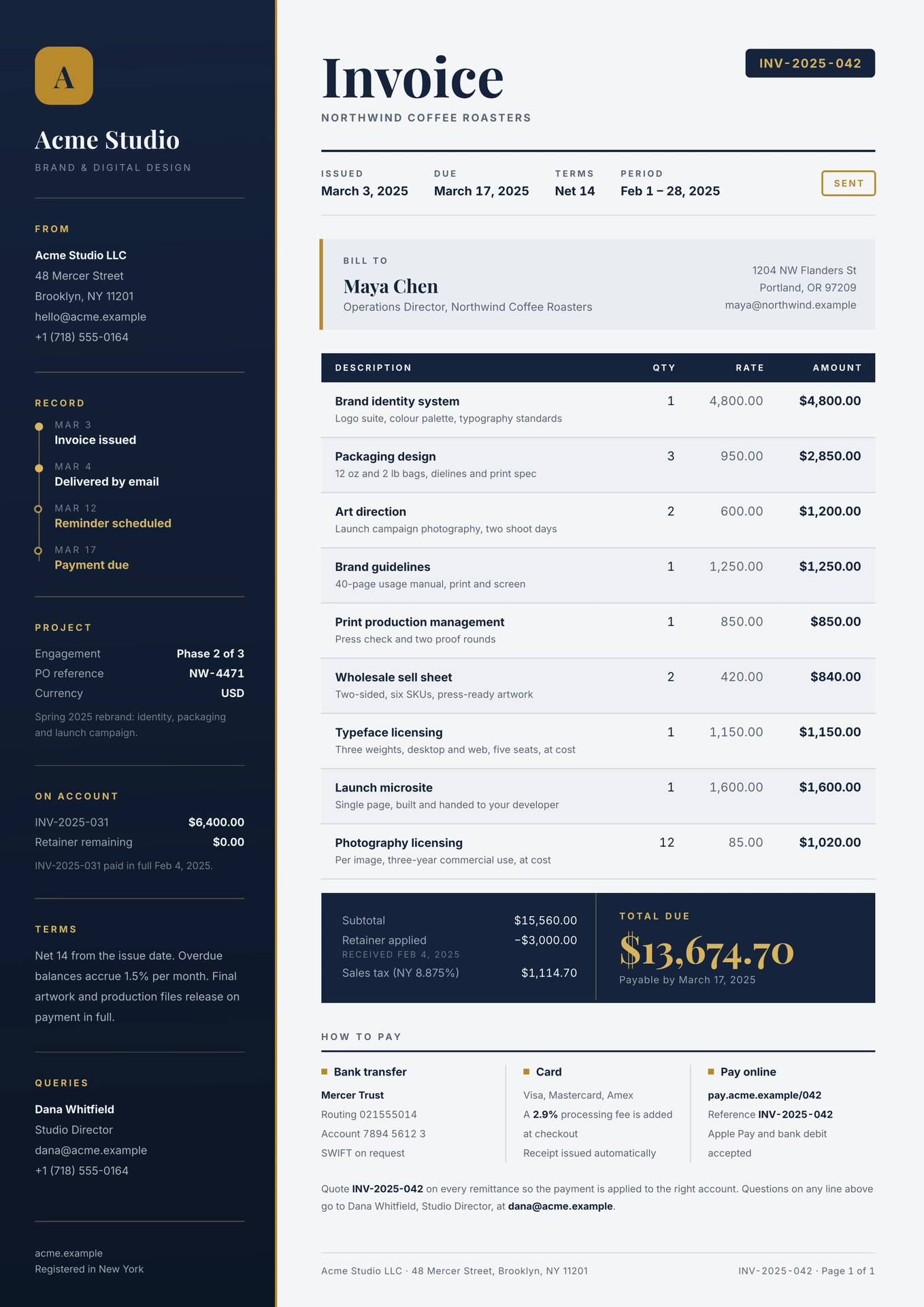
An invoice with a full-height navy rail for the sender, brass accents and totals computed from the line items. Long invoices flow onto more pages: the rail repeats, the table header repeats, and the total never splits.

Designed by pdfs.build, where this template can also be rendered from JSON over an API.
Getting started
In the web app, click “Start from template” and search for ledger-rail. On the
command line:
typst init @preview/ledger-rail:0.1.0
Or import the function into an existing document:
#import "@preview/ledger-rail:0.1.0": invoice

#show: invoice.with(
  company: "Acme Studio",
  rail: (
    (title: "From", body: ([*Acme Studio LLC*], "48 Mercer Street", "hello@acme.example")),
    (title: "Terms", body: [Net 14 from the issue date.]),
  ),
  number: "INV-2025-042",
  meta: (Issued: "March 3, 2025", Due: "March 17, 2025"),
  bill-to: (name: "Maya Chen", address: ("1204 NW Flanders St", "Portland, OR 97209")),
  items: (
    (description: "Brand identity system", detail: "Logo suite and colour palette", quantity: 1, price: 4800),
    (description: "Packaging design", quantity: 3, price: 950),
  ),
  tax: (label: "Sales tax (8.875%)", rate: 0.08875),
  payment: ((title: "Bank transfer", body: ("Mercer Trust", "Account 7894 5612 3")),),
)

Quote *INV-2025-042* with your payment.
The document body after the show rule becomes the closing note under the
payment details. See template/main.typ for every option in use.
Fonts
The design uses two fonts, both under the SIL Open Font License 1.1 and free from Google Fonts:
- Playfair Display for the title, names and total
- Inter for everything else
On the command line, install them or point Typst at them with
typst compile --font-path fonts main.typ. In the web app, if they are not in
the font list, upload the .ttf files into your project. Typst before 0.15
does not support variable fonts, so use the files from the static folder of
the Google Fonts download. To use other fonts, pass
fonts: (display: "...", body: "...").
Options
All parameters of invoice are named and optional.
| Parameter | Default | Description |
|---|---|---|
company |
"Company" |
Sender name at the top of the rail. |
tagline |
none |
Small caps line under the company name. |
logo |
auto |
auto draws a tile with the first letter of company. Pass content, e.g. image("logo.svg", width: 37.5pt), or none. |
rail |
() |
Rail sections, top to bottom. Each is a dictionary with a title and any of body, rows, note and steps (see below). |
rail-footer |
none |
Fine print at the foot of the rail. |
number |
"INV-0001" |
Invoice number, shown in the badge and the page footer. |
subtitle |
none |
Small caps line under the title, e.g. the client’s company. |
status |
none |
Outlined badge at the end of the meta row, e.g. "Paid". |
meta |
(:) |
Key facts under the title, e.g. (Issued: "May 1, 2026", Terms: "Net 14"). |
bill-to |
(name: "Client") |
name, and optionally role and address. |
items |
() |
Line items as (description:, detail:, quantity:, price:). detail is optional. |
currency |
"$" |
Symbol placed before amounts. |
money |
auto |
Custom formatter value => str for all amounts and rates. |
credit |
none |
Amount deducted before tax, e.g. a retainer: (label:, amount:, note:). |
tax |
none |
Tax on the subtotal minus the credit: (label:, rate:), with rate as a fraction. |
due-note |
none |
Line under the total, e.g. "Payable by March 17, 2025". |
payment |
() |
Payment options shown side by side, as (title:, body:). |
footer |
none |
Left side of the page footer. |
paper |
"a4" |
Paper size, e.g. "us-letter". |
colors |
(:) |
Overrides for default-colors: ink, ink-deep, accent, accent-soft, canvas, surface, muted, rule, on-ink. |
fonts |
(:) |
Overrides for (display: "Playfair Display", body: "Inter"). |
labels |
(:) |
Overrides for default-labels, to translate the fixed text. |
A rail section can combine these keys:
body: content, or an array of lines joined with line breaksrows: a dictionary of key-value pairs, e.g.("PO reference": "NW-4471")note: small print after the rowssteps: a timeline, as an array of(date:, label:, done:);doneis optional
The rail is page decoration: it repeats on every page and does not grow, so keep its content short enough to fit the page height.
Wherever a parameter takes content or an array of lines, strings are the
easiest way to write email addresses. In markup, @ starts a reference, so
write [hello\@example.com] there.
Another language or currency
#import "@preview/ledger-rail:0.1.0": invoice, format-money

#show: invoice.with(
  money: v => format-money(v, currency: "", thousands: ".", decimal: ",") + " €",
  labels: (
    title: "Rechnung", bill-to: "Rechnung an", description: "Leistung",
    quantity: "Menge", price: "Preis", amount: "Betrag", subtotal: "Zwischensumme",
    total: "Gesamtbetrag", payment: "Zahlung", page: "Seite", of: "von",
  ),
  // ...
)
License
The files in the template/ directory are licensed under MIT-0, so documents
you create from the template carry no license obligations. All other files are
licensed under MIT. See LICENSE for both texts.