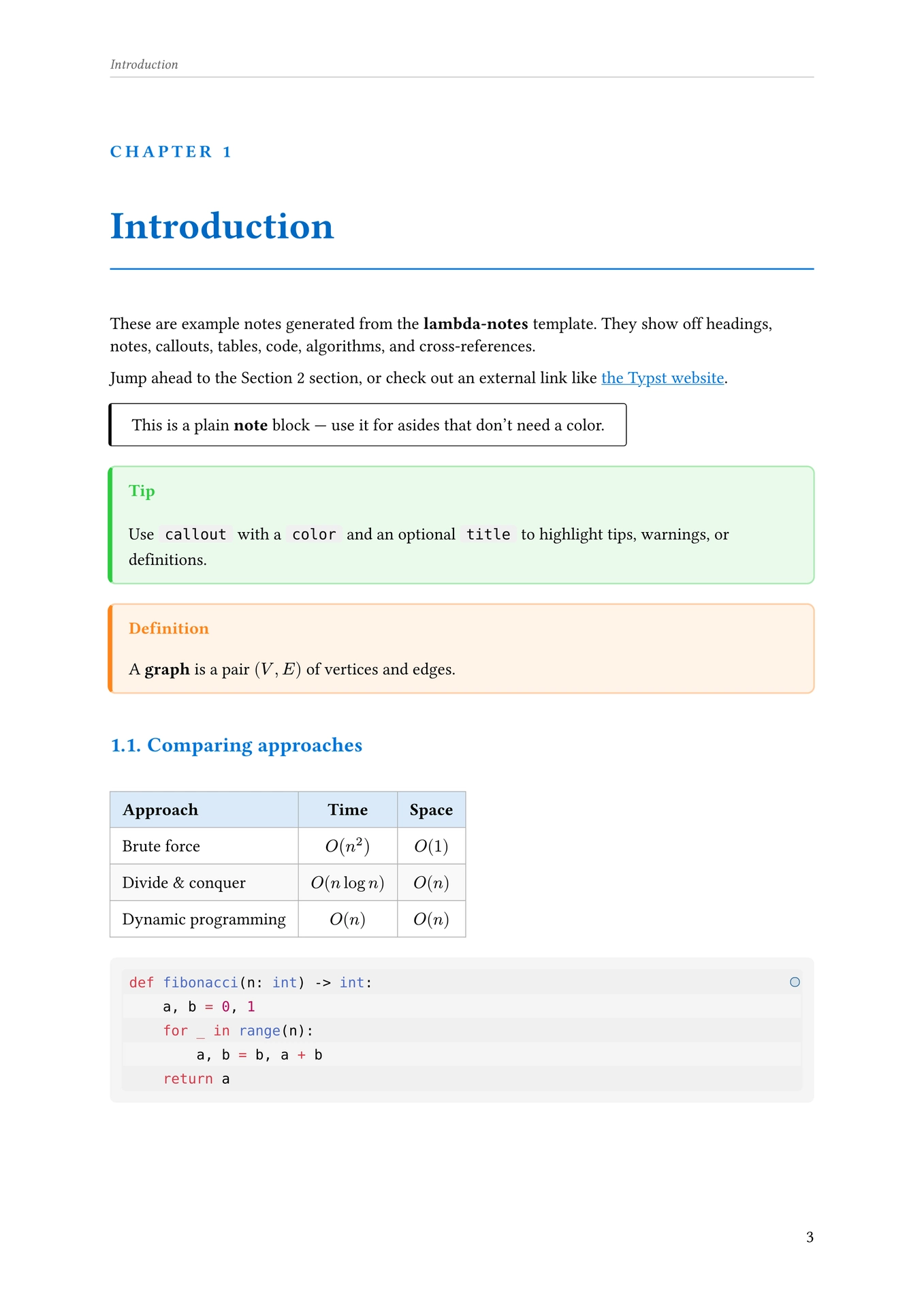
A clean Typst template for university computer science notes. It provides a themeable document layout with chapter-style headings, a running header, styled tables and code blocks, an algorithm figure environment, and two callout components for highlighting information.
Installation
Import the template from the local package:
#import "@local/lambda-notes:0.1.0": *
or, once published, from the Typst Universe:
#import "@preview/lambda-notes:0.1.0": *
Quick start
#show: lambda-notes.with(
  title: "Algorithms and Data Structures",
  author: "Your Name",
  date: "A.A. 2025/2026",
  subject: "Lecture notes",
  keywords: ("algorithms", "data structures"),
  color: blue,
)

= Introduction
Some notes here.

#note[
  This is a plain note block.
]

#callout(title: "Tip", color: green)[
  This is a colored callout with a title.
]
The lambda-notes function
lambda-notes is the main show rule for the document. All content passed to #show: lambda-notes.with(...) is rendered with the template’s styling applied.
#show: lambda-notes.with(
  title: "Notes Title",
  author: "Your Name",
  date: "2026",
  subject: "Lecture notes",
  keywords: ("notes"),
  color: blue,
  show-outline: true,
  outline-title: [Contents],
  chapter-label: [Chapter],
)
| Parameter | Type | Default | Description |
|---|---|---|---|
title |
content/str |
none |
Document title. Set in document() metadata and rendered on the title page. |
author |
str/array |
none |
Author(s). Passed to document() metadata (only if a str or array) and shown on the title page. |
date |
content/str |
none |
Date or academic year, shown next to the author on the title page. |
subject |
content/str |
none |
Document description, set in document() metadata (e.g. for PDF metadata). |
keywords |
array |
() |
PDF keywords metadata. |
color |
color |
none (→ black) |
Theme accent color used for headings, the title page, links, table headers, and rules. |
show-outline |
bool |
true |
Whether to render a table of contents after the title block. |
outline-title |
content |
[Contents] |
Title of the table of contents. |
chapter-label |
content |
[Chapter] |
Label prefixed to the chapter number above each level-1 heading title (e.g. “Chapter 1”). Override this to localize or reword it. |
body |
content |
— | The document content. |
What it sets up
Applying lambda-notes configures the whole document:
- Document metadata —
title,author,description,keywordsare set viaset document(...). - Page numbering — Arabic numbering (
"1"), right-aligned. - Heading numbering — sections numbered as
1.1,1.1.1, etc. - Level-1 headings (“chapters”) — outlined level-1 headings start on a new page (
pagebreak(weak: true)) and are rendered as a large chapter title: a small trackedchapter-label Nlabel (e.g. “Chapter 1”), the chapter title in large bold themed text, and a themed horizontal rule underneath. - All headings — get extra vertical spacing and are tinted with the theme color.
- Links — underlined and colored; internal cross-references (links to a
label) use a distinct green (#57B94F) instead of the theme color, so you can visually tell navigation links from external links. - Tables — wrapped in a non-breakable block with extra spacing above; header row (
y == 0) is filled with a light tint of the theme color, even body rows get a light gray fill (zebra striping), cells are centered/middle-aligned except the first column (left-aligned), and cells get an 8pt inset with a light gray stroke. - Figures — numbered
"1". - Code blocks — powered by codly with line numbers disabled and language labels disabled, using codly-languages for language icons/colors. In addition, block-level raw text gets a light gray rounded background box, and inline raw text gets a smaller rounded highlight box; both use
DejaVu Sans Mono. - Algorithms — powered by algorithmic with a custom style (see below).
- Running header — every page except the one where the current level-1 heading starts shows a small italic header with the current chapter title (left) and current level-2 section title (right), separated by a rule.
- Title page — a centered block showing the title (large, bold, themed), a themed rule, and the author/date line (small, tracked, gray, separated by a centered dot).
- Outline — if
show-outline: true, a table of contents is rendered right after the title block, with level-1 entries bolded and given extra spacing.
Components
note
A simple, undecorated callout for asides or remarks. Fixed black/gray styling (not affected by the color theme).
#note[
  Remember to check edge cases when `n = 0`.
]
Renders as a non-breakable block with a thick black left border, a thin border on the other sides, rounded corners, and padding.
callout
A colored, titled callout box for tips, warnings, definitions, etc.
| Parameter | Type | Default | Description |
|---|---|---|---|
title |
content |
none |
Optional bold title shown at the top, tinted with color. |
color |
color |
blue |
Accent color for the title, left border, border, and background tint. |
body |
content |
— | Callout content (positional). |
#callout(title: "Definition", color: orange)[
  A *graph* is a pair $(V, E)$ of vertices and edges.
]
Renders as a non-breakable, full-width block with a light tint of color as background, a colored left border, and a lighter colored border on the other sides.
Algorithms
lambda-notes re-exports customized versions of algorithm-figure and style-algorithm from the algorithmic package:
algorithm-figure— preconfigured with light gray vertical rules (luma(200)), a0.3eminset, and plain (unbracketed) line numbers.style-algorithm— preconfigured to draw a rule above the caption, one below it, and one at the bottom of the algorithm table (no per-row lines).
Algorithms are written using algorithmic’s own pseudocode builders (Procedure, Call, For, While, If, ElseIf, Else, Assign, Return, Comment, …), not raw markdown lists:
#algorithm-figure(
  "Binary search",
  {
    Procedure(
      "BINARY-SEARCH",
      ("A", "target"),
      {
        Assign[lo][0]
        Assign[hi][$|A| - 1$]
        While($"lo" <= "hi"$, {
          Assign[mid][$floor(("lo" + "hi") / 2)$]
          If($A["mid"] = "target"$, {
            Return[mid]
          })
          ElseIf($A["mid"] < "target"$, {
            Assign[lo][$"mid" + 1$]
          })
          Else({
            Assign[hi][$"mid" - 1$]
          })
        })
        Return[$-1$]
      },
    )
  },
)
style-algorithm is applied automatically by lambda-notes, so algorithms match the rest of the document’s table styling.
Theming
The color argument drives the whole visual identity of the notes: heading text, chapter rules, the title page rule and title, link color, and table header fills all derive from it via .lighten() / .darken(). Leaving color: none falls back to plain black/white styling.
#show: lambda-notes.with(title: "Networking", color: rgb("#1E88E5"))