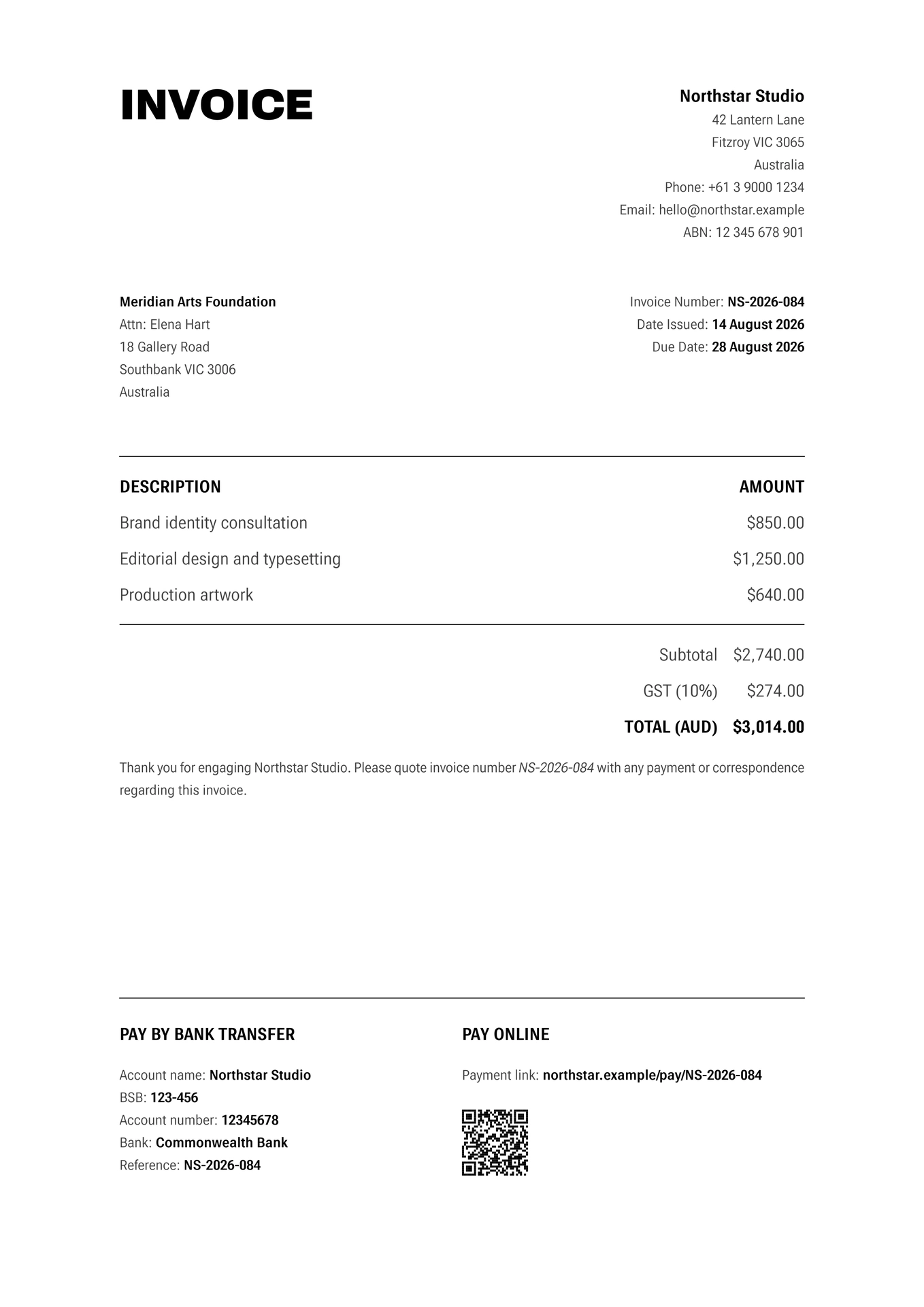
Invar is a precision invoice template for Typst.
Typography does the work: The template avoids ornamental decoration and instead creates hierarchy through Roboto Flex’s variable axes, size, weight, width, spacing, and colour.
The common case should be simple: An invoice item is just a description and an amount. Sender and recipient information can contain arbitrary fields. Payment information is extensible without requiring a rigid schema.
Defaults should be useful: All parameters can be omitted. An invoice should remain valid and visually coherent without requiring users to configure every aspect of the template.
Usage
#import "@preview/invar:0.1.0": *

#show: invoice.with(
  sender: (
    name: "Northstar Studio",
    address: "42 Lantern Lane, Fitzroy VIC 3065, Australia",
    "Phone": "+61 3 9000 1234",
    "Email": "hello@northstar.example",
    "ABN": "12 345 678 901",
  ),
  recipient: (
    name: "Meridian Arts Foundation",
    "Attn": "Elena Hart",
    address: "18 Gallery Road, Southbank VIC 3006, Australia",
  ),
  date: (
    datetime(
      year: 2026,
      month: 8,
      day: 14,
    ),
    "[day] [month repr:long] [year]",
  ),
  number: "NS-2026-084",
  due: 14,
  currency: (
    name: "AUD",
    symbol: "$",
  ),
  items: (
    "Brand identity consultation": 850,
    "Editorial design and typesetting": 1250,
    "Production artwork": 640,
  ),
  taxes: (
    "GST": 10,
  ),
  payment: (
    (
      heading: "Pay by bank transfer",
      width: 2fr,
      "Account name": "Northstar Studio",
      "BSB": "123-456",
      "Account number": "12345678",
      "Bank": "Commonwealth Bank",
      "Reference": "NS-2026-084",
    ),
    (
      heading: "Pay online",
      width: 1fr,
      "Payment link": "northstar.example/pay/NS-2026-084",
      qr: qr-code(
        "https://northstar.example/pay/NS-2026-084",
        width: 2cm,
      ),
    ),
  ),
)

Thank you for engaging Northstar Studio. Please quote invoice number
_NS-2026-084_ with any payment or correspondence regarding this invoice.
All fields are optional, and can be added and removed as necessary.
Parameters
Sender
| Parameter | Default | Description |
|---|---|---|
sender |
(:) |
Dictionary containing the sender’s information. |
sender.name |
none |
Sender name. Displayed prominently above the sender’s other information. |
sender.address |
none |
Sender address. Comma-separated components are displayed on separate lines. |
| Other fields | — | Any additional fields are displayed as Label: value below the address. |
Sender information is intentionally open-ended. For example:
sender: (
  name: "Northstar Studio",
  address: "42 Lantern Lane, Fitzroy VIC 3065, Australia",
  "Phone": "+61 3 9000 1234",
  "Email": "hello@northstar.example",
  "ABN": "12 345 678 901",
),
The name and address fields receive special treatment; any other fields are rendered automatically.
Recipient
| Parameter | Default | Description |
|---|---|---|
recipient |
(:) |
Dictionary containing the recipient’s information. |
recipient.name |
none |
Recipient name. |
recipient.address |
none |
Recipient address. Comma-separated components are displayed on separate lines. |
| Other fields | — | Any additional fields are displayed automatically as Label: value. |
For example:
recipient: (
  name: "Meridian Arts Foundation",
  "Attn": "Elena Hart",
  address: "18 Gallery Road, Southbank VIC 3006, Australia",
),
Fields other than name and address are not reserved. This means you can use whatever labels are appropriate for the recipient without having to modify the template.
Invoice details
| Parameter | Default | Description |
|---|---|---|
date |
none |
Invoice issue date. Accepts a datetime, or a (datetime, format) pair. |
number |
none |
Invoice number. |
due |
none |
Payment due date. An integer is interpreted as a number of days after the issue date; a datetime can also be supplied directly. |
A simple date can be supplied as:
date: datetime.today(),
To specify the display format:
date: (
  datetime(
    year: 2026,
    month: 8,
    day: 14,
  ),
  "[day] [month repr:long] [year]",
),
The due date can be specified as a number of days:
date: datetime.today(),
due: 30,
In this case, Invar calculates the due date automatically.
Alternatively, supply a specific date:
due: datetime(
  year: 2026,
  month: 9,
  day: 13,
),
If date, number, or due is omitted, the corresponding invoice detail is omitted rather than displaying an empty field.
Currency
The currency parameter controls the currency name, symbol, decimal separator, thousands separator, and number of decimal places.
currency: (
  name: "AUD",
  symbol: "$",
),
All currency options are optional:
| Field | Default | Description |
|---|---|---|
name |
none |
Currency name displayed in the total, e.g. AUD. |
symbol |
"" |
Symbol placed before monetary amounts, e.g. $ or €. |
decimal |
"." |
Decimal separator. |
thousands |
"," |
Thousands separator. Set to none to disable grouping. |
decimals |
2 |
Number of digits after the decimal separator. |
For example, an Australian dollar invoice can use:
currency: (
  name: "AUD",
  symbol: "$",
),
which produces amounts such as:
$1,234.50
A European-style format can be specified as:
currency: (
  name: "EUR",
  symbol: "€",
  decimal: ",",
  thousands: ".",
  decimals: 2,
),
which produces:
€1.234,50
For convenience, a currency can also be specified simply as a string:
currency: "$",
This supplies the symbol while retaining the default formatting options.
Items
Invoice items are represented as a dictionary where each key is the description and each value is the amount:
items: (
  "Translation services": 1200,
  "Proofreading": 400,
),
Additional information can be included in the description:
items: (
  "Translation — 10 hours": 1200,
  "Proofreading — 5 hours": 400,
),
Amounts are automatically included in the subtotal and total.
Taxes
Taxes are represented as a dictionary where each key is the tax name and each value is its percentage:
taxes: (
  "GST": 10,
),
Multiple taxes can be specified:
taxes: (
  "State tax": 5,
  "Local tax": 2.5,
),
Tax amounts are calculated from the subtotal and displayed individually before the final total.
Payment information
The payment parameter accepts one or more payment blocks. Each block is a dictionary containing a heading, an optional width, and any number of payment details.
payment: (
  (
    heading: "Pay by bank transfer",
    width: 2fr,
    "Account name": "Northstar Studio",
    "BSB": "123-456",
    "Account number": "12345678",
  ),
  (
    heading: "Pay online",
    width: 1fr,
    "Payment link": "northstar.example/pay/NS-2026-084",
  ),
),
The heading identifies the payment method, while width controls its relative width within the payment section.
All other fields are displayed automatically. This means payment methods can contain whatever information is appropriate without requiring the template to know about specific banking systems.
For values that need to be displayed as Typst content rather than text, pass content directly:
payment: (
  (
    heading: "Pay by bank transfer",
    "Account name": "Northstar Studio",
    "Account number": "12345678",
    qr: qr-code(
      "https://northstar.example/pay",
      width: 2cm,
    ),
  ),
),
An empty string can be used when a field’s key itself contains information that should be displayed without a Label: value prefix:
"89-16 Jamaica Ave, Woodhaven NY 11421, United States": "",
This is useful for additional lines of payment or banking information that do not naturally have a label.
Paper
The paper parameter controls the page size and margins:
paper: (
  size: "a4",
  margins: (
    x: none,
    y: none,
  ),
),
| Field | Default | Description |
|---|---|---|
size |
"a4" |
Any paper size supported by Typst, such as "a4", "a5", or "us-letter". |
margins.x |
none |
Horizontal page margin. When none, Invar derives the margin from the baseline grid. |
margins.y |
none |
Vertical page margin. When none, Invar derives the margin from the baseline grid. |
The default margins are derived from the base font size and leading rather. This allows the overall proportions of the document to remain coherent when the font size changes.
To specify custom margins:
paper: (
  size: "a4",
  margins: (
    x: 2.5cm,
    y: 2cm,
  ),
),
The margins field itself may be omitted:
paper: (
  size: "a4",
),
Typography
Invar makes extensive use of Roboto Flex’s variable axes to indicate hieararchy.
The design uses variations in:
- Weight (
wght) for hierarchy and emphasis. - Width (
wdth) for compact metadata and expansive display text. - Grade (
GRAD) to control visual density without changing text metrics. - Optical size (
YOPQ) for the large display title.
The base text uses a deliberately condensed width, while the invoice title expands dramatically. Labels become highly condensed and heavy, while values use weight and colour to establish a secondary hierarchy.
Font size and leading
| Parameter | Default | Description |
|---|---|---|
font-size |
11pt |
Base font size. Other type sizes and document spacing derive from this value. |
leading-ratio |
1.75 |
Line height as a multiple of the base font size. Also determines the document’s baseline grid. |
font-face |
"Roboto Flex" |
Font used throughout the document. |
cjk-font-face |
"Noto Sans CJK JP" |
Fallback front for CJK content. |
For example:
#show: invoice.with(
  font-size: 10pt,
  leading-ratio: 1.7,
)
Roboto Flex must be available to Typst for the default design to render as intended.
Colour
| Parameter | Default | Description |
|---|---|---|
background-color |
rgb("#ffffff") |
Page background colour. |
foreground-color |
rgb("#000000") |
Primary foreground colour. |
Invar derives a secondary foreground colour automatically from these two values. This is used for addresses, metadata, amounts, and other secondary information, allowing the hierarchy to remain coherent when the primary colours are changed.
For example:
#show: invoice.with(
  foreground-color: rgb("#17202a"),
  background-color: rgb("#f8f7f3"),
)
Language
| Parameter | Default | Description |
|---|---|---|
language |
"en" |
Document language. Accepts a Typst language code such as "de", "fr", or "ja". |
#show: invoice.with(
  language: "de",
)
The language is passed to Typst’s text system so that language-sensitive typography and hyphenation can work appropriately.
License
Copyright © 2026 Haydn Trowell.
This program is free software: you can redistribute it and/or modify it under the terms of the GNU General Public License as published by the Free Software Foundation, either version 3 of the License, or (at your option) any later version.
This program is distributed in the hope that it will be useful, but WITHOUT ANY WARRANTY; without even the implied warranty of MERCHANTABILITY or FITNESS FOR A PARTICULAR PURPOSE. See the GNU General Public License for more details.
You should have received a copy of the GNU General Public License along with this program. If not, see https://www.gnu.org/licenses/.