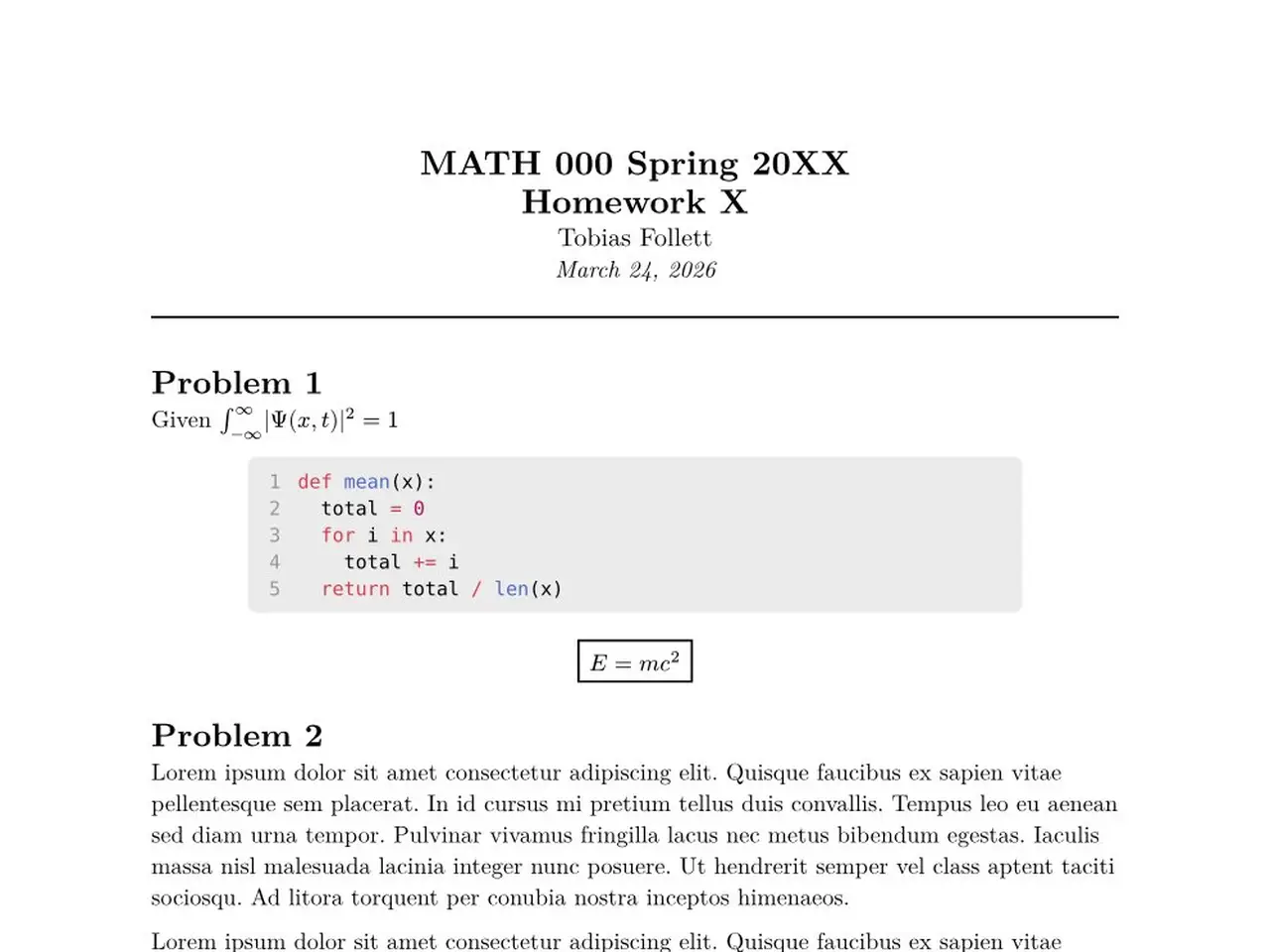
A clean homework template with a formatted title block, running page headers, and styled code blocks with line numbers.
Quick Start
Initialize a new project from the template:
typst init @preview/homiework:0.1.0
Or import it manually in an existing file:
#import "@preview/homework:0.1.0": homework

#show: homework.with(
  course: "MATH 000",
  semester: "Spring 20XX",
  number: "1",
  date: datetime(year: 2026, month: 1, day: 1),
)

= Problem 1

Given $integral_(-infinity)^infinity |Psi(x,t)|^2 = 1$
Compile with typst compile main.typ or use the Tinymist VS Code extension.
Features
Title Block
The first page opens with a centered title block showing the course, semester, homework number, author name, and date, followed by a full-width rule.
        MATH 000 Spring 20XX
            Homework 1
           Tobias Follett
           January 1, 2026
  ──────────────────────────────
Running Header
Pages after the first display a header with the course and homework number on the left and the author name on the right, separated by a rule:
MATH 000 — Homework 1              Tobias Follett
──────────────────────────────────────────────────
Code Blocks
Fenced code blocks are centered, lightly shaded, and include line numbers. All major languages work — for example, Python and MATLAB:
```python
def mean(x):
    return sum(x) / len(x)
```
```matlab
[t, y] = ode45(@(t,y) -k*(y - Tenv), tspan, T0);
```
Math
Standard Typst math works inline and in display mode:
Given $integral_(-infinity)^infinity |Psi(x,t)|^2 = 1$

#align(center)[
  #rect[$ E = m c^2 $]
]
All Parameters
| Parameter | Default | Description |
|---|---|---|
course |
"COURSE 000" |
Course name and number |
semester |
"Spring 20XX" |
Semester label |
number |
"X" |
Homework number |
author |
"Tobias Follett" |
Author name |
date |
datetime.today() |
Assignment date |
License
This package is licensed under the MIT License.