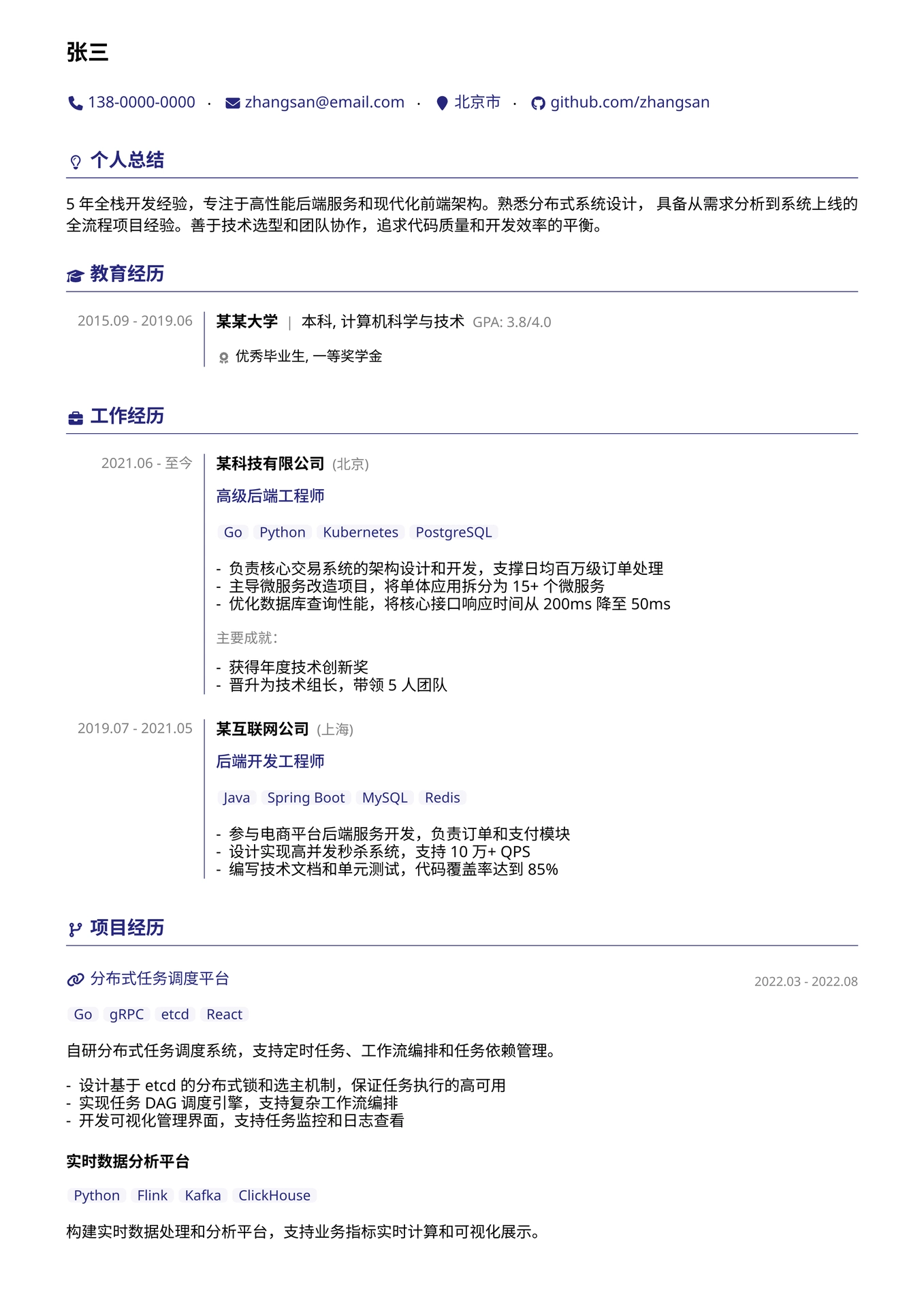
一个使用 Typst 编写的模块化简历模板,专为简体中文排版优化。
特性
- 模块化设计 - 配置、组件、图标、章节分离,便于维护和定制
- 中文优化 - 针对简体中文排版调优,字体栈包含 Noto Sans CJK SC
- 丰富组件 - 提供工作经历、教育背景、项目经历、技能展示等常用简历组件
- 图标支持 - 集成 Nerdfont 图标,支持 60+ 常用图标
- 高度可配置 - 字体、颜色、间距、布局均可通过配置文件调整
- 多种布局 - 支持双列、三列、侧边栏、时间轴等布局方式
模板展示
快速开始
通过 Typst Packages
// 远程包导入
#import "@preview/golixp-resume-zh-cn:0.1.2": *
通过 Typst Web App
点击链接: https://typst.app/app?template=golixp-resume-zh-cn&version=0.1.2
在官方 Typst Web App 使用此模板, 需要手动上传 Nerd Font 字体到根目录, Nerd Font 字体下载链接: https://github.com/ryanoasis/nerd-fonts/releases/download/v3.3.0/NerdFontsSymbolsOnly.zip
将压缩包内的 SymbolsNerdFont-Regular.ttf 和 SymbolsNerdFontMono-Regular.ttf 上传到 Typst Web App 对应项目根目录.
克隆仓库
git clone https://github.com/golixp/typst-resume-zh-cn.git
通过 Typst Local Packages
创建包
Linux:
mkdir -p ~/.local/share/typst/packages/local/golixp-resume-zh-cn/
git clone https://github.com/golixp/typst-resume-zh-cn.git ~/.local/share/typst/packages/local/golixp-resume-zh-cn/0.1.2
macOS:
mkdir -p "~/Library/Application Support/typst/packages/local/golixp-resume-zh-cn/"
git clone https://github.com/golixp/typst-resume-zh-cn.git ~/Library/Application\ Support/typst/packages/local/golixp-resume-zh-cn/0.1.2
Windows:
mkdir -Force "$env:APPDATA\typst\packages\local\golixp-resume-zh-cn\0.1.2"
git clone https://github.com/golixp/typst-resume-zh-cn.git "$env:APPDATA\typst\packages\local\golixp-resume-zh-cn\0.1.2"
导入包
// 本地包导入
#import "@local/golixp-resume-zh-cn:0.1.2": *
前置要求
- Typst >= 0.14.0
- 字体:Noto Sans、Noto Sans CJK SC、Symbols Nerd Font
编译
typst compile example.typ
GitHub Actions 自动发布
项目内置 GitHub Actions 工作流(.github/workflows/release.yml),可在推送 Git 标签时自动编译 Typst 文档并将生成的 PDF 发布到 GitHub Releases。
配置
GitHub Actions 仅识别仓库根目录下 .github/workflows/ 中的工作流文件,因此必须将工作流文件复制到正确位置。
将本项目的 .github/workflows/release.yml 复制到你的仓库对应目录:
mkdir -p .github/workflows
cp <仓库目录>/.github/workflows/release.yml .github/workflows/release.yml
然后根据简历源文件的实际位置调整 TYPST_SOURCE。编辑 .github/workflows/release.yml,将 TYPST_SOURCE 环境变量设置为目标 Typst 源文件名称(不含 .typ 扩展名):
env:
  TYPST_SOURCE: example  # 替换为你的文件名
如果简历源文件位于子目录中,需将 TYPST_SOURCE 设置为相对于仓库根目录的路径(不含 .typ 扩展名):
env:
  TYPST_SOURCE: docs/resume  # 对应 docs/resume.typ
触发发布
创建 Git 标签并推送至远程仓库,即可触发自动构建:
git tag v1.0.0
git push origin v1.0.0
工作流将自动执行以下步骤:安装所需字体、编译 Typst 文档为 PDF、创建 GitHub Release 并上传 PDF 文件。
注意:工作流仅在推送标签时触发,普通的代码提交不会触发发布流程。
项目结构
.
├── .github
│   └── workflows
│       └── release.yml      # GitHub Actions 发布工作流
├── modules
│   ├── config.typ           # 配置模块(字体、颜色、间距等)
│   ├── icons.typ            # 图标模块(Nerdfont 图标定义)
│   ├── components.typ       # 基础组件(布局、列表、卡片等)
│   └── sections.typ         # 章节组件(工作经历、教育等)
├── template
│   └── main.typ             # 示例模板入口
├── lib.typ                  # 模板入口(统一导出模块)
├── example.typ              # 示例简历文件
├── typst.toml               # Typst 包配置
├── README.md                # 中文使用说明
├── README_en.md             # 英文使用说明
└── LICENSE                  # 开源许可证(MIT)
使用方法
导入模块
// 远程包导入
#import "@preview/golixp-resume-zh-cn:0.1.2": *

// 本地包导入
// #import "@local/golixp-resume-zh-cn:0.1.2": *

// 本地文件导入
// #import "lib.typ": *
个人信息
#personal-header(
  "姓名",
  (
    (icon: "phone", content: "138-0000-0000"),
    (icon: "email", content: "email@example.com"),
    (icon: "github", content: "github.com/user", link: "https://github.com/user"),
  ),
)
工作经历
#section-header("工作经历", icon-name: "work")

#work-item(
  "2021.06 - 至今",
  "公司名称",
  "职位",
  location: "北京",
  tech-stack: ("Go", "Python", "Kubernetes"),
  responsibilities: (
    [工作职责 1],
    [工作职责 2],
  ),
  achievements: (
    [主要成就],
  ),
)
教育经历
#section-header("教育经历", icon-name: "graduation")

#education-item(
  "2015.09 - 2019.06",
  "大学名称",
  "本科",
  "专业名称",
  gpa: "3.8/4.0",
  honors: ("荣誉 1", "荣誉 2"),
)
项目经历
#section-header("项目经历", icon-name: "project")

#project-item(
  "项目名称",
  [项目描述],
  tech-stack: ("Go", "gRPC", "etcd"),
  responsibilities: (
    [职责 1],
    [职责 2],
  ),
  link: "https://github.com/example/project",
)
技能展示
#section-header("专业技能", icon-name: "code")

#skill-category(
  "编程语言",
  ("Go", "Python", "Java", "TypeScript"),
  level: ("精通", "熟练", none, ""),
  icon-names: ("go", "python", none, ""),
)
配置选项
通过 resume-doc 或 resume-init / get-config 自定义样式。
方式一:推荐 - 使用 resume-doc
#show: resume-doc.with(
  overrides: (
    colors: (primary: rgb(180, 0, 0)),
    fonts: (main: "Source Han Sans SC"),
  ),
)
方式二:手动初始化 + 读取配置
#resume-init(
  overrides: (
    colors: (primary: rgb(180, 0, 0)),
  ),
)

#context {
  let cfg = get-config()
  set page(margin: cfg.at("page-margins"))
  set text(font: cfg.at("font-stack"), size: cfg.at("font-sizes").base)
  set par(justify: cfg.at("style-features")["paragraph-justify"], leading: cfg.spacing.paragraph)
}
可覆盖的配置段 (config.typ)
| 配置项 | 说明 |
|---|---|
fonts |
字体族定义(main/mono/sc/nerd/nerd-mono/emoji) |
colors |
颜色配置(主题色、文本色等) |
font-sizes |
字号配置 |
spacing |
间距配置 |
page-margins |
页面边距 |
style-features |
样式开关(链接下划线、段落对齐等) |
layout-defaults |
布局参数(侧边栏宽度、列比例等) |
可用组件
基础组件 (components.typ)
| 组件 | 说明 |
|---|---|
list-view |
通用列表 |
description-list |
描述列表(键值对) |
tag-list |
标签列表 |
two-col / three-col |
多列布局 |
sidebar |
侧边栏布局 |
card / bordered-card / info-card |
卡片组件 |
timeline / timeline-item |
时间轴 |
styled-link / icon-link |
链接组件 |
date-text / label-text / tech-text |
文本样式 |
章节组件 (sections.typ)
| 组件 | 说明 |
|---|---|
section-header |
章节标题 |
personal-header |
个人信息头部 |
work-item / work-list |
工作经历 |
education-item / education-list |
教育经历 |
project-item / project-list |
项目经历 |
skill-category / skill-list / skill-cloud |
技能展示 |
award-item / award-list |
获奖荣誉 |
summary-paragraph / summary-list |
个人总结 |
图标 (icons.typ)
| 组件 | 说明 |
|---|---|
icon |
显示单个图标 |
icon-label |
图标 + 文本标签 |
tech-icon |
技术栈图标 |
支持的图标:phone、email、location、github、linkedin、work、graduation、project、code、award 等 60+ 种。
许可证
Warning: This template is optimized for Simplified Chinese typography. English-only layouts have not been tested and may require adjustments.
A modular resume template built with Typst, optimized for Simplified Chinese typography.
Features
- Modular Architecture - Separate config, components, icons, and sections for easy maintenance
- CJK Optimized - Fine-tuned for Simplified Chinese with Noto Sans CJK SC font stack
- Rich Components - Work experience, education, projects, skills, and more
- Icon Support - Integrated Nerdfont icons with 60+ commonly used icons
- Highly Configurable - Fonts, colors, spacing, and layouts all customizable
- Multiple Layouts - Two-column, three-column, sidebar, timeline layouts
Template Preview
Quick Start
Using Typst Packages
// Remote package import
#import "@preview/golixp-resume-zh-cn:0.1.2": *
Via Typst Web App
Click the link: https://typst.app/app?template=golixp-resume-zh-cn&version=0.1.2
To use this template in the official Typst Web App, you need to manually upload Nerd Fonts to the root directory. Download link for Nerd Fonts: https://github.com/ryanoasis/nerd-fonts/releases/download/v3.3.0/NerdFontsSymbolsOnly.zip
Upload SymbolsNerdFont-Regular.ttf and SymbolsNerdFontMono-Regular.ttf from the zip file to the root directory of your project in the Typst Web App.
Clone the Repository
git clone https://github.com/golixp/typst-resume-zh-cn.git
Using Typst Local Packages
Create Local Package
Linux:
mkdir -p ~/.local/share/typst/packages/local/golixp-resume-zh-cn/
git clone https://github.com/golixp/typst-resume-zh-cn.git ~/.local/share/typst/packages/local/golixp-resume-zh-cn/0.1.2
macOS:
mkdir -p "~/Library/Application Support/typst/packages/local/golixp-resume-zh-cn/"
git clone https://github.com/golixp/typst-resume-zh-cn.git ~/Library/Application\ Support/typst/packages/local/golixp-resume-zh-cn/0.1.2
Windows:
mkdir -Force "$env:APPDATA\typst\packages\local\golixp-resume-zh-cn\0.1.2"
git clone https://github.com/golixp/typst-resume-zh-cn.git "$env:APPDATA\typst\packages\local\golixp-resume-zh-cn\0.1.2"
Import Local Package
// Local package import
#import "@local/golixp-resume-zh-cn:0.1.2": *
Prerequisites
- Typst >= 0.14.0
- Fonts: Noto Sans, Noto Sans CJK SC, Symbols Nerd Font
Compile
typst compile example.typ
GitHub Actions Auto-Release
The project includes a GitHub Actions workflow (.github/workflows/release.yml) that automatically compiles Typst documents and publishes the generated PDF to GitHub Releases when a Git tag is pushed.
Configuration
GitHub Actions only recognizes workflow files in .github/workflows/ at the repository root, so you must copy the workflow file to the correct location.
Copy the .github/workflows/release.yml from this project to your repository:
mkdir -p .github/workflows
cp <repository-directory>/.github/workflows/release.yml .github/workflows/release.yml
Then adjust TYPST_SOURCE according to the actual location of your resume source file. Edit .github/workflows/release.yml and set the TYPST_SOURCE environment variable to the target Typst source filename (without the .typ extension):
env:
  TYPST_SOURCE: example  # Replace with your filename
If your resume source file is located in a subdirectory, set TYPST_SOURCE to the path relative to the repository root (without the .typ extension):
env:
  TYPST_SOURCE: docs/resume  # Corresponds to docs/resume.typ
Trigger a Release
Create a Git tag and push it to the remote repository to trigger the automated build:
git tag v1.0.0
git push origin v1.0.0
The workflow will automatically: install required fonts, compile the Typst document to PDF, create a GitHub Release and upload the PDF file.
Note: The workflow is triggered only by tag pushes. Regular commits will not trigger the release process.
Project Structure
.
├── .github
│   └── workflows
│       └── release.yml      # GitHub Actions release workflow
├── modules
│   ├── config.typ           # Configuration (fonts, colors, spacing)
│   ├── icons.typ            # Icon definitions (Nerdfont)
│   ├── components.typ       # Base components (layouts, lists, cards)
│   └── sections.typ         # Section components (work, education, etc.)
├── template
│   └── main.typ             # Example template entry
├── lib.typ                  # Library entry point (exports modules)
├── example.typ              # Example resume file
├── typst.toml               # Typst package manifest
├── README.md                # Documentation (Chinese)
├── README_en.md             # Documentation (English)
└── LICENSE                  # License (MIT)
Usage
Import Modules
// Typst Packages
#import "@preview/golixp-resume-zh-cn:0.1.2": *

// Typst Local Packages
// #import "@local/golixp-resume-zh-cn:0.1.2": *

// Local File
// #import "lib.typ": *
Personal Information
#personal-header(
  "Your Name",
  (
    (icon: "phone", content: "+1-234-567-8900"),
    (icon: "email", content: "email@example.com"),
    (icon: "github", content: "github.com/user", link: "https://github.com/user"),
  ),
)
Work Experience
#section-header("Work Experience", icon-name: "work")

#work-item(
  "2021.06 - Present",
  "Company Name",
  "Position",
  location: "City",
  tech-stack: ("Go", "Python", "Kubernetes"),
  responsibilities: (
    [Responsibility 1],
    [Responsibility 2],
  ),
  achievements: (
    [Achievement],
  ),
)
Education
#section-header("Education", icon-name: "graduation")

#education-item(
  "2015.09 - 2019.06",
  "University Name",
  "Bachelor",
  "Major",
  gpa: "3.8/4.0",
  honors: ("Honor 1", "Honor 2"),
)
Projects
#section-header("Projects", icon-name: "project")

#project-item(
  "Project Name",
  [Project description],
  tech-stack: ("Go", "gRPC", "etcd"),
  responsibilities: (
    [Contribution 1],
    [Contribution 2],
  ),
  link: "https://github.com/example/project",
)
Skills
#section-header("Skills", icon-name: "code")

#skill-category(
  "Programming Languages",
  ("Go", "Python", "Java", "TypeScript"),
  level: ("Expert", "Proficient", none, ""),
  icon-names: ("go", "python", none, ""),
)
Configuration
Configuration is injected via resume-doc or resume-init / get-config.
Option 1 (recommended): resume-doc
#show: resume-doc.with(
  overrides: (
    colors: (primary: rgb(180, 0, 0)),
    fonts: (main: "Source Han Sans SC"),
  ),
)
Option 2: Manual init + read config
#resume-init(
  overrides: (
    colors: (primary: rgb(180, 0, 0)),
  ),
)

#context {
  let cfg = get-config()
  set page(margin: cfg.at("page-margins"))
  set text(font: cfg.at("font-stack"), size: cfg.at("font-sizes").base)
  set par(justify: cfg.at("style-features")["paragraph-justify"], leading: cfg.spacing.paragraph)
}
Configurable sections (config.typ)
| Option | Description |
|---|---|
fonts |
Font family definitions (main/mono/sc/nerd/nerd-mono/emoji) |
colors |
Color palette (theme, text colors) |
font-sizes |
Font size settings |
spacing |
Spacing configuration |
page-margins |
Page margins |
style-features |
Style toggles (link underlines, justification) |
layout-defaults |
Layout parameters (sidebar width, column ratios) |
Available Components
Base Components (components.typ)
| Component | Description |
|---|---|
list-view |
Generic list |
description-list |
Key-value list |
tag-list |
Tag list |
two-col / three-col |
Multi-column layouts |
sidebar |
Sidebar layout |
card / bordered-card / info-card |
Card components |
timeline / timeline-item |
Timeline |
styled-link / icon-link |
Link components |
date-text / label-text / tech-text |
Text styles |
Section Components (sections.typ)
| Component | Description |
|---|---|
section-header |
Section heading |
personal-header |
Personal info header |
work-item / work-list |
Work experience |
education-item / education-list |
Education |
project-item / project-list |
Projects |
skill-category / skill-list / skill-cloud |
Skills |
award-item / award-list |
Awards |
summary-paragraph / summary-list |
Summary |
Icons (icons.typ)
| Component | Description |
|---|---|
icon |
Display single icon |
icon-label |
Icon with text label |
tech-icon |
Tech stack icon |
Supported icons: phone, email, location, github, linkedin, work, graduation, project, code, award, and 60+ more.
License
Some code and documentation generated with AI assistance