
A tokenized design system, composable component library, and multi-science layout toolkit for Typst.
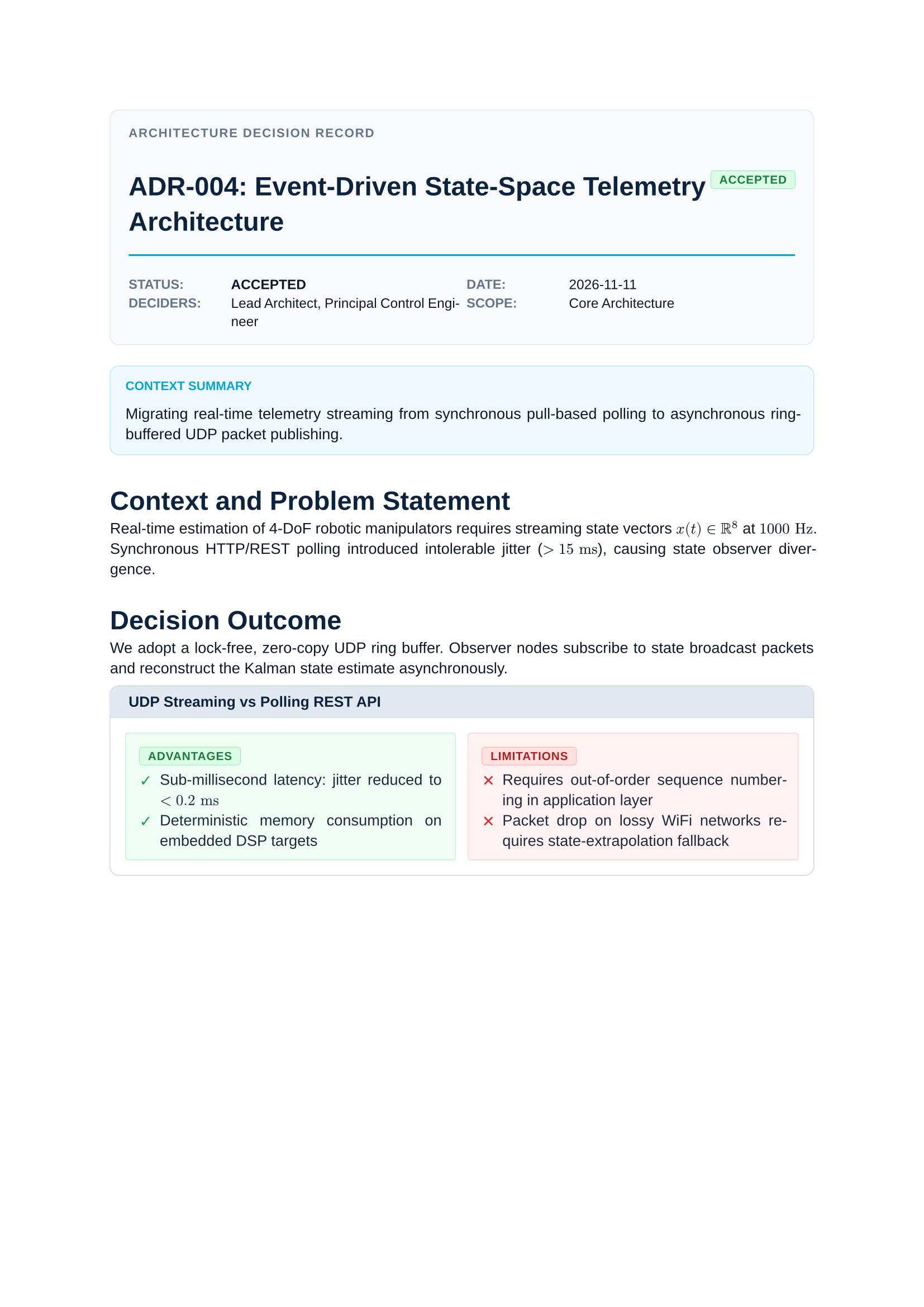
Floe provides modular structural primitives, equal-height row engines, composable show-rule mixins, scientific plotting and stoichiometry parsers, academic plaques, and turnkey document presets for course readers, lecture notes, technical reports, presentations, formula cheatsheets, and Architecture Decision Records.
Showcase
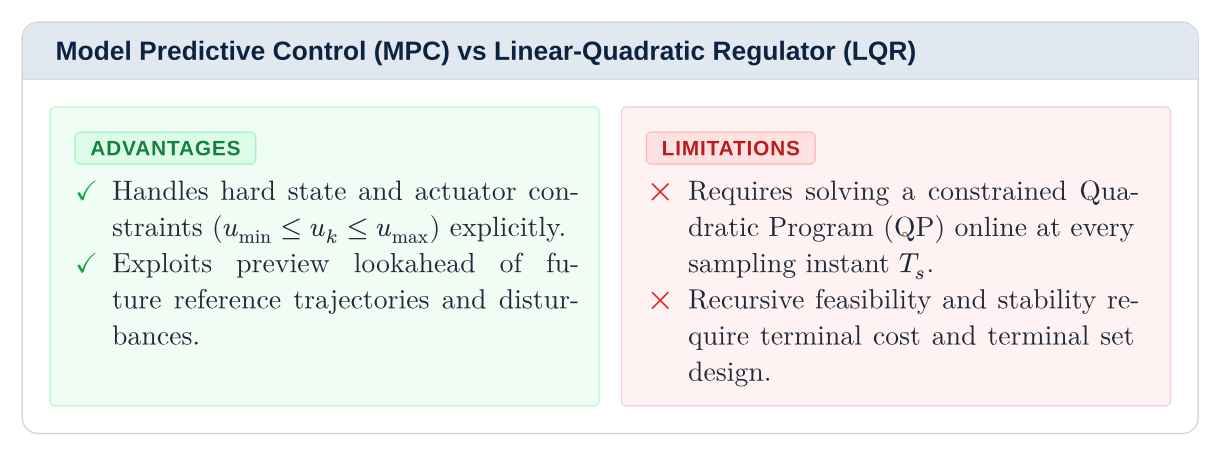
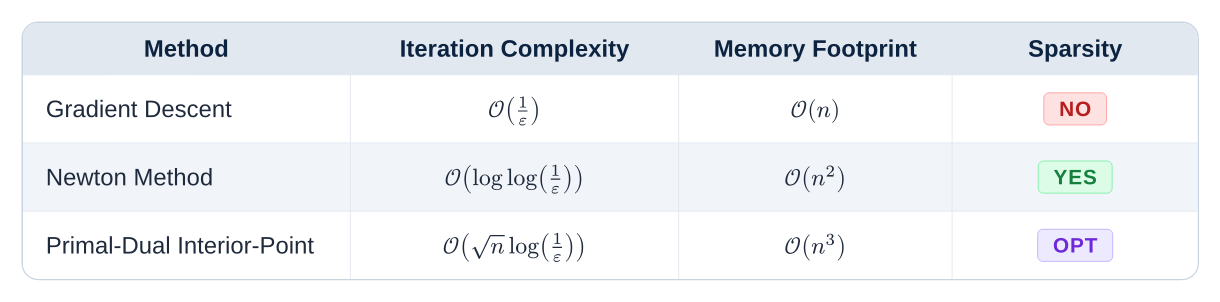
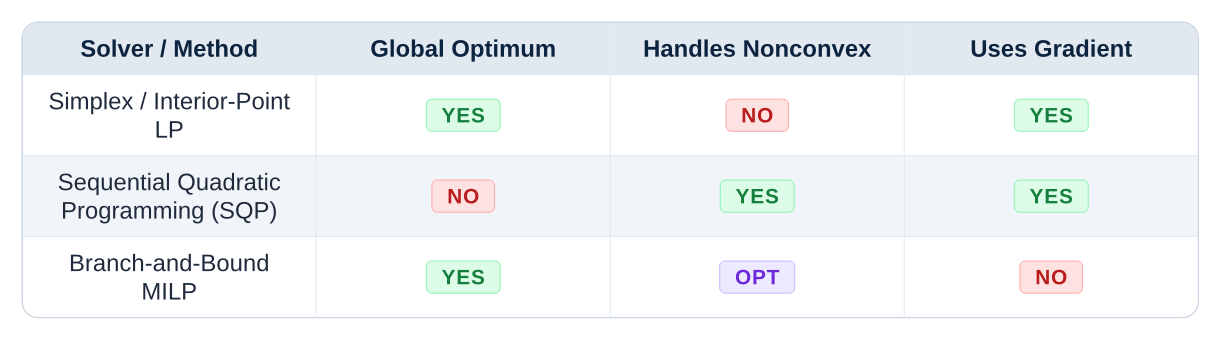
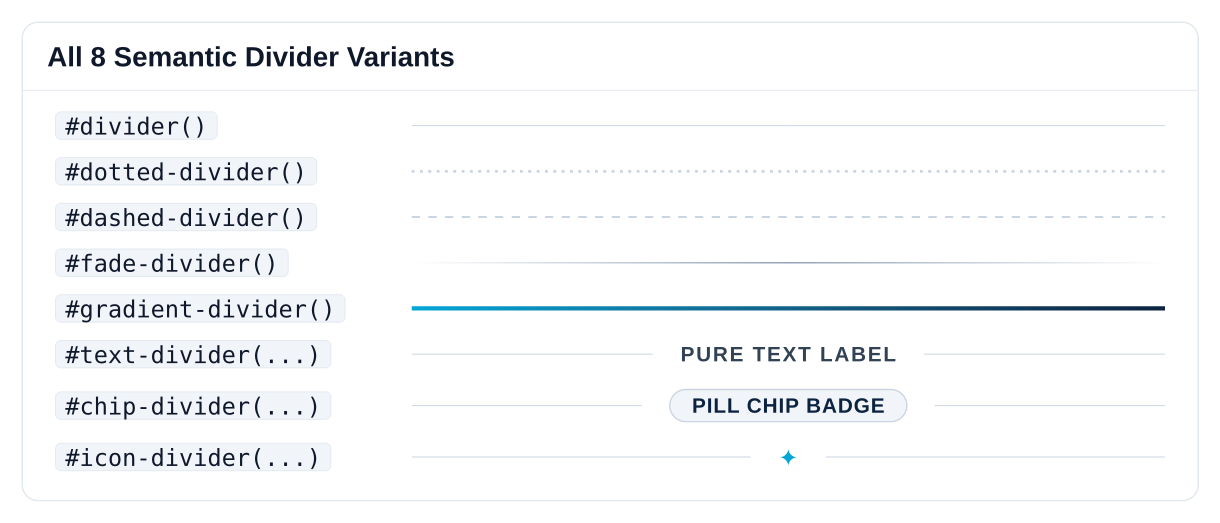
Tip Complete Component & API Reference: This showcase highlights selected components across all five architectural layers. Every primitive, mixin, component, and preset is documented in depth with live Typst code, parameter tables, and visual previews on the Documentation Site.
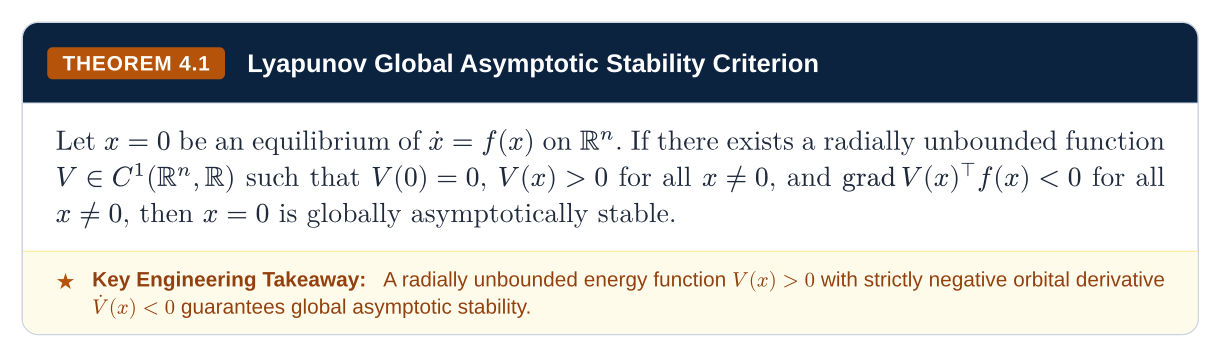
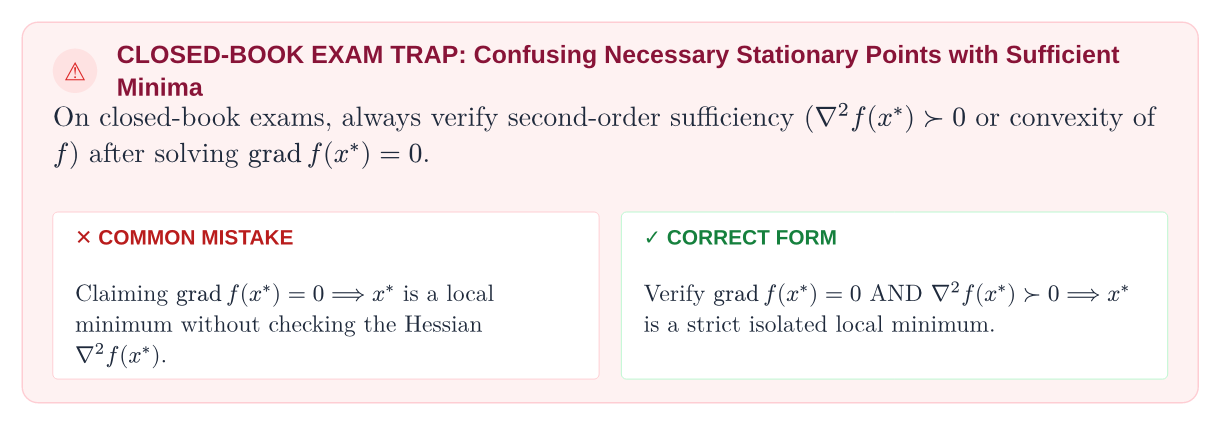
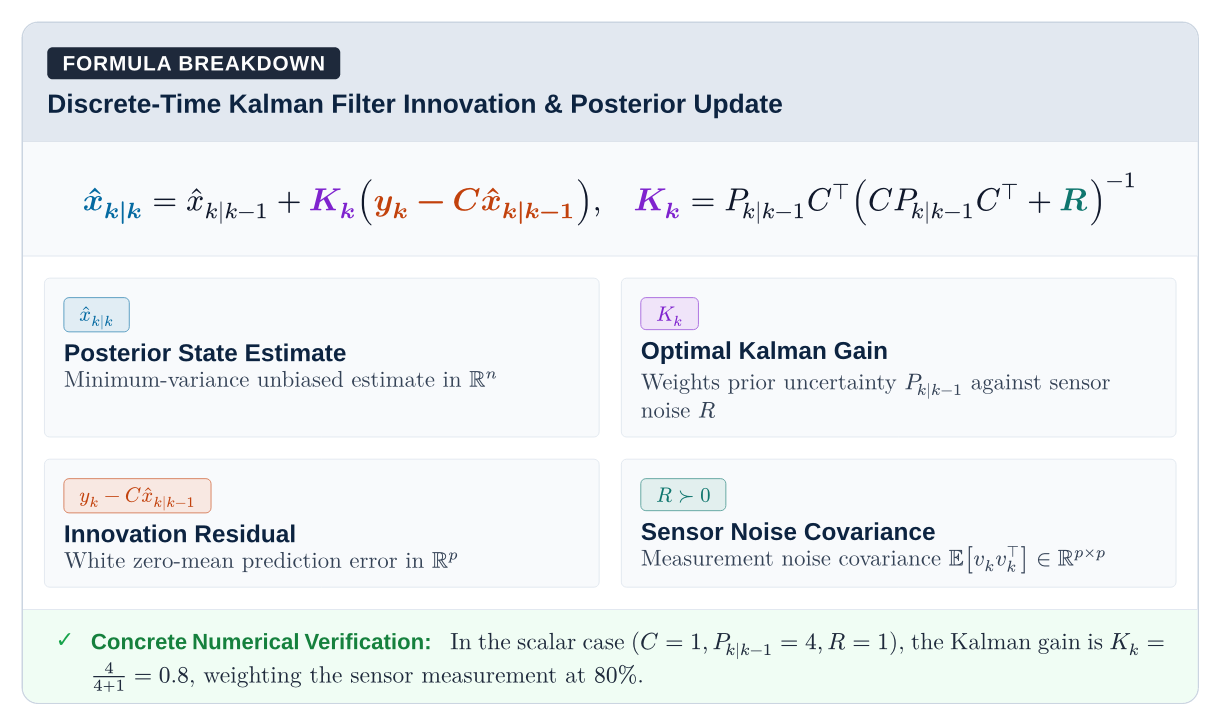
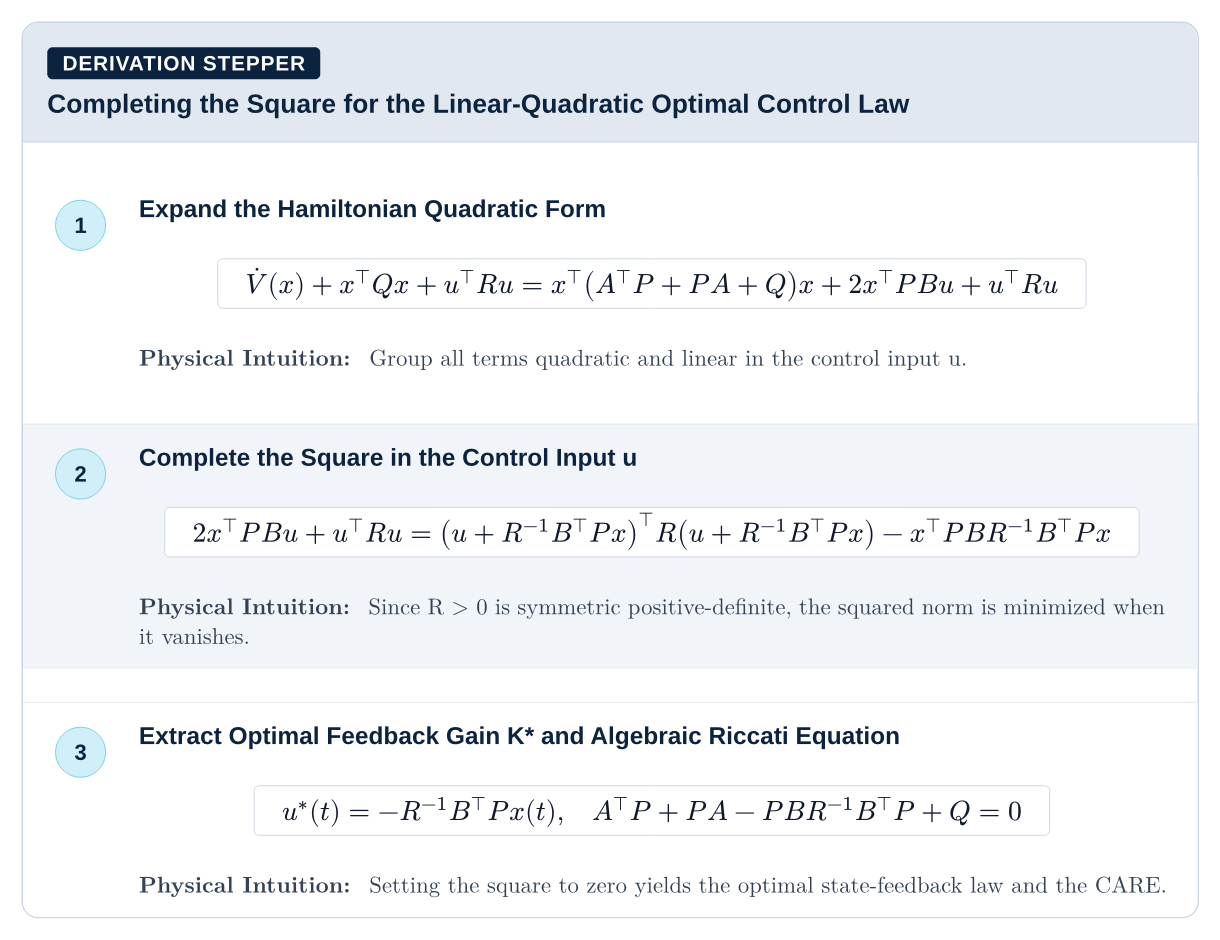

Why Floe
ice floe (
/floʊ/) — noun: A flat, buoyant sheet of sea ice drifting independently across open arctic waters, providing sure-footed footing and refuge without the immovable, submerged bulk of a glacier.
In document engineering and academic publishing, most templates behave like icebergs: massive, rigid monoliths where 90% of the complexity is submerged underwater. If you want to change a heading font or widen a table margin, you collide with hundreds of lines of brittle, interconnected macros that pull your layout down into the deep.
Floe is designed as an archipelago of ice floes:
- Flat, Visible & Buoyant: What you see is what you get. Every primitive is lightweight, self-contained, and floats on top of your document without hidden side effects.
- Step Across Freely: You don’t have to adopt an entire opinionated universe. A polar bear doesn’t need the entire arctic ice sheet to cross the ocean—it just needs a stable floe to step on. You can use a single
#card,#formula-breakdown, or#text-dividerfloe in your document and leave everything else untouched.
What is Floe
Is Floe a framework? A template? Or a component library?
Floe is a composable UI design system and component toolkit for Typst—analogous to what Tailwind CSS + Shadcn UI + Radix Primitives are to modern web engineering:
- Not a rigid, monolithic template: Traditional LaTeX and Typst templates box you into a multi-hundred-line monolithic function where changing font sizes or margins breaks header alignment or requires rewriting the package internals.
- Atomic & Decoupled: Floe separates styling into five independent layers: tokens and backend engines, layout atoms, show-rule mixins, domain components, and optional document presets.
- Zero Lock-In: You can use Floe as a complete turnkey document engine with one-line presets (
#show: textbook.with(...)), or you can completely ignore the presets and cherry-pick only the specific atoms (#card,#theorem,#text-divider,#formula-breakdown) you need in an existing custom Typst document.
Overridable and Extensible Architecture
Every layer in Floe is designed to be predictably overridden without touching library sources:
- Token Overrides: All palette colors (
floe-navy,floe-cyan,floe-amber), typography scales (text-scale), font families (fonts.sans,fonts.serif,fonts.mono), radii (radii.sm,radii.md), and stroke widths (strokes.border,strokes.hairline) are first-class variables. - Component Parameter Overrides: Every card, plaque, alert, divider, and table accepts explicit styling parameters (
accent,fill,stroke,radius,inset,color). If you pass a custom accent or fill, the component seamlessly overrides its default theme. - Composable Show-Rule Mixins: Mixins are pure, independent show rules (
#show: with-code-theme,#show: with-heading-theme,#show: with-table-theme). You can apply them selectively, reorder them, or chain them before or after your own custom#showrules. - Custom Atomic Assemblies: Because primitives like
#cardand#plaquemake zero domain assumptions, you can assemble brand new domain components in five lines of code.
GitHub Flavored Markdown Compatibility
A primary design goal of Floe is first-class, drop-in compatibility with GitHub Flavored Markdown:
The Vision: Write ordinary
.mdtechnical notes, lecture transcripts, and READMEs, parse them with standard Typst markdown tools, apply Floe mixins, and compile publication-grade PDFs with zero manual syntax conversions.
Current GFM Support
- GFM Callouts:
#show: with-gfm-themeautomatically transforms GitHub blockquotes (> [!NOTE],> [!TIP],> [!IMPORTANT],> [!WARNING],> [!CAUTION]) into delicate Shadcn callout cards with zero thick left-bars. - Fenced Code and Mermaid Blocks:
#show: with-code-themetransforms GitHub Markdown code fences (```rust ... ```) into macOS terminal windows with traffic-light dots and language badges, and automatically renders```mermaid ... ```fences into vector flowcharts. - Tables:
#show: with-table-themetransforms standard Markdown tables into clean, proportional tables with hairline headers and alternating zebra stripes.
Installation
Typst Universe
Import the package directly in any Typst document:
#import "@preview/floe:0.2.2": *
Local Development
To use the local development build or contribute to Floe:
mkdir -p ~/.local/share/typst/packages/local/floe
ln -s /path/to/Floe ~/.local/share/typst/packages/local/floe/0.2.2
Then import the local package:
#import "@preview/floe:0.2.2": *
Quick Start
#import "@preview/floe:0.2.2": *

#show: textbook.with(
  title: "Optimal Control & Dynamic Programming",
  course-code: "SC42056",
  institution: "Systems & Control Institute • Academic Series",
)

#chapter-header(
  num: 1,
  title: "First-Order Optimality Conditions",
  subtitle: "Unconstrained minimization, stationary points, and descent directions",
)

== Necessary Conditions

#theorem(
  num: "1.1",
  title: "First-Order Necessary Condition",
  takeaway: [If $nabla f(x^*) eq.not 0$, the negative gradient $d = -nabla f(x^*)$ is a strict descent direction.],
)[
  Let $f: bb(R)^n -> bb(R)$ be continuously differentiable over an open set $cal(D) subset.eq bb(R)^n$.
  If $x^* in cal(D)$ is a local minimizer of $f$, then:
  $ nabla f(x^*) = 0 $
]

#pitfall(
  title: "Vanishing Gradient Fallacy",
  mistake: [$nabla f(x^*) = 0 arrow.double x^*$ is a local minimum],
  correct: [Check $nabla f(x^*) = 0$ AND $nabla^2 f(x^*) succ.eq 0$],
)[
  $nabla f(x) = 0$ identifies stationary points, not minimizers. Saddle points and local maximizers also satisfy first-order stationarity.
]
Document Presets
Six complete document engines configured with a single #show rule:
| Preset | Format | Purpose | Preview & Docs |
|---|---|---|---|
#show: textbook.with(...) |
A4 Single-Column | Course readers, textbook companions, and study guides with Hydra chrome. | Example • Docs |
#show: report.with(...) |
A4 Sans-Serif | Engineering reports, design reviews, and technical whitepapers. | Example • Docs |
#show: slides.with(...) |
16:9 Widescreen | Keynote-style presentation slides with dark and light themes. | Example • Docs |
#show: cheatsheet.with(...) |
Landscape 3-Column | Dense closed-book exam revision and quick-reference formula sheets. | Example • Docs |
#show: memo.with(...) |
A4 Briefing | Executive decision memos with structured metadata plaques and executive summaries. | Example • Docs |
#show: adr.with(...) |
Dual-Mode A4 | 16:9 | Architecture Decision Records compiling to an A4 record or 16:9 presentation deck. | Example • Docs |
Architecture
Floe is structured into five decoupled layers. You can use high-level presets (textbook, report, slides, adr), cherry-pick individual components (theorem, formula-breakdown, plot-2d, data-table), or compose pure layout atoms (equal-grid, card, plaque, figure-card, stepper) with zero external side effects.
Floe/
├── core/                      # Layer 0: Tokens, metrics, palettes, universe packages & #ce chemistry
├── primitives/                # Layer 1: Equal-height grids, cards, plaques, figures, badges & dividers
├── mixins/                    # Layer 2: Pure show rules: headings, chrome, code + Mermaid, math, tables
├── components/                # Layer 3: Academic, alerts, pedagogical, science, layouts, tables, headers
└── presets/                   # Layer 4: Master document templates: textbook, report, slides, memo, adr
Every module exposes a lib.typ entrypoint, allowing either whole-library or layer-specific imports:
#import "@preview/floe:0.2.2": *                // Import everything
#import "@preview/floe:0.2.2/core": *           // Import Layer 0 tokens & scientific backends
#import "@preview/floe:0.2.2/primitives": *     // Import Layer 1 atomic primitives
#import "@preview/floe:0.2.2/mixins": *         // Import Layer 2 show rules
#import "@preview/floe:0.2.2/components": *     // Import Layer 3 high-level components
#import "@preview/floe:0.2.2/presets": *        // Import Layer 4 document presets
Component Reference
Layer 0: Core Foundation
Located in core/tokens.typ, core/packages.typ, and core/chemistry.typ. Layer 0 defines the design tokens and re-exports Typst Universe’s premier scientific and diagramming engines out of the box:
| Export | Source Module | Description |
|---|---|---|
floe-navy, floe-cyan, floe-amber, floe-green, floe-red, floe-purple, slate-* |
core/tokens.typ |
Semantic brand colors, 10-step Tailwind slate neutral scale, typography scales, radii, and hairline stroke tokens. |
#ce("...") |
core/chemistry.typ |
Native pure-Typst chemical stoichiometry, ion charge, oxidation state, and equilibrium arrow parser. |
@preview/physica:0.9.8 |
core/packages.typ |
Re-exported for Dirac bra-ket notation (ket, bra, braket), derivatives (dv, pdv), and vector calculus (grad, div, curl). |
@preview/unify:0.7.0 |
core/packages.typ |
Re-exported for SI units and physical quantities (qty, num, unit, qtyrange). |
@preview/cetz:0.5.2 & @preview/fletcher:0.5.8 |
core/packages.typ |
Re-exported for vector canvas graphics (cetz) and commutative/block diagrams (diagram, node, edge). |
@preview/merman:0.1.0 & @preview/zap:0.5.0 |
core/packages.typ |
Re-exported for native Mermaid flowcharts (mermaid) and electrical circuit schematics (zap.circuit). |
Layer 1: Atomic Primitives
Located in primitives/. Pure structural building blocks with zero domain assumptions:
| Primitive | Parameters | Description |
|---|---|---|
#equal-grid(...) |
columns: (1fr, 1fr), gutter: 10pt, ..children |
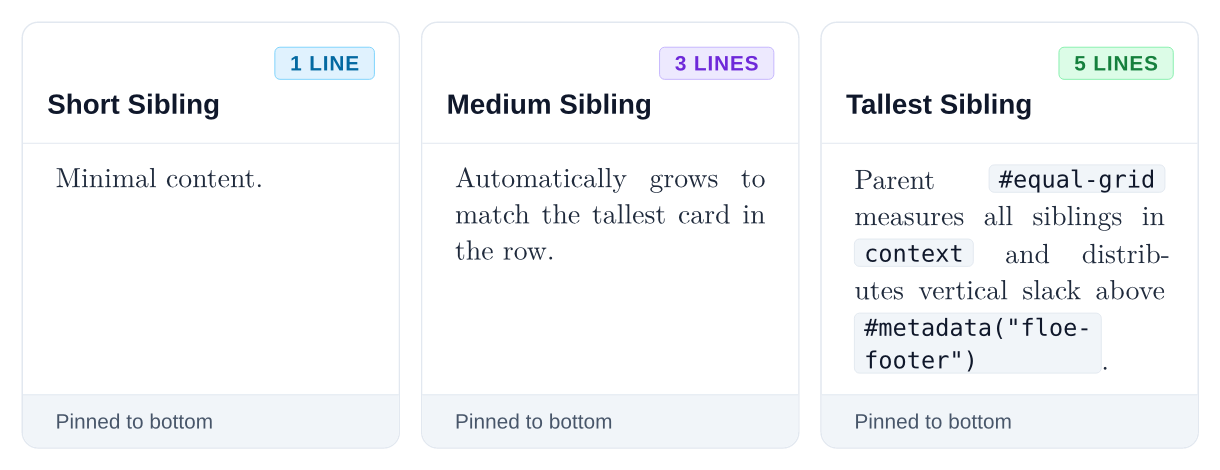
Parent-driven equal-height row engine that measures each row at exact column widths and stretches sibling blocks to match the tallest child. |
#stretch-cell(...) |
child, height |
Internal stretch helper that injects vertical slack above #metadata("floe-footer") markers so footers remain bottom-aligned. |
#card(...) |
title, description, icon, badge-label, footer, body |
Universal structural card container with optional header, badge chip, and bottom-aligned footer. |
#alert(...) |
variant: "info" | "success" | "warning" | "danger" | "tip" | "neutral", title, body |
Base semantic callout box with delicate top-corner icon and subtle border. |
#plaque(...) |
tag, num, title, accent, title-below, footer, body |
Master academic plaque container supporting inline header titles (title-below: false) and stacked body titles (title-below: true). |
#figure-card(...) |
title, subtitle, badge-label, footer, body |
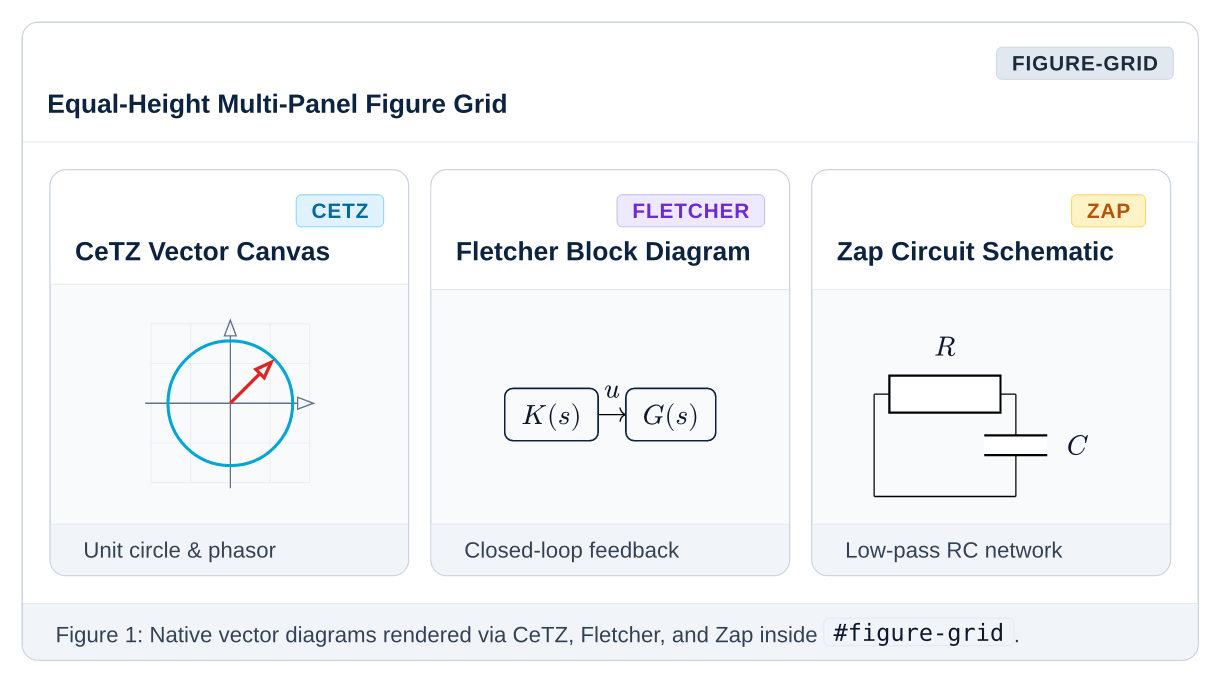
Framed visual container for plots, circuits, and diagrams (supports both bare box mode and titled editorial figure mode). |
#figure-grid(...) |
columns: (1fr, 1fr), gutter: 10pt, ..children |
Equal-height multi-column grid specialized for side-by-side #figure-card frames. |
#item-card(...) |
label, title, color, footer, body |
Compact breakdown card with a colored pill badge on top and full-width text below. |
#item-grid(...) |
columns: (1fr, 1fr), gutter: 8pt, ..items |
Equal-height multi-column grid for #item-card elements or general blocks. |
#stepper(...) |
steps: ((title, body), ...), accent, zebra |
Numbered vertical step table with connected circular counters. |
#timeline(...) |
..events, accent, dot-size |
Vertical chronological timeline with colored nodes and connecting rail. |
#badge(...) |
label, variant: "neutral" | "info" | "success" | "warning" | "danger" | "purple" | "dark" | "outline" |
Semantic pill tag with automatic baseline alignment. |
#kbd(...) |
..keys |
Tactile keyboard keycap (e.g. #kbd("Ctrl", "Shift", "B")). |
#status-dot(...) |
color, size |
Inline colored status indicator dot. |
#divider(...) |
color, thickness, above, below |
Subtle horizontal hairline separator rule. |
#text-divider(...) |
label, text-color, color |
Pure uppercase text label centered between hairline rules with zero box around the text. |
#chip-divider(...) |
label, badge-fill, color |
Boxed pill chip badge centered between hairline rules. |
#dotted-divider(...) |
color, thickness |
Dotted horizontal separator rule. |
#dashed-divider(...) |
color, thickness |
Dashed horizontal separator rule. |
#fade-divider(...) |
color, thickness |
Gradient fade divider tapering smoothly to transparent at both page margins. |
#gradient-divider(...) |
from-color, to-color, thickness |
Brand linear gradient accent divider. |
#icon-divider(...) |
icon, icon-color, color |
Centered glyph emblem separator rule (e.g. ✦). |
Layer 2: Composable Mixins
Located in mixins/. Mixins are pure #show rules that configure document behavior without modifying raw Markdown or Typst content:
#show: with-heading-theme.with(numbering: "1.1") // Anti-orphan titles, clean chapter counters
#show: with-running-chrome.with()                // Single-line Hydra headers & page footers
#show: with-code-theme                           // macOS terminal blocks + native mermaid rendering
#show: with-math-theme                           // Bracketed matrix delimiters and equation spacing
#show: with-table-theme                          // Hairline striped table styling
#show: with-gfm-theme                            // Maps GitHub blockquotes (> [!NOTE]) to cards
#show: with-compact-theme                        // Tight margins for dense formula cheatsheets
Layer 3: High-Level Components
Located in components/ and organized into 8 domain submodules:
Academic Callouts
Defined in components/academic.typ:
#theorem(num: "", title: "", takeaway: none)[...]— Formal theorem plaque with amber accent bar and optional key takeaway footer.#definition(num: "", title: "", tag: none)[...]— Formal academic definition with sky-blue tint and stacked title layout (title-below: true).#lemma(num: "", title: "")[...]— Supporting mathematical lemma with violet accent.#corollary(title: "")[...]— Direct logical consequence plaque.#algorithm(num: "", title: "")[...]— Algorithmic procedure plaque.#proof(title: none, sketch: false)[...]— Left-ruled derivation block with trailing open QED marker (□); passsketch: truefor a proof sketch.
Exam Traps and Alerts
Defined in components/alerts.typ:
#pitfall(title: "", mistake: none, correct: none)[...]— Closed-book exam trap card with side-by-side Common Mistake vs. Correct Form panels measured to equal height via#equal-grid.#exam-alert(title: "")[...]— Amber key formula reminder for closed-book examinations.#note(title: "")[...]— Sky-blue informational remark.#tip(title: "")[...]— Violet engineering best practice.#warning(title: "")[...]— Amber saturation or stability boundary alert.
Pedagogical Dissection
Defined in components/pedagogical.typ:
#formula-breakdown(formula: $...$, symbols: (...), arithmetic: [...])— Places an equation on a prominent pedestal, renders symbol breakdown cards in equal-height rows, and includes a numerical sanity-check strip.#derivation-stepper(title: "", steps: ((title, math, reason), ...))— Multi-step mathematical derivation card with numbered steps, centered display equations, and justification notes.#physical-anchor(domain: "", system: "", title: "")[...]— Grounds abstract equations in physical hardware or experimental systems.#worked-example(title: "", problem: [...], solution: [...])[...]— Step-by-step problem statement, derivation, and verified final result card.
Scientific Plotting and Chemistry
Defined in components/science.typ:
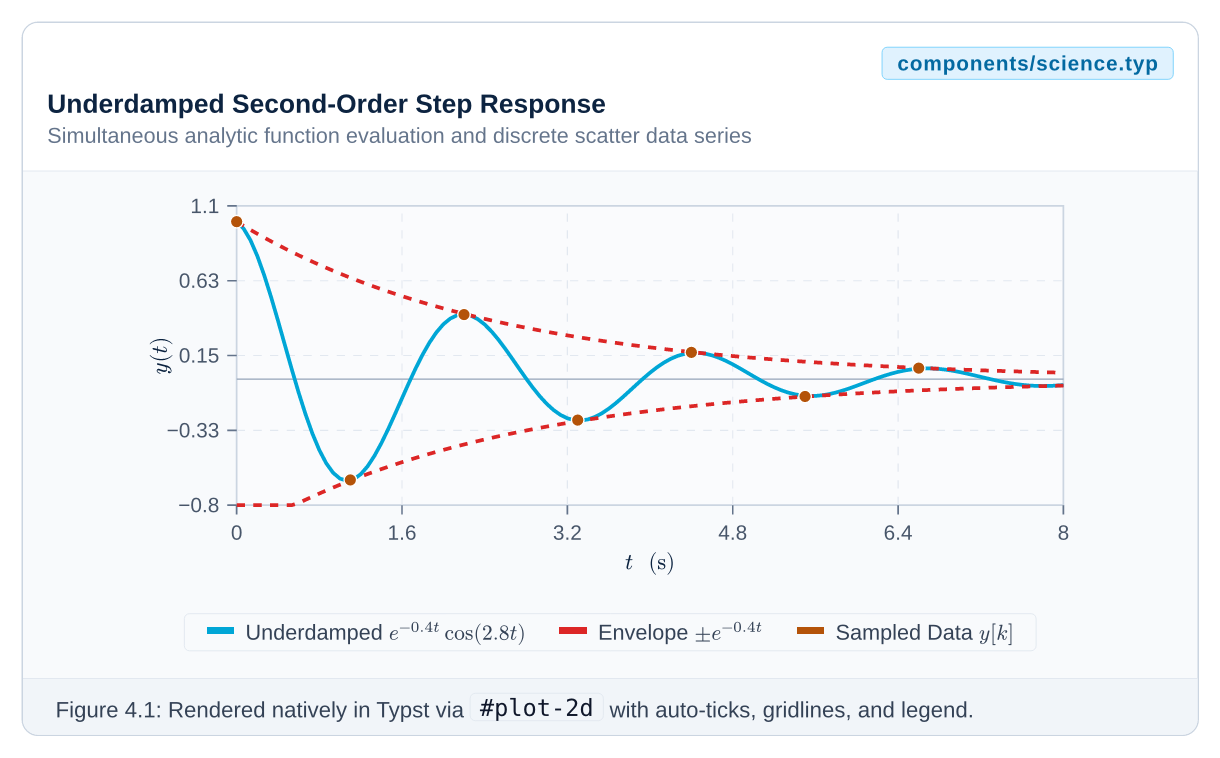
#plot-2d(domain: (...), yrange: (...), functions: (...), series: (...))— Native CeTZ 2D function and scatter/line data series plotter with automatic ticks, gridlines, and legends.#reaction(eq, title: none, conditions: none, delta-h: none, delta-g: none, keq: none, num: none)— Chemical reaction showcase card pairing#ce(...)stoichiometry with thermodynamic data badges ($\Delta H^\circ$, $\Delta G^\circ$, $K_{\text{eq}}$).
Composite Layouts
Defined in components/layouts.typ:
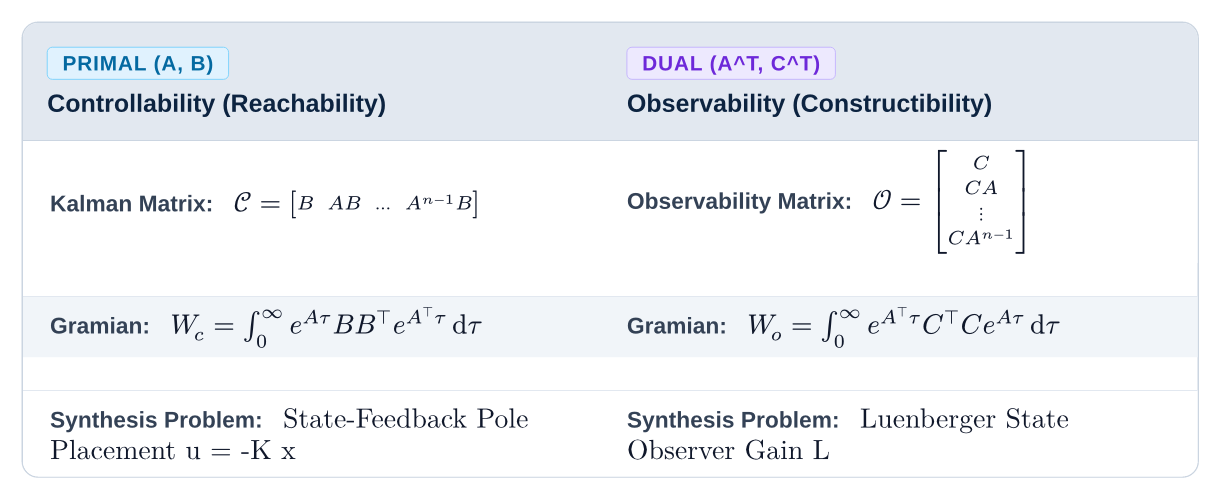
#split-view(left, right, titles: (...), badges: (...))— Two-column comparison layout with equal-height row synchronization.#pro-con(pros: (...), cons: (...), title: "...")— Advantages vs. limitations comparison card with equal-height columns.#bento-grid(columns: (1fr, 1fr), ..cells)&#bento-cell(title: "", badge-label: "")[...]— Modern asymmetric feature showcase grid.#feature-grid(columns: (1fr, 1fr, 1fr), ..features)— Equal-height icon and capability grid.#key-value-grid(items: (...))— Zebra-striped parameter specification table.#duality-grid(left-title: "", right-title: "", rows: (...))— Row-by-row primal-dual mathematical correspondence table.
Data and Comparison Tables
Defined in components/tables.typ:
#data-table(columns: (...), headers: (...), ..cells)— Safe table wrapper with fractional column expansion and repeating headers across page breaks.#spec-table(..pairs)— 2-column parameter and specification key-value table.#comparison-table(columns: (...), headers: (...), ..cells)— Feature matrix table with#badge-yes,#badge-no, and#badge-optindicators.
Heroes and Section Headers
Defined in components/hero.typ:
#cover-hero(title: "", subtitle: none, eyebrow: "", badge-label: none, meta: ())— Full-width dark-navy book/monograph cover masthead with corner-anchored pills and metadata strip.#chapter-header(num: 1, title: "", subtitle: "", slides-ref: none, reader-ref: none)— Classic academic chapter opener with syllabus cross-reference bar.#editorial-header(num: 1, eyebrow: "", title: "", read-time: none, goals: ())— Magazine-style editorial module header with learning goals strip.#banner-header(title: "", subtitle: none, tag: "", badge-label: none)— Dark-navy in-page part or topic transition card.#split-hero(title: "", subtitle: none, highlights: (), visual: none)— Two-column narrative + visual showcase hero built on#equal-grid.#stat-hero(title: "", subtitle: none, stats: ())— Dark-navy hero header paired with an equal-height KPI specification strip.#section-header(title: "", subtitle: none, tag: none, badge-label: none)— Clean in-page section divider with corner-anchored beans and cyan rule.#subchapter-card(title: "", tag: none, badge-label: none)[...]— Left-accented section syllabus preview and roadmap card.#minimal-header(title: "", breadcrumbs: (), date: none)— Swiss-style minimalist monograph header.#document-header(title: "", subtitle: "", tag: none, badge-label: none, metadata: ())— Clean executive masthead for reports and whitepapers.#appendix-header(letter: "A", title: "", subtitle: none)— Alphanumeric appendix opener plaque.#keynote-header(title: "", subtitle: "", tag: none, badge-label: none)— High-impact 16:9 presentation slide title banner.
Universal Equation Dissection
Defined in components/math.typ and core/tokens.typ:
#t1(expr)…#t6(expr)&#math-hl(color, expr)— Domain-agnostic term highlighters powered byterm-palette(c-term-1…c-term-6).#math-annot(expr, label, color: ...)&#math-annot-top(expr, label, color: ...)— Colored underbrace and overbrace equation annotations.#eq-legend(..items)— Rounded equation legend mapping 2-tuples(sym, desc)(auto-colored viaterm-palette) or 3-tuples(color, sym, desc)to physical meanings.
Layer 4: Master Document Presets
Located in presets/:
#show: textbook.with(...)— Single-column publication-grade textbook companion with cover page, running headers, chapter counters, and table of contents.#show: report.with(...)— Clean sans-serif engineering report and technical whitepaper.#show: slides.with(...)— 16:9 widescreen presentation slide deck supportingtheme: "dark"andtheme: "light".#show: cheatsheet.with(...)— 2- or 3-column dense landscape formula reference sheet.#show: memo.with(...)— Executive decision memo with structured metadata plaque and executive summary.#show: adr.with(mode: "document" | "slides", ...)— Dual-mode Architecture Decision Record (also exported as#adr-documentand#adr-slides).
Gallery and Visual Showcase
examples/gallery.typ is a compact smoke test covering a subset of Floe’s components; it is what CI compiles. The exhaustive layer-by-layer catalog (every component, with previews) is the floe-showcase-vX.Y.Z.pdf attached to each GitHub release, and the per-layer pages in docs/.
To compile the smoke-test gallery locally:
typst compile --root . examples/gallery.typ examples/gallery.pdf
License
MIT License © SpanishSyntax. Part of the Frost / Icebergs ecosystem.