A lightweight Typst utility for maintaining a single figure library while seamlessly exporting individual, auto-cropped vector graphics for using elsewhere.
Typst, combined with CeTZ, is a powerful alternative to TikZ or Matplotlib for academic illustrations. When working on papers or slides with other tools like LaTeX or PowerPoint, managing dozens of separate .typ files becomes a headache. Fig Plucker keeps everything in one place and exports exactly the figure you need.
Key Features
Our workflow provides two distinct modes to bridge the gap between “designing” and “exporting”:
| Feature | Debug Mode (debug: true) |
Output Mode (debug: false) |
|---|---|---|
| Visibility | Renders all figures in the file (multiple pages) | Renders only one specified figure (a single page) |
| Canvas | Auto-cropped to figure size with breaks | Auto-cropped to figure size (perfect for PDF/SVG) |
| Metadata | Displays Index & Label above each plot | Clean output (no text labels) |
| Use Case | Organizing and identifying figures | Final export for LaTeX/PPT |
Illustrating example
A minimal CeTZ example (3 figures) is in mini.typ. It draws a circle, square, and triangle.
- Debug mode: renders a 3-page PDF.
- Output mode: set
output-label: "square"anddebug: falseto export a single figure.
#import "@preview/fig-plucker:0.1.0": fig-plucker, fig
#import "@preview/cetz:0.4.2": canvas, draw

#show: fig-plucker.with(
  debug: true,
  output-label: "square",
  // output-num: 1,
)

#fig("circle")[
  #canvas({
    import draw: *
    circle((0, 0), radius: 0.8)
  })
]

#fig("square")[
  #canvas({
    import draw: *
    rect((-0.8, 0.8), (0.8, -0.8))
  })
]

#fig("triangle")[
  #canvas({
    import draw: *
    polygon((0, 0.9), (-0.8, -0.7), (0.8, -0.7))
  })
]
Debug mode outputs (3 pages):
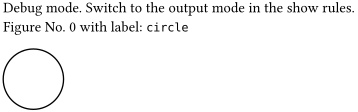
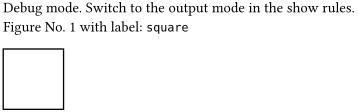
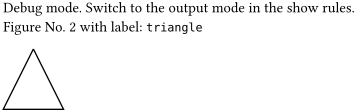
Output mode (single figure):

How to Use
Use the #show rule to toggle between modes and select a figure by label or index:
#import "@preview/fig-plucker:0.1.0": *

#show: fig-plucker.with(
  debug: true,            // Set to false for final export
  output-label: "my-plot", // Target by label...
  // output-num: 1        // ...or target by index (0, 1, 2...)
)

#fig("label for the first figure")[
  // Your CeTZ code or diagram here
]

#fig("label for the second figure")[
  // Another figure
]
The Workflow
- Design in Debug Mode: Keep
debug: true. You will see all figures listed with their index numbers and labels. Example debug info:
Debug mode. Switch to output mode in show rules.
Figure No. 0 with label:label for the first figure
- Export for Publication: Specify
output-labeloroutput-numand setdebug: false. Typst will render a single page perfectly cropped to your figure’s boundaries, ready for PDF/SVG export. The recommended workflow is to keepdebug: truewhile you find the figure you need, then flipdebugtofalsefor a clean export.
Error Handling
To prevent ghost exports or accidental overwrites, Fig Plucker includes built-in guards:
-
Conflict Prevention: If you set both
output-labelandoutput-num, the output file warns you:Please specify the rendered figure by label or number, but not by both!
-
Index Bounds: If you request an index that doesn’t exist, you will receive:
Error:
output-numlarger than total figure number!
These messages are rendered directly in the output file, which is faster to read than compiler logs during figure export.
More Information
For more details and a comprehensive example, see this working example.