A Typst package for writing exams, quizzes, and homework with automatically numbered questions, answer boxes, points accounting, smart cross-references, and solutions that can be toggled on and off. This package follows the spirit of the exam class for LaTeX.
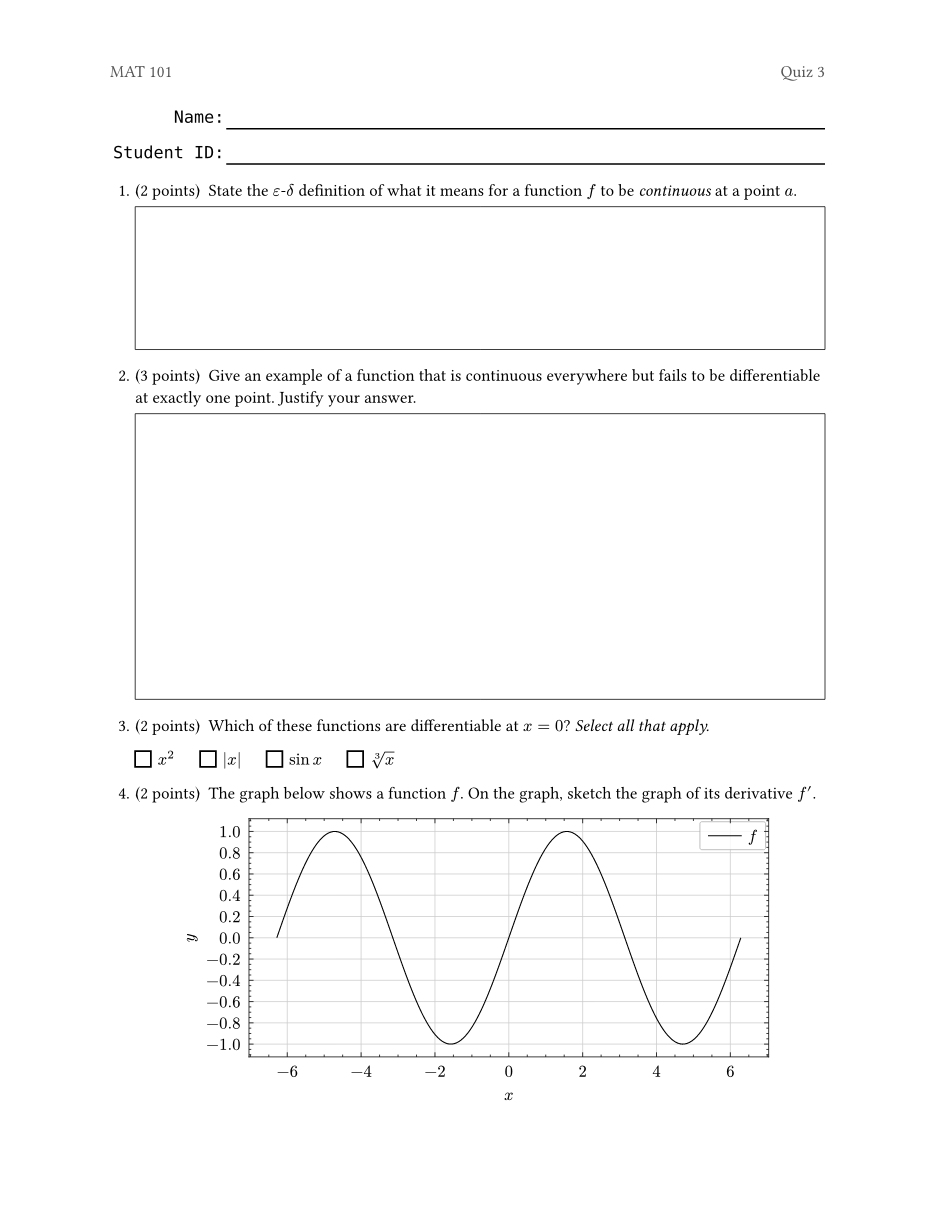
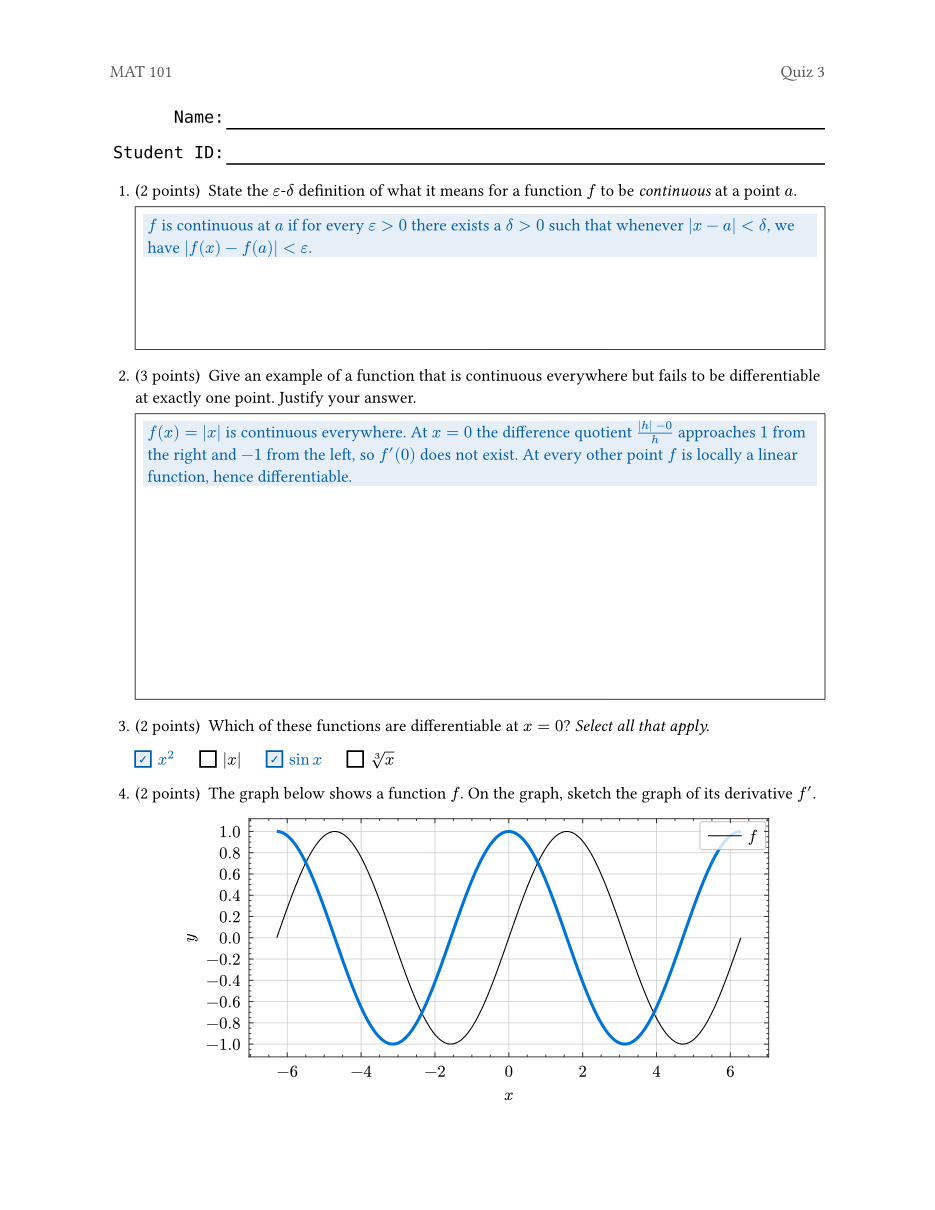
examples/quiz.typ, compiled without and with solutions.
See examples/ for usage examples.
Quick start
#import "@preview/examy:0.4.0": *

#show: e.prepare()
#show: e.set_(config, show-solutions: false)

// A fill-in block (Name / Student ID) at the top of the page
#name-block()

#exam(
  questions: [
    #question(points: 2)[
      State the definition of a _continuous function_.
      #answer-box(width: 100%, height: 1fr)[
        #solution[A function $f$ is continuous at $a$ if ...]
      ]
    ]
    #question(points: 3)[
      Give an example of a continuous function that is not differentiable.
      #answer-box(width: 100%, height: 2fr)[
        #solution[$f(x) = |x|$ ...]
      ]
    ]
  ],
)
The two #show lines are required: e.prepare() enables
elembic elements and references,
and e.set_(config, ...) sets package options.
Features
Questions, parts, and subparts
A document is built out of an #exam(..., questions: [...]). Inside of questions, the commands
#question[...], #part[...], and #subpart[...] can be used to create a question hierarchy.
Questions/parts/subparts can be assigned points, heights, etc.
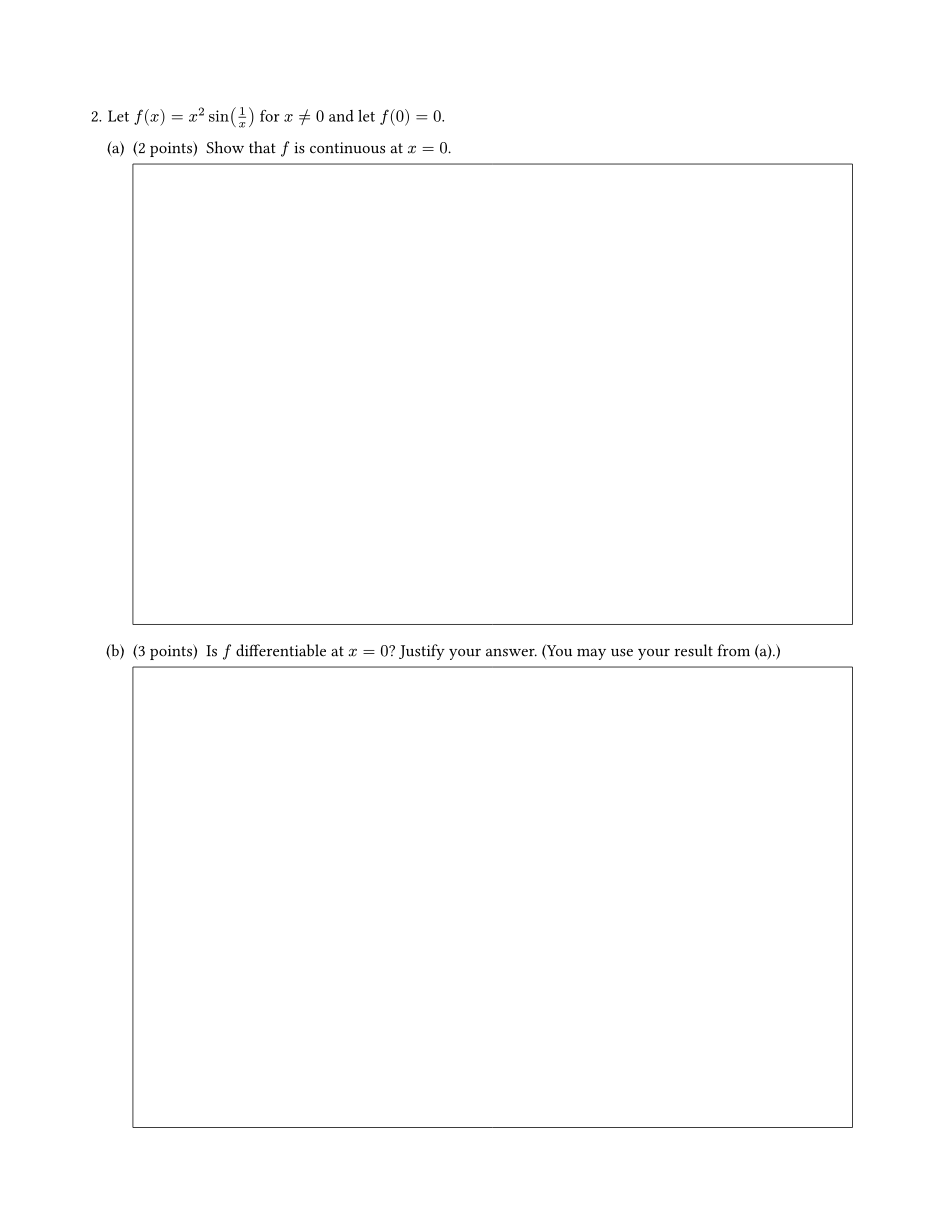
From examples/final-exam.typ (solutions abridged), rendered below it:
#question[
  Let $f(x) = x^2 sin(1/x)$ for $x != 0$ and let $f(0) = 0$.
  #part(points: 2, label: <continuity>)[
    Show that $f$ is continuous at $x = 0$.
    #answer-box(width: 100%, height: 1fr)[
      #solution[...]
    ]
  ]
  #part(points: 3)[
    Is $f$ differentiable at $x = 0$? Justify your answer. (You may use
    your result from @continuity.)
    #answer-box(width: 100%, height: 1fr)[
      #solution[...]
    ]
  ]
]
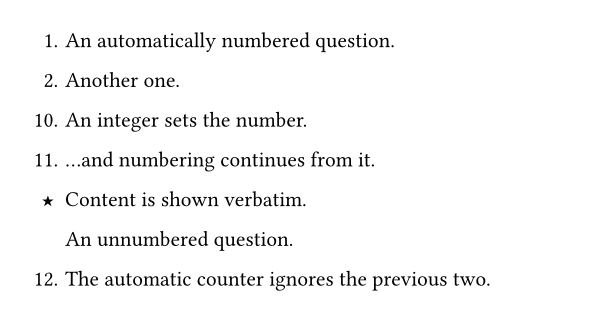
Numbering can be customized per division with the number: argument:
auto (default), an integer to set the number (later divisions continue
from it), arbitrary content (e.g. number: "★") shown verbatim, or none
for an unnumbered division. From
examples/numbering.typ:
#question[An automatically numbered question.]
#question[Another one.]
#question(number: 10)[An integer sets the number.]
#question[...and numbering continues from it.]
#question(number: "★")[Content is shown verbatim.]
#question(number: none)[An unnumbered question.]
#question[The automatic counter ignores the previous two.]
Points
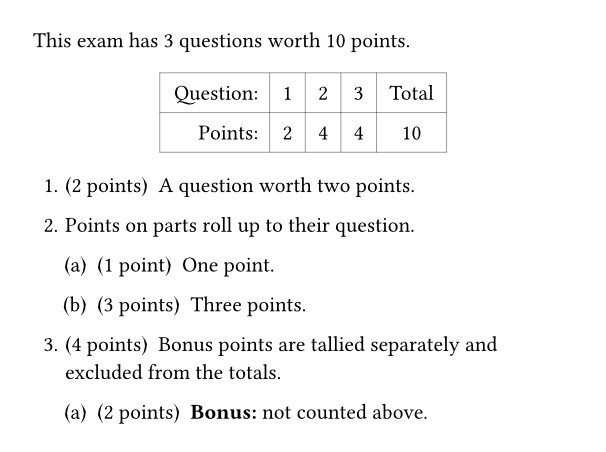
Give any question/part/subpart giving a value to points: x will cause an “(x points)”
annotation to show next to the question/part/subpart.
Related to points is:
#points-tablerender a scoring table.#num-pointsand#num-questionsgive total number of points and questions.intent: "bonus"bonus points are tracked separately and excluded from the regular totals.
From examples/points.typ:
This exam has #num-questions questions worth #num-points points.

#{
  set align(center)
  points-table
}

#exam(questions: [
  #question(points: 2)[A question worth two points.]
  #question[
    Points on parts roll up to their question.
    #part(points: 1)[One point.]
    #part(points: 3)[Three points.]
  ]
  #question(points: 4)[
    Bonus points are tallied separately and excluded from the totals.
    #part(points: 2, intent: "bonus")[*Bonus:* not counted above.]
  ]
])
Answer boxes
#answer-box(width: ..., height: ...)[...] draws a box for students to write
in. A fixed height (2cm, 1in, …) gives a box of that size; a fraction
height (1fr, 2fr, …) makes the box grow to fill the remaining space on
the page — multiple fr boxes on one page share the leftover space
proportionally.
Solutions
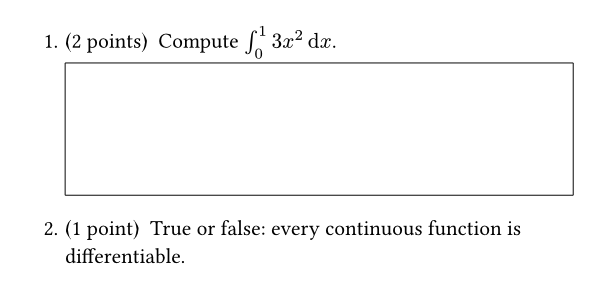
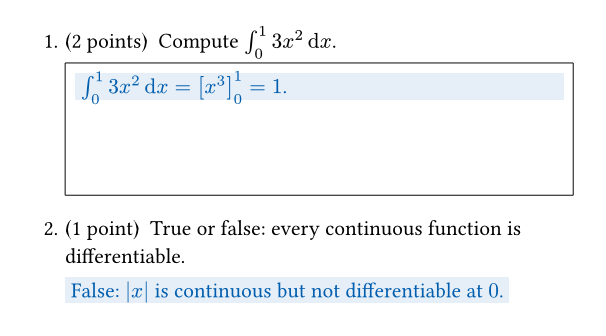
Wrap solutions in #solution[...] (anywhere in your document, including inside an answer box).
Solutions are only rendered when enabled, so the same source produces
both the exam and the answer key:
typst compile exam.typ                                 # whatever the document configures
typst compile --input show-solutions=false exam.typ    # student version (force solutions off)
typst compile --input show-solutions=true exam.typ     # answer key (force solutions on)
When given on the command line, the show-solutions input overrides the document setting
#show: e.set_(config, show-solutions: ...). This can be used in
build scripts that must produce a specific variant regardless of what the
source file currently configures.
Both renders of examples/solutions.typ, which puts one solution inside an answer box and one inline:
Alternatively, Typst’s (experimental) bundle export can emit both PDFs
from a single compilation: wrap the exam in a function of the
show-solutions value and construct one document per variant. From
examples/bundle.typ:
#let quiz(solutions) = {
  set page(paper: "us-letter", margin: 1in)
  show: e.prepare()
  show: e.set_(config, show-solutions: solutions)

  name-block()
  exam(questions: [
    ...
  ])
}

#document("quiz-nosolutions.pdf", quiz(false))
#document("quiz-solutions.pdf", quiz(true))
typst compile --features bundle -f bundle bundle.typ out/
# writes out/quiz-nosolutions.pdf and out/quiz-solutions.pdf
Solutions are wrapped in context {...}, which limits their use in some cases. You can manually access the
show-solutions config variable in these cases via elembic methods.
#e.get(get => {
  // `get(config).show-solutions` would read the raw config value; the
  // `show-solutions` helper also honors the command-line override.
  let solutions = show-solutions(get) != false
  let xs = lq.linspace(-2 * calc.pi, 2 * calc.pi, num: 200)
  lq.diagram(
    width: 12cm,
    height: 5.5cm,
    xlabel: $x$,
    ylabel: $y$,
    lq.plot(xs, xs.map(x => calc.sin(x)), mark: none, color: black, label: $f$),
    ..if solutions {
      (lq.plot(xs, xs.map(x => calc.cos(x)), mark: none, color: blue, stroke: 2pt),)
    } else { () },
  )
})
examples/quiz.typ uses this to add the answer curve of a sketch-the-derivative question (drawn with lilaq) only on the answer key — visible in the screenshot pair at the top of this page.
Solutions are drawn in a configurable pair of colors — the text color and the highlight behind it. If only one of these is set, the other color is derived from the set color.
#show: e.set_(config, solution-color: maroon)            // highlight follows
#show: e.set_(config, solution-background-color: olive.lighten(90%))  // text follows
#show: e.set_(config, solution-color: maroon, solution-background-color: luma(93%))
Choices and Bubbles
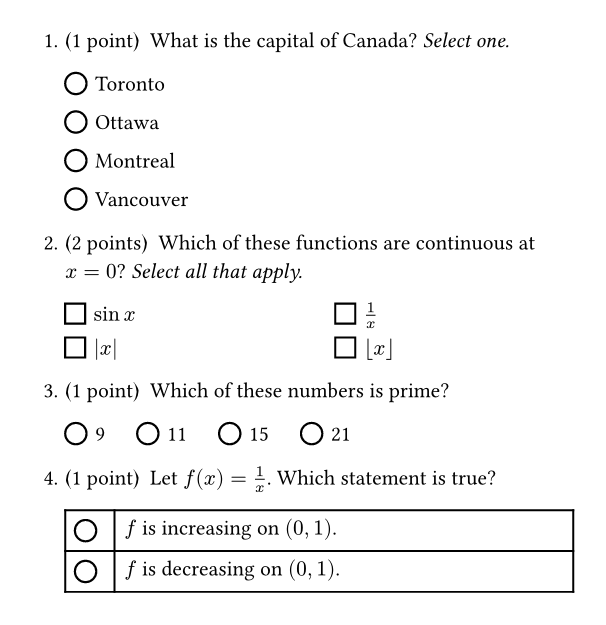
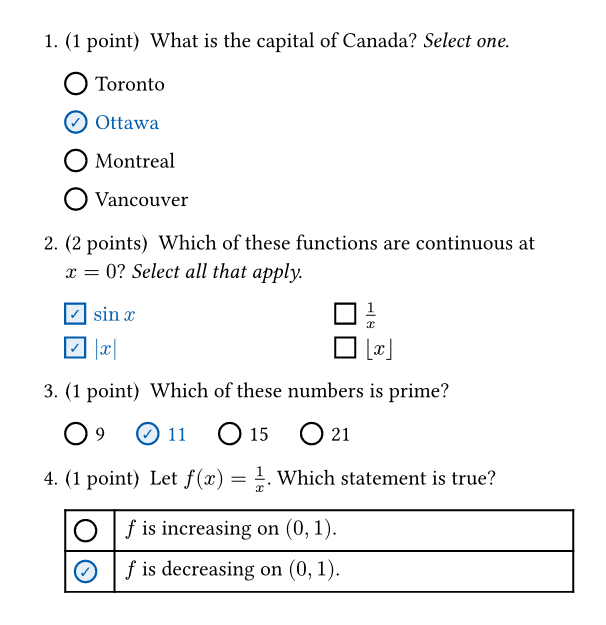
#choice[] draws a bubble (circle or square) to the left of text. #choices[...] takes a list and draws a bubble before each item for
students to fill in. Write each choice on its own line starting with -. Starting an item with + will mark it as a correct choice (it will only render differently if solutions are shown.)
#question(points: 1)[
  What is the capital of Canada? _Select one._
  #choices[
    - Toronto
    + Ottawa
    - Montreal
    - Vancouver
  ]
]
#choices[...] API
correct: int | array— An alternative to using+to mark a correct choice. Settingcorrect: 0marks the first choice as correct,correct: (0, 2)marks the first and third.bubble: "circle" | "square"— Round bubbles (the default) for “select one”, square ones for “select all that apply”.columns: int— Lay the choices out in this many equal columns, filled row by row.inline: bool— Run the choices side by side in a paragraph, wrapping like text. Suits short choices. Cannot be combined withcolumns.gap: length— The space between choices. One per line, it is the space between rows (by default, the text’s line spacing). Side by side, it is the space between them (by default1.5em); inline,1frspreads the choices across the line.
For a layout of your own, #choice[...] draws a single bubble before its
content; mark an answer with correct: true. It takes bubble: "circle" | "square".
The gap between a choice bubble and its content can be set with outset (e.g. outset: .6em).
See examples/multiple-choice.typ
#import "@preview/examy:0.4.0": *

// A small page, so the screenshot stays readable; drop it for a full page.
#set page(width: 11cm, height: auto, margin: 6mm)
#show: e.prepare()
// `true` prints the answer key, with the correct bubbles filled in.
#show: e.set_(config, show-solutions: true)

#exam(questions: [
  #question(points: 1)[
    What is the capital of Canada? _Select one._
    // One per line (the default), spread out with `gap`.
    #choices(gap: 0.8em)[
      - Toronto
      + Ottawa
      - Montreal
      - Vancouver
    ]
  ]
  #question(points: 2)[
    Which of these functions are continuous at $x = 0$? _Select all that apply._
    // Square bubbles, in two columns.
    #choices(bubble: "square", columns: 2)[
      + $sin x$
      - $1/x$
      + $abs(x)$
      - $floor(x)$
    ]
  ]
  #question(points: 1)[
    Which of these numbers is prime?
    // Side by side, with the choices as an array and the answer by index.
    #choices(inline: true, correct: 1, (9, 11, 15, 21))
  ]
  #question(points: 1)[
    Let $f(x) = 1/x$. Which statement is true?
    // A bare `#bubble()` in each row of a table, for a layout of your own.
    #table(
      columns: (auto, 1fr),
      align: (center + horizon, left),
      [#bubble()], [$f$ is increasing on $(0, 1)$.],
      [#bubble(correct: true)], [$f$ is decreasing on $(0, 1)$.],
    )
  ]
])
Cross-references
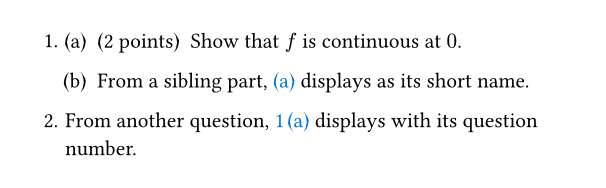
Label a division with label: <name> and reference it with @name. The
displayed text adapts to where the reference appears: referencing question 1
part (a) shows “1 (a)” from inside question 2, but just “(a)” from elsewhere
in question 1. From
examples/cross-references.typ:
#question[
  #part(points: 2, label: <continuity>)[Show that $f$ is continuous at $0$.]
  #part[From a sibling part, @continuity displays as its short name.]
]
#question[From another question, @continuity displays with its question number.]
Page breaks inside questions
#pagebreak() works inside questions, parts, and subparts: the division
continues on the next page at the correct indentation, without repeating its
number.
Name blocks
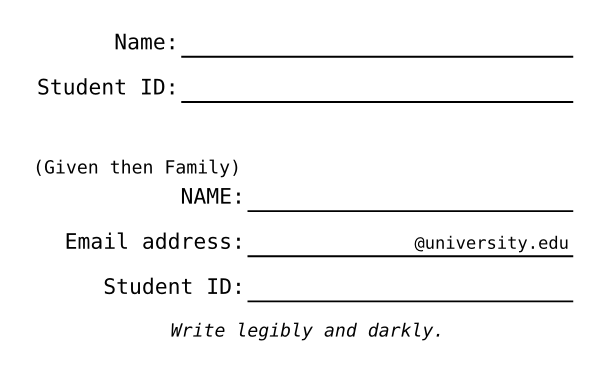
#name-block() renders a fill-in block (Name / Student ID by default). It
is ordinary content: put it at the top of a quiz page or on a cover page.
The rows are configurable with
fields: — an entry is either a (prefix: ..., suffix: ...) dictionary,
rendered as the prefix, an underline extending to the end of the line, and
the suffix sitting on the line at its right end. An optional title: is shown above the block.
From examples/name-blocks.typ:
// The default block: a Name row and a Student ID row.
#name-block()

// Custom rows.
#name-block(fields: (
  (prefix: [#text(size: .85em)[(Given then Family)] \ NAME:]),
  (prefix: [Email address:], suffix: [`@university.edu`]),
  (prefix: [Student ID:]),
  {
    set align(center)
    text(size: .85em)[_Write legibly and darkly._]
  },
))
Institution-specific layouts ship with the package as presets; the
University of Toronto block is #name-block(fields: presets.utoronto.name_fields).
Exam cover page
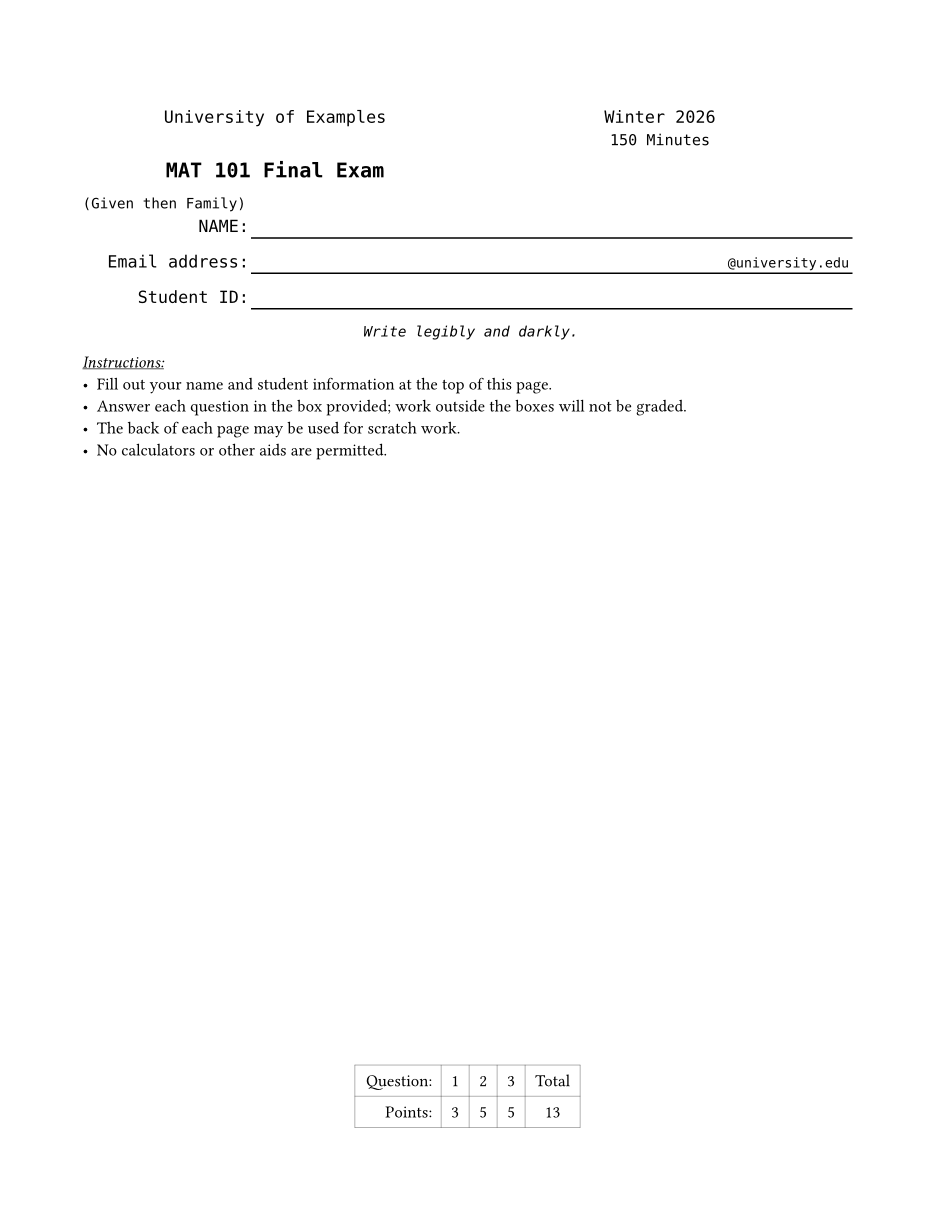
A cover page is ordinary content before #exam(...). Set the exam’s
details (institution, exam-name, term, duration) on the config
object and render them with #maketitle(). Each configured value can
be overridden by passing arguments to maketitle(), e.g. #maketitle(term: [Summer 2026]).
From examples/final-exam.typ (name fields abridged), rendered below:
#show: e.set_(
  config,
  institution: [University of Examples],
  exam-name: [MAT 101 Final Exam],
  term: [Winter 2026],
  duration: duration(minutes: 150),
)

#maketitle()
#name-block(fields: (
  (prefix: [#text(size: .85em)[(Given then Family)] \ NAME:]),
  // ...more fields
))

#underline[_Instructions:_]
- Fill out your name and student information at the top of this page.
- Answer each question in the box provided; work outside the boxes will
  not be graded.
- The back of each page may be used for scratch work.
- No calculators or other aids are permitted.

#v(1fr)
#{
  set align(center)
  points-table
}
#pagebreak()

#exam(questions: [...])
See examples/quiz.typ for a minimal quiz, examples/final-exam.typ for a complete exam with custom name fields, and examples/utoronto-exam.typ for the preset in use.
API Reference
All names below are exported by #import "@preview/examy:0.4.0": *.
question(body, points: none, intent: none, solution: none, rubric: none, number: auto, indent: 1.5em, label: none)
part(body, points: none, intent: none, solution: none, rubric: none, number: auto, indent: 1.5em, label: none)
subpart(body, points: none, intent: none, solution: none, rubric: none, number: auto, indent: 1.5em, label: none)
Declare a question, part, or subpart — numbered 1., (a), or i. respectively. The three functions take identical arguments; the numbering style is chosen by nesting depth, not by which function is called.
body: content(required) — The body of the question.points: int | float | none = none— The number of points: shows a “(2 points)” badge and feeds the points table.intent: "practice" | "bonus" | none = none— Practice and bonus points are excluded from the regular totals; bonus points are tallied separately.solution: content | none = none— A solution, rendered at the end of the division when solutions are enabled.rubric: content | none = none— A grading rubric (accepted, but not yet rendered).number: auto | int | content | none = auto—autonumbers sequentially; an integer is the number as displayed (later divisions continue from it); content is shown verbatim;noneomits the number.indent: length = 1.5em— Indentation of the body relative to the parent.label: label | none = none— Attach a label so the division can be referenced with@name.
answer-box(body, solution: none, width: auto, height: none, baseline: 50% - .33em, default_height: 2cm, default_width: 2cm)
A box for students to write answers in.
body: content(required) — Content shown inside the box (a prompt,#solution[..], or nothing).solution: content | none = none— Solution content that fills the bottom of the box when solutions are enabled.width: auto | length | ratio | relative = auto— The width of the box;autofalls back todefault_width.height: length | fraction | none = none— A fixed height gives a box of that size (nonefalls back todefault_height); a fraction (1fr) makes the box grow to fill the remaining space on the page, shared proportionally with the otherfrboxes there.baseline: length | ratio | relative = 50% - .33em— Baseline shift for small boxes sitting inline in a sentence; ignored for block-mode and full-width boxes. The default centers the box on the center line of a capital letter, the same linebubbleis centered on, so a bubble and a box side by side line up.default_height: length = 2cm— The height used whenheightisnone.default_width: length = 2cm— The width used whenwidthisauto(inline boxes only).
choice(body, bubble: "circle", correct: false, outset: (right: 0.4em), size: auto)
A bubble for students to fill in, followed by the choice it labels. On the answer key (when solutions are shown) a bubble marked correct is filled in and checked in the solution color, and its content is set in that color; otherwise it is drawn empty, so the same source gives both the exam and its key. For a list of choices, use choices.
body: content | none = none— The choice the bubble labels, shown after it. Omit it, or leave it empty (#choice[]), for a bare bubble, e.g. one in a table or a grid of its own.bubble: "circle" | "square" = "circle"— The shape of the bubble: round for “select one”, square for “select all that apply”. Typst’s owncircleandsquarework too.correct: bool = false— Whether this choice is part of the answer, and so is filled in and checked when solutions are shown.outset: length | dictionary = (right: 0.4em)— The space the bubble keeps around itself. A length sets the gap after the bubble, between it and its content (outset: .6em); a dictionary sets any ofleft,right,top,bottom,x,yandrest, as theinsetof a box does, and leaves the sides it does not name at their defaults. The default parts the bubble from whatever follows — its content, an answer box, the next choice — so a gap need not be written at the call site.size: auto | length = auto— The diameter of a round bubble, or the side of a square one.autois 1em round and 0.93em square (a little smaller across than the circle, so the two read alike); relative to the font size, so a bubble scales with the surrounding text.
bubble
choice.with(bubble: "circle"): a round bubble, for “select one”. Takes the same arguments as choice.
square-bubble
choice.with(bubble: "square"): a square bubble, for “select all that apply”. Takes the same arguments as choice.
choices(body, correct: none, bubble: "circle", inline: false, columns: none, gap: auto)
A multiple-choice answer: a bubble for each choice, filled in and checked on the answer key (when solutions are shown) for the correct ones, whose content is then set in the solution color. Mark a correct choice with + in place of -, or by its index with correct.
body: content | array(required) — The choices: a list, one- ..item per choice (+ ..for a correct one), each starting its own line; or an array of the choices’ content.correct: int | array | none = none— The index of the correct choice, or an array of indices for several, counted as Typst counts an array’s: from 0 at the first choice, or from -1 at the last. Adds to any choices marked with+.bubble: "circle" | "square" = "circle"— The shape of the bubbles: round for “select one”, square for “select all that apply”. Typst’s owncircleandsquarework too, as dobubbleandsquare-bubble.inline: bool = false— Run the choices together, side by side in a paragraph of their own, rather than one per line; suits short choices. A choice is not split across lines unless it is longer than a whole line. Cannot be combined withcolumns.columns: int | none = none— Set the choices in this many equal columns, filled across each row in turn, rather than one per line. Cannot be combined withinline.gap: auto | length | fraction = auto— The space between two choices. One per line, it is the space between one choice and the next below it, andautosets them as close as the lines of a paragraph. Side by side, inline or incolumns, it is the space between them, andautois 1.5em; there, a fraction (1fr) spreads the choices across the line.
solution(body, boxed: true, width: none) (elembic element)
Declare a solution to a question, part, or subpart; this is only rendered if the config option to show solutions is enabled.
body: content(required) — The solution content.boxed: bool = true— Whether to put the solution in a box.width: auto | relative length | none = none— Width of the solution box.autoshrink-wraps it to its content;nonelets the context choose (answer-boxfills its width for a solution standing alone in a paragraph, otherwise it shrink-wraps).
show-solutions(get)
Returns the effective show-solutions setting: the --input show-solutions=.. command-line override if given, otherwise config’s value. Use it to conditionally render content that #solution[..] cannot wrap (e.g. one curve of a plot).
get: function(required) — The accessor provided bye.get(get => ..).
exam(questions: ..) (elembic element)
Declare an exam.
questions: content | function(required) — The questions in the exam or a function that accepts asolutions_onlyfunction and returns the exam questions.
maketitle(institution: auto, exam-name: auto, term: auto, duration: auto)
The exam title block (in the spirit of LaTeX’s \maketitle). Renders nothing if all four values resolve to none.
institution: auto | content | none = auto— The institution name;autotakesconfig’s value,nonesuppresses it.exam-name: auto | content | none = auto— The exam name, shown bold;autotakesconfig’s value,nonesuppresses it.term: auto | content | none = auto— The term (e.g. Fall 2026);autotakesconfig’s value,nonesuppresses it.duration: auto | duration | none = auto— The exam length, shown under the term;autotakesconfig’s value,nonesuppresses it.
name-block(title: none, fields: ((prefix: [Name:]), (prefix: [Student ID:])))
A block of fill-in rows for a cover page or quiz header.
title: content | none = none— A heading shown centered above the block.fields: (dictionary | content)[] = ((prefix: [Name:]), (prefix: [Student ID:]))— One entry per row. A(prefix: .., suffix: ..)dictionary (both keys optional) renders the prefix, an underline extending to the end of the line, and the suffix sitting on the line at its right end; any other entry is content rendered verbatim as its own row.
config (elembic element)
Package options. Set them with a show rule: #show: e.set_(config, show-solutions: false, ...).
show-solutions: bool | none = none— Whether to show solutions.institution: content | none = none— The institution name, shown bymaketitle.exam-name: content | none = none— The name of the exam, shown bymaketitle.term: content | none = none— The term of the exam (e.g. Fall 2026), shown bymaketitle.duration: duration | none = none— The length of the exam, shown bymaketitle.show-rubric: bool | none = none— Whether to show a rubric.solution-color: auto | color = auto— The color solutions are drawn in: the text of a solution, the outline and check mark of a filled-in bubble.autoderives it fromsolution-background-color, or falls back to the package default if that isautotoo.solution-background-color: auto | color = auto— The color behind a solution, and the fill of a filled-in bubble.autoderives it fromsolution-colorby lightening.solution-text-color: auto | color = auto— Deprecated: the old name ofsolution-color, still accepted. Ignored whensolution-coloris set.
presets
Institution-specific argument sets. Currently presets.utoronto.name_fields: the University of Toronto name-block rows (NAME / Email address / UTORid).
num-points
The total number of regular (non-bonus, non-practice) points. Works anywhere in the document.
num-questions
The total number of questions in the exam. Works anywhere in the document.
points-table
A scoring table with one column per question plus a total. Works anywhere in the document, even before the exam.
e
A re-export of elembic. Every document needs #show: e.prepare(); options are set with #show: e.set_(config, ..); element state is read with e.get(get => ..).
How examy Works
A straight-forward implementation of examy would wrap each question/part/subpart in a box
and apply an appropriate inset. Unfortunately, #pagebreak() cannot work inside a box and,
worse still, boxes can only negotiate fractional units if they are peers of each other. So, the
box approach would make it impossible to have a part and a subpart both share the remaining space
on the page.
Instead, examy flattens all question/part/subpart contents and tags the start and end of each
block with metadata. The flat stream is then parsed, indentation level is tracked, and peer
boxes are produced, so that #pagebreak() and fr units can negotiate space.
The downside of this parsing is that “click back” in tools like tinymist can be broken. (Usually it works to click a sub-boxed item, like an equation.)
License
MIT