String diagrams for Markov categories, and more generally for monoidal categories with copying and discarding, as a Typst package.
You write a diagram as a term, such as serial(copy, parallel(discard, wire())), and drawstring lays it out in the style of Fritz (2020) and Cho–Jacobs (2019), drawing with CeTZ.
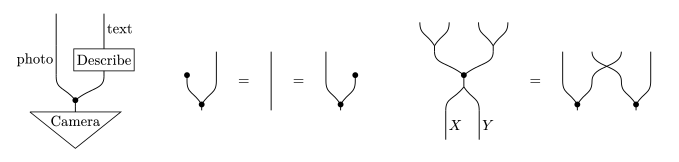
- Terms, not coordinates. Wires, boxes, states and effects are composed in series and in parallel; drawstring places every element and routes the wires between them.
- Made for equations. A diagram is content whose centre sits on the math axis, so
$ #string-diagram(a) = #string-diagram(b) $reads as an equation. - Styling at three levels: the whole diagram, a sub-diagram, or a single element.
- Four reading directions: bottom to top by default, or top to bottom, left to right and right to left.
- Extensible: any CeTZ drawing can become an element.
Quick start
#import "@preview/drawstring:0.1.0": *

$ #string-diagram(serial(
    state("Camera"),
    wire("photo"),
    process("Describe"),
    wire("text"),
  )) $

$ #string-diagram(serial(
    copy,
    parallel(discard, wire()),
  )) = #string-diagram(wire()) $
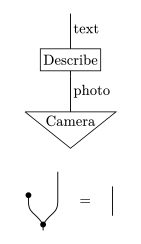
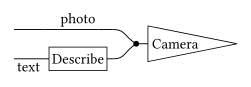
The first diagram is read from the bottom up: a camera produces a photo, which is then described in text. The second says that copying something and discarding one of the copies is the same as doing nothing.
Building blocks
| Element | Wires | Drawing | Description |
|---|---|---|---|
wire(label, length: 1, side: "right") |
1 → 1 |  |
A wire of length units, with an optional label beside it. wire() is the identity. |
process(label, inputs: 1, outputs: 1) |
n → m |  |
A step with inputs and outputs: a box with the label inside. |
state(label, outputs: 1) |
0 → m |  |
A source, with outputs only; in a Markov category, a distribution. A triangle pointing down. |
effect(label, inputs: 1) |
n → 0 |  |
A sink, with inputs only: the mirror image of state. |
copy |
1 → 2 |  |
A dot with two arms. |
discard |
1 → 0 |  |
A wire ending in a dot, or in a ground symbol with the style discard: (kind: "ground"). |
swap |
2 → 2 |  |
Two wires crossing. |
unbundle |
1 → 2 |  |
A fork without a dot, to draw a product wire X × Y as two wires. |
bundle |
2 → 1 |  |
The mirror image of unbundle. |
copy,discard,swap,unbundleandbundleare values, not functions: writecopy, notcopy().- Labels are ordinary content: a string is typeset upright,
$X$gives math.wirealso accepts its label aslabel: $X$. - Boxes, triangles and wires grow to fit their labels.
- Sizes are measured in abstract units.
Neighbouring wires are one unit apart, and the style key
unit(2emby default) sets how long a unit is on the page. process,stateandeffectalso takestroke:andfill:, andwireastroke:, to restyle that one element; see Styling.
Some variants:
| Code | Drawing |
|---|---|
wire($X$, length: 2, side: "left") |
 |
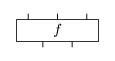
process($f$, inputs: 2, outputs: 3) |
 |
state($p$, outputs: 2) |
 |
effect($e$, inputs: 2) |
 |
process("Describe") |
 |
A note on names:
stateshadows Typst’s builtin, which stays reachable asstd.state; to keep the builtin, import selectively and rename, as in#import "@preview/drawstring:0.1.0": serial, parallel, wire, state as dist.- The renderer is called
string-diagramrather thandiagram, which fletcher and lilaq already export; alias it with#let sd = string-diagramif you prefer the short name.
Composing diagrams
serial(a, b, ...) stacks diagrams from bottom to top and connects each one’s outputs to the inputs of the next.
parallel(a, b, ...) places diagrams side by side, from left to right.
| Code | Drawing |
|---|---|
serial(process($f$), process($g$)) |
 |
parallel(process($f$), process($g$)) |
 |
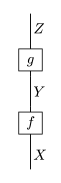
serial(wire($X$), process($f$), wire($Y$), process($g$), wire($Z$)) |
 |
Both nest freely:
serial(
  copy,
  parallel(process($f$), process($g$)),
)

- By default, diagrams read bottom to top: inputs enter at the bottom edge and outputs leave at the top edge, and the first argument of
serialis the bottom one. See Reading direction for the other three. - In
serial, each diagram must have as many outputs as the next one has inputs.serial(copy, wire())is an error, sincecopyhas two outputs andwire()one input. - Every diagram has an
inputsand anoutputsfield with its wire counts. parallelcentres shorter diagrams vertically and extends their wires to the common edges. A diagram with no outputs, such asdiscard, sits at the bottom edge instead, and one with no inputs, such as astate, at the top edge.- With a single argument, both combinators return it unchanged; with none, they return the empty diagram.
How wires are routed
Boxes, triangles and custom elements hold the ends of their wires in place; plain wires and the arms of copy, unbundle and bundle are flexible.
This is what gives the drawings their hand-drawn look.
A wire follows the element it stands on, so a narrow layer of wires over a wide box stays straight rather than kinked:
serial(process("Describe"), wire("text"))

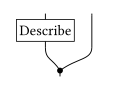
A fork arm runs from its dot straight to wherever the next layer needs it:
serial(
  copy,
  parallel(process("Describe"), wire()),
)
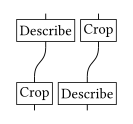
A wire whose two ends are held at different positions becomes an S-curve over its own length:
serial(
  parallel(process("Crop"), process("Describe")),
  parallel(wire(), wire()),
  parallel(process("Describe"), process("Crop")),
)
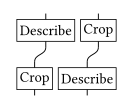
Only where two rigid elements meet and disagree does serial insert a connector band of bend units between the layers:
serial(
  parallel(process("Crop"), process("Describe")),
  parallel(process("Describe"), process("Crop")),
)
Labels
| Code | Drawing |
|---|---|
wire("photo") |
 |
wire($X times Y$) |
 |
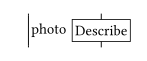
parallel(wire("photo"), process("Describe")) |
 |
parallel(wire("photo", side: "left"), process("Describe")) |
 |
- A string label is set upright, and math is math.
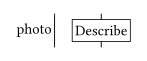
- A wire label sits to the right of its wire, and the wire keeps room for it, so a neighbour in a
parallelis placed after the label.side: "left"puts the label on the other side, for instance to keep it outside the diagram. - Read sideways, a wire is at least as long as its label.
- Label size follows the surrounding text, not the diagram’s
unit. Change it with the style keylabel.size.
Styling
A style is a dictionary of overrides on default-style.
Most documents fix one once, #let sd = string-diagram.with(style: (unit: 1.5em)), but a style can be applied at three levels.
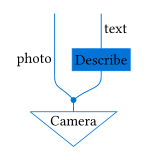
The examples use this program, which keeps a photo and also describes it in text:
#let program = serial(
  state("Camera"),
  copy,
  parallel(wire("photo", side: "left"), process("Describe")),
  parallel(wire(), wire("text")),
)
The whole diagram, through the style: argument of string-diagram:
#string-diagram(program, style: (stroke: (paint: blue), box: (fill: blue.transparentize(85%))))
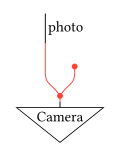
A sub-diagram, through styled:
#string-diagram(serial(
  state("Camera"),
  styled(serial(copy, parallel(wire(), discard)), stroke: (paint: red)),
  wire("photo"),
))
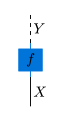
A single element, through its own stroke: and fill: arguments:
#string-diagram(serial(
  wire($X$),
  process($f$, stroke: (paint: blue), fill: blue.transparentize(85%)),
  wire($Y$, stroke: (dash: "dashed")),
))
serial and parallel also take a style: argument, which restyles the diagram they build: serial(copy, parallel(wire(), discard), style: (discard: (kind: "ground"))).
Style keys
The same diagram, serial(copy, parallel(discard, process($f$))), under a few overrides:
| Style | Drawing |
|---|---|
| (default) |  |
(discard: (kind: "ground")) |
 |
(gap: 0.5) |
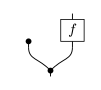 |
(stroke: (thickness: 1.4pt)) |
 |
(dot: (radius: 0.15, height: 0.4)) |
 |
(unit: 1.4em) |
 |
Root keys:
| Key | Default | Meaning |
|---|---|---|
unit |
2em |
length of one unit on the page; an em value scales with the text |
direction |
"up" |
reading direction: "up", "down", "right" or "left" |
stroke |
black + 0.7pt |
base stroke, inherited by every element stroke that is auto |
fill |
white |
fill of boxes and triangles |
inset |
0.1 |
space between a label and the border of its box or triangle |
margin |
0.1 |
space kept free beside a box, a triangle or a wire label, so that neighbours do not touch |
stub |
0.2 |
length of the short wire stubs attached to boxes and triangles |
bend |
0.5 |
height of the connector band that serial inserts between rigid elements |
gap |
0 |
extra space between the factors of a parallel |
padding |
0.1 |
padding around the canvas, so that strokes are not clipped |
Element groups:
| Key | Default | Meaning |
|---|---|---|
wire.stroke |
auto |
stroke of all wires |
wire.arm-angle |
0.1 |
sideways reach of a fork arm, relative to its rise, up to which the arm leaves the dot vertically; beyond it the arm leaves at an angle, and 0 makes every arm do so |
box.stroke, box.fill |
(thickness: 0.6pt), auto |
stroke and fill of process boxes |
box.height |
0.75 |
minimum height of a box |
box.inset, box.margin |
auto |
as the root keys, for boxes |
triangle.stroke, triangle.fill |
(thickness: 0.6pt), auto |
stroke and fill of state and effect triangles |
triangle.height |
0.75 |
minimum height of a triangle |
triangle.aspect |
2.5 |
width-to-height ratio a triangle aims for; a long label first widens it and then, past this ratio, makes it taller too |
triangle.inset, triangle.margin |
auto |
as the root keys, for triangles |
dot.radius |
0.1 |
radius of the copy and discard dots |
dot.height |
0.2 |
distance of a dot, or of the branch point of unbundle and bundle, from the end of its single wire |
dot.fill |
auto |
fill of the dots; auto follows the wire paint |
discard.kind |
"dot" |
"dot" or "ground" |
label.size |
1em |
text size of all labels |
label.sep |
0.1 |
distance between a wire and its label |
Plain numbers are in units and scale with unit; unit, label.size and stroke thicknesses are Typst lengths.
How styles combine
autoin an element group means “use the root key of the same name”.- Strokes fold as in CeTZ: a partial stroke such as
(paint: red)or(dash: "dashed")changes only what it names, while a full stroke such asred + 1ptreplaces the inherited one. stroke: noneat the root hides everything, since boxes, triangles and dots take their paint from it. An element comes back only when its own stroke names a paint, for examplebox: (stroke: (paint: black)).unit,paddinganddirectiondescribe the diagram as a whole, so onlystring-diagramaccepts them, notstyled.- Unknown keys are an error, so a typo does not pass silently.
Reading direction
The direction style key turns the finished drawing.
Labels stay upright; boxes, triangles and labelled wires make room for them along the new flow.
| Style | Drawing |
|---|---|
(direction: "up") |
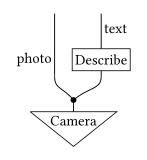 |
(direction: "down") |
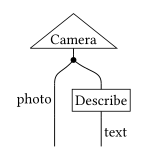 |
(direction: "right") |
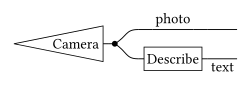 |
(direction: "left") |
 |
"down"is the vertical mirror image of"up".- In
"right"and"left", the first factor of aparallelis on top, and boxes are long along the flow, as such diagrams are usually drawn. - Read sideways, a wire label with
side: "right"sits below its wire and one withside: "left"above it.
Diagrams in running text
The default unit is sized for display math. Inline, pass a smaller one, and a smaller label size if the diagram carries labels:
#let small = string-diagram.with(style: (unit: 1.2em))
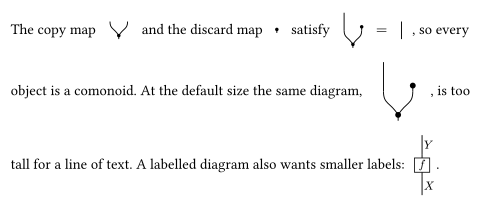
The copy map #small(copy) and the discard map #small(discard) satisfy
#small(serial(copy, parallel(wire(), discard))) $=$ #small(wire()), so every object is a comonoid.
At the default size the same diagram, #string-diagram(serial(copy, parallel(wire(), discard))), is too tall for a line of text.
A labelled diagram also wants smaller labels: #string-diagram(serial(wire($X$), process($f$), wire($Y$)), style: (unit: 1.3em, label: (size: 0.8em))).
string-diagram returns a box whose baseline is shifted so that the diagram’s vertical centre lands on the math axis.
Pass baseline: to change that.
Custom primitives
primitive turns a CeTZ drawing into an element that composes like the built-in ones.
#import "@preview/cetz:0.5.2": draw

#let cup = primitive(inputs: 0, outputs: 2, width: 2, height: 1, draw: (style, geometry) => {
  draw.bezier((0.5, 1), (1.5, 1), (0.5, 0.2), (1.5, 0.2), stroke: style.wire.stroke)
})

#let cap = primitive(inputs: 2, outputs: 0, width: 2, height: 1, draw: (style, geometry) => {
  draw.bezier((0.5, 0), (1.5, 0), (0.5, 0.8), (1.5, 0.8), stroke: style.wire.stroke)
})

#let spider(n, m) = primitive(inputs: n, outputs: m, draw: (style, geometry) => {
  let c = (geometry.width / 2, geometry.height / 2)
  for x in geometry.input-positions { draw.line((x, 0), c, stroke: style.wire.stroke) }
  for x in geometry.output-positions { draw.line(c, (x, geometry.height), stroke: style.wire.stroke) }
  draw.circle(c, radius: style.dot.radius, fill: style.dot.fill, stroke: none)
})
| Element | Drawing |
|---|---|
cup |
 |
cap |
 |
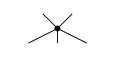
spider(3, 2) |
 |
trapezoid("Describe"), defined in docs/figures/custom.typ |
 |
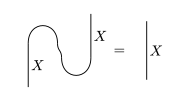
The snake equation of a compact closed category:
$ #string-diagram(serial(
    parallel(wire($X$), cup),
    parallel(cap, wire($X$)),
  )) = #string-diagram(wire($X$, length: 2)) $
draw(style, geometry)returns CeTZ elements. It draws in units, with the origin at the bottom-left corner of the element.styleis the fully resolved style, sostyle.wire.stroke,style.box.fillorstyle.dot.radiuscan be handed to CeTZ as they are. Import the same CeTZ version as drawstring does.geometryholds the element’swidth,height,input-positionsandoutput-positions, and ameasurefunction.- The element is
width×heightunits; by default it is one unit tall and as wide as its larger wire count. Its wire ends are spread evenly along its edges unlessinput-positionsandoutput-positionssay otherwise. - To size an element to its label, pass
widthorheight(or the positions) as a function(style, measure) => ....measure(label)returns the label’swidthandheightin units, along the element’s own axes, so that the element fits its label in every reading direction. The trapezoid above is drawn this way. - Custom elements are rigid: their wire ends stay put, and the neighbouring wires bend to meet them.
- The declared size counts towards the canvas even where the drawing is smaller.
Further information
- Gallery: docs/gallery.typ shows the whole repertoire in one document, with examples from probability theory; docs/gallery.pdf is its output.
- Requirements: Typst 0.14 or newer.
- Contributing: CONTRIBUTING.md explains how to run the tests and regenerate the figures, and ARCHITECTURE.md how the layout works.
- AI assistance: drawstring was developed with the help of AI coding assistants (Claude Code and OpenAI Codex) under close human review.
- License: MIT, see LICENSE.