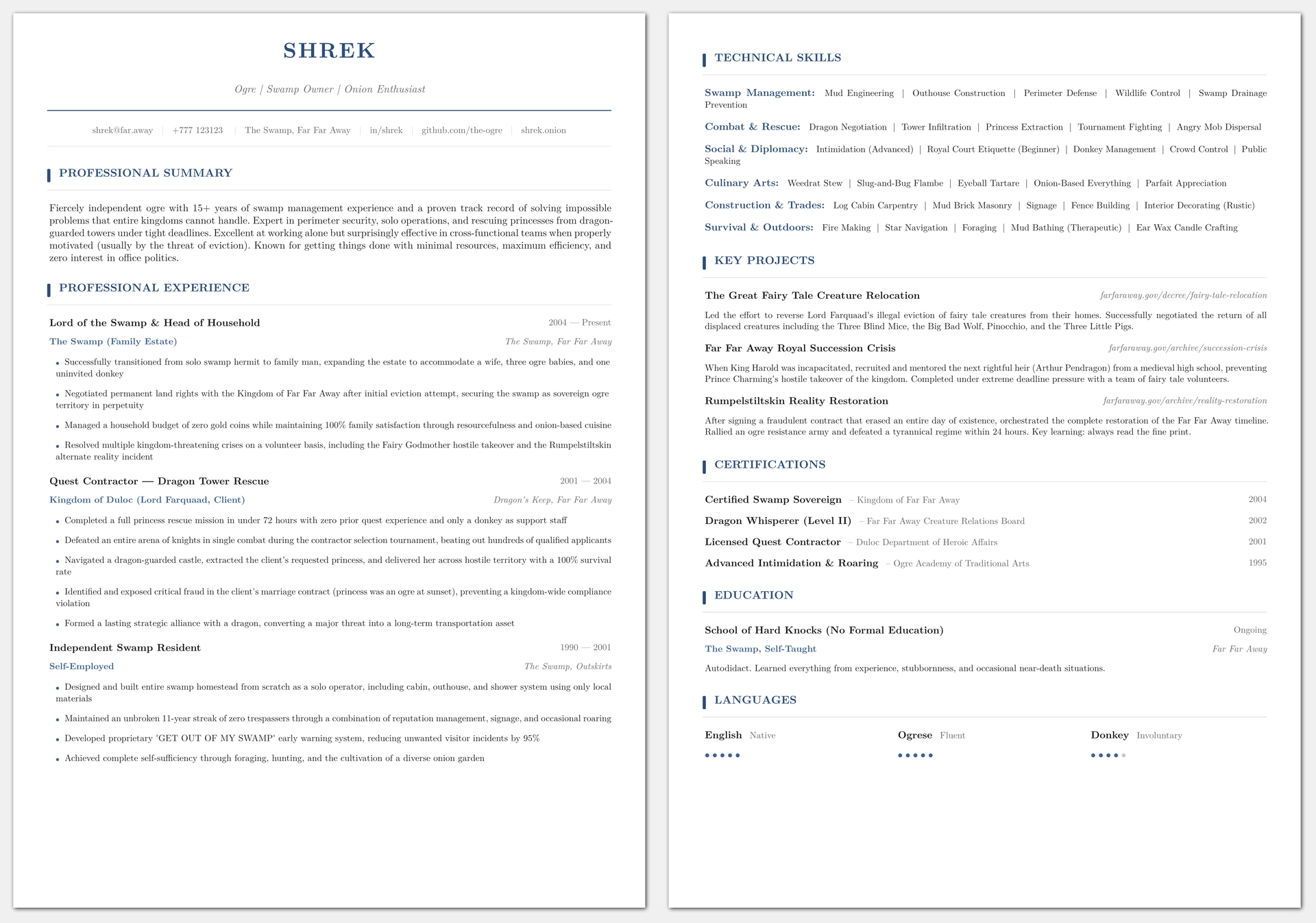
A clean, print-friendly CV template for Typst. YAML-driven content, zero color fills, works in B&W.

Features
- Print-friendly: no solid color blocks, minimal ink usage, looks identical in B&W
- YAML-driven: edit
cv-data.yamlwith your content, the template handles the rest - No page breaks inside sections: certifications, education, projects, etc. never split across pages
- ATS-compatible: single-column layout, standard section headings, clean PDF output
- Self-contained: no external Typst packages required
Using as a Typst package
Quick start with typst init
The fastest way to get started is using Typst’s built-in scaffolding:
typst init @preview/clean-print-cv:0.1.0 my-cv
cd my-cv
This creates a new directory with main.typ and cv-data.yaml ready to edit.
Manual import
In any .typ file, import the template and use its functions:
#import "@preview/clean-print-cv:0.1.0": *

#let data = yaml("cv-data.yaml")

#show: cv-page-setup

#cv-header(data.personal)
#cv-summary(data.summary)
#cv-experience(data.experience)
#cv-skills(data.skills)
#cv-projects(data.projects)
#cv-certifications(data.certifications)
#cv-education(data.education)
#cv-languages(data.languages)
Then compile:
typst compile main.typ
Local development
If you’ve cloned this repository and want to work on it directly:
- Install Typst
- Edit
cv-data.yamlwith your data - Compile:
typst compile cv.typ
Or use live reload while editing:
typst watch cv.typ
Files
| File | Purpose |
|---|---|
cv.typ |
Entry point; compile this. Controls section order. |
cv-template.typ |
All styling and layout logic. |
cv-data.yaml |
Your CV content. Edit this. |
template/ |
Scaffolding files for typst init. |
typst.toml |
Package manifest for Typst Universe. |
Sections
The template includes these sections, all optional (comment out any line in your entry point to remove):
- Professional Summary
- Professional Experience
- Technical Skills
- Key Projects
- Certifications
- Education
- Languages (with proficiency dots)
Reorder them by moving lines in your .typ file.
Customization
Colors
Edit the variables at the top of cv-template.typ:
#let primary    = rgb("#2b4c7e")   // headings, name, accent bars
#let accent     = rgb("#3d6098")   // company names, bullets
#let body-color = rgb("#1a1a1a")   // body text
#let muted      = rgb("#666666")   // dates, locations
#let rule-color = rgb("#d0d0d0")   // hairline separators
Font sizes
#let name-size       = 20pt
#let title-size      = 10pt
#let section-size    = 10.5pt
#let body-size       = 9.5pt
#let small-size      = 8.5pt
Fonts
Change the font in the cv-page-setup function:
set text(font: "New Computer Modern", ...)
Replace "New Computer Modern" with any system font.
Licensing
The package code (cv-template.typ) is licensed under MIT.
The template directory contents (template/) are licensed under MIT-0,
so you may use, modify, and distribute your CV without attribution or including a license notice.
Building the thumbnail
The thumbnail for Typst Universe is generated from the template data. Requires ImageMagick:
make thumbnail