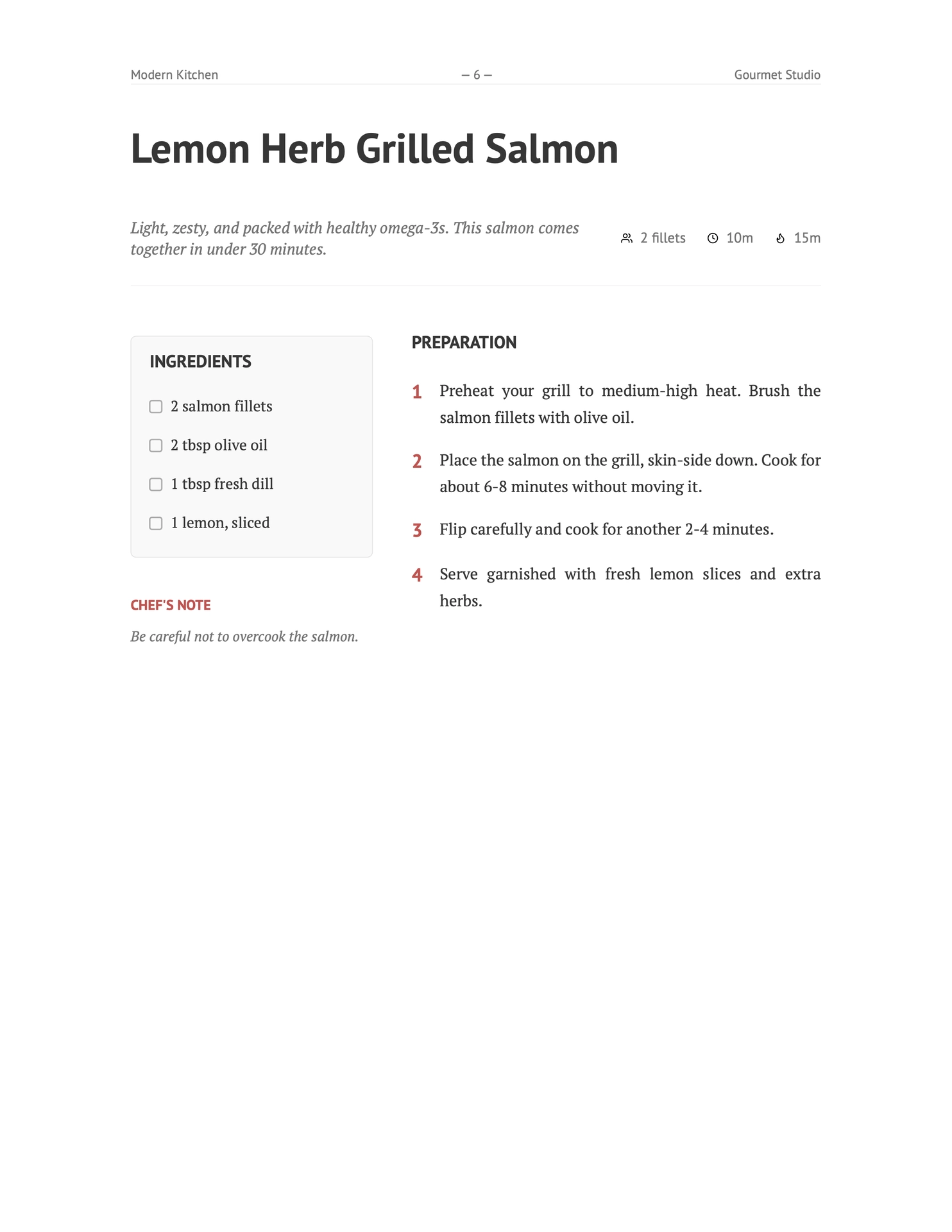
A clear and minimal Typst template for creating recipe collections and cookbooks (example pdf).

Usage
You can use this template in the Typst web app by clicking “Start from template” on the dashboard and searching for chef-cookbook.
Alternatively, you can use the CLI:
typst init @preview/chef-cookbook
Configuration
The template exports two main functions: cookbook and recipe.
cookbook
This is the main show rule that sets up the document structure, cover page, and table of contents.
#import "@preview/chef-cookbook:0.3.0": *

#show: cookbook.with(
  title: "My Recipes",
  author: "Your Name",
  date: datetime.today(),        // Optional: Defaults to today
  paper: "a4",                   // Optional: Defaults to "a4"
  accent-color: rgb("#D9534F"),  // Optional: Defaults to a warm red
  cover-image: none,             // Optional: Image content for the cover
)
recipe
Use this function to add a recipe to your cookbook.
#recipe(
  "Recipe Name",
  description: [Short description of the dish.],
  cuisine: "Italian",                // Optional: displayed with a globe icon
  tags: ("pasta", "quick", "easy"),  // Optional: rendered as pill badges
  servings: "4 servings",
  prep-time: "20m",
  cook-time: "40m",
  ingredients: (
    (amount: "200g", name: "Flour"),
    (amount: "2", name: "Eggs"),
    "Salt",
    "Pepper",
  ),
  utensils: (
    "Large mixing bowl",
    "Whisk",
    "Baking sheet",
  ),
  instructions: [
    + First step...
    + Second step...
  ],
  notes: "Optional chef's notes.",
  image: image("path/to/dish.jpg"), // Optional
)
Ingredients Format
Ingredients can be specified as a list containing either:
- Strings: Simple text (e.g., “Salt”).
- Dictionaries: Structured data with
amountandnamekeys (e.g.,(amount: "1 cup", name: "Milk")).
Utensils Format
Utensils are specified as a list of strings. They are rendered in the recipe sidebar with a utensil icon and accent-colored left border.
utensils: (
  "Large pot",
  "Wooden spoon",
  "Blender",
)
Notes
The notes parameter on recipe() renders a styled callout box in the sidebar below the ingredients, with a lightbulb icon and accent-colored left border.
Cuisine & Tags
Recipes can optionally include metadata for cuisine type and tags:
cuisine(string): Displayed in the recipe header next to a globe icon. Use it to indicate the origin or style of the dish (e.g.,"Italian","Japanese").tags(list of strings): Rendered as small pill badges below the recipe header, next to a tag icon. Useful for categorising recipes by dietary info, meal type, etc.
#recipe(
  "Pasta Primavera",
  cuisine: "Italian",
  tags: ("vegetarian", "pasta", "quick"),
  // ... other params
)
Both parameters are optional and recipes without them render exactly as before.
Named Sections
To divide preparation steps into named groups, pass a dictionary to instructions instead of plain content. Each key becomes a section heading:
instructions: (
  "For the dough": [
    + Mix flour and eggs...
    + Knead for 10 minutes...
  ],
  "For the sauce": [
    + Heat olive oil...
    + Add garlic...
  ],
)
Each section renders as an accent-colored uppercase label with a decorative underline, visually separating groups of steps within the preparation column. Plain content is still supported for recipes without sections.
Internationalization (i18n)
The cookbook supports multiple languages out of the box, including English, German, Polish, French, Spanish, and Italian. It automatically adapts to the language set via Typst’s native text rules.
Basic Usage
To set the language for the entire cookbook, pass the lang parameter to the setup function:
#show: cookbook.with(
  title: "Meine Rezepte",
  lang: "de", // Switches headings to German
)
To change the language for a specific recipe, use set text rule:
#{
  set text(lang: "de")
  recipe(
    "Gegrillter Lachs mit Zitronen-Dill-Marinade",
    // ... other parameters
  )
}
Custom Dictionaries
If a language is missing or you wish to override specific terms (e.g., using “Components” instead of “Ingredients”), use the custom-dicts parameter:
#show: cookbook.with(
  custom-dicts: (
    "en": (ingredients: "COMPONENTS"),
    "pl": (chefs-note: "PORADA"),
    "cz": (
      chapter: "Kapitola",
      collection: "Sbírka od ",
      contents: "Obsah",
      ingredients: "INGREDIENCE",
      utensils: "NÁČINÍ",
      chefs-note: "POZNÁMKA ŠÉFKUCHAŘE",
      note: "POZNÁMKA",
      preparations: "PŘÍPRAVA",
    ),
  )
)
Development
For development guide, see docs/CONTRIBUTING.md
License
MIT