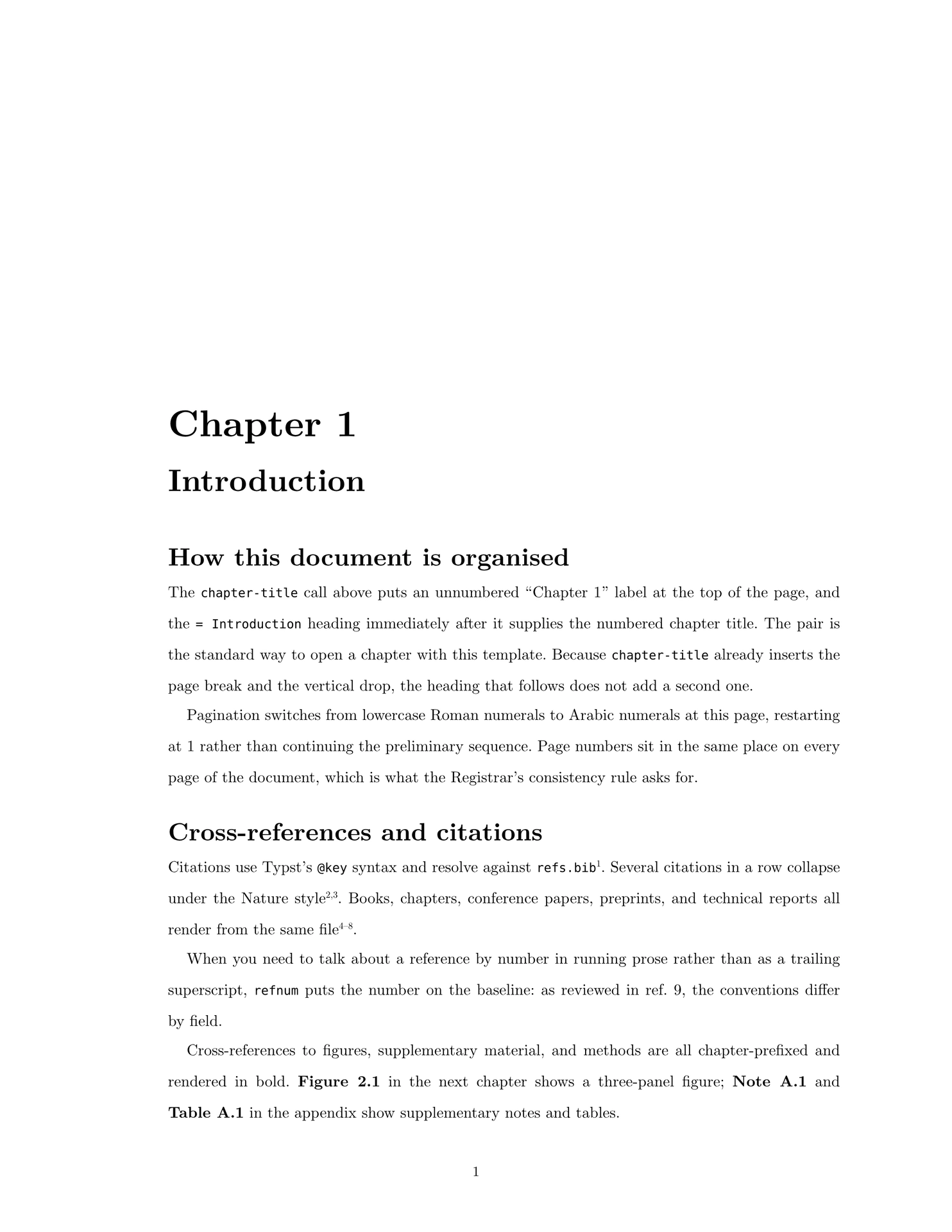
A Typst template for a Stanford Ph.D. dissertation or Engineer thesis, built to the Office of the University Registrar’s published format requirements.
This template is not endorsed by Stanford. The Registrar states: “The Office of the University Registrar does not endorse or verify the accuracy of any dissertation or thesis formatting templates that may be available to you. It is your student responsibility to make sure that the formatting meets these requirements.” Read the requirements yourself before you submit. REQUIREMENTS.md maps every clause to what this template does, and lists what it cannot do for you.
Getting started
typst init @preview/cardinal-su-thesis
cd cardinal-su-thesis
typst watch main.typ
The generated project is a complete example dissertation — abstract, acknowledgements, preface, introduction, a chapter exercising every feature, conclusions, an appendix, and a bibliography. Compile it, read it, then replace the content with your own.
What you get out of the box
- US letter, 1.5 in binding margin, 1 in elsewhere, alternating for double-sided printing
- 10 pt New Computer Modern (on the Registrar’s acceptable-families list, and bundled with Typst so nothing needs installing)
- One-and-a-half line spacing, measured at 1.502× the font size
- Roman preliminary numerals with the Abstract on iv, Arabic restarting at 1 at Chapter 1, in a consistent position throughout
- No copyright or signature page — Axess inserts those, and leaving them in is the single most common formatting mistake
- Title page generated to match the official samples word for word
- Chapter-prefixed figures, tables, and equations (Figure 2.1, Table 2.1, equation (2.1)), each on its own counter, all resetting per chapter
- Running heads that abbreviate long chapter titles
- Supplementary notes, supplementary table stubs, and numbered methods subsections, all cross-referenceable
Document structure
main.typ applies three show rules in sequence, which switch numbering modes:
#show: front-matter   // unnumbered headings, Roman page numbers
#show: main-body      // numbered chapters, Arabic page numbers restarting at 1
#show: appendix       // letter-numbered headings (A, A.1, ...)
Chapters live in their own files and are pulled in with #include. Because
#include does not share scope, each chapter file needs its own import line:
#import "@preview/cardinal-su-thesis:0.1.0": *
Recipes
Each snippet shows only the options it is about; combine them with the rest
of your own thesis.with call.
Open a chapter
#chapter-title[Chapter 2]
= The full chapter title, which may be long
chapter-title prints the unnumbered label and inserts the page break and
vertical drop; the = heading supplies the numbered title. To keep a long title
out of the running head, pass a short form:
#chapter-title(short: [Regulatory maps])[Chapter 2]
= Mapping enhancer-gene regulatory interactions from single-cell data
A figure with a short title and a long legend
caption: is what lands in the List of Figures, so keep it to a short title and
put the description in fig-legend immediately after. The caption is printed
above the legend on the page, so don’t repeat the title in the legend:
#figure(
  image("figures/results.jpg", width: 90%),
  caption: [Benchmarking across five cell types],
) <fig-bench>
#fig-legend[
  *(a)* Precision-recall curves.
  *(b)* Effect sizes by distance bin ($n = 1{,}204$).
]
Panel markers in the legend are written plainly as *(a)*, since the caption
above already carries the figure number. To name a panel from running text, use
figpanel: figpanel(<fig-bench>, [a]) renders as Figure 2.1a and stays
correct if the chapter is reordered. Reference the figure itself with
@fig-bench.
Cite a reference by number in running prose
as reviewed in ref.~#refnum(<Gasperini2020>)
refnum puts the citation number on the baseline instead of superscripting it.
The ~ is a non-breaking space.
Supplementary notes, tables, and methods
#supp-note[Naming conventions][
  Body of the note, which may run across pages.
] <supp-note-naming>

#supp-table(
  [Model parameters],
  [One row per parameter.],
  filename: "TableA1_parameters.tsv",
) <supp-tab-params>

#method-heading[Sample preparation] <method-prep>
These print as Note A.1, Table A.1, and A.1. Sample preparation, each
on its own counter, and are referenced with @supp-note-naming,
@supp-tab-params, and @method-prep — the last resolving to Methods A.1.
Switch to an Engineer thesis
#show: thesis.with(degree: "engineer")
A program rather than a department
#show: thesis.with(program: "Biophysics") // "SUBMITTED TO THE PROGRAM IN BIOPHYSICS"
GSB, GSE, Law (J.S.D.), or D.M.A. title pages
Stanford publishes five Ph.D. title page variants. The department and program forms are built in; for the other three, override the block between the title and your name with the exact lines from the official samples:
#show: thesis.with(
  title-page-lines: (
    "A Dissertation",
    "Submitted to the Graduate School of Business",
    "and the Committee on Graduate Studies",
    "of Stanford University",
    "in partial fulfillment of the requirements",
    "for the degree of",
    "Doctor of Philosophy",
  ),
)
Single-sided printing
#show: thesis.with(double-sided: false)
The binding margin stops alternating and stays on the left, and running heads stop mirroring. Pagination is unaffected — the Abstract is on iv either way.
Options
All are keyword arguments to thesis.
Identity
| Option | Default | Effect |
|---|---|---|
title |
"Thesis Title" |
Document title and PDF metadata |
title-display |
none |
Line-broken form for the title page, e.g. [First part \ second part]. Falls back to title |
author |
"Author Name" |
Your full name |
date |
datetime.today() |
Must be the month and year you actually submit |
degree |
"phd" |
"phd" → A DISSERTATION / DOCTOR OF PHILOSOPHY; "engineer" → A THESIS / ENGINEER |
department |
"Your Department" |
Renders “SUBMITTED TO THE DEPARTMENT OF …” |
program |
none |
If set, renders “SUBMITTED TO THE PROGRAM IN …” instead of the department line |
Layout
| Option | Default | Effect |
|---|---|---|
paper |
"us-letter" |
Required to stay 8.5 × 11 in |
margin-inner |
1.5in |
Binding-edge margin |
margin-outer |
1in |
All other margins |
page-number-margin |
0.5in |
Distance from page edge to the folio. The requirement is a minimum of 0.5 in |
chapter-drop |
1/3 |
Fraction of page height at which a chapter title starts |
double-sided |
true |
Alternates the binding margin and mirrors running heads |
blank-page-iv |
false |
Inserts a blank page iv so the Abstract falls on v. Only for double-sided printing with each section opening on a right-hand page |
Typography
| Option | Default | Effect |
|---|---|---|
body-font |
"New Computer Modern" |
Bundled with Typst; on the acceptable-families list |
mono-font |
"DejaVu Sans Mono" |
Bundled with Typst. Use "Courier New" to stay strictly on the list |
body-size |
10pt |
Must be 10, 11, or 12 pt |
body-leading |
1.32em |
1.502× the font size at 10 pt. Use ≈1.99em for double spacing |
par-indent |
1.2em |
First-line indent |
par-justify |
true |
Justify body text |
Title page
| Option | Default | Effect |
|---|---|---|
title-size |
10pt |
Size of the title and degree block |
title-leading |
0.75em |
Line spacing on the title page |
title-vspace |
8em |
Gap above and below the degree block |
title-page-centering |
"page" |
"page" centres on the sheet; "margins" centres within the margins (the literal requirement) |
title-page-case |
"standard" |
"standard", "all" (also uppercases author and date), or "none" |
title-page-lines |
none |
Array overriding the whole degree block |
Headings
| Option | Default | Effect |
|---|---|---|
heading-styles |
default-heading-styles |
Array of four dicts: size, above, below, weight, style, page-break, leading |
chapter-title-style |
default-chapter-title-style |
Dict: size, vspace, weight, style |
Both defaults are exported, so you can tweak one level:
#show: thesis.with(
  heading-styles: default-heading-styles.enumerate().map(((i, s)) =>
    if i == 0 { s + (size: 22pt) } else { s }),
)
Running heads and pagination
| Option | Default | Effect |
|---|---|---|
running-heads |
true |
Chapter name in the header of non-opening pages |
header-size |
9pt |
Running head and folio size |
chapter-label |
"Chapter" |
Word before the number in the running head |
appendix-label |
"Appendix" |
Same, inside appendices |
header-sep |
". " |
Separator between number and title |
page-number-position |
"bottom-center" |
Or "bottom-outer". Applied to every numbered page |
Figures, tables, and equations
| Option | Default | Effect |
|---|---|---|
figure-supplement |
[Figure] |
Use [Fig.] to abbreviate |
table-supplement |
[Table] |
Label for table figures |
figure-sep |
[: ] |
Separator after the figure number |
caption-size |
9pt |
Caption and legend size |
caption-leading |
0.6em |
Caption and legend line spacing |
caption-legend-gap |
0.75em |
Gap between caption and fig-legend |
supp-table-supplement |
[Table] |
Label for supp-table |
supp-table-sep |
[: ] |
Separator for supp-table |
supp-note-supplement |
[Note] |
Label for supp-note |
method-supplement |
[Methods] |
Label used when referencing method-heading |
equation-numbering |
auto |
auto numbers per chapter as (2.1) and resets at each chapter; a pattern like "(1)" numbers continuously; none disables |
Verifying your output
tests/check.py compiles the example and asserts 35 properties against the
compiled PDF — page box, both margins by page parity, title-page margins under a
wrapping title, measured line spacing, folio inset, the iv start, the Arabic
restart, section order, per-kind counters and labels, font embedding, encryption,
and file size. It also parses every typst block in this README, the way
typst/packages CI does:
python3 tests/check.py
It needs typst on PATH and pypdf. Point it at your own document by editing
the path at the top. It is a safety net, not a substitute for reading the
requirements.
Gotchas
Show-rule alignment. lib.typ sets show figure: set align(center), which
wraps the entire show-rule chain. Any block returned by a later
show figure: it => .. rule is therefore placed inside a centred context. Two
consequences, both worked around in lib.typ:
set align(left)must come before the block, at branch level. Putting it inside the block’s content only affects the text, not the block’s own placement, so a block narrower than the text column ends up centred.block(breakable: true, ..)is not enough when the content holds a large unbreakable child such as anenum. The block can break between children, but an oversized child still overflows. Return a flat content sequence withset block(breakable: true)in scope instead of wrapping it.
Scope supplements per figure kind. A bare set figure(supplement: [Figure])
relabels every figure kind, tables included. lib.typ therefore applies
figure-supplement and table-supplement through
show figure.where(kind: ..): set figure(..), and the cross-reference rule reads
each label off it.element.kind so a table reference counts on the table
counter.
Don’t name a parameter numbering. It shadows the builtin numbering()
function. main-body and appendix take heading-numbering for this reason.
A bare @ in text. On Typst 0.13 an @ followed by punctuation parses as a
label reference and fails the build. Write it as `@` or \@.
Requirements
Typst 0.13.0 or later. The example compiles cleanly on 0.13.0, 0.14.0, and 0.15.0, with the same pagination and every page’s text laid out within 1 pt of the same position. One thing does differ: Typst’s bundled Nature bibliography style gained editor and publisher details for book chapters in 0.15.0, so those entries are fuller on newer compilers.
Developing locally
git clone https://github.com/mayasheth/cardinal-su-thesis
mkdir -p "$HOME/Library/Application Support/typst/packages/preview/cardinal-su-thesis"
ln -s "$PWD/cardinal-su-thesis" \
  "$HOME/Library/Application Support/typst/packages/preview/cardinal-su-thesis/0.1.0"
typst init @preview/cardinal-su-thesis:0.1.0 /tmp/demo
cd /tmp/demo && typst compile main.typ
On Linux the package directory is ~/.local/share/typst/packages/preview/….
Changelog
See CHANGELOG.md.
License
MIT-0, so anything you write with the template is yours with no attribution or license-text obligations. See LICENSE.
The bundled example figures are synthetic images generated for this repository,
and the entries in template/refs.bib are fictitious.