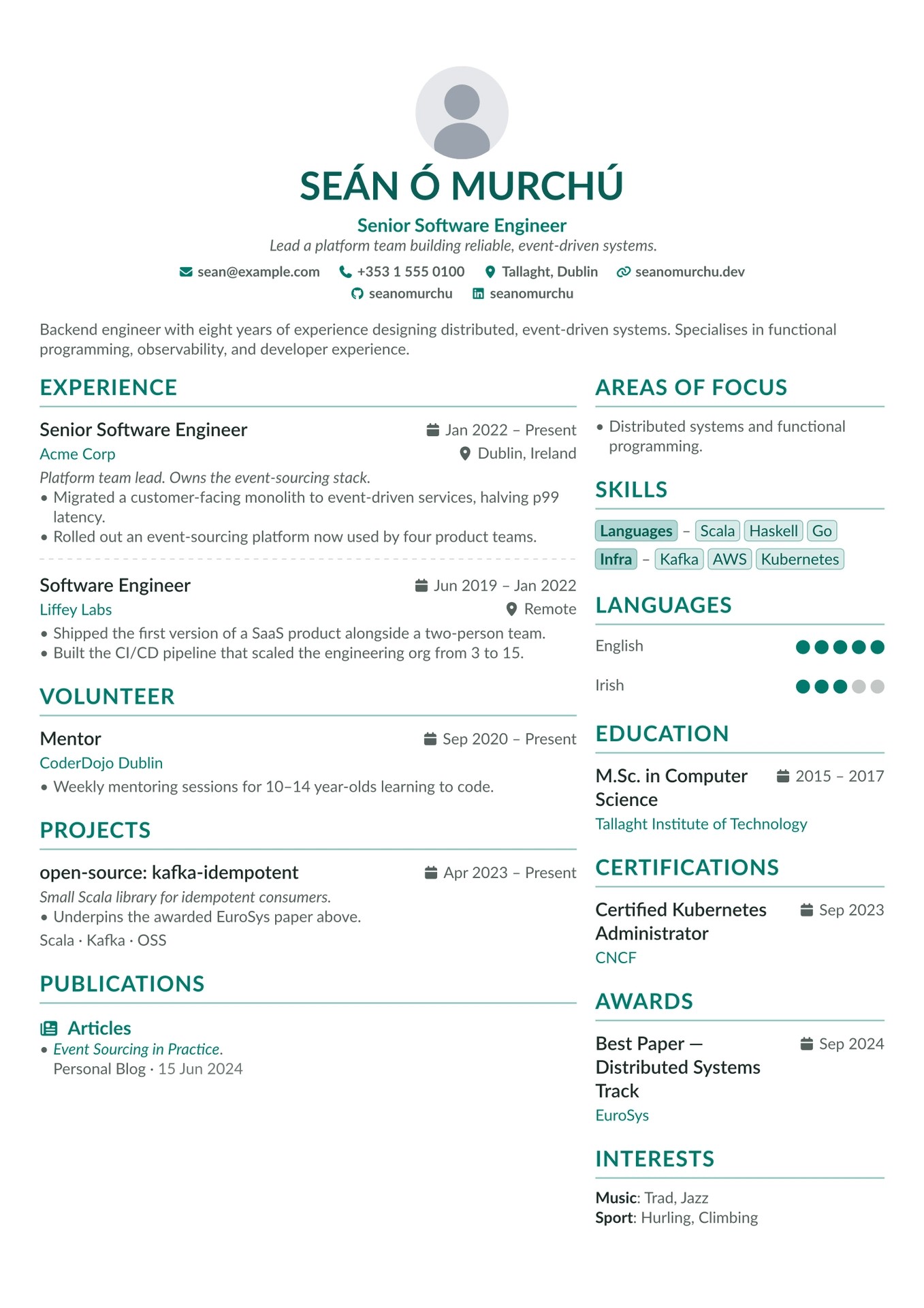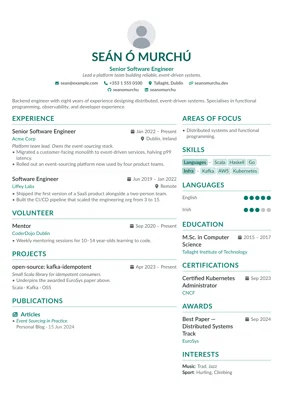


A two-column CV template for Typst.
Write your CV once as JSON Resume data; pick a theme, a layout and a language.

One CV in every built-in theme, each frame with a different layout: columns, photo position and shape, header alignment, date format, QR code, justified text, single column, a CV in Irish, and show rules restyling the ratings and keywords.
Highlights
- Data, not layout. Your CV is a JSON Resume dict, inline in Typst or loaded from a
resume.json. Empty sections disappear, and a misspelt key or a wrong type stops the build with a message naming it. - A Typst template. Themes for the look, Typst’s own
setandshowrules for the rest: the page, the font, the language, any part of the CV. - Any layout. Two columns at any ratio, any section in either column, or a single column for applicant-tracking systems (ATS).
- A rich header. A photo, a contact bar with icons for common networks, and an optional QR code to your homepage for printed copies.
- Every string translatable, month names included. The labels follow
set text(lang: ..), with English and Irish built in. - Print- and archive-ready. PDF metadata comes from your data, and the output compiles as PDF/A and PDF/UA-1.
The full example, every section in use, over two pages (source , PDF):
| Page 1 | Page 2 |
|---|---|
 |
 |
Contents
- Quick start: your data in Typst, a
resume.json - Customising: themes, fonts, layout, photo and contacts, labels and language, restyling, page and footers
- Beyond the data: the CV in markup, your own mapping
- Reference · Upgrading · Contributing · Credits
Quick start
Requirements: Typst 0.15.0 or later, and two fonts: Lato (the default) and the FontAwesome 7 desktop fonts (for icons). The Typst web app has both. Locally, on macOS, brew install --cask font-lato font-fontawesome; elsewhere, install Lato from Google Fonts and the FontAwesome 7 desktop OTFs from fontawesome.com/download (Debian/Ubuntu’s fonts-font-awesome is v6, which isn’t read). Run typst fonts to check: without FontAwesome, icons render as empty boxes. Package dependencies download automatically.
typst init @preview/altacv
This copies template/cv.typ, a complete example CV, and template/resume.json, the same CV as a JSON Resume file, into a new project. Edit the data in cv.typ and compile.
Your data in Typst
#import "@preview/altacv:1.9.0": alta, altacv

#let cv = (
  basics: (
    name: "Jane Doe",
    label: "Senior Software Engineer",
    summary: [Backend engineer with eight years' experience…],
    email: "jane@example.com",
    profiles: ((network: "GitHub", username: "janedoe", url: "https://github.com/janedoe"),),
  ),
  work: ((
    position: "Senior Software Engineer",
    name: "Acme Corp",
    url: "https://acme.example.com", // links the company name
    startDate: "2022-01",            // no endDate: "Present"
    highlights: ([Led the migration…], [Designed the platform…]),
  ),),
  skills: ((name: "Languages", level: "Expert", keywords: ("Scala", "Python")),),
  // education, languages, projects, publications, certificates, awards, …
)

#show: altacv.with()

#alta(cv)
#show: altacv.with(..) is the template; your own set and show rules go after it and win. alta(cv) draws the CV. Only basics.name is required. Fields that take a string also take Typst markup ([Led the *platform* team]); keep to plain strings if the data also lives in a resume.json. Dates are ISO 8601 (2024, 2024-06, 2024-06-15). The data schema lists every section and field.
A resume.json
Load a JSON Resume file with gairm-import’s parse, which checks it against the schema first, so a vanilla resume.json works without edits:
#import "@preview/altacv:1.9.0": alta, altacv
#import "@preview/gairm-import:1.9.0": parse

#show: altacv.with()

#alta(parse(path("resume.json")))
Both routes take the same data: anything the dict holds, altacv’s extensions included, a resume.json can too. Typst can’t load a photo from a JSON string (a bare path resolves inside the package), so set it from your own file:
#let cv = parse(path("resume.json"))
#alta(cv + (basics: cv.basics + (image: path("photo.jpg"))))
Customising
Settings layer in order: the template’s theme, then your set and show rules after the show line, then show rules on a part. alta() takes the layout and data options as preferences, each merged over its default, so set only the keys you change: #alta(cv, preferences: (date-format: "short", photo-position: left)). Option names are kebab-case. An unknown key or a wrong type panics, naming it. Every option is in the reference. The snippets below use the cv dict from Quick start.
Themes and colours
The template’s theme picks the look. The built-in themes are themes.teal (the default), navy, crimson, forest, plum, charcoal, altacv, rust, bauhaus, riso, phosphor and catppuccin. A theme is a dict of tokens: colour roles, the font, the type sizes and weights, the spacing and the separators. A theme of your own sets only what it changes; the rest is the default theme’s:
#show: altacv.with(theme: (
  font: "Libertinus Serif",
  type: (headline: (size: 1.2)),  // section titles
  separator: (facts: " | "),
))
To adjust a built-in theme, add to it: themes.navy + (font: "Libertinus Serif"). Typst’s + merges only the top level, so to change a few colour roles, spread the theme’s own: themes.navy + (colours: (..themes.navy.colours, accent: rgb("#b5179e"))).
Fonts
The font is Typst’s: #set text(font: "Inter") after the show line, over the theme’s. Any installed font works. The name is Typst’s title element and section titles are level-1 headings, so a show rule sets them in another face:
#set text(font: "Source Sans 3")
#show selector(title).or(heading.where(level: 1)): set text(font: "Roboto Slab")
Groups are level-2 headings and entry titles one level below their section or group, so a plain show heading: .. reaches them too.
Layout
column-ratio is the left column’s share of the width. left-column-sections and right-column-sections pick which sections go where, in order; a section in neither isn’t drawn. By default the long-form sections (experience, volunteering, projects, publications) take the wide left column. To put the side panel on the narrow left:
#alta(cv, preferences: (
  column-ratio: 0.35,
  // a section in neither list isn't drawn
  left-column-sections: ("focus-areas", "skills", "languages", "education"),
  right-column-sections: ("work", "projects"),
))
column-ratio: 1 stacks every section in one column, the left list first, for applicant-tracking systems that misread columns. #set par(justify: true) justifies the prose (the summaries, highlights and publications); rows of facts, keywords and tags stay ragged.
Photo, contact bar and QR code
Set basics.image to add a photo, as a path("photo.jpg"), which resolves from your own file, or as bytes; a string resolves inside the package. photo-position (left, right, top or bottom), photo-size and photo-shape ("circle", "rounded", "square") place it; header-text-align aligns the header’s text. avatar-placeholder is a generic silhouette to start with.
The contact bar shows basics.email, phone, location, url and profiles, each linked. link-contact-info turns linking off, entirely or per channel; for paper, add print-full-urls: true to print profile URLs in place of usernames. A network with no built-in icon panics unless you give it one in profile-icons (networks).
qr-code: auto adds a QR code to basics.url, opposite the photo, for printed copies; a URL string encodes that instead.
Labels and language
Every string the template prints is a label, and the labels follow the document’s language, set with Typst’s own rule after the show line: #set text(lang: "ga"). The language also drives hyphenation, smart quotes and the PDF’s language tag. English and Irish are built in (a CV in Irish ); any other language keeps the English labels. Override any of them for the whole document with the template’s labels:
#show: altacv.with(labels: (
  work: "Berufserfahrung",
  present: "Heute",
  months: ("Jan", "Feb", "Mär", "Apr", "Mai", "Jun", "Jul", "Aug", "Sep", "Okt", "Nov", "Dez"),
))
#set text(lang: "de")
These go over the language’s own wherever they’re read: in alta()'s CVs, in the markup blocks and in the footers. alta(cv, labels: ..) overrides them for one CV. For a full translation, copy internal/data/labels-en.toml, translate it, drop its lang line and its [publication-icons] table, and load it: altacv.with(labels: toml("labels-de.toml")). To have it built in, open a pull request adding it as internal/data/labels-de.toml. Every key is in the reference.
Restyling parts
Parts of the CV carry labels (<alta-…>) that show rules can target, to restyle one part and leave the rest. Put the rules after the show line:
#show <alta-contact>: set text(font: "IBM Plex Mono")
#show <alta-date>: set text(style: "italic")
#show divider: set line(stroke: (paint: gray))  // the line between entries
#show <alta-rating-full>: [★]                   // stars for dots
#show <alta-rating-empty>: [☆]
#show list: set list(marker: [–])
A text part takes set text(..), a line part set line(..), a paragraph part set par(..); a marker (an icon, a rating dot) can be recoloured or replaced. The line between entries is Typst’s divider and the bullets Typst’s list, so restyle them as such. A replacement rule’s it is the part as content: use it whole (tag(it)), not it.text. Every part and its kind is in the reference, with a recipe that draws an entry’s keywords as tags.
Page, footers and PDF
The page is Typst’s: #set page(paper: "us-letter", margin: (x: 1cm)) after the show line. Two footers come with the template: #set page(footer: cv-footer()) puts your name and the page number on a CV of more than one page, and cv-updated-footer() the last-modified date from meta.lastModified (version: true adds meta.version; in a CV written in markup, pass the date:). Any content of your own works too.
The PDF’s title, author, subject, keywords and date come from your data (which fields). For an archival (PDF/A) or accessible (PDF/UA-1) PDF, ask the compiler; the output is tagged, with alt text for the photo and meaningful icons:
typst compile --pdf-standard a-2b,ua-1 cv.typ
Beyond the data
Writing the CV in markup
The blocks alta() draws with are public, so a CV can be written as a Typst document, with sections of your own:
#import "@preview/altacv:1.9.0": altacv, contact, cv-columns, cv-header, entry, skill-row

#set document(title: "Jane Doe", author: "Jane Doe")
#show: altacv.with()

#cv-header(tagline: "Senior Software Engineer", contacts: (contact("email", "jane@example.com"),))

#cv-columns(
  ratio: 2 / 3,
  [
    = Experience

    #entry(title: "Senior Software Engineer", org: "Acme Corp", date: ("2022", none))[
      - Led the migration…
    ]
  ],
  [
    = Skills

    #skill-row("Languages", ("Scala", "Python"), level: "Expert")
  ],
)
The structure is Typst’s own: the name is the document’s title, = headings are sections, == headings are groups, and entries sit below them. cv-columns lays out the columns with the theme’s gutter; a plain grid works too. The blocks are cv-header, contact, entry, publication, skill-row, rating, label-row, tag and cv-columns, each with a doc comment your editor shows on hover, and listed with their arguments in the reference. tests/markup.typ is a complete CV written this way. A few things to know:
- An
entryneeds a=or==heading before it; one right after#alta(cv)continues its last section. It doesn’t break across pages, so split long prose over several entries. - Group headings carry no icon unless you add one:
== #icon("microphone") Talks. - A
===heading isn’t styled as a group, and anentryunder one panics. - Numbering headings (
set heading(numbering: ..)) numbers the outline, not the title as drawn. - Use
outline(depth: 1)to list only sections, as entries are headings too.
Your own mapping
Inside the template, alta(cv) draws the CV with adapter/json-resume.typ , a mapping from JSON Resume onto the public blocks, written to be copied. To change how a section is drawn beyond what the preferences and show rules reach, copy it into your project as json-resume.typ, replace its #import lines with one, edit it, and render your copy under the template:
// json-resume.typ, your copy: its imports become
#import "@preview/altacv:1.9.0": adapter, cv-columns, cv-header, divider, entry, icon, label-row, publication, rating, skill-row

// cv.typ
#import "@preview/altacv:1.9.0": altacv
#import "@preview/gairm-import:1.9.0": parse
#import "json-resume.typ": resume

#show: altacv
#set document(title: "Jane Doe", author: "Jane Doe")
#resume(parse(path("resume.json")))
resume(cv, preferences: (:)) takes validated JSON Resume: parse’s output, or a CV alta() has checked. It doesn’t check the fields again, so a wrong-typed field fails inside the mapping rather than naming itself. Its preferences are alta()'s, merged and checked the same way, and its labels are the template’s. The set document fills the PDF’s metadata, which alta() does for you. A bare basics.image path resolves from your copy’s folder. Each section is a function of its own, work(cv, ctx) and so on, where ctx holds the resolved labels and prefs and the owners set apart among publication authors, and sections maps each column key to one. The mapping reads the CV with the adapter helpers, the readers alta() uses, so your copy reads the data as alta() does.
Upgrading
Deprecated forms keep working until the next major release, which removes them (#239).
Standalone alta(). alta(cv) without #show: altacv still renders a CV in the default theme, but is deprecated: add the show line above it. Inside the template, the document-level preferences panic, naming their replacement:
| Standalone | In the template |
|---|---|
alta(cv, ..) on its own |
#show: altacv.with(..), then alta(cv, ..) |
font, body-size |
set text(font: .., size: ..) |
paper, margin |
set page(paper: .., margin: ..) |
page-footer: auto |
set page(footer: cv-footer()); your own content: set page(footer: [..]) |
last-modified-footer, footer-version |
set page(footer: cv-updated-footer(version: ..)) |
accent |
altacv.with(theme: ..), a theme or a colour role over one |
labels.lang |
set text(lang: ..) |
labels for every CV |
altacv.with(labels: ..) |
In the template the name is Typst’s title and sections are level-1 headings, where standalone has the name at level 1 and sections at level 2, so retarget heading show rules. Your set text and set list rules after the show line reach inside the CV, where standalone alta() set its own.
Other deprecations:
| Deprecated | Use instead |
|---|---|
alta-from-json(path("resume.json"), ..) |
alta(parse(path("resume.json")), ..), with gairm-import’s parse (A resume.json) |
from-json-resume(data) |
gairm-import’s parse(data) |
name(body) |
entry(org: ..) |
term(period, location: ..) |
entry(date: .., location: ..) |
styled-link(content, dest: ..) |
entry(title: .., url: ..) |
tag(.., label: true) |
tag(.., category: true) |
camelCase option names (columnRatio, labels.pageNumber) |
kebab-case (column-ratio, labels.page-number); the data keeps JSON Resume’s camelCase (startDate) |
palettes |
themes |
The reference lists every deprecated option and data form.
Contributing
Bug reports and pull requests are welcome; see CONTRIBUTING.md.
Credits
- LianTze Lim — AltaCV (LPPL). The visual ancestor: the two-column layout, accent palette, and section structure originate in LianTze’s LaTeX class.
- Catppuccin (MIT).
themes.catppuccinuses the Latte flavour’s colours. - George Honeywood — alta-typst (MIT, © 2023). Prior Typst implementation; the grid layout, pill tags, and half-fill skill dots originate there.
License
MIT. Copyright © 2023 George Honeywood, © 2026 Shane Murphy.