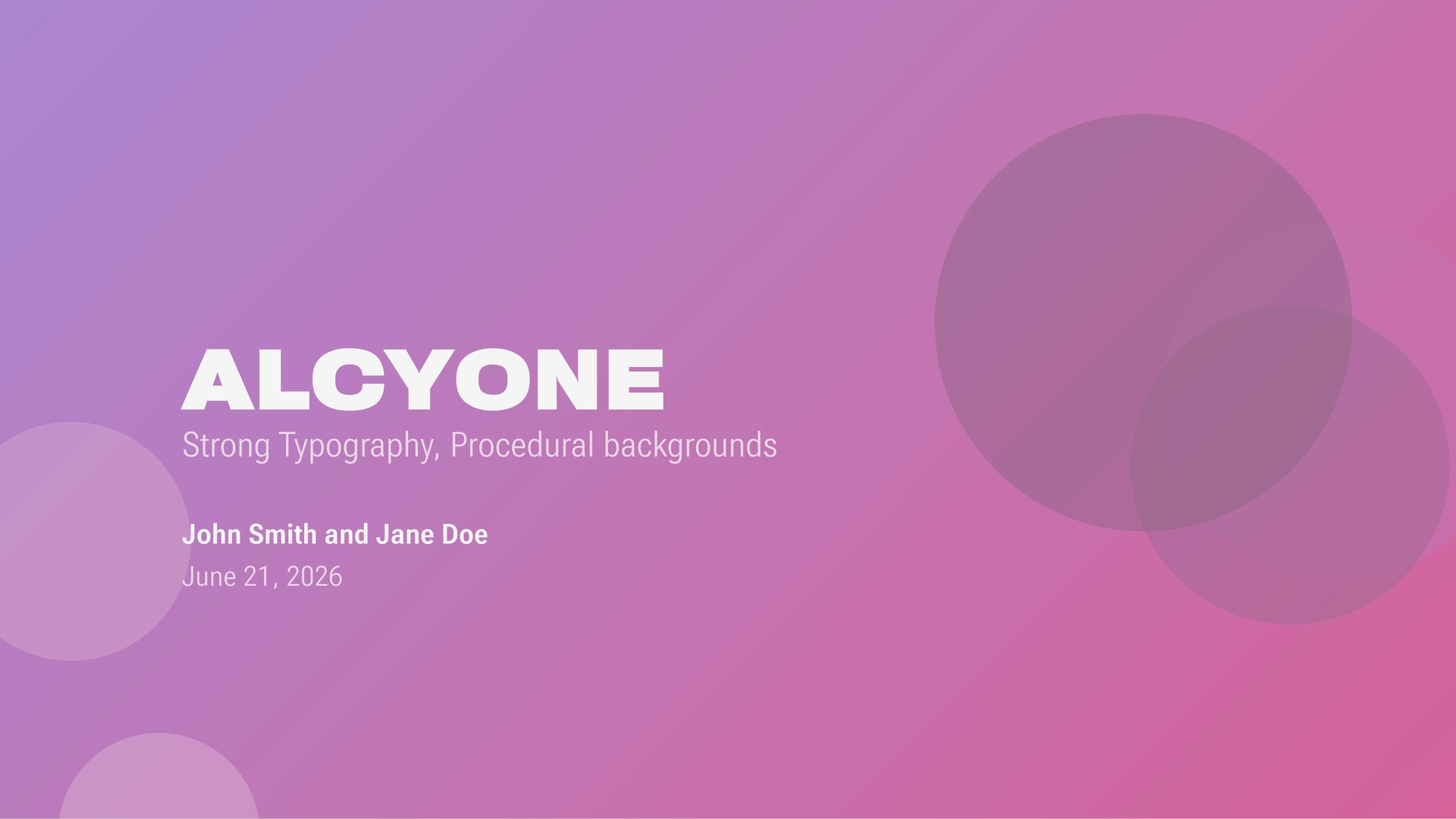
Alcyone is a bold, typography-driven slide template for Typst, designed around a few simple principles:
Typography does the work. Hierarchy comes from Roboto Flex’s variable axes, weight, width, grade, and optical size, not from ornament.
Every slide has its own artwork. Backgrounds are generated procedurally from each slide’s own content, so no two slides look identical, and nothing needs to be designed or sourced by hand.
The common case should be simple. Writing a deck is just writing headings and text. Section dividers, titled slides, quotes, and figures all fall out of plain markup, no custom function calls required.
Defaults should be useful. A deck should look coherent with zero configuration, and every parameter can be overridden without fighting the template.
The grid should remain coherent. Every type size and spacing value derives from one base font size, so the deck rescales consistently when it changes.
Usage
#import "@preview/Alcyone:0.1.0"

#show: Alcyone.slides.with(
  title: "Alcyone",
  subtitle: "Strong typography, procedural backgrounds",
  author: (
    "John Smith",
    ("Jane Doe", "jane@example.com"),
  ),
  date: datetime(year: 2026, month: 6, day: 21)
)

= Getting Started

== Using the theme

Write plain markup. Headings drive the layout.

== Structuring a slide

- Bullets, numbers, and terms all inherit the accent colour automatically.

#quote(
  block: true,
  attribution: "Alcyone",
  [Full-slide blockquotes.],
)
All parameters can be omitted. A deck built from nothing but headings and body text will still look complete.
Structure
Alcyone reads ordinary Typst markup and infers slide structure from it, rather than requiring a custom slide-creation function.
| Element | Renders as |
|---|---|
= (level 1 heading) |
A full-bleed section divider slide, centred, with no header or footer. |
== (level 2 heading) |
A new titled content slide. The heading text becomes the header bar. |
=== (level 3 heading) |
A sub-heading within the current slide, coloured with the accent, no new slide. |
#figure(..) |
Its own dedicated slide, centred, with the caption below. |
#quote(block: true, ..) |
A full-bleed quote slide, with the attribution set in the accent colour. |
#bibliography(..) |
Its own slide, in a smaller size with a hanging indent. |
Regular text, lists, tables, and code blocks flow underneath the current heading like a normal document.
Parameters
Metadata
| Parameter | Default | Description |
|---|---|---|
title |
none |
Deck title. Displayed prominently on the title slide. |
subtitle |
none |
Deck subtitle, displayed beneath the title. |
author |
none |
Author name, (name, email) pair, or array of either, for multiple authors. |
date |
none |
A datetime, or a (datetime, format) pair. |
Multiple authors are joined automatically with commas and “and”:
author: (
  "John Smith",
  ("Jane Doe", "jane@example.com"),
),
An author with an email is rendered as a mailto: link. If title, subtitle, author, or date is omitted, the corresponding element is simply left out of the title slide rather than showing empty.
Appearance
| Parameter | Default | Description |
|---|---|---|
accent |
Purple-to-pink gradient | A single colour or a gradient. Used for headings, markers, and full-bleed slide fills. |
background-color |
rgb("#F5F5F4") |
Page background colour. |
font-color |
rgb("#555555") |
Primary text colour. |
font-face |
"Roboto Flex" |
Font used throughout the deck. |
font-size |
20pt |
Base font size. Every other type size and spacing value derives from this. |
mono-font-face |
"Adwaita Mono" |
Font used for code blocks. |
When accent is a gradient, Alcyone samples its midpoint to get a flat colour for uses that need one, like text and list markers. Alcyone also derives several secondary colours automatically, for footers, subtitles, and quote attributions, by mixing accent, background-color, and font-color in the oklab colour space. This keeps the secondary hierarchy coherent when the primary colours change, without needing to specify each one by hand.
Procedural background
Every content, section, and quote slide gets background artwork generated automatically from its own content, so continuing a slide onto a second page still yields a related-but-distinct look, and a deck never repeats the same background twice by accident.
| Parameter | Default | Description |
|---|---|---|
background-generator |
procedural-circles |
The function that draws each slide’s background artwork. |
The default generator, procedural-circles, scatters a handful of translucent circles seeded deterministically from each slide’s heading or content:
| Parameter | Default | Description |
|---|---|---|
palette |
auto |
An array of colours to draw from, or auto to derive one from the theme’s accent, background-color, and font-color. |
count |
5 |
Number of circles drawn per slide. |
Content slides carry running text, so their backgrounds render more subtly than section, quote, and title slides, which are full-bleed and have no text to protect. This happens automatically and isn’t a separate parameter.
Layout
| Parameter | Default | Description |
|---|---|---|
content-align |
start + top |
Alignment of body content on regular slides. |
paper-size |
"presentation-16-9" |
Any paper size supported by Typst. |
Presentation
| Parameter | Default | Description |
|---|---|---|
footer-label |
none |
Text shown in the footer of content slides, alongside the page number. |
language |
"en" |
Document language. Accepts a Typst language code such as "de" or "ja". |
Pages
| Parameter | Default | Description |
|---|---|---|
outline-page |
false |
Whether to include an agenda/contents slide. |
outline-page-heading |
auto |
Heading text for the agenda slide. |
title-page |
true |
Whether to include a title slide. |
Typography
Alcyone makes extensive use of Roboto Flex’s variable axes to establish hierarchy without extra ornamentation:
- Weight (
wght) for emphasis on headings and display text. - Width (
wdth) for a condensed body face and dramatically expanded headings. - Grade (
GRAD) to adjust visual density without changing metrics. - Optical size (
YOPQ) for large display text.
Every type size in the theme derives from font-size and a 1.25× step (a major third), so changing one number rescales the whole deck consistently:
| Role | Multiplier | Size at 20pt |
|---|---|---|
| Fine print | × 0.64 | 12.8pt |
| Captions | × 0.80 | 16pt |
| Body text | × 1.00 | 20pt |
| Lead-ins | × 1.25 | 25pt |
| Headings | × 1.56 | 31.3pt |
| Display | × 1.95 | 39.1pt |
| Titles | × 2.44 | 48.8pt |
Page margins, header and footer bar heights, and internal spacing are all derived from font-size in the same way, so the deck’s proportions stay consistent as typography changes.
License
Copyright © 2026 Haydn Trowell
This program is free software: you can redistribute it and/or modify it under the terms of the GNU General Public License as published by the Free Software Foundation, either version 3 of the License, or (at your option) any later version.
This program is distributed in the hope that it will be useful, but WITHOUT ANY WARRANTY; without even the implied warranty of MERCHANTABILITY or FITNESS FOR A PARTICULAR PURPOSE. See the GNU General Public License for more details.
You should have received a copy of the GNU General Public License along with this program. If not, see https://www.gnu.org/licenses/.