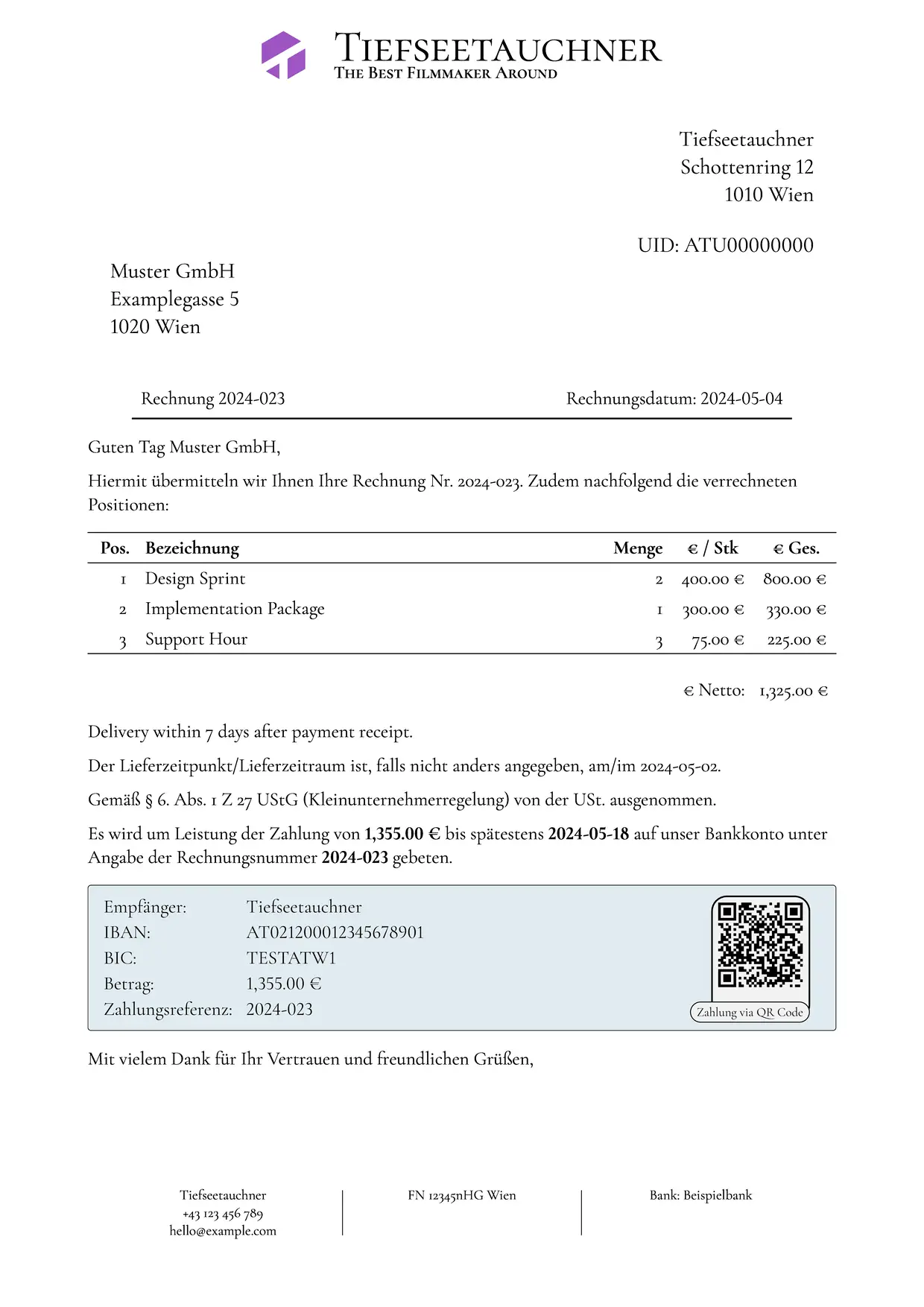
TiefLetter is a collection of templates that can conceivably enable someone to create a matching set of documents using Typst.
These templates provide a clear entry point into creating invoices, offers, contracts, and more, even using automated systems.
A note on using these templates: These are not a replacement for legal council. There is no liability taken by the author(s), and by using these templates, you alone are responsible for ensuring the legality of the documents, as defined in the LICENSE:
THE SOFTWARE IS PROVIDED “AS IS”, WITHOUT WARRANTY OF ANY KIND, EXPRESS OR IMPLIED, INCLUDING BUT NOT LIMITED TO THE WARRANTIES OF MERCHANTABILITY, FITNESS FOR A PARTICULAR PURPOSE AND NONINFRINGEMENT. IN NO EVENT SHALL THE AUTHORS OR COPYRIGHT HOLDERS BE LIABLE FOR ANY CLAIM, DAMAGES OR OTHER LIABILITY, WHETHER IN AN ACTION OF CONTRACT, TORT OR OTHERWISE, ARISING FROM, OUT OF OR IN CONNECTION WITH THE SOFTWARE OR THE USE OR OTHER DEALINGS IN THE SOFTWARE.
Note: The classes are historically very overgrown. There’s a lot of arguments, and I may have missed one or threehundred. Sorry.
Usage
To use TiefLetter with the Typst web app, choose “Start from template” and select TiefLetter. You will also need to include or install the Cormorant Garamond and Cormorant SC Fonts, should you chose to not change the default font.
To import the package manually in your Typst project, use:
#import "@preview/tiefletter:0.2.2": invoice
Setup
Setting up a project is relatively straightforward: import and select a language.
TiefLetter uses a translation layer called tieflang, which allows a user to set a language once and have it reused, or change it later. Available languages in TiefLetter are currently listed in the exported languages dictionary, and are:
- english-at – English documents with Austrian formatting and laws applied. Language code “en-at”
- english-de – English documents with German formatting and laws applied. Language code “en-de”
- english-us – English documents with USA formatting (there are no laws in use that exist in the US to my knowledge). Language code “en-us”
- deutsch-at – German documents with Austrian formatting and laws applied. Language code “de-at”
- deutsch-de – German documents with German formatting and laws applied. Language code “de-de”
To set a language, call the select-language method from tieflang with either a language code or an element of the languages dictionary. To do so, you must import tieflang:0.1.0 yourself:
#import "@preview/tieflang:0.1.0": select-language
#import "@preview/tiefletter:0.2.2": languages

// ...

#select-language(languages.english-de)
This also selects which laws and currency format will be used for your document.
The invoice class
Creating an invoice is a matter of filling in the fields appropriate for your invoice. The usage looks something like this:
// Importantly: Always select your language before using a class!
// Available locales are listed in the languages dictionary.
#select-language(languages.deutsch-at)
#invoice(
  invoice-number: none, // The invoice number, referenced in, among others, the payment reference
  invoice-date: none, // The invoice date
  delivery-date: none, // The date of delivery
  payment-due-date: none, // The due date of the invoice
  seller: (
    name: none, // Name of the seller (sender)
    address: none, // Address of the seller (sender)
    uid: none, // Umsatzsteuer ID of the seller (sender)
    is-kleinunternehmer: false, // Whether the seller is a "kleinunternehmer", meaning relieved from vat
    tel: none, // Phone number of the seller (sender)
    email: none, // E-Mail Address of the seller (sender)
    signature: false, // Whether to display a signature field for the seller (sender)
  ),
  client: (
    gender-marker: none, // How to address the client (recipient). Allows f, m, and o
    full-name: none, // Full name of the client (recipient)
    short-name: none, // Short name to use in the addressing. Usually the last name of the client (recipient)
    address: none, // Address of the client (recipient)
    signature: false, // Whether to display a signature field for the seller (sender)
  ),
  footer-middle: none, // Middle footer to display
  footer-right: none, // Right footer to display
  banner-image: none, // Image to display at the top of the invoice
  items: none, // List of items on the invoice. Array of (quantity, description, unit-price) dictionaries
  after-table-text: none, // Optional text to insert after the table
  iban: none, // IBAN to pay the invoice to
  bic: none, // BIC to pay the invoice to
  currency: (
    currency-thousands-separator: none, // Optional currency formatting
    currency-comma-separator: none, // Optional currency formatting
    currency-symbol: none, // Optional currency formatting
  ),
)
The offer class
Creating an offer is similar to creating an invoice. Following are the relevant fields:
// Importantly: Always select your language before using a class!
// Available locales are listed in the languages dictionary.
#select-language(languages.deutsch-at)
#offer(
  offer-number: none, // The offer number
  offer-date: none, // The date the offer was made
  offer-valid-until: none, // How long the offer is valid (default 30 days)
  seller: (
    name: none, // Name of the seller (sender)
    address: none, // Address of the seller (sender)
    uid: none, // Umsatzsteuer ID of the seller (sender)
    is-kleinunternehmer: false, // Whether the seller is a "kleinunternehmer", meaning relieved from vat
    tel: none, // Phone number of the seller (sender)
    email: none, // E-Mail Address of the seller (sender)
    signature: false, // Whether to display a signature field for the seller (sender)
  ),
  client: (
    gender-marker: none, // How to address the client (recipient). Allows f, m, and o
    full-name: none, // Full name of the client (recipient)
    short-name: none, // Short name to use in the addressing. Usually the last name of the client (recipient)
    address: none, // Address of the client (recipient)
    signature: false, // Whether to display a signature field for the seller (sender)
  ),
  footer-middle: none, // Middle footer to display
  footer-right: none, // Right footer to display
  banner-image: none, // Image to display at the top of the offer
  items: none, // List of items on the offer. Array of (quantity, description, unit-price) dictionaries
  offer-text: none, // The primary text of the offer prior to the table of items
  after-table-text: none, // Text after the table of items (e.g. legal shenanigans)
  pre-payment-amount: 20, // The prepayment amount in per-cent
  proforma-invoice: true, // Whether a pro-forma invoice will be issued
  currency: (
    currency-thousands-separator: none, // Optional currency formatting
    currency-comma-separator: none, // Optional currency formatting
    currency-symbol: none, // Optional currency formatting
  ),
)
Other classes
There’s other classes, document-preset and letter-preset, which can be used using show rules. Those are relatively self explanatory, examples above.